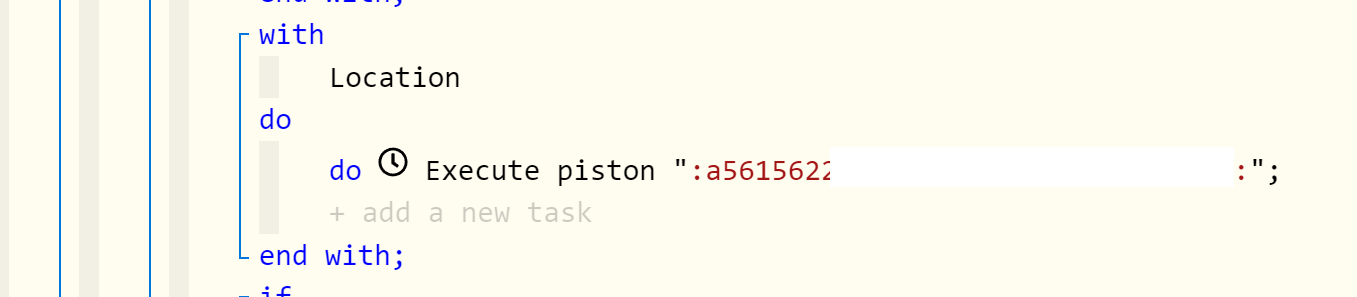
The names of pistons executed from within other pistons, have disappeared and currently only show long codes, e.g.:
The pistons are executing fine despite of this. If I click on the code in the primary piston, the field is empty as if no piston had previously been selected. This is where my problem lies - I have so many pistons I often can't remember which other pistons must be executed (i.e. selected).
I have seen this before, and I suspect this has something to do with migrating webCore to a different hub (when restoring a backup).
It only becomes an issue if I open the "do Execute piston" statement containing the code, so I don't mind re-adding the pistons when I notice this has happened in a piston. If only there is a way to link the name of the piston to the code. Is there some way of doing that?
Thank you
Couple of things:
go into main webCoRE and hit done
- then go into your browser -> webcore ide, and hit logout
- if you have not already waited a couple mins, wait a couple
- login with your browser to the IDE (ie register your instance)
- see if fixed.
If not fixed then
- ensure you webcore / HE firmware is up to date
- politely reboot your hub
- logout your browser again
- re-register
Note that above is trying to see if there is nothing wrong and if re-login fixes it.
If you still have the problem at this point it likely means your account or hub identifiers changed, so you should edit the piston and ensure the proper piston you are calling is set, then save the piston
- when you change account identifiers or hub identifiers (new hub), you could have to edit references like this.
Thanks for the suggestions. It is much appreciated. I've done all these things already. You may remember that you also assisted with the stupid Weather variable error after migrating to the new hub.
Is there a way one can link the code displayed in the piston to the name of the piston being called? In a few instances, I can't figure out which piston should be called. In the meantime, I do not want to disturb such pistons as they all run fine (i.e. calling the correct secondary piston(s)).
Thank you.