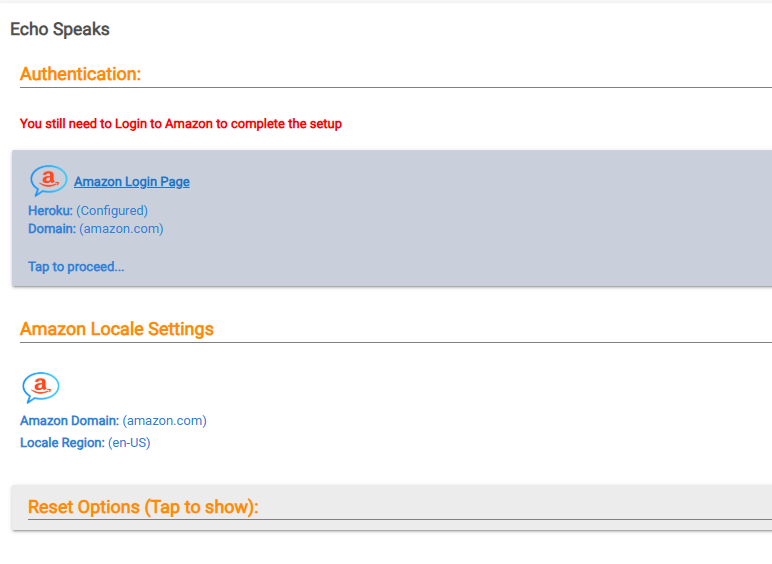
The error you have posted has nothing to do with 2FA. If it lets you log in with your 2FA then dont worry about it. There have been SOME cases where it wont work for people, but it works fine for me. The purple error screen is on Heroku itself. I can see in the screenshot you posted that the URL is wrong (it is the old style).
After you click on #2 that you indicated the next screen is supposed to look like this for Heroku. Red box is where you past in the URL. You do not have that box, and are clicking on the login link which does not work because the URL is wrong.
It might be getting stuck on the initial authentication part though, such that you cannot get to the next step. This is what the fix @Bloodtick_Jones should resolve, it is a manual patch at this time. Once that is installed you might have use the "Reset" options and try deploying again. (Make sure you delete or turn off any old server deployments on Heroku)
Hi Folks, im trying to change to server URL, but i dont have the Server Manager option.. when i ckick on Amazon loginin, it just opens the Heroku. There are no other options... did something change?
Unfortunately, my authenication issue has not changed since I last reported. Still stuck at the purple Heroku ' There is nothing here, yet' screen when I attempt to login.
Does your App version show 4.3.0.1 on the main page?
You might have to do the reset and then try to deploy again after making that patch. Just make sure if you end up with multiple deploys in Heroku that you delete the old ones.
You also have to follow these steps exactly, if this is not done it may prevent the URL Override from showing up. You must use the Open App button from within Heroku and log in, if you do not (or cannot) log into the cookie server that may be the issue.
If you get the purple "there's nothing here" error, you are not following the instructions.
I have validated that I can do all of the above. I am able to get to the Amazon logon page. My Amazon account has MFA enabled. The one-time code prompt does not work with my Heroku app (the prompt box erases the digits of the code as I enter them). I am able to disable MFA for my Amazon account and successfully logon to my Amazon account without MFA. When I do the same from Amazon logon page for my Heroku app I am unable to logon i.e I recieve the message 'Were unable to verify your mobile number'. Issue appears to be in the Heroku app APIs with Amazon.
That is not normal. I have MFA on my account and can log in just fine by typing in the code. Try a different browser or something. Or try and incognito window.
Sound advice. After accepting numerous security warnings from Chrome targeted at herokuapp.com I was able to set the logon cookie for my account with MFA enabled. I had been using Edge. Thank you!
I've just come across Echo Speaks and am excited to get it working. I'm checking on the Heroku setup... Since there is no free option - what are ES users seeing as typical $$ charges for their Heroku account?
There has been vigorous discussion here on the topic of using Heroku or the "free" options like Docker. I am not familiar with Docker and do not use it. I pay the $5 a month for Heroku. It has been a "fire and forget" option and I am pleased with it.