I bought one of the Shelly BLU RC Button 4 ZB scene controllers some months ago, but only got to playing with it today.
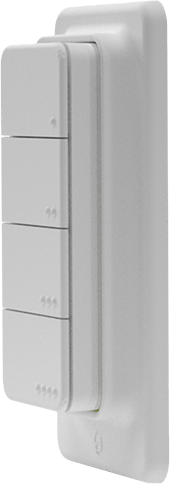
When paired (and it can be difficult to pair, Modified Double Luck Voodoo is your friend [RELEASE] Tuya Zigbee Contact Sensor++ w/ healthStatus - #70 by John_Land), the device is assigned the Nue Zigbee Scene Controller driver, which I could not make work -- no button presses ever logged. I could NOT find a working Hubitat driver for it anywhere.
So Claude and I worked for a couple of hours, based on my feeding Claude this information site: Shelly BLU RC Button 4 ZB | Shelly Technical Documentation
The result is the attached driver, which I hope saves someone else some time.
2026-05-01 UPDATE: Added scheduled health monitoring, a lastPushed timestamp attribute for pushed/held/doubleTapped events, and a "Last Physical Button Pushed" in Current States.
2026-05-02 UPDATE: Added Current States fields to show Triple Tapped and Double Long Held events rather than coding those events into the Pushed field.

/*
 * Shelly BLU RC Button 4 ZB — Hubitat Driver  v1.7
 * Device short name : SBBT-104CUS
 * Manufacturer      : Shelly  (confirmed)
 * Zigbee profile    : 0x0104 (Home Automation)
 * Primary endpoint  : 02  (confirmed; Power Config cluster is on EP1)
 *
 * Features and changes:
 *   - Removed "Device Mode" preference. Driver is hard-wired to On/Off Mode,
 *     which is the device's factory default and the only mode confirmed working.
 *     Toggle Mode required the device to be explicitly reconfigured via a
 *     Zigbee SwitchActions attribute write, and offered no practical advantage.
 *   - Added Health Check capability and healthStatus attribute.
 *   - Added scheduled health monitoring; device is marked online on any inbound
 *     Zigbee message and offline after repeated missed 3-hour check cycles.
 *   - Added lastPushed timestamp attribute for pushed/held/doubleTapped events.
 *   - Added Current State attribute "Last Physical Button Pushed".
 *     Values are 1-4, including logical buttons 5-8 mapped back to their
 *     physical Shelly button number.
 *   - Battery: two strategies combined:
 *       1. configure() now explicitly reads cluster 0x0001 from EP1 (the
 *          endpoint documented for Power Config) rather than EP2.
 *          Also tries voltage (0x0020) in addition to percentage (0x0021).
 *       2. Opportunistic read: after any button press the device is awake,
 *          so a battery read is queued immediately — best chance of a response
 *          from a sleepy end device.
 *
 * ── Button mapping ──────────────────────────────────────────────────────────
 *
 *   Btn1 single (On  EP1)  → button 1  pushed
 *   Btn2 single (Off EP1)  → button 2  pushed
 *   Btn3 single (On  EP2)  → button 3  pushed
 *   Btn4 single (Off EP2)  → button 4  pushed
 *   Hold btn k             → button k  held
 *   Double click btn k     → button k  doubleTapped
 *   Triple click btn k     → button k  tripleTapped    (custom attribute)
 *   Dbl long press btn k   → button k  doubleLongHeld  (custom attribute; 3s press followed quickly by 2s press)
 *   Triple long press btn k→ logged only
 */

import groovy.transform.Field

@Field static final Integer HEALTH_STATUS_COUNT_THRESHOLD = 4

metadata {
    definition(
        name        : "Shelly BLU RC Button 4 ZB",
        namespace   : "shellyzb v. 1.7",
        author      : "Community",
        importUrl   : ""
    ) {
        capability "Battery"
        capability "PushableButton"
        capability "HoldableButton"
        capability "DoubleTapableButton"
        capability "Configuration"
        capability "Refresh"
        capability "Health Check"

        attribute "healthStatus", "enum", ["offline", "online", "unknown"]
        attribute "lastPushed", "string"
        attribute "Last Physical Button Pushed", "number"
        attribute "tripleTapped", "number"
        attribute "doubleLongHeld", "number"

        fingerprint profileId: "0104", endpointId: "02",
            inClusters : "0000,0001,0003",
            outClusters: "0003,0005,0006,0008",
            manufacturer: "Shelly", model: "SBBT-104CUS",
            deviceJoinName: "Shelly BLU RC Button 4 ZB"

        fingerprint profileId: "0104", endpointId: "02",
            inClusters : "0000,0001,0003",
            outClusters: "0003,0005,0006,0008",
            manufacturer: "Shelly",
            deviceJoinName: "Shelly BLU RC Button 4 ZB"
    }

    preferences {
        input name: "logEnable", type: "bool",
            title: "Enable debug logging (auto-off after 30 min)", defaultValue: true
        input name: "txtEnable", type: "bool",
            title: "Enable description text logging", defaultValue: true
    }
}

// ════════════════════════════════════════════════════════════════════════════
// Lifecycle
// ════════════════════════════════════════════════════════════════════════════

def installed() {
    log.info "${device.displayName}: installed"
    state.notPresentCounter = 0
    initialize()
}

def updated() {
    log.info "${device.displayName}: preferences updated"
    initialize()
}

def initialize() {
    sendEvent(name: "numberOfButtons", value: 4)

    if (state.notPresentCounter == null) state.notPresentCounter = 0
    if (device.currentValue("healthStatus") == null) setHealthStatusValue("unknown")

    scheduleDeviceHealthCheck()

    if (logEnable) {
        unschedule("logsOff")
        runIn(1800, "logsOff")
    }
}

// ════════════════════════════════════════════════════════════════════════════
// Zigbee commands sent TO the device
// ════════════════════════════════════════════════════════════════════════════

def configure() {
    log.info "${device.displayName}: configure"
    initialize()
    List cmds = []

    // ── ZDO bindings — all 4 endpoints, On/Off + Scenes clusters ──────────
    ["01","02","03","04"].each { ep ->
        cmds += "zdo bind 0x${device.deviceNetworkId} 0x${ep} 0x01 0x0006 {${device.zigbeeId}} {}"
        cmds += "delay 200"
        cmds += "zdo bind 0x${device.deviceNetworkId} 0x${ep} 0x01 0x0005 {${device.zigbeeId}} {}"
        cmds += "delay 200"
    }

    // ── Battery — target EP1 explicitly ───────────────────────────────────
    // The Power Config cluster (0x0001) is documented on EP1 of this device.
    // device.endpointId is 02, so zigbee.readAttribute() would target EP2 by
    // default; we use raw "he rattr" commands to force EP1 instead.
    // Tries both percentage (0x0021) and voltage (0x0020) since 0x0021
    // returned UNSUP_ATTRIBUTE on EP2 — EP1 may respond differently.
    cmds += "he rattr 0x${device.deviceNetworkId} 0x01 0x0001 0x0021 {}"  // % remaining
    cmds += "delay 300"
    cmds += "he rattr 0x${device.deviceNetworkId} 0x01 0x0001 0x0020 {}"  // voltage
    cmds += "delay 300"

    // ── Configure reporting for battery percentage on EP1 ─────────────────
    // Report on >=1% change, min 30 s, max 1 hr.
    // Raw configure-reporting ZCL frame targeting EP1:
    //   frame control (0x00) + seq (0x01) + command Configure Reporting (0x06)
    //   + direction (0x00) + attr (0x0021 LE) + type UINT8 (0x20)
    //   + min interval (0x001E = 30s LE) + max interval (0x0E10 = 3600s LE)
    //   + reportable change (0x01)
    cmds += "he raw 0x${device.deviceNetworkId} 0x01 0x01 0x0001 {10 01 06 00 21 00 20 1E 00 10 0E 01}"
    cmds += "delay 300"

    // ── Identity reads ─────────────────────────────────────────────────────
    cmds += zigbee.readAttribute(0x0000, 0x0004)   // Manufacturer (EP2, works)
    cmds += "delay 200"
    cmds += zigbee.readAttribute(0x0000, 0x0005)   // Model (EP2, returns UNSUP but harmless)

    log.info "${device.displayName}: sending ${cmds.size()} commands — press a button to wake device"
    return cmds
}

def refresh() {
    log.info "${device.displayName}: refresh — queuing battery reads for next wake"
    List cmds = []
    cmds += "he rattr 0x${device.deviceNetworkId} 0x01 0x0001 0x0021 {}"
    cmds += "delay 300"
    cmds += "he rattr 0x${device.deviceNetworkId} 0x01 0x0001 0x0020 {}"
    return cmds
}

// ════════════════════════════════════════════════════════════════════════════
// Main parse
// ════════════════════════════════════════════════════════════════════════════

def parse(String description) {
    if (logEnable) log.debug "${device.displayName}: raw → ${description}"
    setHealthStatusOnline()

    Map dm = zigbee.parseDescriptionAsMap(description)
    if (!dm) return
    if (logEnable) log.debug "${device.displayName}: map → ${dm}"

    // Hubitat uses "clusterId" for catchAll, "cluster" for attr reports
    String cluster = dm.cluster ?: dm.clusterId

    switch (cluster) {
        case "0000": handleBasicCluster(dm);                                  break
        case "0001": handlePowerCluster(dm);                                  break
        case "0005": if (dm.command == "05") handleRecallScene(dm);           break
        case "0006": handleOnOffCluster(dm);                                  break
        case "0008": if (dm.command == "02") handleLevelStep(dm);             break
        default:
            if (logEnable) log.debug "${device.displayName}: unhandled cluster ${cluster}"
    }
}

// ════════════════════════════════════════════════════════════════════════════
// Cluster handlers
// ════════════════════════════════════════════════════════════════════════════

private void handleBasicCluster(Map dm) {
    if (dm.attrId == "0004") {
        log.info "${device.displayName}: Manufacturer = '${dm.value}'"
        updateDataValue("manufacturer", dm.value)
    } else if (dm.attrId == "0005") {
        log.info "${device.displayName}: Model = '${dm.value}'"
        updateDataValue("model", dm.value)
    }
}

private void handlePowerCluster(Map dm) {
    if (dm.attrId == "0021") {
        // BatteryPercentageRemaining: stored as 2x actual %, divide by 2
        try {
            int raw = Integer.parseInt(dm.value, 16)
            int pct = Math.round(raw / 2.0)
            if (txtEnable) log.info "${device.displayName}: battery ${pct}% (from percentage attr)"
            sendEvent(name: "battery", value: pct, unit: "%")
        } catch (e) {
            log.warn "${device.displayName}: could not parse battery percentage value '${dm.value}'"
        }
    } else if (dm.attrId == "0020") {
        // BatteryVoltage: stored in units of 100mV
        // CR2032 approximate range: 2.0V (0%) to 3.0V (100%)
        try {
            int raw = Integer.parseInt(dm.value, 16)
            float volts = raw / 10.0
            int pct = Math.min(100, Math.max(0, Math.round((volts - 2.0) / 1.0 * 100)))
            if (txtEnable) log.info "${device.displayName}: battery ${volts}V → ${pct}% (from voltage attr)"
            sendEvent(name: "battery", value: pct, unit: "%")
        } catch (e) {
            log.warn "${device.displayName}: could not parse battery voltage value '${dm.value}'"
        }
    }
}

private void handleOnOffCluster(Map dm) {
    int ep = parseEndpoint(dm)
    if (ep == 0) return

    String cmd = dm.command

    // On/Off Mode (hard-wired):
    //   EP1 On  → button 1     EP1 Off → button 2
    //   EP2 On  → button 3     EP2 Off → button 4
    if (ep == 1) {
        if (cmd == "01")      btnEvent("pushed", 1, "single click [On,  EP1]")
        else if (cmd == "00") btnEvent("pushed", 2, "single click [Off, EP1]")
        else if (logEnable)   log.debug "${device.displayName}: EP1 unexpected cmd ${cmd}"
    } else if (ep == 2) {
        if (cmd == "01")      btnEvent("pushed", 3, "single click [On,  EP2]")
        else if (cmd == "00") btnEvent("pushed", 4, "single click [Off, EP2]")
        else if (logEnable)   log.debug "${device.displayName}: EP2 unexpected cmd ${cmd}"
    } else {
        if (logEnable) log.debug "${device.displayName}: On/Off no mapping — EP${ep} cmd ${cmd}"
    }

    // Opportunistic battery read: device is awake right now after a button press
    sendHubCommand(new hubitat.device.HubMultiAction(
        ["he rattr 0x${device.deviceNetworkId} 0x01 0x0001 0x0021 {}"],
        hubitat.device.Protocol.ZIGBEE
    ))
}

private void handleRecallScene(Map dm) {
    int ep = parseEndpoint(dm)
    if (ep < 1 || ep > 4) return

    List data = dm.data
    if (!data || data.size() < 3) {
        log.warn "${device.displayName}: RecallScene EP${ep} — payload too short: ${data}"
        return
    }
    int scene = Integer.parseInt(data[2], 16)

    if (scene == 1)       btnEvent("doubleTapped",   ep,     "double click   [Scene 1,  EP${ep}]")
    else if (scene == 2)  btnEvent("tripleTapped",   ep,     "triple click   [Scene 2,  EP${ep}]")
    else if (scene == 11) btnEvent("held",            ep,     "long press     [Scene 11, EP${ep}]")
    else if (scene == 12) btnEvent("doubleLongHeld",  ep,     "dbl long press [Scene 12, EP${ep}]")
    else if (scene == 13) {
        if (txtEnable) log.info "${device.displayName}: triple long press btn${ep} — not mapped"
    } else {
        log.warn "${device.displayName}: unknown scene ID ${scene} on EP${ep}"
    }

    // Opportunistic battery read on scene events too
    sendHubCommand(new hubitat.device.HubMultiAction(
        ["he rattr 0x${device.deviceNetworkId} 0x01 0x0001 0x0021 {}"],
        hubitat.device.Protocol.ZIGBEE
    ))
}

private void handleLevelStep(Map dm) {
    int ep = parseEndpoint(dm)
    if (ep == 0) return
    List data = dm.data
    if (!data || data.isEmpty()) return

    int stepMode = Integer.parseInt(data[0], 16)
    int btn = (ep == 1) ? ((stepMode == 0) ? 1 : 2) : ((stepMode == 0) ? 3 : 4)
    btnEvent("held", btn, "hold ${stepMode == 0 ? 'Up' : 'Down'} [Level Step, EP${ep}]")
}

// ════════════════════════════════════════════════════════════════════════════
// Helpers
// ════════════════════════════════════════════════════════════════════════════

private int parseEndpoint(Map dm) {
    String epStr = dm.sourceEndpoint ?: dm.endpoint
    if (!epStr) {
        log.warn "${device.displayName}: no endpoint in map: ${dm}"
        return 0
    }
    return Integer.parseInt(epStr, 16)
}

private void btnEvent(String eventName, int btnNum, String desc) {
    if (txtEnable) log.info "${device.displayName}: button ${btnNum} ${eventName} — ${desc}"
    updateLastPushed(btnNum, eventName)
    sendEvent(name: eventName, value: btnNum, isStateChange: true)
}

private void updateLastPushed(int btnNum, String eventName) {
    TimeZone tz = location?.timeZone ?: TimeZone.getDefault()
    String ts = new Date().format("yyyy-MM-dd HH:mm:ss", tz)
    int physicalBtn = ((btnNum - 1) % 4) + 1

    sendEvent(
        name: "lastPushed",
        value: ts,
        descriptionText: "button ${btnNum} was ${eventName} at ${ts}",
        isStateChange: true
    )
    sendEvent(
        name: "Last Physical Button Pushed",
        value: physicalBtn,
        descriptionText: "physical button ${physicalBtn} was ${eventName} at ${ts}",
        isStateChange: true
    )
}

void scheduleDeviceHealthCheck() {
    Random rnd = new Random()
    unschedule("deviceHealthCheck")
    // Run once every 3 hours at a randomized second/minute to avoid hub load spikes.
    schedule("${rnd.nextInt(60)} ${rnd.nextInt(60)} 1/3 * * ? *", "deviceHealthCheck")
}

// Called every 3 hours. Each inbound Zigbee message resets this counter.
void deviceHealthCheck() {
    state.notPresentCounter = (state.notPresentCounter ?: 0) + 1
    if (state.notPresentCounter > HEALTH_STATUS_COUNT_THRESHOLD) {
        if (!(device.currentValue("healthStatus", true) in ["offline"])) {
            setHealthStatusValue("offline")
            log.warn "${device.displayName}: is offline"
        }
    } else {
        if (logEnable) log.debug "${device.displayName}: health check OK so far (notPresentCounter=${state.notPresentCounter})"
    }
}

void setHealthStatusOnline() {
    state.notPresentCounter = 0
    if (!(device.currentValue("healthStatus", true) in ["online"])) {
        setHealthStatusValue("online")
        if (txtEnable) log.info "${device.displayName}: is online"
    }
}

void setHealthStatusValue(String value) {
    sendEvent(
        name: "healthStatus",
        value: value,
        descriptionText: "${device.displayName} healthStatus set to ${value}",
        isStateChange: true
    )
}

// Required by the Health Check capability. Sleeping button devices usually cannot
// respond immediately, so real health is inferred from incoming reports/events.
void ping() {
    if (logEnable) log.debug "${device.displayName}: ping() requested; waiting for next device report/button event"
}

def logsOff() {
    log.warn "${device.displayName}: debug logging auto-disabled after 30 min"
    device.updateSetting("logEnable", [value: "false", type: "bool"])
}

 . I have a Zooz button which is more of a longer hold. The build quality of Zooz button is horrible the buttons itself rock side to side and stick...this shelly is night and day and your driver works well...thanks again!