{Driver} Connector Relay Hubitat Driver (DD7006 P-Box) local control

I was tired of relying on the Home assistant to control my Fenetex motorized blinds. They came with a DD7006 P-Box that allows app/and local control through the motion blinds integration on Home Assistant as well as google home and Alexa but nothing else. The MFG sent the API info with the blessing to build an app or Driver, so that's what I did (with lots of help from AI, as I'm not a developer)

If anyone can use this feel free, If you have any issues I can try to help. If you find any issues or better way to do anything I'm open to making changes but so far I haven't run into anything that jumps out at me,

I don't know if it's compatible with the DD7002 bridge maybe Dooya and Motionblinds, I'm not sure.

1 Like

Thank you for putting this together as I have the exact same setup. I was able to work through all the install steps and from what I can see have no issues with the key, was able to retrieve the two children however when I try to close them I get no response. I do see the close commands in the log file.

I do see a warning for a truncated access code being sent but no errors in the controller.

In each child I do see an error MissingMethodExceptionNoStack: No signature of method: user_driver_connector_Screen_Child_828.startPositionChange() is applicable for argument types: (java.lang.String) values:[close] (method startPositionChange)

@jcongdon01 I didn't implement startPositionChange (It's built into the Hubitat Windowshade's capability so I don't know how to remove it wasn't high on my list as the open and closed button did everything I needed. If you can get me some logs from the parent device I can try to see what's going on and why your not getting any movement my guess is it chould be a networking (Hubitat pulls the devices using one Http, but commands are sent through multicast so there could be something going on where the multicast is being blocked.

The Truncated access code is if you don't include the "-"'s mine is setup as 8digits-4digits-2digits ex 12345678-1234-12 if you are leaving out the "-"'s the connector relay won't accept commands without the correct access code to create the correct token

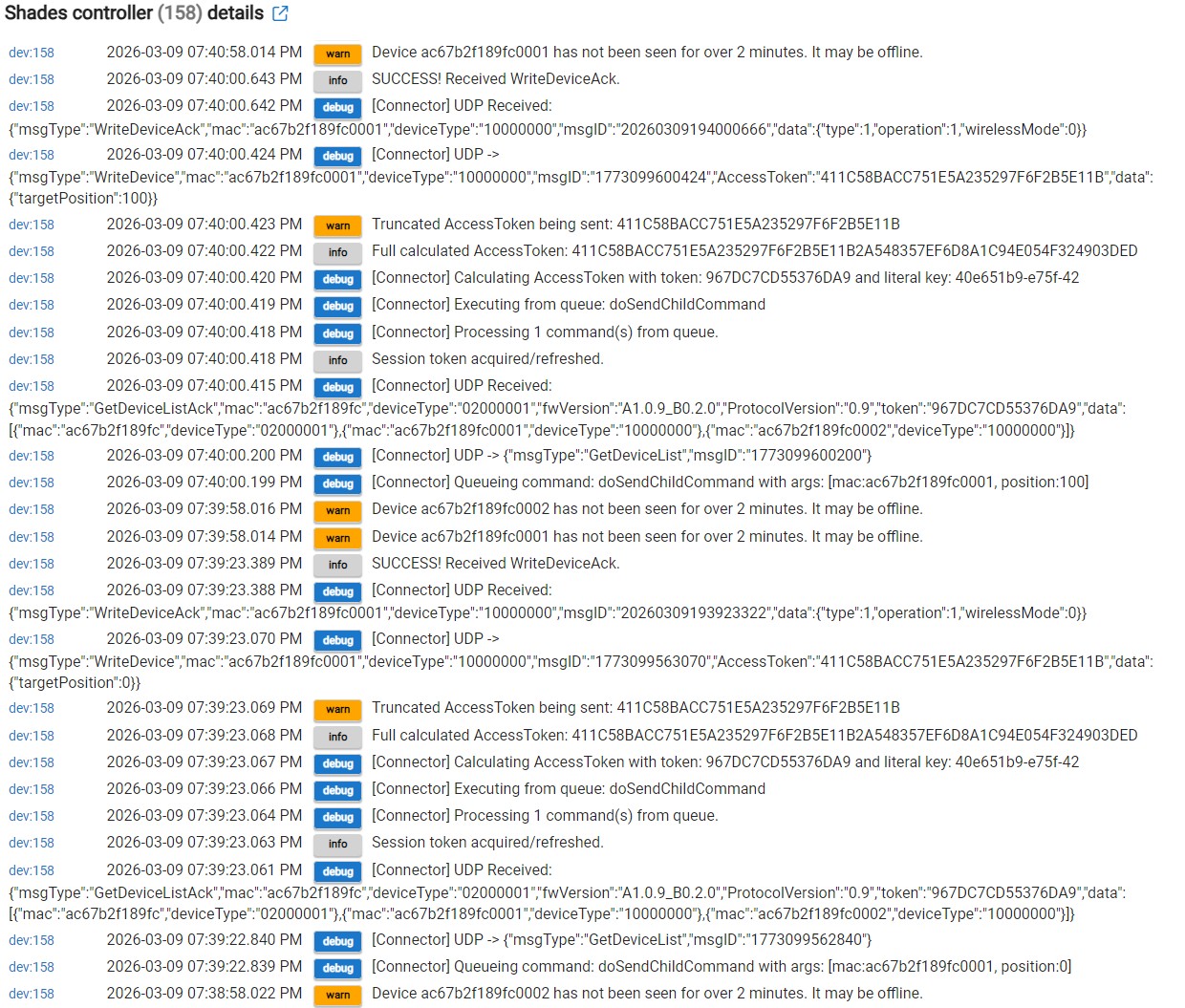
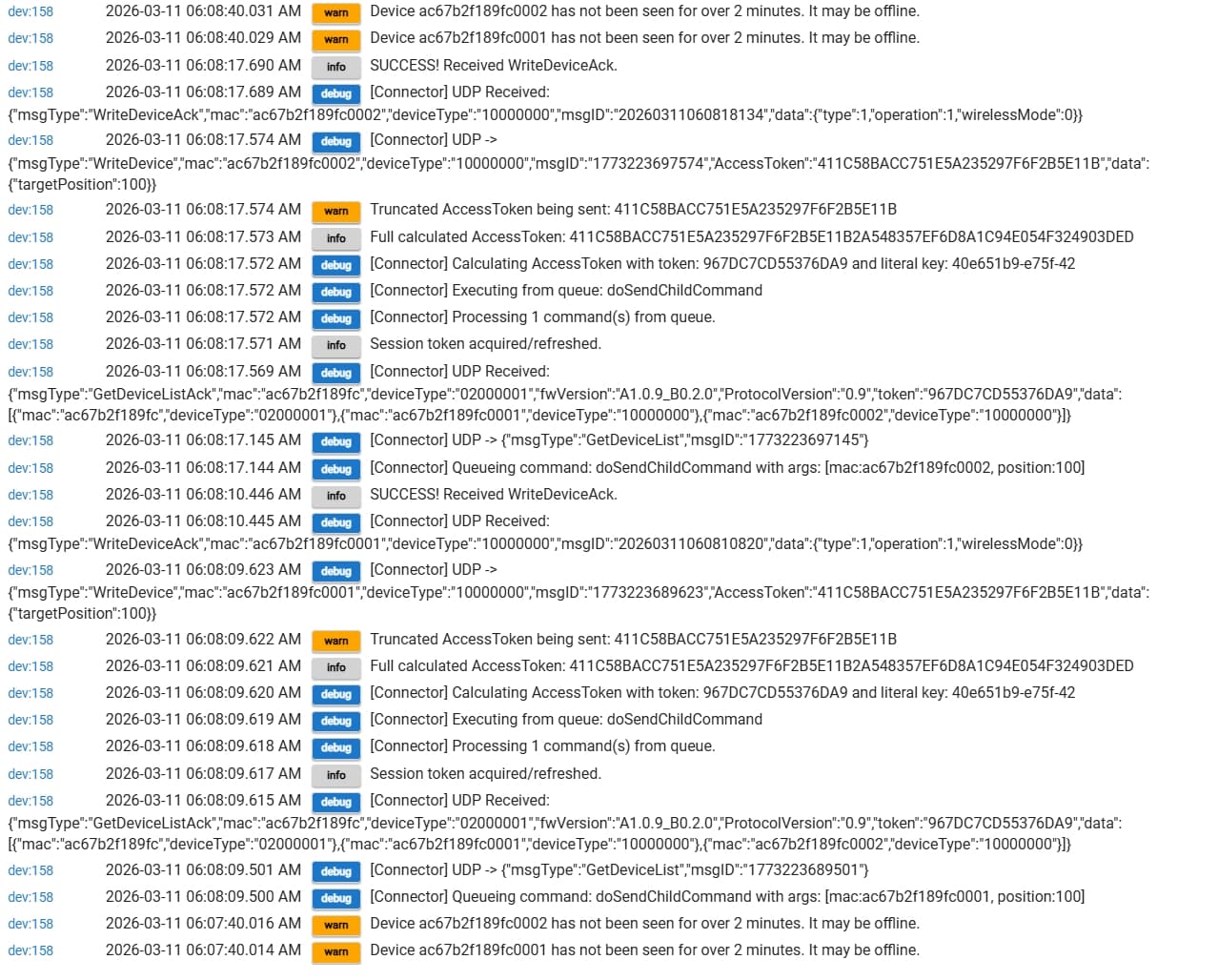
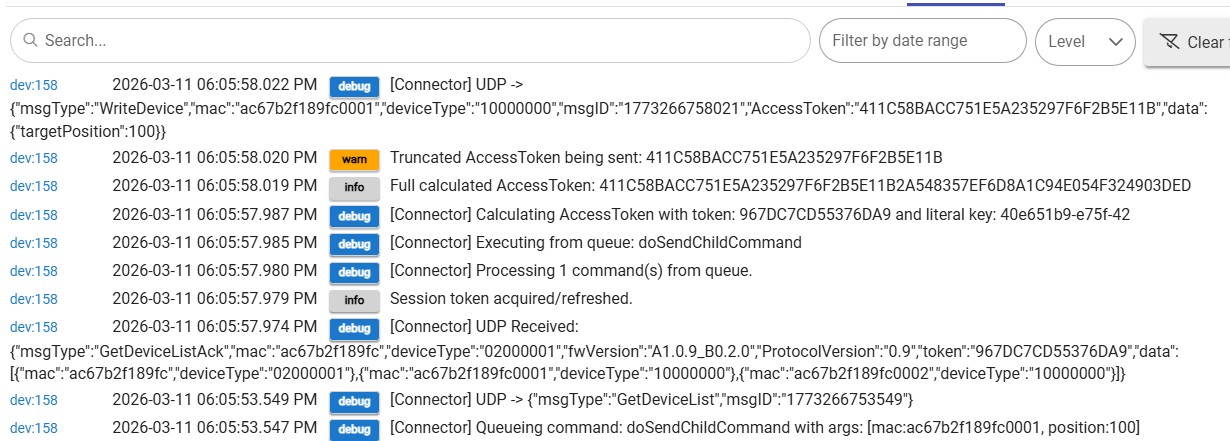
@scubamikejax904 I confirmed the Bridge Key does have 16 characters and includes the dashes. Below is a sample of the logs from the parent device.

It looks like it's receiving the multicast info from the connector hub. can you verify the model of the hub (is it the DD7006 P-Box) If it is what is the branding i'll try to lookup and see If I can find the specs maybe Different Branded uses different firmware/commands)

Mine is a Dooya 7002B Hub.

@jcongdon01 from what I can tell both hubs should use the same ports and commands. I had the AI tailer it a little more to detect the hub version. Found a couple errors try the updated code posted below

@jcongdon01 I may have found the issue, it apears from what I have been able to find online the 7002B requires the full Token and the new 7006 uses only the first 16 Bytes
While we test this one make sure you change the offline detection to 0 we don't need the logs filling up with warnings (and honestly I'm not satisfied with how it works right now so disabling is probably the best for now anyways)

new parent driver

/**

  • Connector WLAN Integration - Full Production
  • DD7006 & DD7002B Compatible ?
    */
    import groovy.json.JsonSlurper
    import groovy.json.JsonOutput
    import hubitat.helper.HexUtils
    import javax.crypto.Cipher
    import javax.crypto.spec.SecretKeySpec // THIS LINE WAS MISSING

metadata {
definition(name: "Connector WLAN Integration (Full)", namespace: "connector", author: "Scubamikejax904 & Manus") {
capability "Initialize"
capability "Refresh"
command "discoverDevices"
}
preferences {
input name: "bridgeIp", type: "text", title: "Bridge IP", required: true
input name: "bridgeKey", type: "text", title: "Bridge Key (16-char string from app, with hyphens)", required: true
input name: "debugLogging", type: "bool", title: "Enable Debug Logging", defaultValue: true
}
}

/* -------------------------------------------------- */
def installed() { initialize() }
def updated() { unschedule(); initialize() }

def initialize() {
logDebug "Initializing..."
state.token = null
state.commandQueue =
runIn(3, "discoverDevices")
runEvery1Minute("checkOffline")
}

/* --------------------------------------------------
DISCOVERY
-------------------------------------------------- */
def discoverDevices() {
def payload = [
msgType: "GetDeviceList",
msgID : now().toString()
]
sendUdp(payload)
}

/* --------------------------------------------------
CHILD MANAGEMENT
-------------------------------------------------- */
def createChild(mac) {
if (getChildDevice(mac)) return
addChildDevice(
"connector",
"Connector Screen Child",
mac,
[
label: "Screen ${mac[-4..-1]}",
isComponent: false
]
)
log.info "Created child ${mac}"
}

/* --------------------------------------------------
CHILD COMMANDS
-------------------------------------------------- */
def sendChildCommand(String mac, Integer position) {
queueCommand("doSendChildCommand", [mac: mac, position: position])
}

def sendChildStop(String mac) {
queueCommand("doSendChildStop", [mac: mac])
}

def refreshChild(String mac) {
queueCommand("doRefreshChild", [mac: mac])
}

/* --------------------------------------------------
TOKEN & QUEUE MANAGEMENT
-------------------------------------------------- */
def queueCommand(String commandName, Map args) {
logDebug "Queueing command: ${commandName} with args: ${args}"
state.commandQueue.add([command: commandName, arguments: args])
discoverDevices()
}

def processCommandQueue() {
if (state.commandQueue == null || state.commandQueue.size() == 0) {
logDebug "Command queue is empty."
return
}

logDebug "Processing ${state.commandQueue.size()} command(s) from queue."
state.commandQueue.each { cmdInfo ->
    logDebug "Executing from queue: ${cmdInfo.command}"
    this."${cmdInfo.command}"(cmdInfo.arguments)
}
state.commandQueue = []

}

/* --------------------------------------------------
INTERNAL COMMAND IMPLEMENTATIONS
-------------------------------------------------- */
def doSendChildCommand(Map args) {
def commandData = [
targetPosition: args.position as Integer
]

String accessToken = calculateAccessToken()
if (!accessToken) {
    log.error "Cannot send command, failed to calculate AccessToken."
    return
}

def packet = [
    msgType: "WriteDevice",
    mac: args.mac,
    deviceType: "10000000",
    msgID: now().toString(),
    AccessToken: accessToken,
    data: commandData
]
sendUdp(packet)

}

def doSendChildStop(Map args) {
def commandData = [
operation: 2
]
String accessToken = calculateAccessToken()
if (!accessToken) {
log.error "Cannot send command, failed to calculate AccessToken."
return
}
def packet = [
msgType: "WriteDevice",
mac: args.mac,
deviceType: "10000000",
msgID: now().toString(),
AccessToken: accessToken,
data: commandData
]
sendUdp(packet)
}

def doRefreshChild(Map args) {
sendUdp([
msgType: "ReadDevice",
mac: args.mac,
deviceType: "10000000",
msgID: now().toString(),
AccessToken: state.token
])
}

/* --------------------------------------------------
ACCESS TOKEN CALCULATION
Same algorithm works for both DD7002B and DD7006A
-------------------------------------------------- */
def calculateAccessToken() {
if (!state.token) {
log.warn "Cannot calculate AccessToken, bridge session token is missing."
return null
}
if (!bridgeKey) {
log.warn "Cannot calculate AccessToken, Bridge Key is missing from preferences."
return null
}

boolean isDebug = debugLogging

if (isDebug) {
    logDebug "Calculating AccessToken with token: ${state.token} and literal key: ${bridgeKey}"
} else {
    logDebug "Calculating AccessToken..."
}

try {
    byte[] keyBytes = bridgeKey.getBytes("UTF-8")
    
    if (keyBytes.length != 16) {
        log.error "Bridge Key in preferences MUST be exactly 16 characters long (including hyphens). Current length is ${keyBytes.length}."
        return null
    }
    
    def keySpec = new SecretKeySpec(keyBytes, "AES")
    byte[] tokenBytes = state.token.getBytes("UTF-8")
    def cipher = Cipher.getInstance("AES/ECB/PKCS5Padding")
    cipher.init(Cipher.ENCRYPT_MODE, keySpec)
    byte[] encryptedResult = cipher.doFinal(tokenBytes)
    String fullAccessToken = HexUtils.byteArrayToHexString(encryptedResult).toUpperCase()
    String finalAccessToken = fullAccessToken.take(32)
    
    if (isDebug) {
        log.info "Full calculated AccessToken: ${fullAccessToken}"
        log.warn "Truncated AccessToken being sent: ${finalAccessToken}"
    } else {
        log.info "AccessToken calculated successfully."
    }
    
    return finalAccessToken

} catch (e) {
    log.error "FATAL: AccessToken calculation failed. Error: ${e.message}"
    return null
}

}

/* --------------------------------------------------
UDP SEND
-------------------------------------------------- */
def sendUdp(Map message) {
String json = JsonOutput.toJson(message)

// If debug is off, create a sanitized version of the log message
if (!debugLogging) {
    Map sanitizedMessage = new HashMap(message)
    if (sanitizedMessage.containsKey("AccessToken")) {
        sanitizedMessage.AccessToken = "[REDACTED]"
    }
    logDebug "UDP -> ${JsonOutput.toJson(sanitizedMessage)}"
} else {
    logDebug "UDP -> ${json}"
}

def action = new hubitat.device.HubAction(
    HexUtils.byteArrayToHexString(json.getBytes("UTF-8")),
    hubitat.device.Protocol.LAN,
    [
        type: hubitat.device.HubAction.Type.LAN_TYPE_UDPCLIENT,
        destinationAddress: "${bridgeIp}:32100",
        encoding: hubitat.device.HubAction.Encoding.HEX_STRING
    ]
)
sendHubCommand(action)

}
/* --------------------------------------------------
PARSE
-------------------------------------------------- */
def parse(String description) {
def msg = parseLanMessage(description)
if (!msg?.payload) return
String jsonString = new String(
HexUtils.hexStringToByteArray(msg.payload),
"UTF-8"
)

// If debug is off, create a sanitized version of the log message
if (!debugLogging) {
    def json = new JsonSlurper().parseText(jsonString)
    Map sanitizedJson = new HashMap(json)
    if (sanitizedJson.containsKey("token")) {
        sanitizedJson.token = "[REDACTED]"
    }
    logDebug "UDP Received: ${JsonOutput.toJson(sanitizedJson)}"
} else {
    logDebug "UDP Received: ${jsonString}"
}

def json = new JsonSlurper().parseText(jsonString)

if (json.msgType == "GetDeviceListAck") {
    state.token = json.token
    log.info "Session token acquired/refreshed." // Removed token from this log
    processCommandQueue()
    
    json.data.each {
        if (it.deviceType == "10000000") {
            createChild(it.mac)
        }
    }
}

if (json.msgType == "Heartbeat") {
    log.info "Heartbeat received."
    if (state.token != json.token) {
        log.warn "Heartbeat token is different. Updating session token."
        state.token = json.token
    }
}

if (json.msgType == "WriteDeviceAck") {
    if (json.actionResult == "AccessToken error") {
        log.warn "AccessToken error received. Check that the Bridge Key in preferences is correct."
    } else {
        log.info "SUCCESS! Received WriteDeviceAck."
    }
}

if (json.msgType == "ReadDeviceAck") {
    def child = getChildDevice(json.mac)
    if (!child) return
    
    def reportData = json.data
    log.info "Status Report for ${json.mac}: ${reportData}"
    
    def pos = reportData?.currentPosition as Integer
    child.sendEvent(name: "level", value: pos)
    child.sendEvent(name: "windowShade",
            value: pos == 0 ? "open" :
                   pos == 100 ? "closed" :
                   "partially open")
    child.sendEvent(name: "lastSeen", value: new Date().toString())
}

if (json.msgType == "Report") {
    log.info "Received unsolicited status report for ${json.mac}"
}

}
/* --------------------------------------------------
OFFLINE DETECTION
-------------------------------------------------- */
/*def checkOffline() {
getChildDevices().each { child ->
def last = child.currentValue("lastSeen")
if (!last) return
def diff = (now() - Date.parse("EEE MMM dd HH:mm:ss z yyyy", last).time) / 1000

    // If it's been over 2 minutes AND the device isn't already marked as unknown...
    if (diff > 120 && child.currentValue("windowShade") != "unknown") {
        // MODIFICATION: Instead of changing the state, just log a warning.
        // This preserves the last known position for the user.
        log.warn "Device ${child.deviceNetworkId} has not been seen for over 2 minutes. It may be offline."
    }
}

}

/* -------------------------------------------------- */
def refresh() {
getChildDevices().each {
refreshChild(it.deviceNetworkId)
}
}

def logDebug(msg) {
if (debugLogging) log.debug "[Connector] ${msg}"
}

@scubamikejax904 Thank you so much for diving into this. Not sure how you figured that out as I am new to this type of coding.

I will drop this into the parent tonight when I get home and will turn off the offline detection and provide an update.

It's a strong use of AI

1 Like

Update. Still no control of the children.

Thank you for those logs, sorry it's taking so long it's a slow process when I don't have the device to test. It looks like the other driver was truncating the token to 32 characters and the 70002B is expecting the entire 64 characters, this version should correct that

7002B Test parent driver

/**

  • Connector WLAN Integration - Full Production
  • DD7006 & DD7002B Compatible ?
    */
    import groovy.json.JsonSlurper
    import groovy.json.JsonOutput
    import hubitat.helper.HexUtils
    import javax.crypto.Cipher
    import javax.crypto.spec.SecretKeySpec // THIS LINE WAS MISSING

metadata {
definition(name: "Connector WLAN Integration (Full)", namespace: "connector", author: "Scubamikejax904 & Manus") {
capability "Initialize"
capability "Refresh"
command "discoverDevices"
}
preferences {
input name: "bridgeIp", type: "text", title: "Bridge IP", required: true
input name: "bridgeKey", type: "text", title: "Bridge Key (16-char string from app, with hyphens)", required: true
input name: "hubType", type: "enum", title: "Hub Type", options: ["DD7002B", "DD7006 P-Box", "Auto-Detect"], defaultValue: "Auto-Detect", required: true
input name: "offlineTimeout", type: "number", title: "Offline Detection Timeout (minutes, 0=disabled)", defaultValue: 2, required: true
input name: "debugLogging", type: "bool", title: "Enable Debug Logging", defaultValue: true
}
}

/* -------------------------------------------------- */
def installed() { initialize() }
def updated() { unschedule(); initialize() }

def initialize() {
logDebug "Initializing Connector WLAN Integration..."
state.token = null
state.commandQueue =
state.detectedHubType = null
runIn(3, "discoverDevices")

// Only schedule offline check if timeout > 0
if (offlineTimeout != null && offlineTimeout > 0) {
    runEvery1Minute("checkOffline")
    logDebug "Offline detection enabled with ${offlineTimeout} minute timeout."
} else {
    logDebug "Offline detection disabled."
}

}

/* --------------------------------------------------
DISCOVERY - Works for both DD7002B and DD7006A
-------------------------------------------------- */
def discoverDevices() {
def payload = [
msgType: "GetDeviceList",
msgID : now().toString()
]
sendUdp(payload)
}

/* --------------------------------------------------
HUB TYPE DETECTION
-------------------------------------------------- */
def detectHubType(Map json) {
// Auto-detect based on response characteristics
if (hubType != "Auto-Detect") {
state.detectedHubType = hubType
log.info "Hub type set from preferences: ${hubType}"
return
}

// Both hubs use same protocol, detection is for logging purposes
// Protocol version can indicate hub generation
def protocol = json.ProtocolVersion ?: "unknown"

if (protocol.startsWith("0.")) {
    state.detectedHubType = "DD7002B or DD7006A"
} else {
    state.detectedHubType = "DD7006A (newer protocol)"
}

log.info "Auto-detected hub type: ${state.detectedHubType} (Protocol: ${protocol})"

}
/* --------------------------------------------------
CHILD MANAGEMENT
-------------------------------------------------- */
def createChild(mac) {
if (getChildDevice(mac)) return
addChildDevice(
"connector",
"Connector Screen Child",
mac,
[
label: "Screen ${mac[-4..-1]}",
isComponent: false
]
)
log.info "Created child ${mac}"
}

/* --------------------------------------------------
CHILD COMMANDS
-------------------------------------------------- */
def sendChildCommand(String mac, Integer position) {
queueCommand("doSendChildCommand", [mac: mac, position: position])
}

def sendChildStop(String mac) {
queueCommand("doSendChildStop", [mac: mac])
}

def refreshChild(String mac) {
queueCommand("doRefreshChild", [mac: mac])
}

/* --------------------------------------------------
TOKEN & QUEUE MANAGEMENT
-------------------------------------------------- */
def queueCommand(String commandName, Map args) {
logDebug "Queueing command: ${commandName} with args: ${args}"
state.commandQueue.add([command: commandName, arguments: args])
discoverDevices()
}

def processCommandQueue() {
if (state.commandQueue == null || state.commandQueue.size() == 0) {
logDebug "Command queue is empty."
return
}

logDebug "Processing ${state.commandQueue.size()} command(s) from queue."
state.commandQueue.each { cmdInfo ->
    logDebug "Executing from queue: ${cmdInfo.command}"
    this."${cmdInfo.command}"(cmdInfo.arguments)
}
state.commandQueue = []

}

/* --------------------------------------------------
INTERNAL COMMAND IMPLEMENTATIONS
-------------------------------------------------- */
def doSendChildCommand(Map args) {
def commandData = [
targetPosition: args.position as Integer
]

String accessToken = calculateAccessToken()
if (!accessToken) {
    log.error "Cannot send command, failed to calculate AccessToken."
    return
}

def packet = [
    msgType: "WriteDevice",
    mac: args.mac,
    deviceType: "10000000",
    msgID: now().toString(),
    AccessToken: accessToken,
    data: commandData
]
sendUdp(packet)

}

def doSendChildStop(Map args) {
def commandData = [
operation: 2
]
String accessToken = calculateAccessToken()
if (!accessToken) {
log.error "Cannot send command, failed to calculate AccessToken."
return
}
def packet = [
msgType: "WriteDevice",
mac: args.mac,
deviceType: "10000000",
msgID: now().toString(),
AccessToken: accessToken,
data: commandData
]
sendUdp(packet)
}

def doRefreshChild(Map args) {
sendUdp([
msgType: "ReadDevice",
mac: args.mac,
deviceType: "10000000",
msgID: now().toString(),
AccessToken: state.token
])
}

/* --------------------------------------------------
ACCESS TOKEN CALCULATION
Same algorithm works for both DD7002B and DD7006A
-------------------------------------------------- */
def generateAccessToken(token) {
if (!bridgeKey || !token) return null
try {
// AES-128-ECB Encryption
SecretKeySpec skeySpec = new SecretKeySpec(bridgeKey.getBytes("UTF-8"), "AES")
Cipher cipher = Cipher.getInstance("AES/ECB/NoPadding")
cipher.init(Cipher.ENCRYPT_MODE, skeySpec)

    // Protocol requires the token string itself to be encrypted.
    // It must be exactly 16 bytes.
    byte[] tokenBytes = token.getBytes("UTF-8")
    byte[] paddedToken = new byte[16]
    
    // Use a Hubitat-safe loop for padding
    for (int i = 0; i < 16; i++) {
        paddedToken[i] = (i < tokenBytes.length) ? tokenBytes[i] : (byte)0
    }
    
    byte[] encrypted = cipher.doFinal(paddedToken)
    String fullToken = HexUtils.byteArrayToHexString(encrypted).toUpperCase()
    
    // The 7002B hub requires the FULL 32-byte (64 character) result.
    logDebug "Calculated AccessToken: ${fullToken}"
    return fullToken
} catch (e) {
    log.error "Encryption Error: ${e.message}"
    return null
}

}

/* --------------------------------------------------
UDP SEND
-------------------------------------------------- */
def sendUdp(Map message) {
String json = JsonOutput.toJson(message)

// If debug is off, create a sanitized version of the log message
if (!debugLogging) {
    Map sanitizedMessage = new HashMap(message)
    if (sanitizedMessage.containsKey("AccessToken")) {
        sanitizedMessage.AccessToken = "[REDACTED]"
    }
    logDebug "UDP -> ${JsonOutput.toJson(sanitizedMessage)}"
} else {
    logDebug "UDP -> ${json}"
}

def action = new hubitat.device.HubAction(
    HexUtils.byteArrayToHexString(json.getBytes("UTF-8")),
    hubitat.device.Protocol.LAN,
    [
        type: hubitat.device.HubAction.Type.LAN_TYPE_UDPCLIENT,
        destinationAddress: "${bridgeIp}:32100",
        encoding: hubitat.device.HubAction.Encoding.HEX_STRING
    ]
)
sendHubCommand(action)

}
/* --------------------------------------------------
PARSE
-------------------------------------------------- */
def parse(String description) {
def msg = parseLanMessage(description)
if (!msg?.payload) return
String jsonString = new String(
HexUtils.hexStringToByteArray(msg.payload),
"UTF-8"
)

// If debug is off, create a sanitized version of the log message
if (!debugLogging) {
    def json = new JsonSlurper().parseText(jsonString)
    Map sanitizedJson = new HashMap(json)
    if (sanitizedJson.containsKey("token")) {
        sanitizedJson.token = "[REDACTED]"
    }
    logDebug "UDP Received: ${JsonOutput.toJson(sanitizedJson)}"
} else {
    logDebug "UDP Received: ${jsonString}"
}

def json = new JsonSlurper().parseText(jsonString)

if (json.msgType == "GetDeviceListAck") {
    state.token = json.token
    log.info "Session token acquired/refreshed." // Removed token from this log
    processCommandQueue()
    
    json.data.each {
        if (it.deviceType == "10000000") {
            createChild(it.mac)
        }
    }
}

if (json.msgType == "Heartbeat") {
    log.info "Heartbeat received."
    if (state.token != json.token) {
        log.warn "Heartbeat token is different. Updating session token."
        state.token = json.token
    }
}

if (json.msgType == "WriteDeviceAck") {
    if (json.actionResult == "AccessToken error") {
        log.warn "AccessToken error received. Check that the Bridge Key in preferences is correct."
    } else {
        log.info "SUCCESS! Received WriteDeviceAck."
    }
}

if (json.msgType == "ReadDeviceAck") {
    def child = getChildDevice(json.mac)
    if (!child) return
    
    def reportData = json.data
    log.info "Status Report for ${json.mac}: ${reportData}"
    
    def pos = reportData?.currentPosition as Integer
    child.sendEvent(name: "level", value: pos)
    child.sendEvent(name: "windowShade",
            value: pos == 0 ? "open" :
                   pos == 100 ? "closed" :
                   "partially open")
    child.sendEvent(name: "lastSeen", value: new Date().toString())
}

if (json.msgType == "Report") {
    log.info "Received unsolicited status report for ${json.mac}"
}

}
/* --------------------------------------------------
OFFLINE DETECTION
-------------------------------------------------- */
/*def checkOffline() {
getChildDevices().each { child ->
def last = child.currentValue("lastSeen")
if (!last) return
def diff = (now() - Date.parse("EEE MMM dd HH:mm:ss z yyyy", last).time) / 1000

    // If it's been over 2 minutes AND the device isn't already marked as unknown...
    if (diff > 120 && child.currentValue("windowShade") != "unknown") {
        // MODIFICATION: Instead of changing the state, just log a warning.
        // This preserves the last known position for the user.
        log.warn "Device ${child.deviceNetworkId} has not been seen for over 2 minutes. It may be offline."
    }
}

}*/

def checkOffline() {
// Skip if offline detection is disabled (timeout = 0 or null)
if (offlineTimeout == null || offlineTimeout == 0) {
return
}

def timeoutSeconds = offlineTimeout * 60

getChildDevices().each { child ->
    def last = child.currentValue("lastSeen")
    if (!last) return
    def diff = (now() - Date.parse("EEE MMM dd HH:mm:ss z yyyy", last).time) / 1000
    
    if (diff > timeoutSeconds && child.currentValue("windowShade") != "unknown") {
        log.warn "Device ${child.deviceNetworkId} has not been seen for over ${offlineTimeout} minute(s). It may be offline."
    }
}

}

/* -------------------------------------------------- */
def refresh() {
getChildDevices().each {
refreshChild(it.deviceNetworkId)
}
}

def logDebug(msg) {
if (debugLogging) log.debug "[Connector] ${msg}"
}

It appears a truncated token is still being sent for some reason.

Hmm on the preferences try changing hub detection from auto to 7002b I'm not sure why it's truncating the token it should be sending the whole thing. I'll take a look at the code in the morning and see what I can figure out

In preferences my only options are Bridge IP, Bridge Key, Enable debug Logging and Default Current State. I have no option for Hub Detection.

Sorry for the confusion I got ahead of myself. I am trying to make it so we can use 1 driver for both Hub versions (mine DD7006 requires the truncated token, and yours DD7002B requires the full token) I'm working on a new version for you to try.

1 Like

I'll upload trial v5 in the morning I did some basic tests here with the my dd7006 and the switch between the 2 boxes seems to work now so we can use this 1 driver for either

1 Like

Trial v5 is up on github, select your Hub type in the preferences (I don't think Auto-detect works I think it defaults to the DD7706, but If you select DD7702B I hope this one works

https://raw.githubusercontent.com/scubamikejax904/Connector-Bridge-Hubitat-direct/refs/heads/main/Driver%20-%20Parent