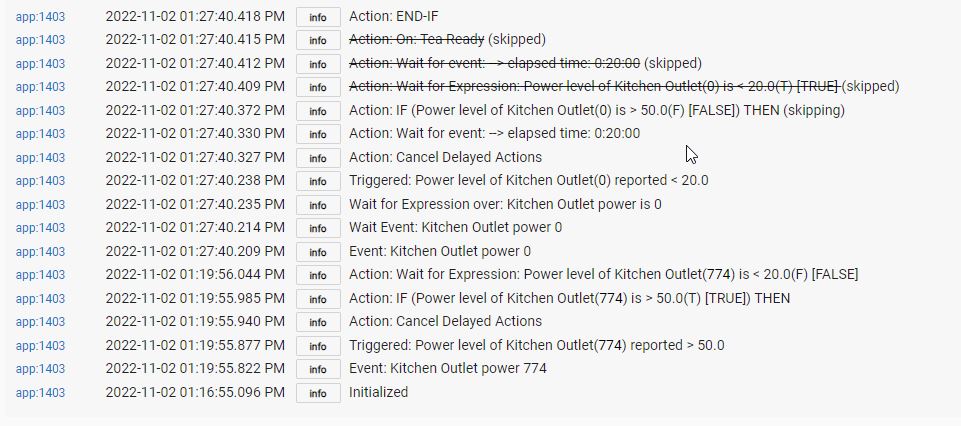
The Wait for Event Elapsed time 20 triggered but the rules kept executing. Should it not stop there and wait for 20 minutes and then do the remaining rules? I am wanting the Tea Ready to trigger after the 20 minutes. The 20 minutes are still running but there is nothing in scheduled jobs so I'm thinking it's not going to do anything at the end of 20 minutes. If this is how it should work what is the purpose of the Wait for elapsed time?
Can you share a screenshot of the actual rule?
1 Like
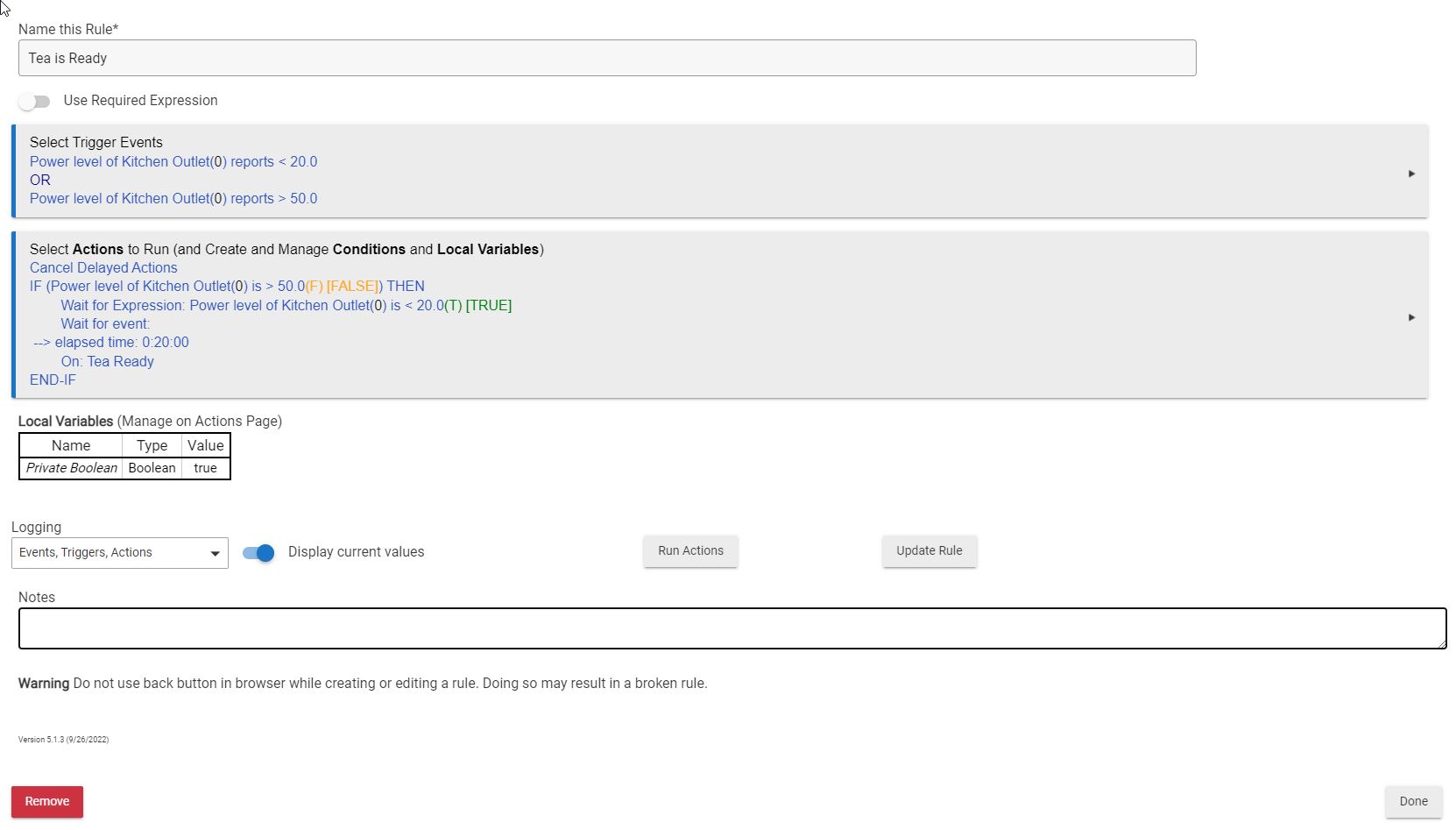
20 min just expired and as I suspected nothing more occured. 
I just changed it to put a delayed 20 on the ON: Tea Ready command that should work. Just puzzled why it didn't work as I had it.
It seems like there may be a misunderstanding of how "Wait" actions work. They will not prevent a rule from re-triggering while waiting. Any trigger event that matches will still cause the rule to re-trigger (unless you're using a "required expression" and it's false, preventing this), so your "power < 20" trigger is fair game while your "Wait for expression: power < 20" is happening. It should also be noted that triggers cancel waits, so this particular combination creates a conflict in your case: you might not get consistent behavior each time, depending on whether the cancellation or the now-fulfilled wait gets processed first, but I'd normally expect subsequent actions to not run for this reason.
"Wait for event: elapsed time" has a pretty handy use in that it's basically a "Delay" except it's automatically cancelled on re-trigger, something that you'd have to do manually with a "Delay." (More on delays below.) This is almost always the desirable behavior, and I think it would work perfectly for your case if you just remove that "power < 20" trigger (assuming I'm guessing correctly about what you want the rule to do.) Your "Wait" creates a temporary subscription for this event when that action is reached, and it seems like the only time you care about that value is after a > 50 value already happened.
There are some tweaks you could make to the rule, mostly removing a few lines that would no longer do anything for you, and an addition you could make if you only care about the first reading above 50 and don't care to basically start the timer over on any subsequent readings, but that's the general idea.
Delays are not cancelled on re-trigger; this must be manually done with "Cancel Delayed Actions" (which you're using in the rule above, though to no effect because you have none). The delay must also be marked as "cancelable" (the option you'll see on any delay).
2 Likes
Ya I made it cancelable.
It certainly is not intuitive that an action of a wait for 20 minutes to elapse would not make the rule hold right there. When would you ever use that since it doesn't? Basically the rule just kept executing so it seems to serve no purpose. Retired programmer here and to me it's counter intuitive. The logs don't look like it retriggered.
The other odd thing is this is a Sengled Smart Plug that I just hooked up. It is set to do "description text logging" yet nothing was logged from the device. As you can see on the rule it did report the power use and then power going back to zero. Dunno, as long as it works with the change I just made I'm happy enough. Don't need to brew more tea at the moment so will see in a couple days when I do it again.
Lots of times.  It seems like you were aiming for a cancelable delay (just maybe not cancelled exactly like this...), and this is basically that, except without having to do the cancellation yourself. Here is a common pattern:
Trigger: Motion active
Actions to run:
On: Lights
Wait for conditions: Motion inactive --> duration 0:05:00
Off: Lights
This basically creates a 5-minute timer to turn off the lights that resets any time they become active again. It's effectively equivalent to this bulkier rule:
Trigger: Motion *changed*
Actions to run:
Cancel Delayed Actions
IF (Motion active) THEN
  On:  Lights
ELSE
  Delay 0:05:00 (cancelable)
  Off: Lights
END-IF
But it's easier to write and easier to write and easier on the hub (not that it should make any real-world difference, but why trigger and then test for a certain value when you could just trigger on that value in the first place?). It's also, IMHO, easier to read and understand.
For an example closer to yours, here is a rule I wrote to notify me when my washing machine is done, based on power consumption. It follows the same paradigm as the first rule above:
Trigger: Power level of Washing Machine Plug is > 40
Actions to Run:
Wait for event: Power level of Washing Machine Plug is <= 20.0
Wait for event:  --> elapsed time: 0:01:00
Speak on Speech Proxy Device: 'The washing machine is done!'
It seems like something similar could work for your rule above, except turning on that switch instead of making an annoucement.
If your
Wait for event: --> elapsed time: 0:01:00
Worked and the announcement didn't come for 1 minute I'm not sure why my rule didn't wait for 20.
But I did change it to put the delay on the actual On command so at least this rule should work now.
If you're talking about your original rule, I mentioned this above: you have too many trigger events specified. If you've fixed that and still have problems, logs should show why. Good luck!
Me again... sorry... reworked the rule and it's still not waiting and I only have one trigger now. Here's my new rule and log:


So it blows right on by the 20 minute delay. I don't get it.
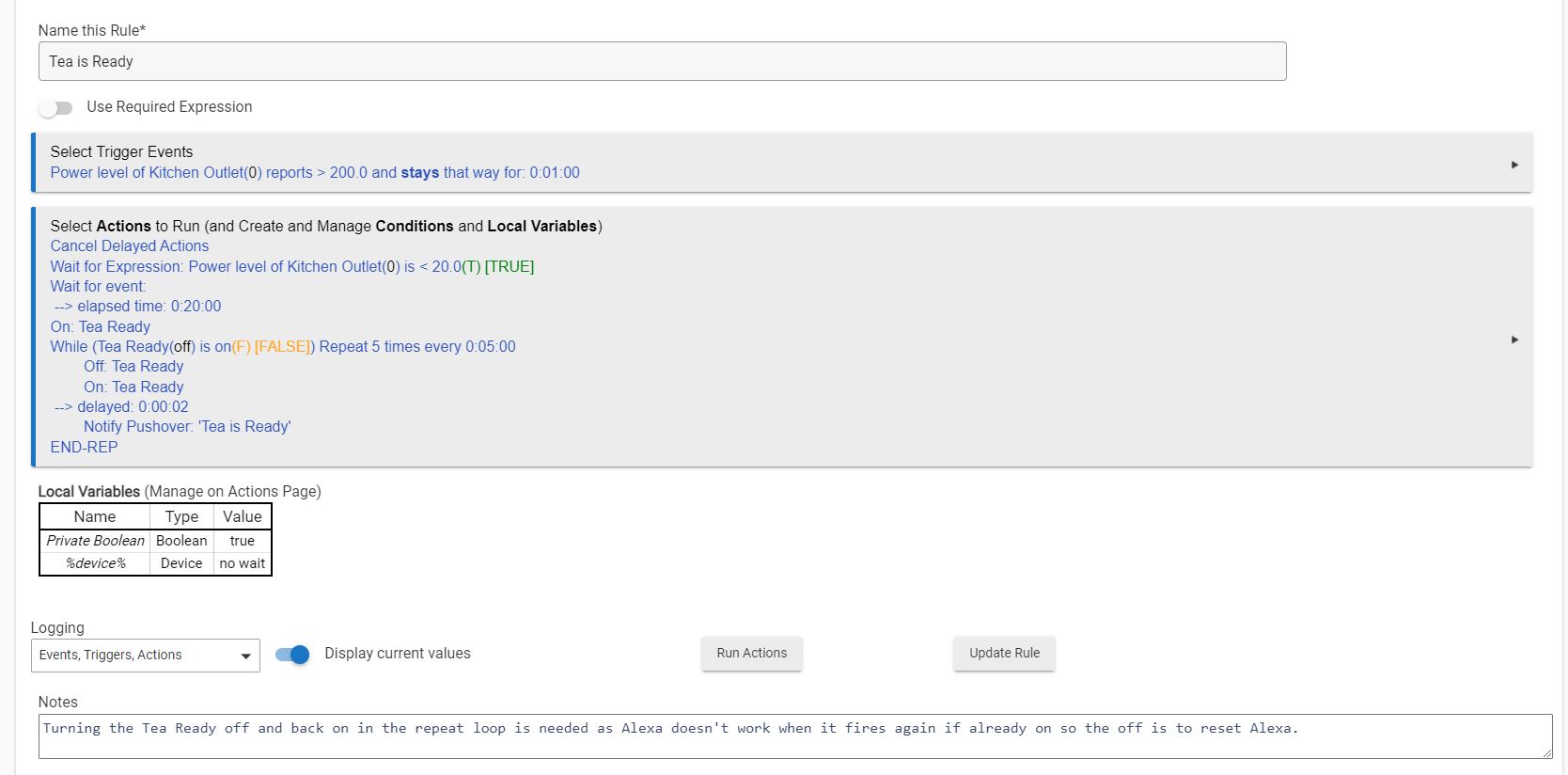
Your second rule should work. Your first one will not necessarily wait 20 minutes because you did not mark the delay as "cancelable," so it will expire 20 minutes after it was scheduled regardless of what happens in the meantime. Waits, again, are cancelled on re-trigger automatically.
Ya but the trigger was the power going over 200 and once it went to zero it did not come back on. So I don't see how the trigger fired again.
There's a second difference that I didn't see until now but also matters: you're using the "delay" option on an action in your first rule. This schedules the attached action, then moves on to the next. A regular "Delay" action and a "Wait for event" both effectively pause execution at that point then resume when whatever it is happens. This appears to explain the first different in your logs, where it reaches the repeat and then basically does nothing else because the "while" expression was false.
Ah. Okay. Thanks.
This topic was automatically closed 365 days after the last reply. New replies are no longer allowed.

