Device Status Checker - UPDATED: 2026-05-14 v. 1.25

This is a little BETA utility app to generate a table showing the following:

  • Device ID
  • Device name
  • Device type (driver name)
  • Disabled state
  • Hub Mesh status (On/Off)
  • Command Retry status (On/Off for devices supporting the function)
  • Event history size
  • State history size
  • Too many events alert threshold
  • Logging status

The screenshot below shows a sample of the output.
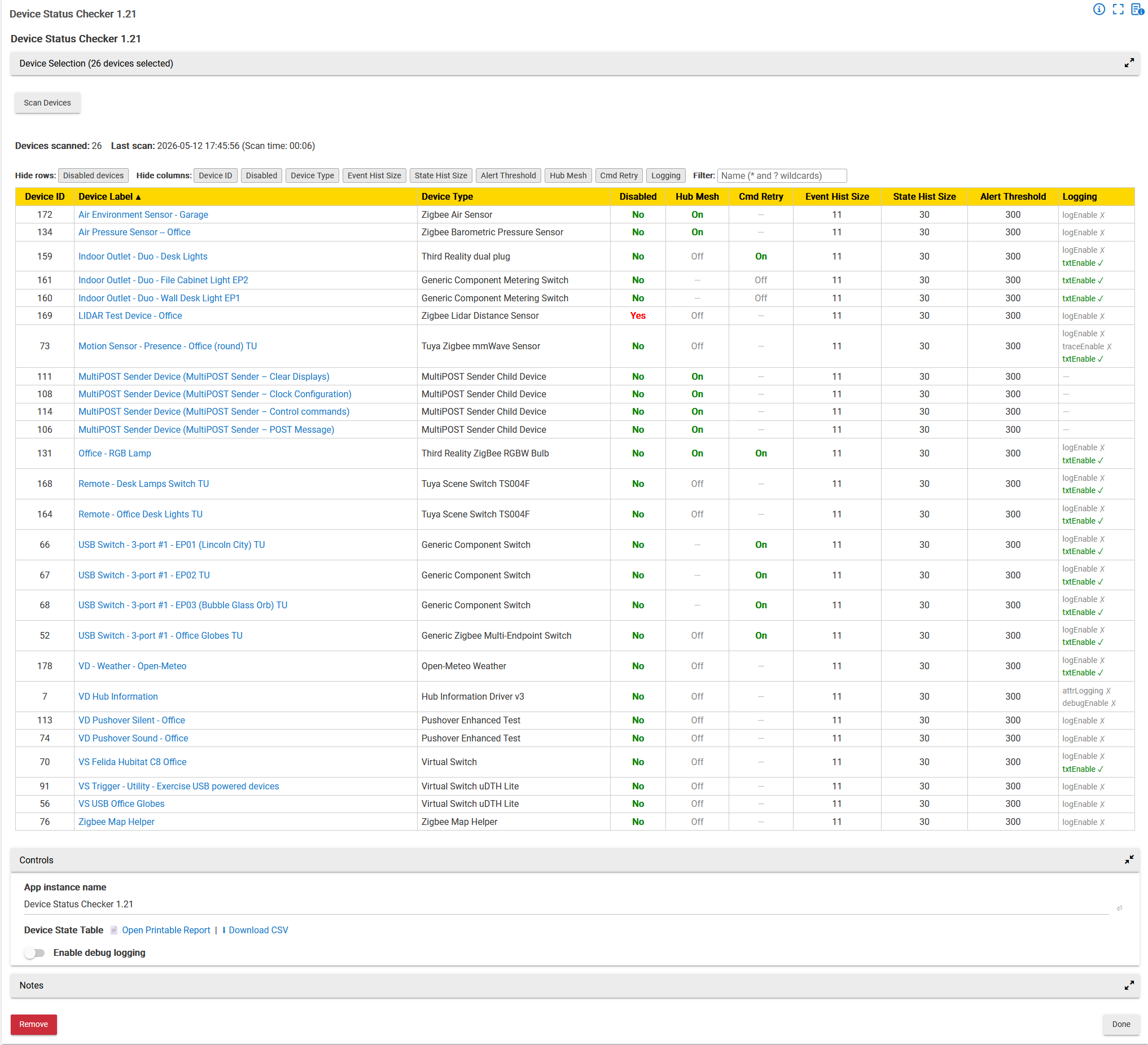
The Disabled, Hub Mesh, and Command Retry cells are clickable to change the state of a device.

The size/threshold cells are not clickable and l likely won't try to make them clickable, because it appears that to do so, the app must mess with an entire device record and not just 3 fields.

Most data columns can now be hidden, and certain types of rows can be hidden, via the push buttons at the top of the table.

NEW: The app now checks logging status. Because the type and degree of logging is controlled by the drivers and is not uniform, a search is done for common terms used to name Boolean variables used for some type of logging. Terms that are present for a device are output to the Logging column, with logging ON being indicated in green text and a checkmark, and logging OFF being indicated in gray text and an "X". If the searched terms are not found for a device, the Logging column cell is marked with a dash "—".

2026-05-09 UPDATE: Uses Device Label rather than Device Name, and the Disabled column is now also hideable. Plus: minor UI changes.

2026-05-14 v. 1.23: UI/UX updates.
2026-05-24 v. 1.25: Bug fix to app instance renaming control.

The app may take some time to retrieve and parse large sets of devices, so be patient if you use it (300 or so devices may take just over a minute).

The app file is now too large to post in this forum -- here's the Github link (the latest version of the app includes an importURL):

4 Likes

Absolutely wonderful! Thank you!!

I knew clickable fields would be difficult if not impossible. If possible, it would probably be very visually messy. Just having all of that info in one glance and exportable into CSV for filtering and searching is an ENORMOUS BENEFIT.

THANK YOU!

Thanks, so much easier to get logging rates aligned.

Could there be an option to use Device Label instead of Device Name?

Please add the option to hide the Disabled column.

Will do -- Claude's supervisor (me) obviously missed that one!

I'll look into that, I agree that would be more useful.

Check out the new version in post #1.

New version 1.20 linked in post #1.

Disagree. The Device Label tends to be the default driver name or similar, where the Device Name is the name the user gives to the device. Now, the list looks like this:

I think that's exactly backwards. I use Device Label to give every one of my 300+ devices the designation that I want; Device Name is usually given automatically by the driver, but I sometimes use that field for my own purposes. Are you SURE that your are not running the old version that used Device Name? Here's a snippet of the table using v. 1.20, which uses Device Label:

After troubleshooting, I found the following: Error - ID10T. :rofl:

I deleted all apps and app code. Rebooted the hub, and reinstalled 1.2. Devices are labeled correctly.

Thank you again for this app and the updates!

The app naming capability in the Controls section doesn't work for me. Still getting the full name, even though the app stores my updated name.

Edit: @John_Land this app has the same renaming issue

Try the new version 1.25.

1 Like

:+1:

I use several types of devices that have different ways to set up logging. They let me pick the logging level from the INFO/WARN/ERROR/TRACE/DEBUG list.

Please update the app to see the logging selection in these drivers.

The drivers are:

Graber Somfy Shade Driver
Zooz ZAC38 Range Extender
Zooz ZEN Plugs Advanced
Zooz ZSE11 Q Sensor
Zooz ZSE43 Tilt-Shock XS Sensor

These are all user created drivers. There are probably more Zooz drivers by Joe Page jtp10181 with this type of logging

Check out v. 1.28: GitHub - JohnFLand/Device-Status-Checker: Report for selected devices for disabled status and history retention settings. · GitHub

:+1:

All of Joe Page's drivers display great. At some point adding the the Graber Somfy Shade Driver would be great.

I looked at one of these drivers (there appear to be several) and it seemed that the terms used for logging types were the same as I used in v. 1.28:

0:"Error", 1:"Warn", 2:"Info", 3:"Debug", 4:"Trace".

What are the terms used in your Graber Somfy Shade Driver?

The same values as standard logging. Different order:

  • Trace
  • Debug
  • info
  • Warn
  • Error

I just created a virtual device to see what “standard logging” might look like. There is a binary toggle, and with it enabled, I got “warn” and “info” values in the log. Is this what you mean by “standard logging”??

The latest version of my app should already pick up those terms, it looks for:

    "0":"Error", "error":"Error",

    "1":"Warn",  "warn":"Warn", "warning":"Warn",

    "2":"Info",  "info":"Info", "normal":"Normal",

    "3":"Debug", "debug":"Debug",

    "4":"Trace", "trace":"Trace"

Found the definitions in the code:

"0" "Trace"
"1" "Debug"
"2" "Info"
"3" "Warn"
"4" "Error"

too bad it's a different order