Designing a whole house infrastructure from scratch in the UK

Hi Hubitat community, I need your help (long naive post warning). I bought my Hubitat Elevation C8 Pro (UK) earlier this year and set it up without any problems. Whilst I believe the easiest way for someone like me (novice, non-technical) to build the infrastructure is to gradually deploy it over time, I am doing a complete refurbishment (& rewire) of my house and therefore feel I need to future proof the house and deploy everything in one go. As such I’m struggling with a number of issues and feel like I just need someone to tell me what to do. So, here are the issue I am dealing with.

Light switches

I don’t like the ones that are glass and have no physical sense when you switch them on. I don’t want a standard rocker switch with a Shelley behind it as you can’t see when it’s on or off. What I’d ideally like is a push on, push off (a bit like the lightwave switches) or a retractive switch with a Shelly behind it or a Zigbee or Wave switch that looks like it’s UK. My wife doesn’t like the American style large switch.

Double sockets

I’ve been looking a some Clicksmart switched sockets (https://www.electrical2go.co.uk/click-smart-13a-2-gang-zigbee-smart-switched-socket-outlet.html?utm_source=google_shopping&gad_source=1&gad_campaignid=21780069279&gbraid=0AAAAADiZC_nEe6C1-JYSOtweve1CwFe-u&gclid=CjwKCAjwhZDUBhBGEiwAbi5bjjelTplBH8BBFhMu79Jn3dykSx82L9tCNOZwJEzq0TBjQE4YcnrRixoCx3MQAvD_BwE) but they’re very expensive. Also, is that a rocker switch on them or is it a push button that lights up when it’s on? I’ve considered doing a mix of Switched sockets like this and then a lot more standard sockets with Shellys behind, not switched (I’m assuming that if I get a standard switched socket and put a shelly behind it, I can turn it off and on remotely when the socket is physically switched on but if it’s physically switched off then I wont be able to control it remotely. Is that correct?). Also, I’m looking for a few double switched sockets with charging points. I dont think clicksmart do one, so is there anything similar out there. Lastly, it says I need to buy the hub that goes with the clicksmart devices but I believe it can connect seamlessly to Hubitat without any loss of function.

Presence sensor / Movement Sensor

I’ve been thinking of putting presence sensors in pretty much all the non-living areas (bathrooms, hall, landing, store room back kitchen, utility room, boot room, front porch etc) but wonder where I should use presence sensor versus movement sensors. Any advice on which brand. I’m assuming I can / should hard wire these in.

Door contacts / Burglar Alarm

I thought maybe the alliance between Hubitat and Ring could be the answer to this one but I’m concerned that one of the benefits of the Hubitat, that it doesn’t need the WiFi to work, would be lost with Ring, as I understand that the contacts do not work in this mode with Hubitat if they also act as contact for the Ring alarm. Is that the case?

Audio / Visual

I haven’t thought much about this as I’m not hugely into the AV stuff. I currently have a Sonos sound bar with separate surround speakers and a sub-woofer, all bought and configured as one. It’s a bit clunky (often the app cant find it and difficult to switch between inputs) and my wife doesn’t like the fact that all the speakers are on show and wants them built in. I’m guessing I should wire in some blue tooth speakers with power now but don’t know what to get, or where to start. Do I still need a sound bar then just hide the surround speakers? Do they sell concealed sub-woofers? What have other people done? I also guess I should run power in the ceiling to all of the bedrooms to wire in blue tooth speakers as well. Thoughts?

Access Points

I think I probably need 4 x APs but I have a friend who has just wired in he’s own APs and although they work well, he has to manually change from one to another as he moves around the house. I currently have a wireless mesh system which handles this issue seamlessly, but often goes down. Is there a solution where I can get APs that give me great reception but give me the ability to move around like my current mesh system does.

Apologies if I'm not supposed to post anything this long.
A well designed mesh network should cover your entire property, without requiring the enduser to move APs around. In my experience, a wired mesh works better than a wireless mesh.

I have a Unifi mesh, centered around a UCG-Max. The UCG-Max is connected to a USW-16 Lite switch, which is connected to 5 access points. This is sufficient to cover a modest size property (~8000 sq ft, including a 2-story house, shed, back and front yards).

We have internet service from two providers - one primary provider (over fiber) and a backup provider (over 5G).

With this setup, I have experienced no network issues at all. I did have issues with an earlier WiFi mesh system from TP-Link.

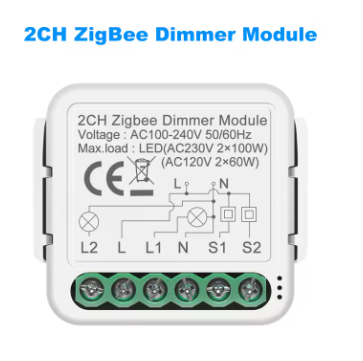
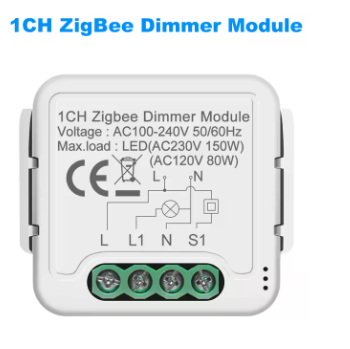
There are Zigbee relays that will work with a momentary switch, even dimmer relays. I put a dimmer relay in my hall light that can be dimmed, and I bought momentary decora switches to match my other rocker switches in the house, which are almost all Zwave in-wall dimmers. The dimmer relay turns the light on and off with a click of the switch, and it dims and brightens if you hold the switch, and then you release it at the dim level you want. Like all my other physical switches, I hardly touch them due to automations, but I like having the physical option there even if it is seldom used.

Bought from Ali Express for about $15.

Edit: You can add as many momentary switches as you want in parallel to the S1 terminal, so this replaced a two-switch 3-way circuit that used to run the hall light. I just had to switch around the wiring that was already there.

So, by wired mesh you mean APs that mesh together. The friend I referenced had APs but they didn't mesh. Do I just specify "mesh when buying multiple APs?

Yes. Single SSID with seamless transfer between APs. With Unifi, I’ve a single SSID for 2.4/5/6 GHz and can roam throughout the home without any issues.

I know Unifi is readily available in the UK through their EU shop. I’d recommend taking your time to determine what the best setup for your needs is, and I strongly recommend doing it with Unifi equipment. Easy to setup, easy to maintain, work well with zigbee/thread networks, and they also provide an easy upgrade path as new WiFi standards evolve.

Thanks. I AI'd the question and one of the responses was Unifi. The only issue is that described it as "prosumer" which put me off a bit but I guess I need to become a little more clued up on this journey anyway. Thanks again. I'll look into unify (once I can find my bl**dy hub on the web again as it's disappeared)

Regarding your edit, are you saying I could replace say a 1 gang 2 way switch with one of these but not a 2 gang one way switch. I'd need two separate relays for that to operate the two lighting circuits.

There is a two channel version of this relay as well on Ali, so it could control two lights from two individual switches. It adds $3 to the cost.

Edit: Note that this was one of the only circuits in my house I did not upgrade during a reno, so the neutral was in the ceiling fixture, so I put this in the ceiling box above the light, and ran the switch wires down from there to the two wall momentary switches both connected to S1 and neutral.

If you have neutrals in the switch box where they should be, both switches could be wired to it, and both lights can be wired to it right in the switch box.

If you don't want a relay behind the switch, then I would recommend considering switches/dimmers from Repenic and Candeo Smart. From what I've seen they are some of the better offerings in the UK. @Candeo_Smart is also active on the Hubitat forums, adding a good reason to consider their products - a vendor who supports their products on the automation platform of your choice is highly desirable!

Old UK lighting didn't generally have neutrals in the switch box but I'm having a complete rewire so have asked for neutrals in all the switches and extra deep pattress boxes. Given my rudimentary grasp of the subject I cant quite work out how one relay controls two lights. Are the two light circuits just wired one to L1 and one to L2?

In UK the nearest thing to a standard looking switch is the MK grid range which is modular. I have them in retractable for lights where I have dimmer modules behind and three position centre off retractable for my curtain motors with shutter modules. My only complaint and it covers most UK light switches is they're a bit clicky (why oh why won't manufacturers make them softer). The lights use Fibaro dimmers but following my recent experience with Z Wave JS (covered elsewhere on this forum) I couldn't really recommend Fibaro.

I have a Honeywell Galaxy alarm as my main alarm system. As a security installer I'm not a fan of 'smart' alarms. However one good thing with using the Honeywell Galaxy is that you can fit a SelfMon Vmod. It's a comms module that works with Galaxy for self monitoring and remote control of your alarm. However the best bit about it, is that it can be configured to publish MQTT topics for all events. That allows you to use anything connected to the alarm - PIRs, doors etc to trigger actions in Hubitat.

Unifi is great for this using one of their routers as a controller. Alternatively TP-Link Omada - you just need the access points and their controller (you can retain your existing router if desired)

Yes, both lights neutrals go to N, then one switch goes to L1 and the other goes to L2. In Hubitat, you would use the Generic Zigbee Multi-Endpoint switch driver, and it would create two child switch devices that act as totally independent switches for both lights.

I've also looked into this, and even though the smart plug devices are a bit ugly the way they protrude out, I found it easier to just use those. There is a switch button the the smart plugs.

Smart plugs can also give you energy monitoring. There are probably outlets out there that do that, though, just not very common.

I also sometimes move the thing that is plugged into it. With a smart outlet plug, you can just move that to another standard outlet with no issues.

USB ports are the other issue. Smart outlets with USBs are not too common. I also don't need to switch the USB ports on and off. So for my Linptech presence sensors, I installed outlets that also have USB ports to plug those in, and I can still plug in a smart plug as well to that outlet, assuming the configuration is such that the smart plug does not block the USB ports.

I use mmWave for areas where people stay still. Kitchen, Dining, Living Room, Bedroom, and Bathrooms (to sense motion behind a shower curtain). For pass-through areas where people don't usually stop moving, I use PIR motion sensors. This would be Entryways, Hallways, Stairs, Pantry, Laundry room and unfinished basement lights.

Thanks for recommending our range @aaiyar , it is much appreciated.

@m_j_mitchell We have a number of options for lighting. You can use retractive switches with both our dimmer modules and our C205 switch module. Also for simple switching, our RF range includes our C-RFZB-SM1 receiver which is used with our wireless kinetic switches that work like retractive switches. And for dimming we also have our C202 or RD1 rotary dimmer ranges.

If you have any questions please do feel free to ask.

I can't second this statement enough. I know you said it referenced "prosumer" but I would look at that term loosely. I had ZERO network experience except plugging in my ISP provided modem/router combo and hoping for the best. I got fiber internet for the first time and was looking for an upgrade.

Many people on here recommended Unifi but like you I was cautious with me having ZERO experience. However, I talked to a few of them, watched some Youtube videos, and decided to take the plunge. I was absolutely amazed at how easy it was to switch everything over, how user friendly everything about Unifi typically is, and how reliable it has been for its own service and no interference with any of my Zigbee mesh.

I went from the ISP provided mode/router combo and 15 Wi-Fi cameras that was really spotty except for the three inside my home due to very little Wi-Fi outside the home to a UDR7 which provides Wi-Fi in my home, a Promax 24 Port switch, UNVR, 14 wired cameras, one Wi-Fi camera, U7 Light access point in my building, and U7 Outdoor Pro Access point on the end of my house. Complete property is covered with Wi-Fi with zero issues. I even ran ethernet cable and installed managed UniFi switches in all the rooms that needed it and my building for three cameras and the U7 Light.

It is a rabbit hole, but I can assure you that I don't think you would be disappointed if you give it a serious look.

More of a rabbit warren :grin: