[Deprecated] Xiaomi / Aqara ZigBee device drivers (possibly may no longer be maintained)

Sorry must have upgraded to 2.05 and forgotten, possibly loking forward to the weekend a bit too much, so deffinately broken on 2.05 if you revert back to 2.04 all works again and the logs show as below.

(So reverted back to 2.04.117 so it looks like it got broke in 2.04.118 and now get the correct values.. Again from top to bottom, push, double tap and held.)

2019-02-11 05:29:26.037 pm debugXiaomi Aqara Wireless Smart Light Switch: Creating event [name:pushed, value:1, isStateChange:true, descriptionText:Button was pressed]

dev:8182019-02-11 05:29:26.019 pm debugXiaomi Aqara Wireless Smart Light Switch: Setting buttonPressed & buttonPressedTime to current date/time for webCoRE/dashboard use

dev:8182019-02-11 05:29:26.000 pm infoXiaomi Aqara Wireless Smart Light Switch: Button was pressed

dev:8182019-02-11 05:29:25.996 pm debugXiaomi Aqara Wireless Smart Light Switch: Parsing message: read attr - raw: D7B50100120A5500210100, dni: D7B5, endpoint: 01, cluster: 0012, size: 0A, attrId: 0055, encoding: 21, value: 0001

dev:8182019-02-11 05:29:24.122 pm debugXiaomi Aqara Wireless Smart Light Switch: Creating event [name:doubleTapped, value:1, isStateChange:true, descriptionText:Button was double-tapped]

dev:8182019-02-11 05:29:24.090 pm debugXiaomi Aqara Wireless Smart Light Switch: Setting buttonDoubleTapped & buttonDoubleTappedTime to current date/time for webCoRE/dashboard use

dev:8182019-02-11 05:29:24.086 pm infoXiaomi Aqara Wireless Smart Light Switch: Button was double-tapped

dev:8182019-02-11 05:29:24.082 pm debugXiaomi Aqara Wireless Smart Light Switch: Parsing message: read attr - raw: D7B50100120A5500210200, dni: D7B5, endpoint: 01, cluster: 0012, size: 0A, attrId: 0055, encoding: 21, value: 0002

dev:8182019-02-11 05:29:21.652 pm debugXiaomi Aqara Wireless Smart Light Switch: Creating event [name:held, value:1, isStateChange:true, descriptionText:Button was held]

dev:8182019-02-11 05:29:21.588 pm debugXiaomi Aqara Wireless Smart Light Switch: Setting buttonHeld & buttonHeldTime to current date/time for webCoRE/dashboard use

dev:8182019-02-11 05:29:21.560 pm infoXiaomi Aqara Wireless Smart Light Switch: Button was held

dev:8182019-02-11 05:29:21.555 pm debugXiaomi Aqara Wireless Smart Light Switch: Parsing message: read attr - raw: D7B50100120A5500210000, dni: D7B5, endpoint: 01, cluster: 0012, size: 0A, attrId: 0055, encoding: 21, value: 0000

So it looks like there is an extra in the report of Command:0A

Hi all - I just wanted to give a quick update:

I am back from my trip and have been working on updates to all of the Xiaomi / Aqara device drivers that I maintain.

It is proving to be more difficult than anticipated. As of now, I've employed a "quick and simple" fix that works for everything except battery voltage reports.

I am in contact with Hubitat to confirm the behavior I'm seeing, which if true just means the drivers need to handle battery voltage reports differently.

I hope to be able to announce the updates with links to the new device driver code in the next couple of days.

Thanks again for your patience.


Yes, what you're seeing is the effect of the change in 2.0.5 on my device drivers that use non-standard methods to deal with the often non-standard Zigbee messages sent by Xiaomi / Aqara devices.

Trust me, I'm working on it, as mentioned above.

Keith, my Aqara drivers are mostly based on your DTHs, and I managed to get them working with full functionality, even though in some cases I don't like the solutions I had to use.

They're available here, check them out, maybe you'll find something useful...

And for anyone who has issues: feel free to use my drivers as long as @veeceeoh provides a full solution (I don't recommend using my drivers in the long term, as I can't promise they'll be as well-maintained as @veeceeoh's stuff are)

Thank you for all of your time and hard work that you have put in to maintain these drivers.

I just wanted to thank @veeceeoh as well for the time and effort. I gave my wife a pink Mi Cube for her area and it skyrocketed my WAF. She shows everyone. It's always the little things. Couldn't have done it without your work and of course @bspranger. Thanks fellas.

Is there some sort of trick with these that I'm missing? I installed the driver and then paired two Aqara motion sensors. I had no problem pairing them, but they only show batteryLastReplaced in the status section, and aren't detecting motion. I repaired the zigbee on one, and it connected right away, but still looks the same on the device page.

Not sure what firmware you are on, but if you've updated to the latest firmware in the last week, there is an issue with Xiaomi sensors. Just read up a few posts. It should be rectified in the coming days. Or you could downgrade to an older firmware.

[UPDATE] All Xiaomi & Aqara Hubitat Device Drivers

Compatibility fix for Hubitat Hub firmware 2.0.5 or newer

Only two changes have been made to the below linked drivers:

  • All functionality is restored when the driver is used with Hubitat firmware 2.0.5 or newer
  • For users with a hub running firmware 2.0.4 or earlier, a preference setting has been added, allowing the user to disable the compatibility fix (see screenshot below)

Links to my updated Xiaomi & Aqara Device Drivers:

  • Aqara Button (WXKG11LM / WXKG12LM) v0.6.5
  • Aqara Leak Sensor (SJCGQ11LM) v0.8
  • Aqara Motion Sensor (RTCGQ11LM) v0.7.2
  • Aqara Vibration Sensor (DJT11LM) v0.7.3b
  • Aqara Wireless Smart Light Switch - 1 button (WXKG03LM) / 2 button (WXKG02LM) v0.7.5b
  • Xiaomi/Aqara Door-Window Sensor (MCCGQ01LM / MCCGQ11LM) v0.7.2
  • Xiaomi/Aqara Temperature Humidity Sensor (RTCGQ01LM / WSDCGQ11LM) v0.8.1
  • Xiaomi Button (WXKG01LM) v0.8.5
  • Xiaomi Mi Cube Controller (MFKZQ01LM) v0.2.1b
  • Xiaomi MiJia Honeywell Smoke Detector (JTYJ-GD-01LM/BW) v0.5.1
  • Xiaomi Motion Sensor (RTCGQ01LM) v0.7.1

Links to updated Xiaomi & Aqara Device Drivers by @guyeeba:

  • Aqara Wired Wall Switch (no neutral) - 1 button (QBKG04LM) / 2 button (QBKG03LM) driver
  • Aqara Wired Wall Switch (with neutral) - 1 button (QBKG11LM) / 2 button (QBKG12LM) driver
  • Aqara Wireless Smart Light Switch - 1 button (WXKG03LM) / 2 button (WXKG02LM) driver
  • Xiaomi/Aqara Door-Window Sensor (MCCGQ01LM / MCCGQ11LM) driver

Many thanks to @mike.maxwell for the suggested code to make the drivers compatible.

At this point, I plan to return to updating and improving each of the drivers on an individual basis (which is a lot more sane given my limited time resources!)

Detailed Notes

  • All this update does is accommodate a change in the way certain kinds of "raw" ZigBee message data is passed on to device handlers. Specifically, the order of bytes of payload data with little-endian data types is reversed, to avoid issues with variable length payload data.
    Most ZigBee device drivers aren't affected because they make use of "helpers" that parse the data and "un-reverse" the byte order of payload data where needed. But many Xiaomi / Aqara devices send messages with data in a non-standard format, so use of the "helpers" doesn't make much sense or simply isn't possible.
    The fix in my updated drivers un-reverses the byte order of payload data where needed, and otherwise all other aspects of the code remains unchanged. I plan to look at switching to the use of helper methods where applicable, on a case by case basis.

  • If debug message logging is enabled, a log message is displayed whenever it has been determined that the byte order of payload data needs to be "un-reversed".

  • IMPORTANT: If you are using any firmware version prior to 2.0.5 with these updated device drivers, then make sure to turn on the preference setting to DISABLE the 2.0.5 firmware compatibility fix for every Xiaomi / Aqara device:

Thanks for all that you do for us with xiaomi.

Silly question, updating drivers in HE, is it as simple as pasting the new code over the old code and saving?

Yes, or copy the link, go to the driver, click import, paste the link, import, save. It's default is for 2.0.5, so I did this first then updated the hub from 2.0.4 to 2.0.5.

Thanks, the import feature is nice.

The import works, just make sure when importing the link goes to the raw code, the links in this thread are all directly to the raw code so no problems, but just saying in case you try with other community's drivers.

Thank you; very nice touch adding the compatibility select switch to allow use with 2.04 f/w. I always prefer changing just one thing at a time.

[UPDATE] v0.7b of Aqara Wireless Smart Light Switch Device Driver

The new beta device driver code can be grabbed from here.

EDIT: Some errors were discovered, and I have re-released the updated driver. Please see this post for details.

Hi @veeceeoh and thanks for you great work on the drivers.
Just an observation.
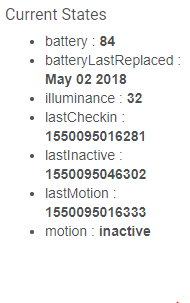
I notice that the date/time stamps are not being displayed in 'English' for the want of a better word.

image

Yes, originally I removed the "human readable" date/time stamps when I ported the ST device handlers to Hubitat device drivers because there was no mobile app for Hubitat. I left the Unix/Epoch-based date/time stamps for people using WebCoRE on their Hubitat, though. That string of numbers is simply the number of milliseconds since Epoch time (00:00:00 Thursday January 1 1970) for when that event took place.

Since then, the Dashboard feature was added, and people who love to see exactly when something has happened on every device starting asking for a custom date/time attribute to be put back in the driver.

However, other people, who hate having their events list cluttered or feel that it may be slowing down things, have asked for a way to disable the custom date/time attribute events altogether.

So, I am going through each of the drivers and adding these features. The one from your screenshot for the Motion Sensor has not yet been updated. I hope to get to it soon.

Thank you for your patience.

This was discussed earlier (around post #293). On the sendEvent( lines you can replace "value: now()" with "value: new Date().toLocaleString()" to get readable dates.

I had to change this line:
if (!oldFirmware & valueHex != null & encoding > 0x18 & encoding < 0x3e) {

to this:
if (!oldFirmware && valueHex != null && encoding > 0x18 && encoding < 0x3e) {

Groovy uses a double ampersand '&&' for the 'AND' operation.

I have not seen any errors with that change. Is there any reason this will be a problem? (I am NOT a Groovy expert).

Thanks. Great work!

[UPDATE] This change is NOT necessary! I used the original code by @veeceeoh and it works great. The error I saw must have been caused by some fat-fingering of my own.

Why did you have to change that line? Was something not working?

Not from what I have read. Although & is a bitwise operator, when evaluating boolean expressions, both & and && act as logical AND operations as they do in Java:

Using && is a little more efficient because if any expression is false then evaluation of all the expressions stops there, and false is returned. In this case, the code is only executed once when a message is passed from the hub's parser, so efficiency isn't really a big concern.

What I am concerned about is that something isn't working despite all of my testing. Are you seeing errors?

As I said, I am not a groovy expert. I had used a pre-release version from your github that had '&' and I did get an error on that line. I honestly did not run the released version before I made the change to '&&'. I will run it as you had it when i get home and report back.