Better to run the thermostat's Custom Action, like this:

Better to run the thermostat's Custom Action, like this:
This update corrects an issue that was causing many of the Helpers to fail during configuration (blank pages) and/or when they executed (silently failing to actually change what they were supposed to). These problems were exposed first on SmartThings as part of the changeover to the "new" mobile app (they changed the version of Groovy that they were using, which created this issue), but they also apply to Hubitat users.
The fixes include:
You can change the setpoints for a given program/climate/comfort setting by using this call against the thermostat device:
setProgramSetpoints(String programName, heatingSetpoint, coolingSetpoint)I haven't exposed making changes to the actual scheduled comfort setting times yet - the native implementation is pretty complicated (you need to pass an array of 48 half-hour climates). I have started the work to support simpler edits (like "run XYZZY from 8:30am to 12:00pm").
@inetjnky & @jsender321 -
If it's not yet winter for you, try this version of the Smart Mode Helper and let me know if it does what you want.
Basically, anytime the thermostat mode changes to anything other than "off," (like when Open Contacts turns the HVAC back on) it will wait 5 seconds and then re-run the logic to change the thermostat Mode, Program and/or Setpoints as specified in the settings.
Note that this COULD cause aggravation if you were trying to override the Helper, because 5 seconds later it will change it back...
Excuse the ES noob question....this is so simple.
In the Smart CIrc helper, down toward the bottom where you can adjust fan circulation based on indoor/outdoor temperature difference, there are options like "10 degrees warmer" and "10 degrees cooler". But nowhere can I find out if that means outside is warmer/cooler than inside? Or inside is warmer/cooler than outside. Which is it? TIA!
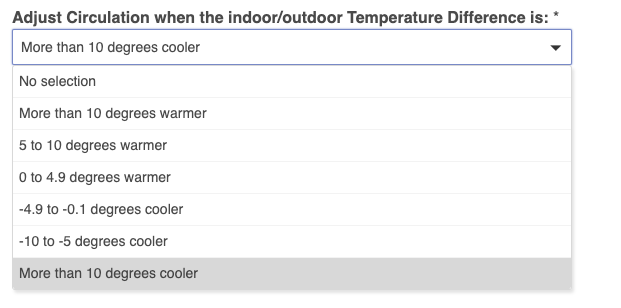
Temperature Difference = Outdoor Temperature minus Indoor Temperature (average).
Thanks Barry.
Can I ask you and others a couple questions about Smart Vents as well? I'm using the Smart Vents helper app to control vents based on my thermostat setpoint. Pretty straightforward to setup. I did notice two things however:
TIA.
You should have an instance of Smart Vents for each Remote Sensor - it doesn't support multiple remote sensors.
Try using the "generic" vent instead of the Keen vent within the Helper. When directly connected to Hubitat, the vent driver that I provide supports the openContact command, but apparently the Keen bridge does not. So just turn the vents on/off...that should work.
Thanks for the reply.
I’m not exactly sure what you mean by “remote sensor”. For each instance of smart vents, I have one thermostat, one ES temperature sensor, and 1-3 vents. I have zero “ES Sensors”.
I’m not using the Keen bridge, just have the vents directly connected to HE using the built-in Hubitat driver. I then use your custom Hubconnect driver to create a virtual “shadow” vent device on the hub where ES resides. I’m not aware of any generic Hubconnect driver for vents? Methinks I might be misunderstanding you?
Were you ever able to track down why I can't use heat on my ecobee with using this suite?
Did you install the updates I posted recently?
If so, did you open and then save ES Manager after installing the updates? That (should) force a rescan of the thermostat’s capabilities.
Then did you open each Helper instance and verify the settings, then save/exit out?
If you still don’t see “heat” as an option, please turn on Live Logging and repeat the above. Check the logs for Errors or Warning in ES Manager, ES THermostat and the Helpers. If there are any errors, copy the log section and the surrounding plus/minus couple of minutes, and PM them to me.
Try using the Keen Vent driver provided in my GitHub instead of the Hubitat native driver...my Hubconnect driver apparently utilizes commands that Hubitat chose not to implement.
Nope, didn't even see them. I'll install tomorrow and see if anything has changed.
Thank you!
No dice for heat still. Do I really have to delete it and start over again?
supportedThermostatModes : [auto, cool, off]
heatStages:0
Please check that the heat stages settings on your actual thermostat is non-zero. Go to Settings / Installation Settings / Equipment and check the Furnace setting. If it is “Heat Stages; 0”, please reconfigure ...
Then, if you change it to Heat Stages 1 (or 2, dependent on your system), then open ES Manager, and Done/Save out again. This should pick up the new values and update them in the ES Thermostat device.
It's already "1 Heat Stage" on the thermostat. Don't see a way to change to 2 then one.
Forced air (air to air)/Heat pump.
BTW. This worked fine with SmartThings.
Ok, so something weird happened when you first installed. I will look into creating a way to force the configuration to update in ES. Sorry for the aggravation...give me another day or two.
Question: What is the value of the ES Thermostat Device's heatMode attribute?
heatMode : false
If you would like, I can give the whole info.
What I need most is a dump of the ES Manager states - everything you get when you click the gear icon for ES Manager. Best to PM - it's a lot of text...
Download the Hubitat app

