I got prompted to change my Amazon password this week as well, when opening the Alexa app on my phone.
I had some dependency warnings/issues when I did the update but everything seemed to work after the update and I can get Alexa to speak again from my hub.
I got prompted yesterday to change my Amazon password as well.
I cannot for the life of me get this app working - everything looks great except I get an invalid cookie error. Im using firefox and Im able to find the cookie data very easily. I then rip out the cookie (intentionally removed removed below), and add the required semi-colon, but it still fails.
I'm In Australia so Im logging on to alexa.amazon.com.au and I have this app configured for AU also.
GET /api/feature-alert-content HTTP/1.1
Host: alexa.amazon.com.au
User-Agent: Mozilla/5.0 (Macintosh; Intel Mac OS X 10.15; rv:79.0) Gecko/20100101 Firefox/79.0
Accept: */*
Accept-Language: en-US,en;q=0.5
Accept-Encoding: gzip, deflate, br
X-Requested-With: XMLHttpRequest
Connection: keep-alive
Referer: https://alexa.amazon.com.au/spa/index.html
Cookie:
I have Alexa TTS working on my Vera Hub using the same cookie info, so im just stumped as to why it wont work on HE! 
I was forced to change my Amazon password recently. I have my Alexa TTS cookie refresh set up using the NodeJS server provided by @gabriele. I suspected that the Amazon password change would cause an issue, which it did when my Hubitat hub attempted to refresh its cookie this morning.
So, per the advice above, I logged into my Raspberry Pi and stopped the AlexaCookie NodeJS server. I them performed a 'npm update' while in the AlexaCookie folder. This updated many dependencies. I then restarted the AlexaCookie NodeJS server.
I then fired up the browser on my RPi and connected to the AlexaCookie NodeJS server, entered my new Amazon credentials, copied the new "Alexa cookie refresh options" and updated my AlexaTTS Manager app's corresponding field on my Hub. I then turned on the "Force Refresh Now?" switch. Five minutes later, everything is working again.
2 Likes
So I've given up on the basic cookie option (I just wanted to get it working before moving on to the node.js solution).
So I've installed node.js on my Unbuntu 18.04 LTS machine (Plex Server) and followed the instructions to the letter and it looks like it's successfully installed and running:
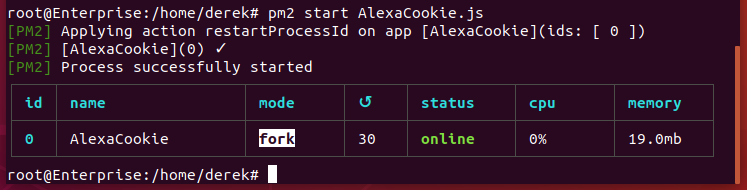
followed by:
- Execute command
pm2 startup - Execute command
pm2 save
and I get command successfull etc .... but there's nothing on port 81 or port 82 on my system.
Has anyone got a more idiot proof guide that I can follow with troubleshooting steps? I just put the Alexa files into my /Home/Derek user directory becasue the guides linked to dont specify any file locations.
I had same situation today. Resolved by @ogiewon’s comment above:
Once I ran npm update within the AlexaCookie folder problem solved.
So run npm stop AlexaCookie and then run the update and start it again after.
1 Like
Just to follow up, I've been going thru this trying to solve the issue (including trying different versions of node.js) and the sticking point is always the "npm install". It throws this error every time and the App never seems to work as a result.

I've even tried modifying the package file to use the full URL without luck:
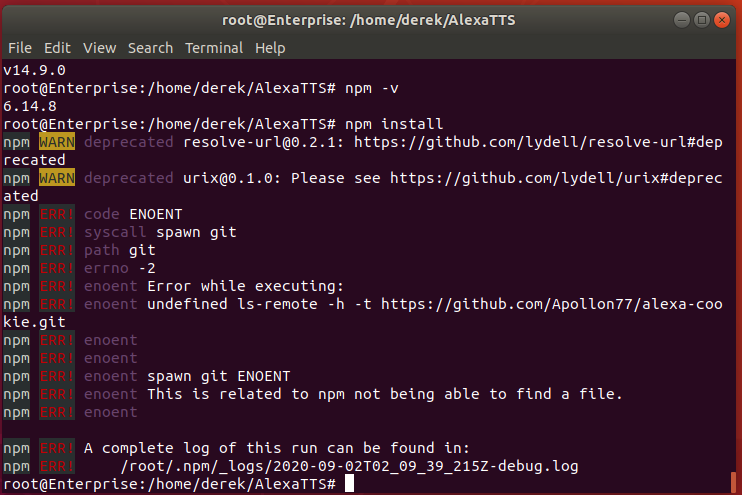
@gabriele I've logged an issue on Github as there is an issue with your script - I get identical results on my Unbuntu Server and my Synology NAS:
Have you tried using higher ports? If you're running this as a "regular" user, you probably won't have access to "low" (privileged, anything below 1024) ports unless you're running as root. I picked two random unused ports the 8000s for my config.json and this fixed the problem for me. (Or if I'm supposed to be running this as a privileged user, then I clearly messed up something trying to follow the instructions...  )
)
No as Im running everything as root. The problem appears to me to be the "npm install" process is failing to DL files.
Edit: I tried 8001 / 8002 and stil no joy - I'm also scanning the ports using the macOS Network Utility and there's nothing showing up.
@ogiewon So after bashing my head against a wall to get the node.js system working and failing, I gave up for a bit and went back to investigating why the basic cookie option wasn't working.
Anyway, long story short, the Instructions on GitHub are wrong - At least for Aussie's with Mac's running Firefox.
You need to go to "https://alexa.amazon.com.au/spa/index.html#smart-home" and Instead of pulling the cookie from "featureaccess-3", you need to get it from "skills-store.amazon.com.au"

and then it will work perfectly.
1 Like
Thanks @dJOS. I have updated the ReadMe based on your feedback. Glad to hear you got it working.
As for getting the AlexaCookie NodeJS server up and working, just wanted to let you know that I am running Node v8.17 on a RPi running Raspian OS. Not sure if such an old version of Node is required or not.
1 Like
Ah that might be the issue, the oldest version I tried was node 10.
1 Like
Ok I ditched v12 from my NAS and installed v8.9.4 - the default "alexa-cookie2": "github:Apollon77/alexa-cookie", line produces this output:
root@DiskStation:/volume1/alexa/AlexaCookieNodeJs# npm install
npm WARN deprecated resolve-url@0.2.1: https://github.com/lydell/resolve-url#deprecated
npm WARN deprecated urix@0.1.0: Please see https://github.com/lydell/urix#deprecated
npm ERR! code ENOGIT
npm ERR! No git binary found in $PATH
npm ERR!
npm ERR! Failed using git.
npm ERR! Please check if you have git installed and in your PATH.

npm ERR! A complete log of this run can be found in:
npm ERR!     /root/.npm/_logs/2020-09-02T23_10_46_903Z-debug.log
root@DiskStation:/volume1/alexa/AlexaCookieNodeJs#
and changing it to this "alexa-cookie2": "https://github.com/Apollon77/alexa-cookie", produces this result:
root@DiskStation:/volume1/alexa/AlexaCookieNodeJs# npm install
npm WARN deprecated resolve-url@0.2.1: https://github.com/lydell/resolve-url#deprecated
npm WARN deprecated urix@0.1.0: Please see https://github.com/lydell/urix#deprecated
npm ERR! code ENOGIT
npm ERR! No git binary found in $PATH
npm ERR!
npm ERR! Failed using git.
npm ERR! Please check if you have git installed and in your PATH.

npm ERR! A complete log of this run can be found in:
npm ERR!     /root/.npm/_logs/2020-09-02T23_14_37_831Z-debug.log
root@DiskStation:/volume1/alexa/AlexaCookieNodeJs#
and when I get to the pm2 start AlexaCookie.js part it fails with:
root@DiskStation:/volume1/alexa/AlexaCookieNodeJs# pm2 start AlexaCookie.js
-ash: /usr/local/bin/pm2: No such file or directory

Seems like “git” may be missing on your system.
Hmmm, I wish ppl (not you) would bother to write comprehensive documentation including correct versions of systems needed and required dependencies. Not everyone is a developer (Im an IT Ops guy).
I am running this as a docker container on my Qnap do similar setup. I was running v9 and when it broke the other day I downloaded the latest, 12 maybe? Whatever latest image from the docker devs and it runs fine. Instead of using Git I just downloaded it into a folder via PC and then setup a share in the NodeJs container so I could just copy the folder and then adjusted the executable.
I ran the following to install NPM:
npm install -g npm@latest
Then remember to run npm update while in your AlexaCookie directory
2 Likes
lol, funny you should mention that - I was just trying essentially this on my NAS and now it's working! 
I Did have to edit the AlexaCookie.js to add Australia tho, but that was easy.
1 Like
Yeah I got lazy not wanting to install Vi, etc on my node container so just made sure all my settings were in place via PC and then put in folder accessible via share. Plus this way I have a backup of my settings too making it easy to update Node to a newer version of need be.
What I haven’t figured out yet is the auto restart of AlexaCookie as suggested above to keep it working. Cron/scheduled activities within docker is tricky. If you figure this out please share.
1 Like
I'm too lazy to bother with docker - plus my DS213j hasn't got enough grunt to pull the skin off custard. Its main purpose is recording security cam footage and serving as an iSCSI target for my file server to perform daily backups too.

