Curtain Robots are Fun 😀

That would be nice. The equation would need inputs that account for sunrise and sunset times, and some way to account for increasing/decreasing lux through the year, and ultimately output a number that corresponds to the lux output of my specific light sensor.

I did poke at the SunCalc driver code, trying to add equations to get it to calculate illuminance at any time of day from it, but I couldn't get it to work. Math is not my strongpoint. What that driver does is so close though, maybe I should poke at that again.

I first heard about SunCalc in a post about adjusting shades using this driver to determine when the sun would come in a window, if it was sunny out.

Ah, that was it, the SunCalc driver was what I was thinking of. If you can't make it work, I'm lost. :wink:

Yeah, I found the equations to calculate illuminance at the surface for any time of a day, based on the calcs that Sun Calc already does (altitude and azimuth). I was just having trouble getting those equations to work in Groovy.

Summary

AI Overview

To calculate solar illuminance (lux) on a surface from sun altitude and azimuth, you need to

find the solar irradiance (W/m²), convert it using a conversion factor (around 100-110 lumens/watt for sunlight), and then apply the Lambert's Cosine Law using the angle of incidence (derived from altitude/zenith) and potentially surface tilt/azimuth, accounting for atmospheric effects (air mass) and whether it's direct (beam) or scattered (diffuse) light. The basic idea is

[image]

E=Irradiance×Conversion Factor×cos(Incidence Angle)cap E equals Irradiance cross Conversion Factor cross cosine open paren Incidence Angle close paren

𝐸=Irradiance×Conversion Factor×cos(Incidence Angle)

, but a full calculation involves complex models for direct vs. diffuse light and atmospheric attenuation, often using solar position data (altitude, azimuth) to find the zenith angle and angle of incidence.


Key Concepts:

  • Altitude (h): Angle of the sun above the horizon (0° to 90°).
  • Azimuth (γs): Horizontal angle of the sun from North (or South).
  • Zenith Angle (Z): Angle from directly overhead (90° - altitude).
  • Incidence Angle (θ): Angle between the sun's rays and the surface normal (perpendicular to the surface).
  • Illuminance (E): Light falling on a surface (lux or lm/m²).
  • Irradiance (GHI/DNI): Solar energy (W/m²).

Steps & Formulas (Simplified for Direct Sunlight on a Tilted Surface):

  1. Calculate Solar Zenith Angle (Z):
  • Z = 90° - Altitude (h) (if surface is horizontal).
  1. Calculate Incidence Angle (θ):
  • This requires surface tilt (

[image]

βbeta

𝛽

) and azimuth (

[image]

γgamma

𝛾

) and solar azimuth (

[image]

γsgamma sub s

𝛾𝑠

). For a tilted surface:

  • cos(θ) = cos(Z)cos(β) + sin(Z)sin(β)cos(γs - γ).
  • For a horizontal surface, cos(θ) = cos(Z) or cos(θ) = sin(h).
  1. Determine Solar Irradiance (GHI/DNI):
  • You need the Global Horizontal Irradiance (GHI) or Direct Normal Irradiance (DNI) for that time/location, often from weather data.
  1. Apply Lambert's Cosine Law (for Beam Irradiance):
  • E_beam = DNI * cos(θ) (for direct component).
  1. Add Diffuse Component (More Complex):
  • E_diffuse = DHI * (1 + cos(β))/2 (Isotropic sky model).
  • This adds light scattered from the sky.
  1. Combine & Convert:
  • Total Irradiance (W/m²) = E_beam + E_diffuse (approx).
  • Total Illuminance (lux) ≈ Total Irradiance (W/m²) × 100 (Use ~100-110 for sunlight conversion factor).

I had this working quite well, Not perfect but more than good enough to not close the shades when overcast. UNTIL it snowed. Even with heavy overcast bright snow adds enough lux to close the shades even when very cloudy. Because snow cover here is intermittent trying to outsmart it is more trouble than it is worth. Pushing a pico is easy enough so those rules are paused until April.

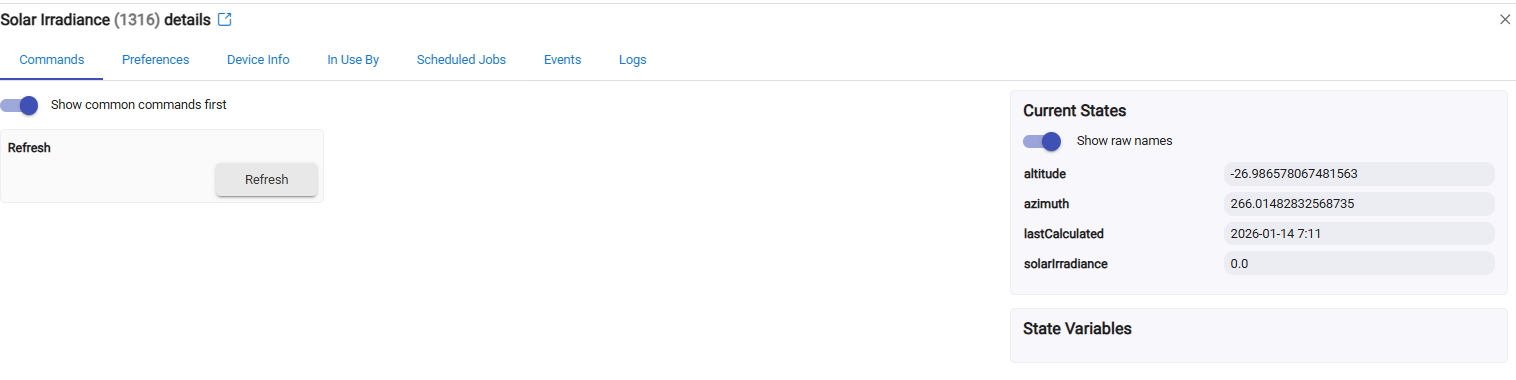
I just asked AI to add Solar Irradiance to the SunCalc Driver. I will have to check when the sun is out tomorrow if it works.

It is night, and 0.0, so good so far!

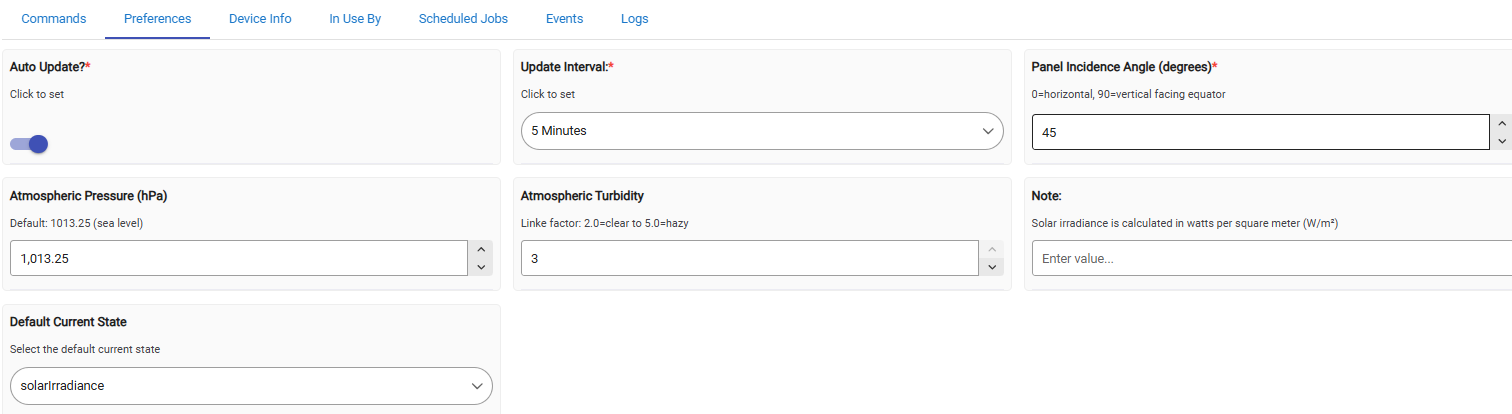
It went into a bit more granularity than I was expecting, adding more preferences to the driver:

Edit: I was going to do the conversion to lux myself, but I decided to have AI add that too. So now there is an attribute for Lux.

It will be interesting how it compares with the other calcs I'm doing, and how it tracks with my Ecowitt Sensor on a clear day in VT.

Weather reports are not looking good for clear day anytime soon. :face_with_diagonal_mouth:

I stuck the AI modified driver here

Very cool...I might try it w/my blinds in the office, which face westerly and get some pretty heavy sun in the afternoon. Right now I use two roughly timed changes in a rule to dim the blinds progressively as the afternoon progresses.

Funny you mention that, I was thinking of opening them progressively as a gradual wake up, since these curtains are in the bedroom, and they are black-out. It would be like making the sun come up when I want it to :grinning:

But that's not going to work in VT right now, since it is still dark before we get up.

1 Like

As soon as the sun came up, that modified driver started generating exceptions.

I had AI fix up the division and type issues causing it, and now it is giving me values for Solar Irradiance and Illuminance. Looks like I'm getting what could be valid values for a sunny day.

I changed the preference it added to "cloudy" and it didn't change the illuminance value at all, so I'll see if it can fix that.

Code is updated at the same link.

2 Likes

All these calculations are very nice science. But how practical is it in a real environment? I asked my wife if she wants a gradual control for shades and curtains. After experimenting she decided fully oppen/close is the case (i.e. no need for gradual control). And for the lighting in the rooms just using simple threshholds and timeouts (all these values were determined experimentally) works just fine.
But sure, everybody definitely will have different requirements and approaches for the automations. My goal - make things as simple as possible but keep them practical.
The reward is - so far WAF is very high.

Is that from the window sensor or an outside sensor? My Ecowitt sensor only gets darker when it snows, but I could see a window sensor getting brighter, possibly. I would need to test that in my case.

Snow also has another issue though; snow piles up on the sensor and makes it too dark if we get a bunch of now. I usually clean it off once the snow stops.

1 Like

My expected Lux calculations work fine in practice, I've been using them for years now and it accurately distinguishes sunny/cloudy/partly cloudy.

I'm comparing my expected illuminance calcs with the illuminance that the modified SunCalc driver is now giving me. They seem to be tacking fairly close together, though there is an offset between them. If it stays somewhat linier it may be usable to use it by just applying an offset so it tracks closer to what my lux sensor reads.

This is an important number for determining if the light coming in the window is direct sun or shaded sun, with the expected lux calc giving me a baseline to make that determination for any time of day.

1 Like

I think I have the modified SunCalc working well now. I had it add a debug logging option and the ability to add an offset to the illuminance calculation.

That driver link above now has the latest AI revision with those options in it.

I added an offset to bring it in range to what my formulas have been producing for expected LUX. I added to my chart to compare, and so far it is tracking close.

Not yet showing much on the chart, but the trip over the noon hours should be a nice curve, compared to my calcs that just use simple slopes for noon hours that form a point.

The red line is the values from SunCalc illuminance with the offset applied (+5000 lux)
image

Edit: I just realized that a hard offset cannot work, as when illuminance is 0, it will just report the offset. I had the driver changed now so the offset is a percentage, then at least it will report 0 at 0, but I'm not sure how well that will track with the sensor.

Edit2: While the % offset to match my sensor solves the zero lux issue, I'm afraid that come summer when lux gets over 100,000, that % offset is going to send calculated lux way over value. It really depends how linier the difference is between my sensor and calculated lux. I may need to use both offsets, a difference and a %. Use % offset early and late, until the lux calc using percent offset is equal to the lux calc using the difference offset, and then switch to the difference offset for the rest of the day.

That's a possible solution, but my weather station is farther away and higher up than I can easily access in the snow. I'll have to look at playing with solar radiation and maybe a toggle when it appears to be blocked by snow. At the moment plenty of snow but enough wind that is seems to be clear. So happy, thought I was running out of projects. :wink:

Where are you getting the current "cloudy" conditions from? The source I was using for current local sky conditions is no longer available.

That is what my app is doing, figuring that out based just on the values coming in from my light sensor.

Sunny = Expected Lux - Sensor Lux is within a sunny range to determine sunny.
Cloudy = Expected Lux - Sensor Lux X is outside sunny range and negative
Partly Sunny = Sunny, but with a lux variance greater than X
Mostly Cloudy = Cloudy, but with a lux variance greater than X

I also have Mostly Sunny and Partly cloudy. It depends on the variance value.

Then I keep a running list of the last five reported conditions, and I find the most common value of those five as the actual report.

So if it gets five Sunny values in a row, the list is sunny, sunny, sunny, sunny, sunny.

The next value is cloudy, and it gets added to the list and I pop the last value off the end. So that would be sunny, sunny, sunny, sunny, cloudy. Most common is still sunny.

This keeps condition reporting more true for the total sky, instead of just being a snapshot of one reading based on a single cloud passing over.

Once I get three cloudy values in a row, the list will be sunny, sunny, cloudy, cloudy, cloudy, and that will result in current condition being reported as cloudy.

Of course, the most common list is also populated with partly sunny, mostly cloudy, etc.

You may want to play with that modified SunCalc driver. It would give you a baseline to know if it was blocked or not.

The % offset seems to be working so far, I need to watch it the rest of the day. The wobble just before noon was when I changed it from using a strict offset to a % offset for illuminance.

image

Thanks for the ideas, I've been using a Hue lux sensor in a west facing window. Worked really well since I set it up last summer. The advent of snow threw a wrench into that. I have a weather station with a sky facing sensor which I previously used but it couldn't account for sun brightness late in the day so I shifted to the window sensor. I suspect I can easily override the snow brightness with some sort of weather station lux sensor level override.

I'm getting closer on getting SunCalc to give me an illuminance value offset that will match my illuminance sensor.

Direct offset and percent offset cannot work, as I should have realized. So what is needed is scaling, and an offset that is applied throughout the range of lux values for the day. So I had it calculate noon illuminance for noon that day, and then scale the readings in that range, with an offset that will allow me to match the expected illuminance values to my illuminance sensor.

So I had Deepseek add that:

5. Enhanced Scaling Logic

  • Scale Factor = current lux / noon lux (capped at 1.0)
  • Applied Offset = upperRangeDifference × scaleFactor
  • Always returns 0 offset when current lux is 0

:bar_chart: How It Works Now

  1. At midnight or driver startup : Calculates expected noon illuminance for the current day
  2. Throughout the day : Compares current lux to noon lux to determine scale factor
  3. Applies offset : Scales upperRangeDifference proportionally based on time of day

Example Behavior:

  • Noon (100,000 lux, noon lux = 100,000): Scale = 1.0, applies full 2000 lux offset
  • Morning (50,000 lux, noon lux = 100,000): Scale = 0.5, applies 1000 lux offset
  • Sunrise (10,000 lux, noon lux = 100,000): Scale = 0.1, applies 200 lux offset
  • Night (0 lux): Scale = 0.0, applies 0 offset

The driver now automatically adapts to daily variations in sunlight intensity based on your location, season, and current atmospheric settings.

I probably should start a new thread for this. :upside_down_face:

1 Like

Just wow. :exploding_head::+1:

Yeah, this is wortha new thread. :wink:

I'm going to start a new thread to release the modified SunCalc when I get done messing with this and it is fully working.

I've gone over this with many iterations with Deep Seek now, and testing. I've ditched its first revision, to get rid of all the extra parameters that didn't really matter. The scaling to a noon illuminance wasn't working either, so I ditched that.

I now have a pretty simple modification I'm testing. The only preferences are for angle of incidence and a correction factor. I'm finding just adjusting angle of incidence allows for calibration to a physical light sensor at noon, so the correction factor is just for fine tuning after that.

Testing yesterday, I realized:

  1. My formulas (green line) has been over adjusting for winter noon, and it is way too low
  2. My sensor had a layer of snow on it.

I was testing starting at 10am and I got the nice curve over the noon hours. Then the sun came out, but readings were not changing much. I cleaned my sensor off and LUX went way up, so I adjusted SunCalc to the actual Lux value. Another adjustment was made at about 2pm when illuminance again went over SunCalc's illuminance calc.

image

Today I hope to get a full day's illuminance curve from SunCalc. The final issue is that the illuminance calculations desync at low light levels in morning and evening. My sensor still reads about 800 when SunCalc goes to zero, so I am going to try and fix that today with an adjustment for only those times, based on altitude.

1 Like