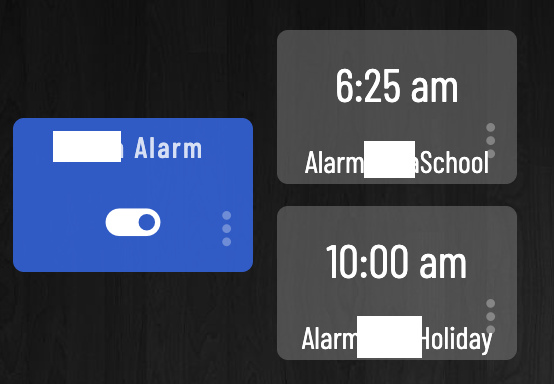
How about a device driver that will ONLY, turn a defined device ON or OFF.
Set On/Off in the device configuration setup along w/ the controlled device.
For the dashboard, put Time selector boxes (arrow up/dn - like an alarm clock),
Enable & Repeat check boxes.
That's it!
To turn a device ON, you create a virtual device.
To turn a device OFF, you create another virtual device.
You then put BOTH virtual devices on a dashboard.
I am still struggling a little bit with the actual use-case. Based on what I have read, the goal is to have a "Virtual Switch" style of device, with a user settable time of day ON time and OFF time. Is this correct?
I know you'd also like it to be easily adjustable on a dashboard for non-techy users.
Now, please explain what you will do with this virtual device once you have it? How will it be utilized in your automations?
I am just trying to understand the full picture. This will help the community help you with a solution.
Most of us try to fully automate our systems so that no manual user input is required. I understand that may not always be practical, but it would still help us to better understand what you're trying to achieve in the end.
Yes, correct.
Think of it as an alarm clock for the ON condition. One half of the desired request.
Hubitat, and all of it's marvelous automations are geared around consistent times, whether sunrise/sunset or some static values. This is all very easy to automate.
But what about households that do not always have the same inhabitants routines?
Firefighter/medical/First responder personnel that work swing shifts from 1 day to the next.
Automations should be able to react accordingly, based on when a person will get up. Coffee should be brewing an hour before the nightstand alarm clock goes off.
Oh. If this automation COULD be the alarm clock, then multiple events can be triggered.
We use an on demand water heater. It takes awhile for the hot water to reach the shower head, therefore a recirc pump can precharge the hot water line so water is not wasted waiting for hot water to get to point of use.
Furnace heat can be raised, an hour before the alarm clock goes off.
SOO many more use cases can be defined, all based on time that is variable, from day to day.
Maybe two hub variables of type date/time exposed to the dashboard, one for the on/start time and and another for the off/stop time? Then make one rule for each triggered at that variable time -- or whatever offset from that -- that does whatever you want for each.
No need for sarcasm when everyone’s just trying to help you meet your stated needs (as best as we can understand them) within the bounds of how the Hubitat platform and its UI currently operate.
It’s possible that precisely what you’re looking for could be added as a feature request. But certainly no guarantee, and may or may not be prioritized if it were to get implemented.
If you don't want to create an automation triggered based on what you want to perform an automation triggered based on what it sounds like you want, then perhaps you could explain what you are looking for more clearly (keeping in mind the design of the system, where apps are responsible for performing automations). I really don't see why something like I suggested won't work. I was suggesting built-in options, though you could certainly write (but probably don't want to) a custom app to help.
When the trigger time is changed from the dashboard, is the Rule’s currently scheduled trigger time automatically revised? Or, does the rule need to be refreshed to “see” the new time in the variable?
You could make a timer too. Make the variable a number. Set the variable for x (minutes). Turn it on. The rule looks for change to the virtual switch, and sets an off command for "now ofset x minutes". Then the rule in #3 takes over when that virtual switch turns off.
I, AND ANYONE ELSE HERE, DO NOT TAKE RESPONSIBILITY IF YOU DO THE FOLLOWING AND IT OVERLOADS YOUR HUB because of a while loop and a dashboard refresh every second.
And if you want a "live" count down display to the timer, then the rule that gets triggered by the ON could have a loop that runs every second, and subtracts current time from the alarm/timer time and updates a countdown variable. That variable gets displayed next to your timer switch and you set the dashboard to refresh every second.
I do the same as @marktheknife, I have a morning wakeup rule. That determines if I need the heater turned on in my bathroom 30 minutes before I get up.
I use a dashboard input just as shown in the mark's post, that sets the automation to trigger at the time shown. There is much more to it than that, however. I wanted it to be as automated as I can so I didn't have to set anything it would just turn it on if it's cold. I am now semi-retired so I don't go to work every day, nor always at the same time. Sometimes I go in very early, so I don't want the heater running two or more hours before I get up. So even just setting the time is not enough.
I have a button by my bed if I click it once it does my normal goodnight routine, if I hold it then it does the good night routine and it initiates the rule to startup at the trigger time the next morning. If I double tap the button it initiates the rule immediately, in case I wake up and just decide to get up
So at the trigger time it starts monitoring other things, like did the HVAC system come on in heat mode, what is the temp in the bathroom, what is the temp outside?. If any of these things are within certain parameters then it waits and turns on the heater in my bathroom at the prescribed time
I post all this to say maybe you need to look at more than just a time, think about other things in the house and are there patterns that you can use to determine something needs to be started up the next day. Or simply setup buttons for on a dashboard, for me along with the physical button by my bed I have a virtual button on the dashboard that can do the same thing.
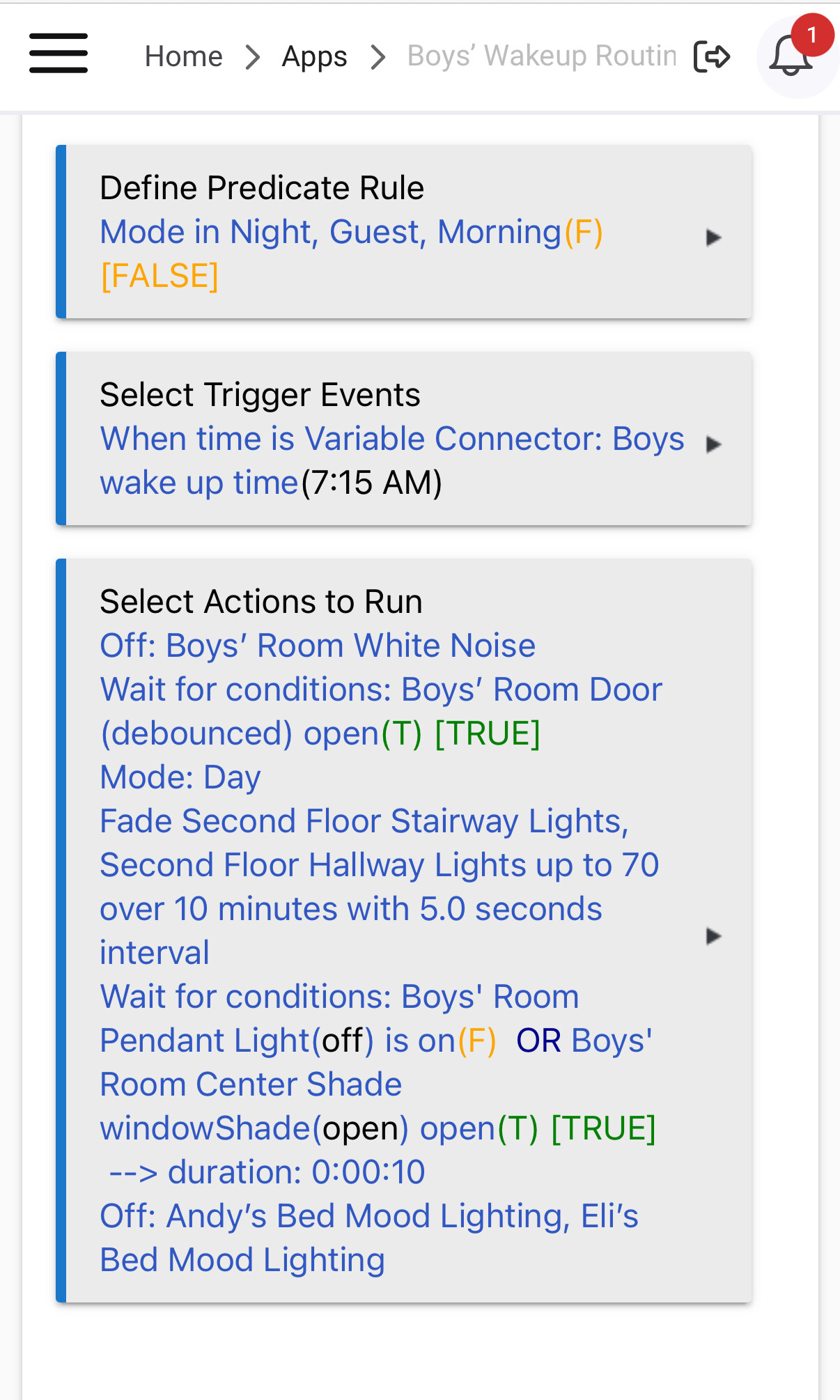

 Or, does the rule need to be refreshed to “see” the new time in the variable?
 .
. .
.