OK. I keep trouble shooting so I'll try to put everything in one post instead of scattered across different posts. I'm in Z-Wave hell right now. I successfully added a bunch of Z-Wave dimmer switches throughout my house and then all of a sudden I can't add any other z-wave devices (ring sensor, outlet, additional dimmers). I've tried everything but obviously I'm missing something. Exclusion, shutdown and unplug, factory reset of devices, kill the power to devices and restart, you name it. I've looked for ghost nodes and haven't found any. Even did the z-wave repair even though some say that's bad (I did it before reading that it might be bad). I'm at a loss. What can I provide here that will help you guys work through this with me? I'm somewhat techie but not at the level of many of you.
post a screenshot of your z-wave details, and your hub model and what platform version you are running. You may have z-wave ghosts. And oh what Z-wave you're using Zip or Z-wave JS
Thanks for the fast response. I'm using a C8-Pro. Platform 2.4.3.158. I'm assuming I'm using Zip since I see a button that shows switch to JS.
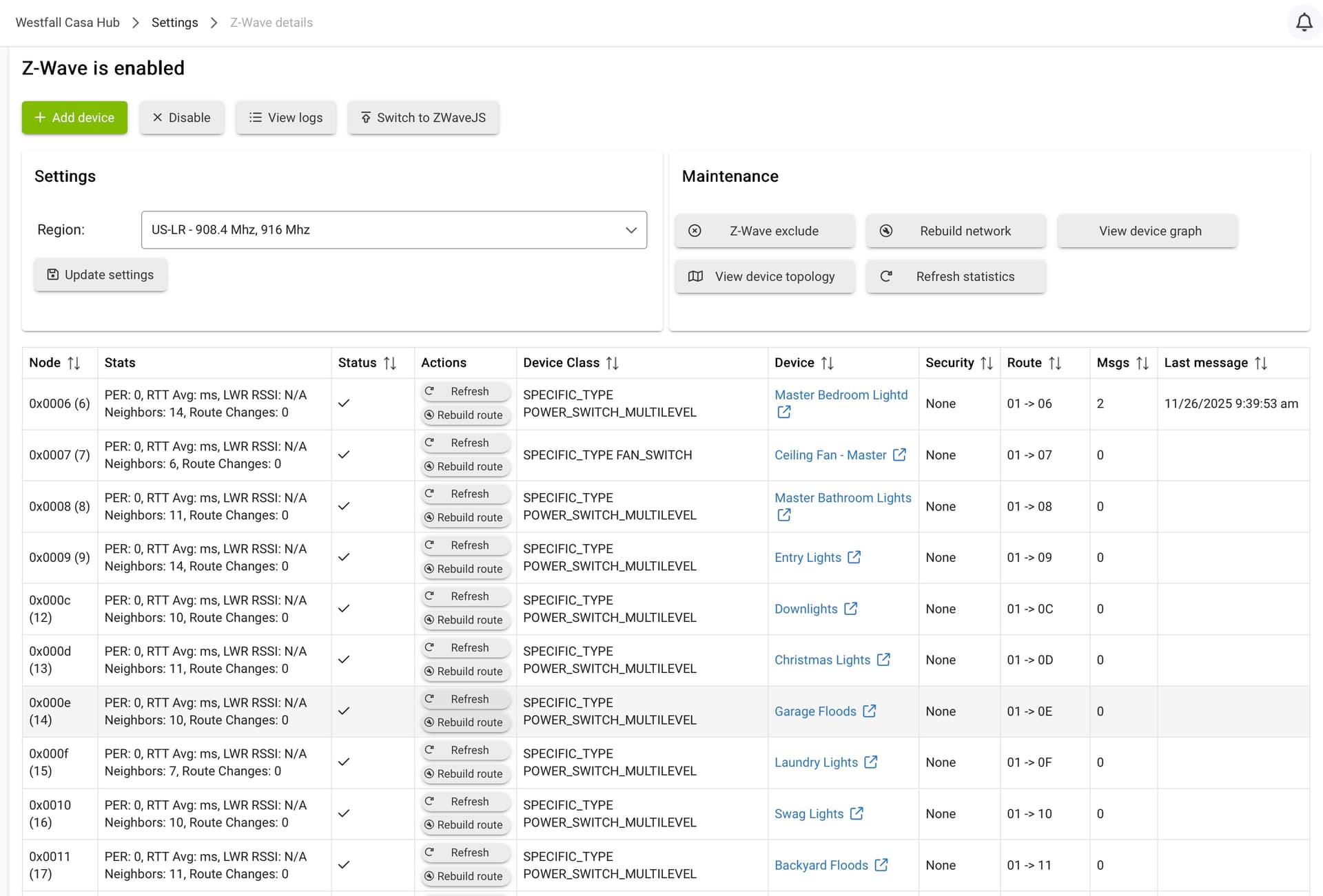
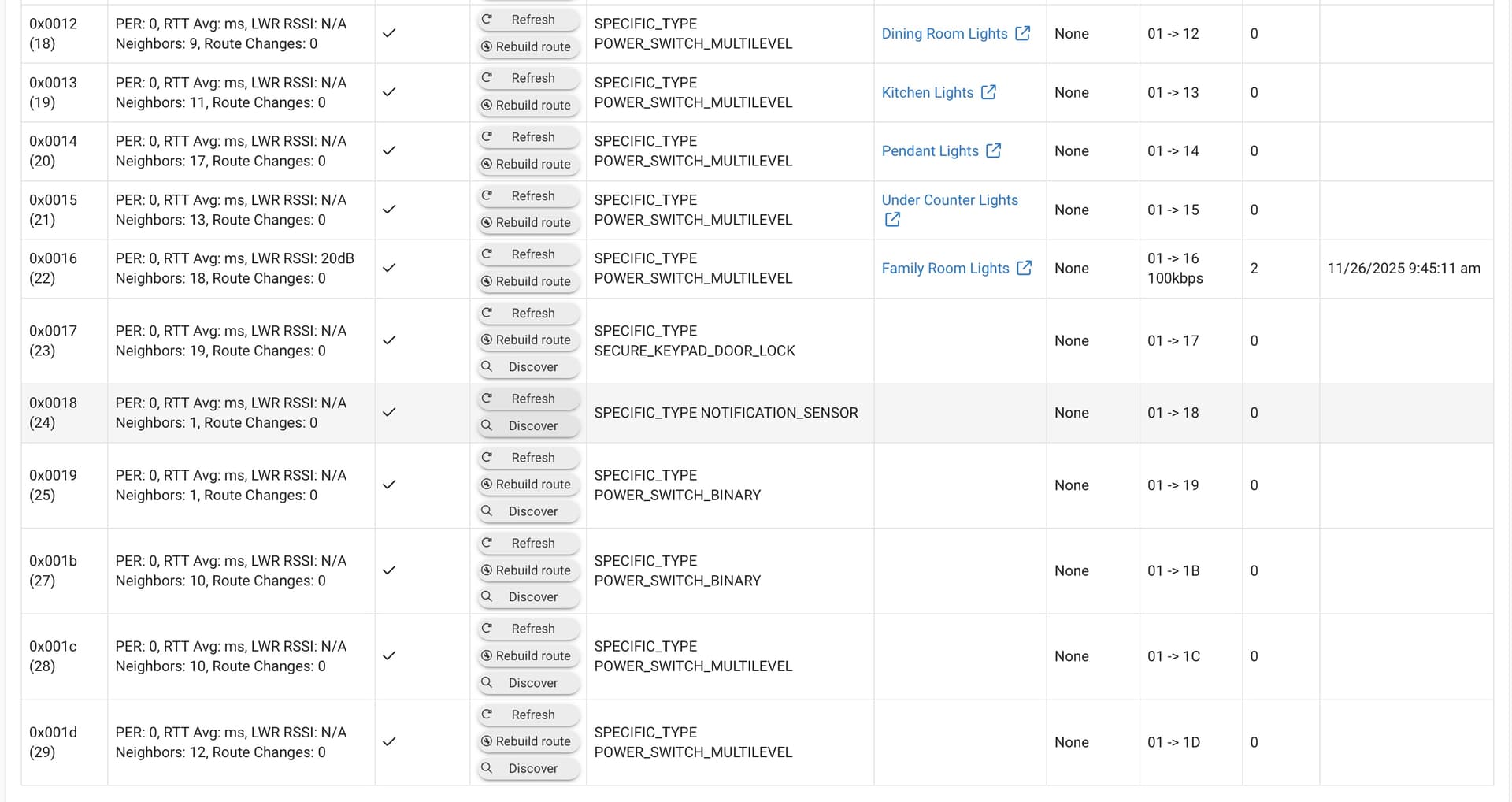
You have a bunch of ghosts...left over from device or devices that didn't join successfully and can really screw up your Z-Wave mesh.
- Shut down the hub, pull power when the hub says it's off, wait 30s, restore power and let the hub boot up. That will clear your Z-Wave radio so it's "fresh" for the next steps. Doing this might resolve/clear some of those ghosts...
- After the hub boots up go back to Z-Wave Details page and for each of those devices still showing Rebuild/Discover/Refresh, select Refresh and you should see a Remove button appear, and then hit that to tell the hub to try to remove the ghost. More info here, in particular section 3 in the guide for detailed steps/info on removing ghosts w/the hub's built-in tools:
Great. Headed off to do those steps. I saw those but didn't know they were ghosts. Learning curve is steep
Keeping you posted on this. Did the shutdown, power off. Clicked refresh and got a remove option on one of the devices. It didn't go away. Status says "pending". When I try to refresh others now, nothing happens. Going to switch over to JS based on your detailed guide to see if I can get that to work.
OK. I have it down to three that I can't get to remove in JS mode. I clicked on Discover and nothing happened. The Route column looks different, but I don't know how to find them to assign them in devices. I switched back to ZWave Legacy and refreshed each of those three and the status changed to "Not Responding".

Change back to zipgateway mode. Shutdown hub, unplugpower for 1 minute and power back up. Switch back to JS mode and try removing. Until those ghosts are removed the z-wave mesh is trashed.
Will do.
Hey Dana, Your writeup is fantastic. I would advise everyone to pair the stick as soon as your done building the mesh, because once you have ghosts, it can be a problem to pair the stick. I keep mine paired and refresh it every so often.
FYI for ghost removal, it's challenging, especially in this instant gratification world we live in. For me, sometimes waiting a day or 2 helps to settle things out, and then the remove button works. That's assuming you CAN wait and at least most devices are working.
I'm down to two devices that I can't get removed. The third was magically identified so I got that one figured out. One is my Schlage door lock that never attached correctly and the other is a random smart outlet.
You can:
- Go back to Z-WaveJS again
- Do the shut down, pull power, wait 30s, restart thing to clear the radio
- Try the Refresh/Remove again in Z-WaveJS.
Unfortunately, w/ghosts there isn't much you can do other than trying again w/hubs removal tools and if that fails get the UZB stick.
Majority of the time Z-WaveJS can get rid of ghosts w/patience.
After you fight the removal process make sure you shutdown the hub, wait and restart, clearing the z-wave table. Countless times I kept trying to remove it only to find out; ask rlithgow1 suggests, shutting down the hub is a key part of the cleanup.
I have also found trying the refresh of the failed node just after the reboot just after the reboot is also sometimes more successful as well.
- Don
SUCCESS!! Through trial and error and going through the steps above multiple times, everything was either removed or were found and assigned. Thanks to the team! I'll do the only last shutdown and restart just to get everything off on a fresh start. Thanks again!
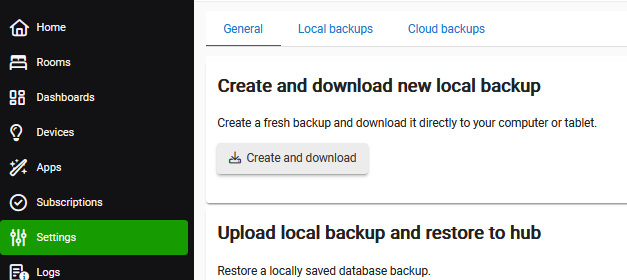
well done. Maybe force a backup as well so you have saved a stable starting point.
I had ghosts recently and switching to JS helped me remove them. Never went back after the mesh was stable.
Force a backup?
Ah. Thanks!
Local backups are free, and can be made anytime you want (and can be regularly scheduled, which is a good idea). However, they do not backup the radio data.
Cloud backups are available as a paid subscription (the Hub Protect or Cloud Backup subscription options), and cloud backups do backup everything, so if you ever need to do a FULL restore for some reason, a cloud backup can really save your bacon.
I realize some folks bristle at the notion of putting cloud backups behind a subscription, but Hubitat's gotta keep the lights on one way or another  , and the subs are (IMHO) very reasonably priced for the peace-of-mind they bring.

