Here’s the latest from photo from the network test via Verizon
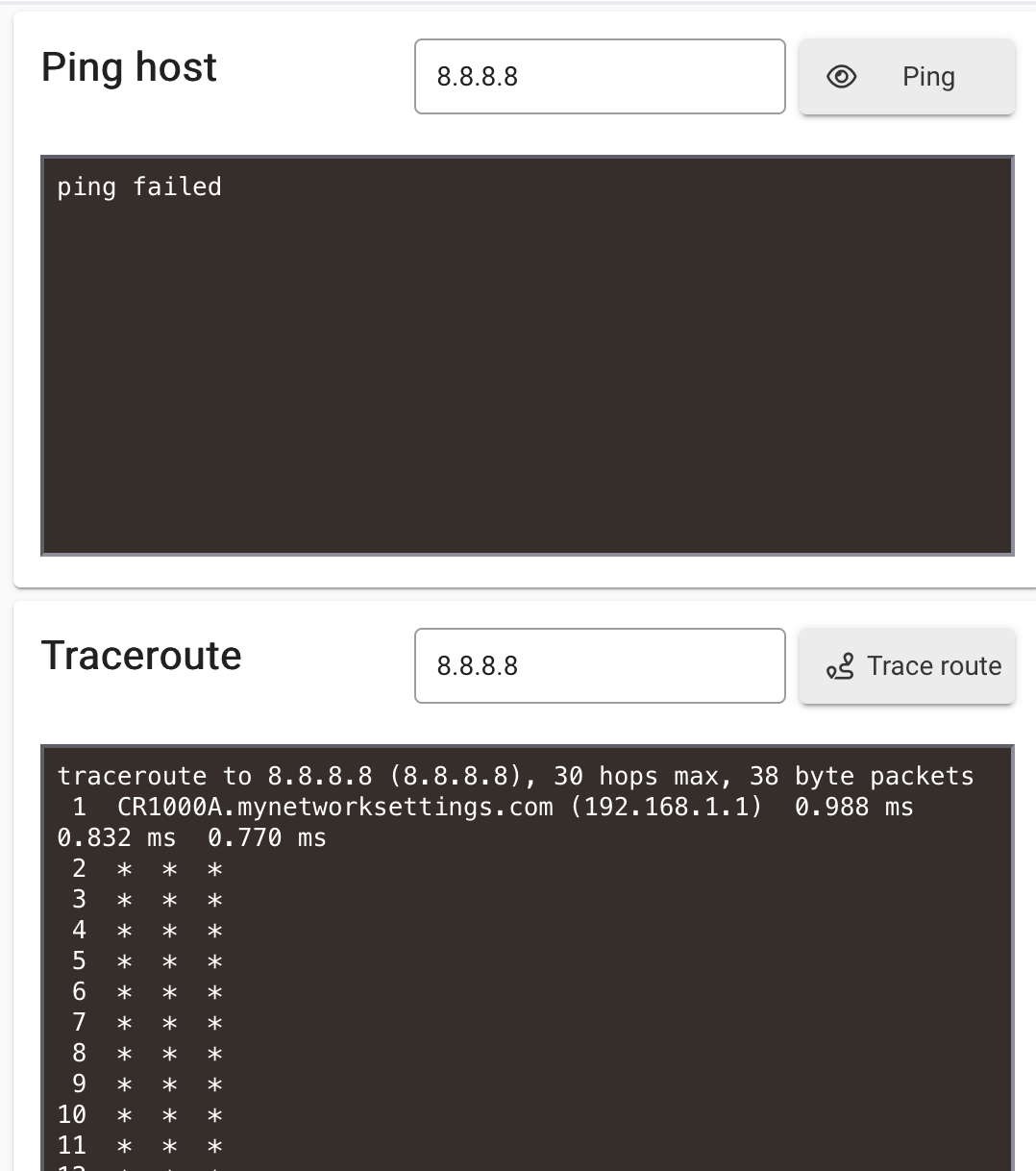
Previously you could ping 8.8.8.8, which indicated you had access to the internet. Now you can no longer ping that address.
That suggests that your hub no longer knows the route to the internet. That is usually caused by a lack of a gateway address.
That is why I suggested that you try to ping the Gateway. If that test fails, then it would seem that your Hub is not accepting the DHCP information from the router.
2 Likes
This appears to be a hub issue. Earlier, the hub was unable to obtain an IP address, and I noticed two devices showing up on the network, one of which had a 169.x.x.x self-assigned IP address.
I've already contacted Hubitat Support regarding a replacement hub under my Hub Protect subscription, but it's been over 24 hours and I have not yet received a response.
At this point, it seems the hub hardware may have failed.
Given the circumstances you’ve described, it seems to me to be very unlikely a hub hardware issue. Configuration or firmware issues, perhaps. If I’m understanding correctly, the essence of the issue is that your hub is unable to successfully request and receive DHCP, which could be a lot of things.
I’ve still not seen any mention of your testing with wi-fi.
In addition to looking at the Advanced Networking settings on your eero, anything interesting in the Port Details as viewed from the eero?
Although counter intuitive, I’d delete the existing reservation for your hub on the eero, and diagnose what happens when the hub tries to obtain DHCP configuration.
3 Likes
I've already gone through all of the troubleshooting steps you've mentioned. The hub is not using Wi-Fi; it's connected via Ethernet, and the Ethernet connection itself has been inconsistent.
I've thoroughly reviewed my Eero configuration, and none of the settings have changed. I've also switched between static IP assignments and DHCP more times than I can count, with no improvement. Other devices on the network are functioning normally, which is why I believe this may be a hub-related issue rather than a network configuration problem.
At this point, I'm still unable to maintain a reliable cloud connection despite extensive troubleshooting on my end.
If you haven’t tried wi-fi, then you haven’t done what I and others think is a valuable troubleshooting step. Yes, I get that you normally use, and all agree wired Ethernet is preferable, but as you said … the Ethernet connection isn’t working.
When your own troubleshooting strategy isn’t working, try someone else’s.
1 Like
The issue is my C-7 device doesn’t have WiFi installed so WiFi troubleshooting isn’t possible.
Right. My apologies. I should have noticed you said C-7.
Cloud connectivity issues are generally not covered under the extended warranty, as they typically indicate a local network-related issue rather than a hardware malfunction. However, your situation appears to be unique, so we have escalated your case to our engineering team for further investigation.
1 Like
Thank you @bobbyD
From the look of it, some part of the network (Eero, provider router, something else along the way) wants you to use particular DNS servers for name resolution. The defaults from the hub are common open DNS servers, but they don’t work, the traffic gets cut off.
Since other devices on the network don’t have this issue, check what Eero’s got for DNS, and use the same ones. Try this button in Settings - Network Setup first.

If that doesn’t work, grab the explicit IP addresses from Eero.
2 Likes
I did this step at least 10 times, back and forth between IP and DNS…
Are the IP addresses for the ISP provided DNS servers reachable from the hub? I can see from the screenshot that 8.8.8.8 isn’t, for example.
I can get local access only via IP no DNS servers are reachable. What it’s worth the App no longer connects to the Hub and this is what I see on the website as well.
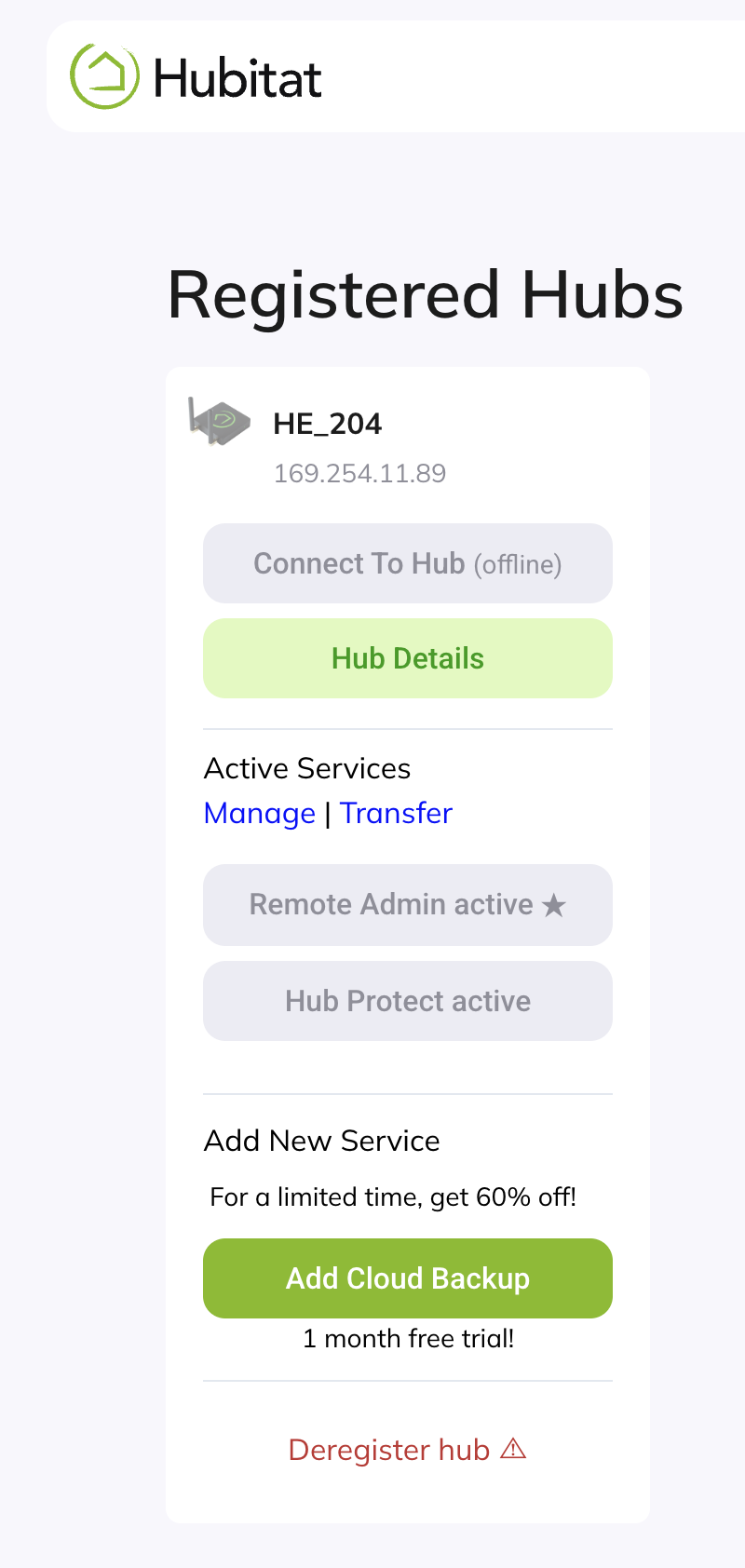
When your hub has an automatic private IP address (169.254.x.x), traffic from it is not going to be routable. Nothing is going to be normal until the client can get an IP address and config from the DHCP server (or you hard-code everything, which you’ve tried).
Do you perhaps have eero Plus? It has features that frustrate your accessing DNS servers of your choice. See https://support.eero.com/hc/en-us/articles/360059988432-How-do-I-set-up-custom-DNS-servers-with-eero. Although I tend to think that is just a follow-on issue if the real problem is you can’t get dynamic host configuration even for your IP address.
What sits between your hub and the eero? A switch?
2 Likes
Nothing sits between my eero and the internet. The Hubitat device is Ethernet plugged directly into the eero. also no other DNS issues or DHCP issues on any other devices in my home.
I’m being persistent here only because I’m trying to help, and my scenario (a wired C-7 on an eero mesh) is very much like yours.
If your hub is plugged into the eero, then either that is the ONLY wired Ethernet device you have (unless your eero is Max 7 or PoE gateway), or you have it plugged into an eero other than the gateway eero. Which is it?
And do you have eero Plus?
Just to summarize this thread, because some previous suggestions are being repeated.
- OP notices internet access unavailable after Eero upgrade
- Attempt to ping google.com produces "failure in name resolution"
- Attempt to ping 8.8.8.8 is successful, proving internet access is working, and problem is a DNS issue
- DNS server override was set to 8.8.8.8 (which we know is accessible) resulting in same name resolution problem.
- Due to problem occurring shortly after Eero update, hub was connected directly to ISP router to rule out an Eero problem.
- This test showed the hub was assigned a correct network IP, and the limited screen captures suggest the correct gateway address was also assigned, but 8.8.8.8 wasn't pingable at all, and traceroute showed the route ending at the router.
The different behavior on the two different networks is confusing, and suggests more testing is required, but it sounds like the OP has already tried everything I could suggest.
2 Likes
Unless he is able to get configuration information from the DHCP server, or can successfully resolve the issue by hard-coding IP address, subnet mask, gateway, and DNS server on the hub, the DNS issue is collateral damage. The hub can’t talk to anything through any router if it has a 169.254.x.x IP address.
There are important details about the exact situation that we don’t know yet. Unless he has a Max 7 or PoE gateway (which is not typical), then one these things is true:
- There are no other wired Ethernet devices connected, which means the utility of comparing against other clients (all wi-fi) is reduced.
- The hub is connected to an eero node other than the gateway, which raises questions about its update, its backhaul, has it been power cycled, etc.
3 Likes