9 times out of 10 if you reboot the router and the hub cloud issues resolves that points to a issue with the network.... rebooting the hub while you have the cloud issue and it remains until a reboot of the router really really points to a network issue and this is what I was attempting to explain before.
Ran into this with my last router. Had networking issues (with multiple pieces of equipment) and a reboot of the router would fix it, for awhile. It turns out I was pushing the old router too hard. I swapped out the router, took the old one and ran an Ethernet back haul to my shed and now use it as part of the Asus AI Mesh and it works great with fewer devices connected to it. You have to troubleshoot the problem. Just fixing the symptom is never the correct answer.
Couldn't have said it any better.
And my issue may come back but it was happening every 12-36 hours and we are approaching about 5 days since the soft reset. Being that the soft reset is a "free and painless" option it's worth trying just to rule out some form of DB corruption.
It's still my firm belief that network engineers actually practice some form of black magic to keep the systems operational.
well, as a network professional , I understand all of your considerations pointing to the router.
But;
- The router I'm using is one of the top home-use routers of Asus. (rt-ax88u) It really has lots of power and I am not using it even close to its limits.
- I also have asus mesh nodes distributed around the house. So wifi load is not directly on the router.
- As I stated, I don't observe any other cloud issues with other devices at home. And believe me I have many more cloud connections.
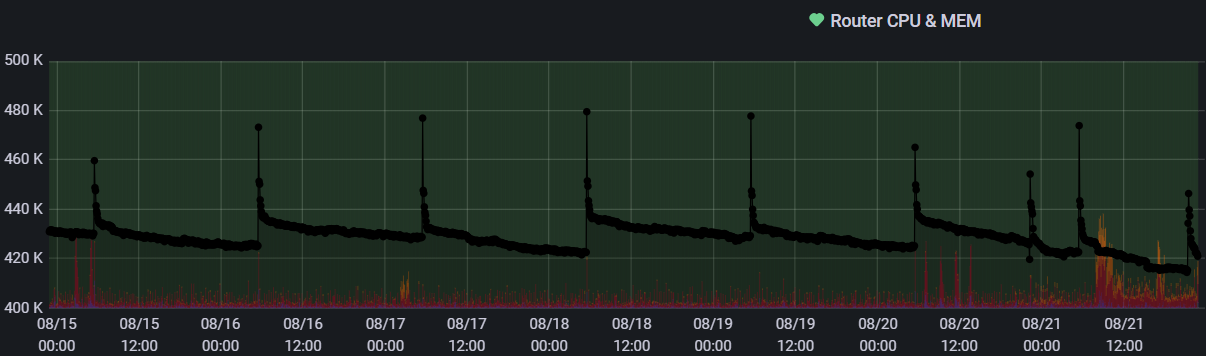
- I watch the router's memory&cpu values using Grafana. (see below)
- Router reboots every morning before I wake up (cron job)
- The last occurance of the issue is when I was on vacation, so it is maybe the time the router had least traffic on it.
So I really don't believe that this is a router resource issue.

Okie dokie....
I don't think anyone has suggested that.
If I were you, I would:
- Apply Occam's razor to your observations; at least the ones recounted in this thread.
- Eliminate the possibilities starting with the ones with the fewest suppositions.
But you do whatever you're comfortable with.
well, you may laugh at me , or ignore me. All I am asking is support from official Hubitat staff.
I need their assistance to troubleshoot the problem I'm having.
As a home user, I can't identify what's going wrong with my Hubitat hub.
I don't know how it works. I don't know how frequently it tries to keep the cloud connection alive.
Maybe its frequency is not keeping up with my internet access.
And there is not much that I can change on my side.
All I know is that this started just about 2 months ago. Maybe Hubitat changed its cloud access behaviour and it is not working good with my environment. If I could get an official response it would mean a lot. And probably help resolving the issue.
really ?
isn't this your saying:
If a router reboot resolved the issue, then a reasonable person will conclude that the issue is with the router. Perhaps its RAM got corrupted - this happens all the time when little SBC-like computers have been a running for days on end. And routers are basically specialized SBCs.
A reboot or a power-cycle cleared the RAM, eliminating the issue. It doesn't mean that there's anything wrong with the router's settings, which are stored in NVRAM.
maybe I do not understand correctly since I am not a native English speaker.
But from what you say I understood that you are pointing to the router and specifically to the RAM of the router.
All I know is that I am not alone. But other users are not complaining as much as me.
Maybe cloud access is not important for many of the users who have this issue.
I wish all of them has raised their issues.
Now, without support of others, I seem to be the sole person who has this issue and then every response points to me as an individual problem of a specific user.
Perhaps there's an issue with your comprehending what I wrote.
I said that no one suggested there is a router resource issue. RAM getting corrupted is NOT a resource issue.
A resource issue would be a router that is RAM-limited or processor-limited.
I rebooted my Hub earlier (not my router), problem fixed... For another few weeks.
Well, then the origin of your hub's issue is different than the person who started this thread. You should start a new troubleshooting thread describing the problems encountered with your hub. So this thread can focus on whatever issue is wrong with @ilkeraktuna's router.
then you are suggesting that there is a bug on the router which causes RAM corruption. That's the weirdest approach I heard.
This is Asus, not Hubitat. Come on...
Of course they may have bugs. But they would see and fix something so huge...
There are all sorts of situations where SBCs develop memory corruption. I'm surprised you are so unaware of them.
We've seen memory corruption occur under specific situations in enterprise grade Cisco equipment. So I have zero doubt that it can happen in your little consumer grade (or prosumer grade) ASUS router.
My approach to your problem would be to apply Occam's razor. But you do whatever makes you feel good 
ok fair.
but hidden line is : I won't be able to get any official support from Hubitat staff.
as always...
It's a shame you feel that way. The staff are generally extremely helpful.
Perhaps one of the powers that be could step in and see if there's anything they may be able to spot, before further reboots etc?
They’re not responsible for your router, are they?
they are not responsible from anything. absolutely, that's what I'm saying.
We can not reach them. How could they be responsible ?
ahahahah , this is getting really funny.