Has anyone manage to get the CLIPSAL ICONIC WISER 755WSA smoke alarm working. We are currently building a granny flat and the builder has put one in. I was gonna try and connect to it on the weekend.
Is the device this one ?
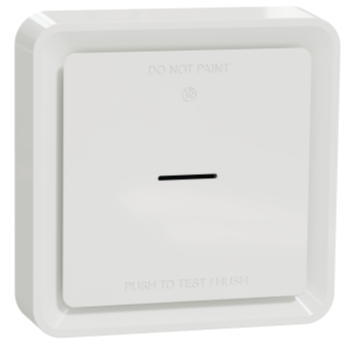
CLIPSAL Wiser smoke alarm seems to be a rebranded Schneider Wiser (used in Europe).
Can anyone confirm that it works with any of the HE inbuilt drivers?
Hey did you every try connecting this?
Was thinking of getting one and wanted to confirm if it will work or not.
Hi Andrew, your post was a few years ago but I'm hoping you can provide some answered as I'm looking into getting a couple of smoke detectors and the Clipsal 755WSA came up.
Did you ever use them ?
Did you get them integrated and detected by the Hubitat Hub so as to be "useful" ?
Many thanks,
Nic
I have a hardwired Clipsal 755WSA smoke alarm integrated with Hubitat. It uses Zigbee. You will need a driver as there is no Zigbee compatible driver.
You will not be able to affect changes on the smoke alarm, it will only poll every 30 minutes its current state. When smoke is detected, it does generate an event that you can trigger off of.
Also, the unit supports heat detection. But you cannot use it as a temperature sensor. The heat alarm only triggers during high heat event(I’m not sure of the exact temperature). The unit I tested was this one: https://www.se.com/au/en/product/755WSA/smoke-alarm-clipsal-smoke-alarms-230v-ip20-white/
Which one did you use?
There were none that seemed to work. I’ve been tinkering with my own driver and think I have a working prototype. Just started testing it.
Here’s the code i’m testing: https://raw.githubusercontent.com/rusecure/hubitat-clipsal-smoke-alarm/refs/heads/main/clipsal-schneider-wiser-smoke-alarm-755wsa.groovy
I can confirm the status reporting works fine with the Clipsal 755WSA (It should also work with the CLP599WSAL model). I have not been able to test all status events. (Heat only triggers above 57C apparently, i’m not planning on doing that
)
There are some quirks to be aware of so far.
Sleepy End Device Radio Behavior (Configure/Refresh Workaround)
Even though the 755WSA is a mains-powered (230V AC) model, its Zigbee radio runs as a Sleepy End Device (EMBER_SLEEPY_END_DEVICE). This ensures identical hardware behavior to the lithium battery-only model (CLP599WSAL) and allows it to conserve its backup battery during power failures.
- When you first adopt via Zigbee or click Configure or Refresh in the Hubitat Web UI, Hubitat broadcasts the command, but the smoke alarm is sleeping and doesn't receive it. The command times out and is discarded.
- The Solution: To run Configure or Refresh successfully, you must physically wake up the device:
- Click Configure or Refresh in the Hubitat Web UI.
- Immediately walk over to the physical smoke alarm and short-press its physical Test/Hush button once.
- This manually wakes up the Zigbee radio and opens a polling window (10-30s) during which it will successfully download and execute the configuration bindings and report its status.
Non-Functional Attributes (Sensor Temperature)
- While some internal attributes like
Temperaturemight appear in standard cluster discovery, this device does not include an ambient room temperature sensor. Any temperature outputs read as0.0or remain blank by design from Schneider.
I have also not done any testing with linked smoke alarms(wired or wireless). Unclear how that will affect status reporting.
| Attribute | Type | Possible Values | Description |
|---|---|---|---|
smoke |
String | clear, detected |
Standard smoke alarm status (from SmokeDetector capability). Represents whether smoke has been detected. |
heat |
String | clear, detected |
High-temperature or rapid-rise heat detection status. |
tamper |
String | clear, detected |
Anti-tamper monitoring status (from TamperAlert capability). Indicates if the smoke alarm has been removed from its mounting base/bracket. |
battery |
Number | 0 - 100 |
Backup lithium battery charge percentage (from Battery capability), calculated linearly between 2.5V (0%) and 3.0V (100%). |
batteryVoltage |
Number | e.g., 2.85, 3.0 |
The precise real-time voltage of the backup battery in Volts (V). |
batteryLow |
String | clear, detected |
Hardware-reported low backup battery warning status. |
lifetime |
Number | e.g., 10.0, 5.0 |
Calculated remaining lifetime of the physical smoke sensor in years. |
testMode |
String | inactive, active |
Indicates whether the physical test/self-diagnostic sequence is currently running. |
silenceMode |
String | inactive, active |
Indicates if the smoke alarm is currently hushed / silenced. |
ledBrightness |
String | Min, Max |
The current configuration of the status LED brightness level. |
lastStatus |
String | e.g., "Thu Jun 04 15:45:12 UTC 2026" |
A timestamp string recording when the driver last processed an IAS Zone Status update from the device. |