Can someone dummy down all these hubs & using Hubitat

So I recently bought Hubitat C7 because I needed it for my Smartwings blings with Zwave. I ended up changing the motor to Matter.

Im honestly confused with all these hubs that are needed what I actually NEED. All my devices aren’t connected to anything as our construction is just finishing up so all installs will be first time.

HomeKit is where I invisioned I’d control everything

HomePod mini = Thread Border Router

Lutron Hub = Needed for Lutron switches

Aqara Hub possibly needed to fully use their automations together?

My current products

Smartwings blings w/Matter motor

Lutron Caseta Light Switches

Aqara Door bell, sensors & doorbell

Ecobee Thermostat premium

Yale Assure2 Lock

Do I need hubitat? From what I’m understanding is id put all devices into hubitat as the main and then make that discoverable to Homekit? What about the other hubs?

If you are going to depend on Homekit, I would recommend getting at least one more HomePod Mini - you can make them a pair for stereo, or put them if different rooms. Ideally, an Apple TV. Reasons are, more than one device gives you failover. Apple TV is Ethernet, HomePod mini's are wireless only. I prefer wired over wifi for critical things.

Also, Welcome!

If I wasn't clear, 2 devices are better than one. One of them being Apple TV is best.

1 Like

Most Aqara devices are now supported natively or with a couple of great community drivers so not much need for an Aqara hub.

1 Like

You have to have some idea of what your goals are. If all you want is to be able to control all your devices in 1 place Apple Home is probably good enough. If you want to be able to automate your devices then Hubitat is a good choice as its automation capability is significantly better than Apple Home. And you can still use Apple Home to control the devices.

As far as your devices go, you should consult the compatibility list. I don't know anything about Aqara devices. Lutron Caséta will require a Pro hub to work with Hubitat. The Yale lock will only work with Hubitat if you use the Z-Wave card.

What protocol is your module for the Yale lock?

My goal would be to dive into automation more than just asking it to turn on/off light when I enter the room. Stuff like If this then do that. So, if I'm making sense of all this I would set my products up into Hubitat and create my automations with Hubitat. How does HomeKit then get involved?

Yale Lock is Wifi

I actually do have an Apple TV with Ethernet port that will be in the mix. You said you prefer wired over wifi for the critical things. How do you decipher which Apple device will handle what?

The latest version of Apple TVOS (beta?) allows you to set the preferred hub.

1 Like

Sorry - Latest version of Homekit.

I don't have Homekit myself, but use Alexa/Echos... Their main function in the set up is verbal input and output. On/off or simple commands to control. Output for for alerts, alarms and notifications, confirmations through Echo Speaks.

Hubitat is much stronger for custom automations.. like you said, if this, then that. Rule Machine mainly, and others allow you to create multiple conditions and parameters for triggers and actions to function.

I don't use the Alexa for much 'automation' logic aside from the super simple.

For me, devices start in Hubitat. Then they are exposed to Alexa/Echo for convenience through the voice or the alexa app. (my wife uses the Alexa App instead of hubitats app, my watch interfaces with alexa)

Hope that helps - just a perspective on how it all plays together.

Oh.. and i have xiaomi/aquara devices (motion & contact sensors, buttons) all direct to hubitat, no additional hub. As others have said, looking at your list I think everything but Lutron can*connect direct .

  • Dependant on Yale Module being used, and Lutron will require the Pro hub.

This did help. I was getting very overwhelmed with all the different hubs. I actually thought I needed the Aqara hub so the Aqara devices play well together through automation. Also few posts stating the delay with the door sensor notifying is around 2-3 seconds, but if connected to the Aqara hub it's instant?

I am happy to keep the Hubitat I bought since I do want to really explore the many automations available. For example something like -IF front door sensor opens between 7p - 9p turn on Lutron Kitchen switch. (As if I'm coming home at night)

Your example of coming home is just scratching the surface too. You could use the geofence to have it turn on when you pull in the driveway... and open the garage door if you wanted.

I would suggest searching the forums for the types of automations/rules/triggers your interested in, and I expect you'd get a good idea of what is capable.

The community here is very helpful, and the skill level ranges from beginner to very advanced (I fall a hair above beginner - sometimes it gets well over my head, but its always fun to learn)

Eg. One users post help me to set up a poll/log of my fridge temperature sensor into Google Forms and then into sheets so I could track and graph the temp changes. I still have no real clue how it works.. but the step by step instructions were super simple. - There are lots of examples like that out here.

What you may want to do is try to break things down a little bit to help understand what does what for you.

Voice Assistants:

Example Apple Homepod, Alexa , Google Home

These devices allow you to talk to your platform of choice, They often do come with some level of automation rules, but are very limited.

Automation hubs(Platforms):

Hubitat, Smartthings, Home Assitant, Aquara Hub, Tuya Smartlife, Many more

These are the brains of your Home Automation, Generally with rule engines of some kind to allow you to create allot of rules that follow some kind of: If this happens do this. Not all rule engines are created equally though. Generally speaking the most powerful rule engines are considered Hubitat, and Home Assistant with Hubitat being the easier to use. Some of these hubs are heavily cloud dependent, while others are not. As of right now i think Hubitat and Home Assistant are the only 100% local platforms,

Device only Hubs:

Lutron, possibly more

These will be hubs for other platforms to talk to their proprietery devices. Because lutron doesn't follow a standard radio used in Home Automation platforms it needs a intermediate hub to talk between any Home Automation platform and it's devices. Many consider this a tradeoff good because of the quality of devices. But often these devices can be replaced with similar devices that run on native Home Automation wireless technologies.

How devices connect to the hub

You also want to consider how things connect to your hub. There are 3 main ways things will talk to your hub. Wifi, Zwave, or Zigbee. Not all are created equal.

Zwave is a 900mhz radio that is standard to many Home Automation platforms. Generally speaking if a device uses Zwave for it communication it can talk to any hub that supports Zwave. This will talk directly to the hub, or through other zwave devices that are part of your zwave network

Zigbee is similar to Zwave in that it is a Home Automation radio technology to talk to your hub directly, It runs on 2.4Ghz and as such is subject to more interference from the slew of wifi devices and such that also use that range. That said it generally works well, has more bandwith then Zwave, and is very mature and used in a variety of ways to extend it's use outside of just Home Automation.

Wifi is exactly what it sounds like. It is home automation with devices attaching to your Home wifi network(your router) and then talking to your hub over it's local LAN connection to your home network. Wifi is a hard nut to crack as it sounds great, but suffers from some potential major drawbacks. Wifi devices can talk directly to the internet and are often locked to Cloud only options. This isn't always the case, but often is. If you find wifi devices that don't require Internet access then that is best.

As far as devices mentioned

From your list of current products you have a really good start to work almost exclusively from Hubitat if you wanted to.

As the Hubitat supports Matter it can certainly control the "SmartWings Blinds" as long as you get the C7 or above hubitat hub

Lutron will be one hub you can't avoid if you get Lutron switches. Just make sure you get the Pro one. You may want to check for limitations on the hub to know if you need to get more then one based on number of devices to connect to it.

There has been a huge push of Aqara devices with official support. That said one device i don't see on the device compatibility list is the doorbell.

The Ecobee thermostat is generally a cloud only affair except for Homekit. It uses Wifi to talk to the ecobee cloud and then you can either use the native Hubitat integration or the Ecobee Suite integration to have it interact with your hub. I actually have one and use the Ecobee Suite Integration. It is more feature rich. As i said earlier this device also supports Homekit, and that can provide you a way to bring it in locally. You just have to remember it is limited based on functions Homekit supports. This simply means some functionality would be missing using HomeKit.

I also have the Yale Assure2 Lock. I don't know why Yale makes it so hard to find it with their zwave lock module. I would suggest returning this and swapping for the wave module if possible. If not you can buy the zwave module as a add on. All Yale Assure locks have Bluetooth built in and then can support wifi, Zwave, or Zigbee with the addition of a communication module. You just need to get the right one.

I tend to try to stay within the Zwave/Zigbee communication method if I can. I hope all that has helped.
5 Likes

I truly appreciate the time you took to detail each area and helped explain things much better

I found the zwave module on eBay to purchase since I’m outside the Amazon return period.

Once my Doorbell is setup I’ll see if I can add it and go from there. I should be starting this installation of products next week. I’ll be diving into the forum to see what others have done (as Medlock.Ryan suggested!)

Thank you all!

1 Like

You sold me on pulling in the driveway and it begin my automation!! I will be diving into this forum!

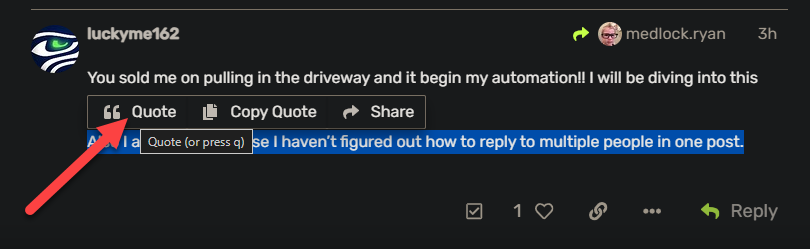
Also I apologize because I haven’t figured out how to reply to multiple people in one post.

1 Like

You can also use their @username (mine is @Slate ) and they will get notified. As will you, @luckyme162 now.

1 Like

There's a couple of ways to get people's attention...

  • Like @Slate mentioned, you can tag someone
  • When you click the big green Reply button at the very bottom of the post, that is treated as though you are responding to the original post for the topic, so the person who posted will be notified, plus anyone who has opted to receive notifications for the topic
  • If you click the Reply button at the bottom of an individual post (next to the solution, heart, link, etc), then that is seen as you responding to the poster of that specific post. They will get a notification, along with the OP and those who configured notifications on the topic
  • Finally, and the one you are most likely wanting, if you quote someone, that will also notify them, and you can do multiples of these. Highlight some or all of the text in someone's post and click Quote in the pop-up that is displayed. As you might expect, those that you quote, the OP and others will be notified.

You can even do this while writing a response, the quote will appear where you cursor is in the dialog for your new post. You can also do this multuple times as part of the same response.

4 Likes

This topic was automatically closed 365 days after the last reply. New replies are no longer allowed.

