I have a new 8 pro and i have tried almost everything to connect to hub. I have a starlink. Nothing works getting very frustrated. Any help is appreciated.
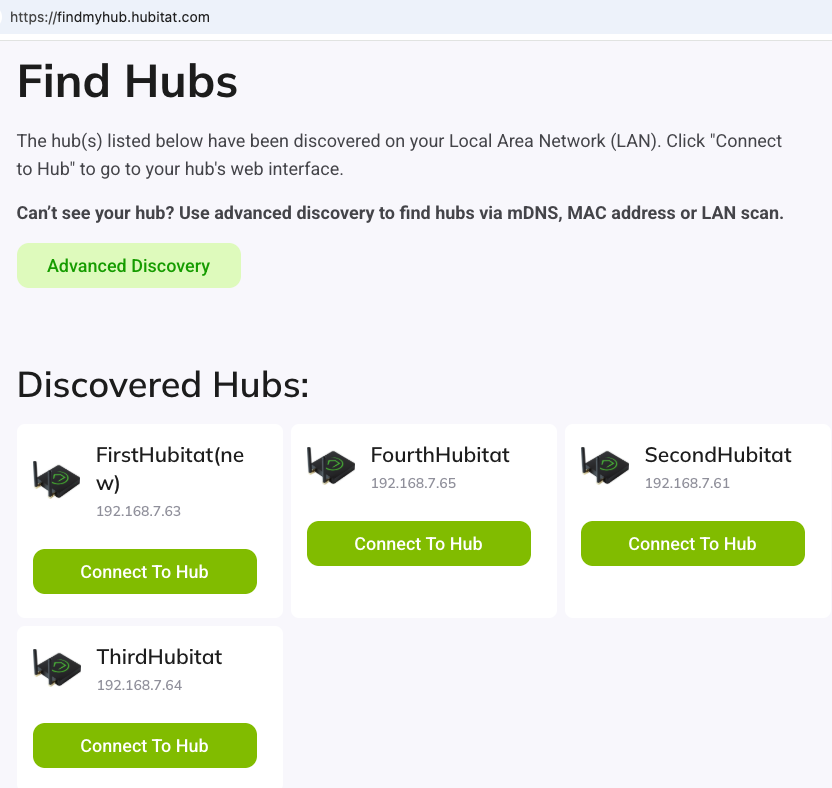
I am not totally familiar with Starlink, do you have a conventional router that all your devices plug into? Are you trying to connect Hubitat wirelessly?
Please describe your networking setup, and what you have tried with the Hubitat so someone can see your setup without us being there.
Also, what color are the lights on the Hubitat? Are you powering it with the supplied power adapter?
Did you ever get connected?
I have tried to connect on 2 different networks and nothing even with the mac address ect. I must have a faulty device. Getting a response from hubitat is almost an impossibility. No response at all. What other hubs are out there.
How are you trying to contact Hubitat? That isn't normal to not hear a response.
This isn't a normal experience, I am tagging the @support_team and specifically @bobbyD
It looks like you submitted a warranty claim about 10 minutes ago, and it is currently in the queue for review today. We do not see any other inquiries associated with your Community email address.
If you contacted us using a different email address, please send it to me in a private message. I’d be happy to investigate further and determine why you may not have received a response.
I have tried everything that was sent to me. I can see the hub has wifi signal but I cant connect or do anything with it, cant find the hub.
Be sure to respond to our support email. They will look at your hub once you provide the details. Sounds like you may be dealing with a hardware malfunction, in which case a replacement will be shipped to you as soon as possible.
I have re-read your posts, and I cannot determine if you are trying to connect by Wi-Fi or by Ethernet cable.
Are you saying that you can see the SSID "MyNewHubitat" being broadcast from your hub?
If that is the case then you are not connected by cable, or your cable is defective.
Please confirm, and let me know, if you are seeing the "MyNewHubitat" SSID after pressing the reset button on the bottom of the hub (with no ethernet cable connected).
I am not sure I understand everything that has been tried either. I suspect it might come down to how Starlink is being used in the network, but hard saying without details. Curt4nu never did clarify how their network is set up.
Hopefully support will get them sorted out!
If he was having trouble connecting remotely, then I would agree, but he should be able to connect to the hub locally with no Internet connection at all. Although he didn't specify what type of connection wasn't working.
The latest post sounds like he might be seeing the "MyNewHubitat" SSID, but he may not have connected and entered the login credentials for his Wi-Fi network.
It seems us users are having trouble interpreting what is going on exactly so we don't know what to tell you to do. For our (and maybe for support too) could you please respond to each of the following questions?
- Have you tried wired ethernet to the hub?
- You tried a different ethernet cable?
- You can/cannot see MyNewHubitat wifi on your phone?
- What happens if you try to join MyNewHubitat network?
- You do have a 2.4g wifi connection in your home? You aren't trying to use 5g, the hub won't accept that.
- Can you turn off your 5g wifi, so that just 2.4 is active, and see if that makes any difference?
- Tell us exactly what is between Starlink, and everything else in the home. Do you have a separate wifi router, or does Starlink have wifi? Which are you using?
Also, did you follow up with support, and do everything they said in their support ticket response? Please give them as much detail as you can, if your replies to them are as vague as the ones you have left here on the forum, it is going to be hard for anyone to help.
Everyone is willing to help, but we aren't there, so you have to be our eyes and tell us in as much detail as possible what steps you are taking.
@curt4nu can you please update us?
Have you tried wired ethernet to the hub?
Yes I have tried it wired to two different Networks a starlink network and my fiber Network at my other home both of them have been plugged in to the router directly and or through a switching port
You tried a different ethernet cable?
I have tried three different cables two of them are known to work properly at least and I have used the one that came with the Hub itself
You can/cannot see MyNewHubitat wifi on your phone?
I can see the my new hubitat on my Galaxy s25 but cannot connect to it through the find my Hub app or website
What happens if you try to join MyNewHubitat network?
It does nothing when I try to connect to it it shows that I'm connected without internet but I cannot find any thing with the find my Hub app or from the internet
You do have a 2.4g wifi connection in your home? You aren't trying to use 5g, the hub won't accept that.
I have tried the 2.4 G from the starlink and cannot see it at all
Can you turn off your 5g wifi, so that just 2.4 is active, and see if that makes any difference?
I will try that this afternoon
Tell us exactly what is between Starlink, and everything else in the home. Do you have a separate wifi router, or does Starlink have wifi? Which are you using?
Starlink has its own Wi-Fi and router I have plugged directly into the cat6port and it does not show anything I also have a 24 Port switch that I have used along with the starlink so that I can connect up the rest of my house and nothing has ever shown there. that I have tried to use it at my house as well and the only thing that I'm ever able to see is the Wi-Fi on my phone. I have tried plugging in the MAC address and the Wi-Fi address and it never finds anything
I have trying tried to push the reset button several different times and nothing new ever happens
Curt
Sorry I tried to reply to the email and it will not go through
You mean support email that they sent you?
No worries—I can pass along the details you shared. Could you also confirm the color of the LED on the hub? That’s the last piece of information they need before they can get started the replacement process.
It is green
That is a good sign! At a basic level, the hub is running. BobbyD can tell you what to do next.