So before I purchased a C8 pro I spent many hours reading the migration stories here, as well as the instructions. I was ready, a bag full of Zigbee 3.0 repaters, a Z-stick, flux capacitor, sledge hammer and a handfull of Xanax, expecting the worst, but being ready to do whatever it took.
I tried my best. Made sure I had no Z-wave ghosts, did a fresh shutdown, power pull, then also a reboot with DB rebuild. Proceeded to do my cloud migration backup after that, which went fine.
Shut down my C7.
Fired up the C8pro and let it boot fully(waited about 7 minutes) after it auto upgraded to the latest platform(same platform as my C7).
I then assigned the same static IP the C7 was using, rebooted & then restored the cloud migration backup to the C8Pro. Most of my OCD tasks were probably not necessary, but I was a bit paranoid.
Everything went incredibly smooth. I had to wake up a few Zigbee battery devices for them to check in, but everything else slotted right into place, even my Iris V1 devices(I know I can't re-pair those to the C8Pro, if they fall off).
I just have to say, incredible job, Hubitat Team, @mike.maxwell , @gopher.ny , @bcopeland , @bravenel, @bobbyD and the rest of the team whose names I don't know.
Special thanks to the ambassadors, whose dedication to answering 8642 questions helped immensly in my research.
You've convinced me. I've been on the fence about upgrading my working well C-8 but I really don't have any other automation projects on my to do list. Time for a new toy on the last day of the Black Friday sale.
I took advantage of the discounted price for a C-8 Pro over the Holidays and it was delivered yesterday. I have read most of the discussions on the migration and am cautiously optimistic. Any last minute words of wisdom from anyone before I take a perfectly working C-7 out of service and attempt this migration? (No Zigbee, all devices zwave) TIA
Do a cloud backup. Follow the below carefully. Disable any external WiFi or lan connected apps. Hue hub, Lutron, Alexa, etc. Complete the process. After your C8 Pro is up and running enable those apps and most things should be good. I have quite the mixed bag, Zigbee, Z-wave, some WiFi, Lutron, Hue, Ecobee and everything came back without issues. I did have 6 or 8 ZigBee sensor that seemed problematic. Waited overnight for their typical daily checkin and they slotted right back in. So, If a few things don't seem quite right I'd give it a day or two before trying to fix it.
Lan IP. I wanted to maintain my hub IP address. After getting everything ready to go, before shutting down my old hub I went into my router and changed its reserved IP address. Then I went into the new C8 Pro on the router and changed its reserved IP to the address of my previous C8. Shut down the C8 AND removed power. Restarted the C8 Pro to make sure it was on the old hubs address. Then proceeded with the migration.
Read the migration instructions in the HE documentation (again).
If you use IP reservations on your router for your hub IP (and most of us think you should) remember to move the reservation for your C7 to the C8. Keeping the same IP on the new hub makes things easier.
Also don't forget to shut down and pull power (only way the radios are really off) from the C7 before starting the migration to the C8.
If you run into problems ask here first, don't start madly resetting everything...
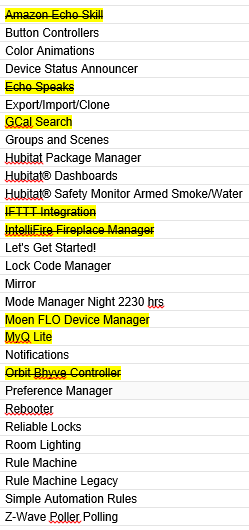
Here is a list of my apps. I have highlighted some in yellow that I am guessing you are referring to here. Should the yellows all be disabled before proceeding with the migration?
After reviewing it all again I felt I was ready so I went for it tonight. Migration completed successfully. As far as I can tell everything is functional. IP reservation to the new MAC. Apps that were disabled have been turned back on. Thanks again for the support!
You must have lost my address. Even after having done this for a number of years it still takes a "leap of faith." Kind of like restoring a hard drive/system backup. You know it's supposed to work, but........
 Happy hubbing.