What do you mean by "hard reset"?
1 Like
Soft reset:
Step-1 yourhubip:>>backup and restore>>Click Create and Download button.
Step-2 yourhubip:8081 and click Soft Reset.
Step-3 Upon reboot restore the the backup you downloaded onto your pc that was created in step-1
This will ensure your hub is free of database corruption.
There is no HARD RESET option on the hub. If you are thinking about the button on the bottom of the hub, that is simply a network reset button. It doesn't reset the hub.
2 Likes
The reset that happened was just due to the upgrade that happened. I have also logged into it to restart it. That isn’t a soft reset? If I do the soft reset that you described will I have to setup my zwave connected devices again?
I called the hard reset me just removing power from the device.
Also if I get a replacement device and do the soft reset like you described will I have to setup my zwave devices again?
No
No. The radios are not disturbed. You don't lose anything doing what I outlined above.
That's not a reset. That's just a reboot
As @aaiyar points out, that isn't good. This is what causes database corruption which can lead to lockups.
If it locks up again, can you get to yourhubip:8081 ?
1 Like
Abruptly removing power without having previously done a controlled shut down is not recommended.
Presumably you did this because you were unable to access the web interface?
3 Likes
Correct. I unplugged it because I couldn’t access it by ip.
I will try this next time it happens.
What about if I receive a replacement unit. Will I have to setup the zwave devices again if I restore from a backup?
Local backups do not backup the radios. Cloud backup does. Cloud backup is available with a Hub Protect subscription. Can you post your current z-wave details page in it's entirety?
hopefully this is what you mean. if not how would i get you that information?
Z-Wave Radio Devices (view as graph - beta)
Node Stats Status Device Class Device Security Route
| 0x06 (006) | PER: 0, RTT Avg: ms, LWR RSSI: | |||||
| Neighbors: 12, Route Changes: 0 | OK | SPECIFIC_TYPE_POWER_SWITCH_BINARY | ||||
| Jasco Products | Deck Door Lamp Right | None | 01 -> 06 100kbps | |||
| 0x07 (007) | PER: 0, RTT Avg: ms, LWR RSSI: | |||||
| Neighbors: 3, Route Changes: 0 | OK | SPECIFIC_TYPE_NOTIFICATION_SENSOR | ||||
| Fibargroup | Kitchen Sink Flood Sensor | S0 | 01 -> 07 100kbps | |||
| 0x08 (008) | PER: 0, RTT Avg: ms, LWR RSSI: | |||||
| Neighbors: 10, Route Changes: 0 | OK | SPECIFIC_TYPE_POWER_SWITCH_BINARY | ||||
| Jasco Products | Deck Door Lamp Left | None | 01 -> 08 100kbps | |||
| 0x0A (010) | PER: 0, RTT Avg: ms, LWR RSSI: | |||||
| Neighbors: 3, Route Changes: 0 | OK | SPECIFIC_TYPE_NOTIFICATION_SENSOR | ||||
| Fibargroup | Basement Sump Pump Flood Sensor | S0 | 01 -> 0A 100kbps | |||
| 0x0B (011) | PER: 0, RTT Avg: ms, LWR RSSI: | |||||
| Neighbors: 2, Route Changes: 0 | OK | SPECIFIC_TYPE_NOTIFICATION_SENSOR | ||||
| Fibargroup | Basement Bathroom Sink Flood Sensor | S0 | ||||
| 0x0C (012) | PER: 0, RTT Avg: ms, LWR RSSI: | |||||
| Neighbors: 1, Route Changes: 0 | OK | SPECIFIC_TYPE_NOTIFICATION_SENSOR | ||||
| Fibargroup | Basement Bathroom Toilet Flood Sensor | S0 | 01 -> 0C 100kbps | |||
| 0x0D (013) | PER: 0, RTT Avg: ms, LWR RSSI: | |||||
| Neighbors: 3, Route Changes: 0 | OK | SPECIFIC_TYPE_NOTIFICATION_SENSOR | ||||
| Fibargroup | Laundry Room Sink Flood Sensor | S0 | 01 -> 0D 100kbps | |||
| 0x0E (014) | PER: 0, RTT Avg: ms, LWR RSSI: | |||||
| Neighbors: 3, Route Changes: 0 | OK | SPECIFIC_TYPE_NOTIFICATION_SENSOR | ||||
| Fibargroup | Master Bathroom Sink Left Flood Sensor | S0 | 01 -> 0E 100kbps | |||
| 0x0F (015) | PER: 0, RTT Avg: ms, LWR RSSI: | |||||
| Neighbors: 3, Route Changes: 0 | OK | SPECIFIC_TYPE_NOTIFICATION_SENSOR | ||||
| Fibargroup | Master Bathroom Sink Right Flood Sensor | S0 | 01 -> 0F 100kbps | |||
| 0x10 (016) | PER: 0, RTT Avg: ms, LWR RSSI: | |||||
| Neighbors: 3, Route Changes: 0 | OK | SPECIFIC_TYPE_NOTIFICATION_SENSOR | ||||
| Fibargroup | Master Bathroom Toilet Flood Sensor | S0 | 01 -> 10 100kbps | |||
| 0x11 (017) | PER: 0, RTT Avg: ms, LWR RSSI: | |||||
| Neighbors: 3, Route Changes: 0 | OK | SPECIFIC_TYPE_NOTIFICATION_SENSOR | ||||
| Fibargroup | Bathroom Sink Flood Sensor | S0 | 01 -> 11 100kbps | |||
| 0x12 (018) | PER: 0, RTT Avg: ms, LWR RSSI: | |||||
| Neighbors: 3, Route Changes: 0 | OK | SPECIFIC_TYPE_NOTIFICATION_SENSOR | ||||
| Fibargroup | Bathroom Toilet Flood Sensor | S0 | 01 -> 12 100kbps |
It would be easier to read if you pasted a screenshot of that page.
Having said that, it appears that you have multiple sensors paired with S0 security. I would recommend you pair these with either S2 security or with no security. S0 security uses approximately 3 times the number of packets as no security. If you have one or more "chatty" sensors, they will bog your hub's z-wave radio down with transmissions. This could be one reason why your hub goes offline with the LED still green.
1 Like
That's the page but can you screen shot it from a pc instead?
looks like it's the fibaro flood sensors that are like that. how would i pair them any different. pretty sure i just put them in inclusion mode and had the hub discover them.

You’ll probably need a secondary controller to pair those. Do you have an old Aeotec Minimote or USB zwave stick?
i do not but all of those sensors are less than a year old. shouldn't they support something else? is their anyway to force something else when i pair them?
Settings))z-wave details page
what am i looking at here?
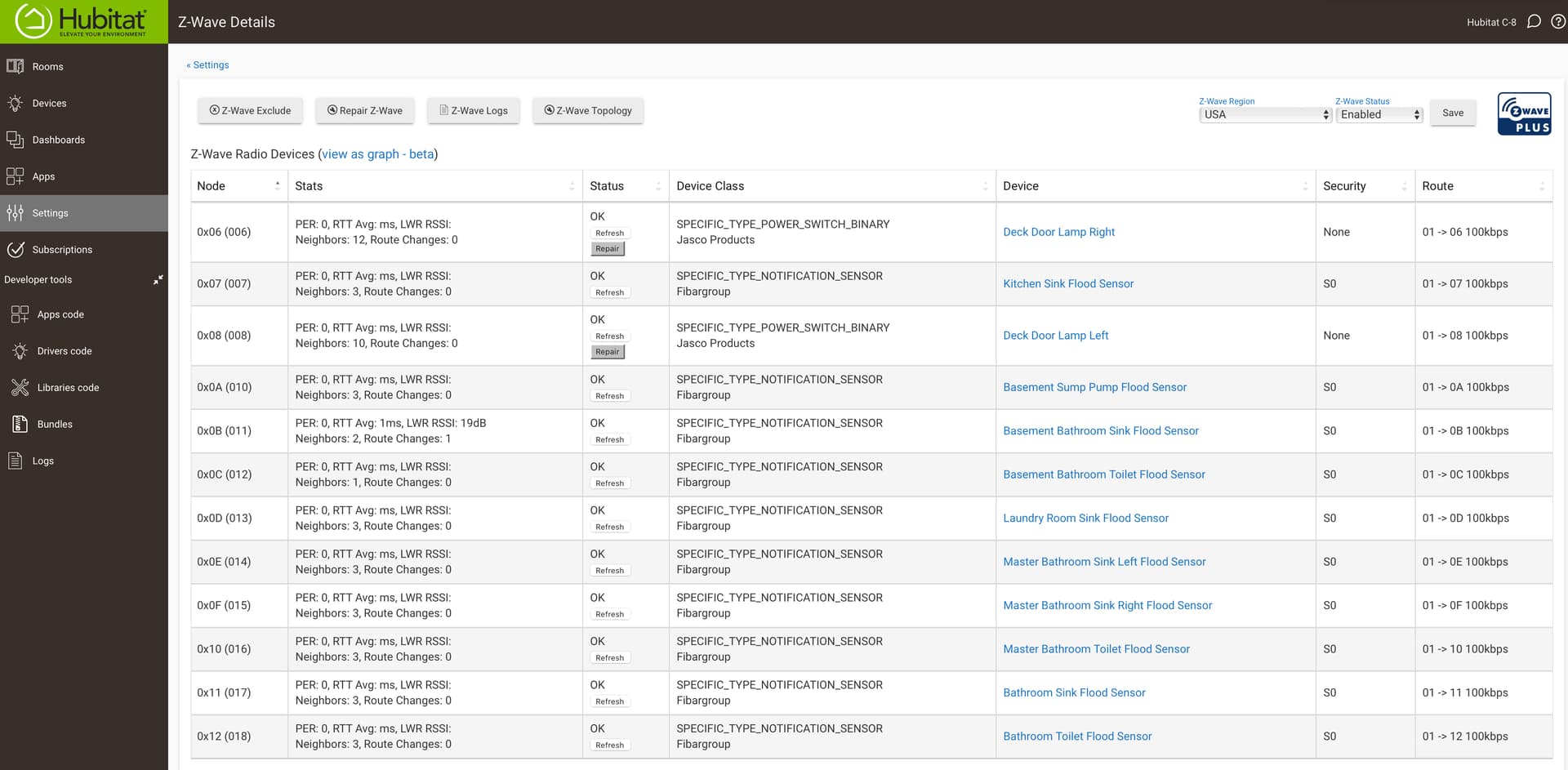
You should re pair all of those fibaros without security. S0 is really chatty and with so many like that your mesh could be getting crushed.
how do i choose to do without security? from what i remember i just put them in inclusion mode and selected the device by brand and added it.

