My original problem of "MyNewHubitat" has been solved, thanks, but now that I've gotten beyond that step, I can't get the hub to connect to my wifi. It just tells me that it can't connect, despite seeing it in the list. Router is a Netgear w/ 2.4/5GHz. Thanks.
Seperate your 2.4 and 5ghz ssid. Cqall it whatever24 and whatever5. Some routers aren't always nice when detecting devices.
Yikes. Are you saying to rename my SSID's? Won't that break all of my device connections?
leave your 5ghz the same ssid, make 2.4 a different ssid
There's a simpler solution that doesn't require you to change SSIDs.
Go to your Netgear router's web interface, and TURN OFF the 5 GHz radio. Then connect the Hubitat. It will connect to the 2.4 GHz radio. Once the Hubitat is connected, then turn the 5 GHz radio back on.
The Hubitat will remain connected to 2.4 GHz radio even if you restart it or power cycle it.
1 Like
Haha! I already made the change, but it's still not connecting to it. I'll try your suggestion, thanks.
if that that still desn’t work, i’d check the logs on your AP to to get a better understanding of why its not connecting. It could be interference it could be your security is set to wpa3 when it probably should be set to wpa2/wpa3 compatibility… either way the AP logs should have more info.
1 Like
Based on your other posts, your hub was already set up and you were able to reach it since you mentioned you've added the first devices. Something to keep in mind, some of the suggestions in this thread assume that you are just trying to get started. Please be sure the device you are trying to access the hub is connected to the same network as the hub. You may not need to make any changes to your network since you set up the hub and was working at some point.
1 Like
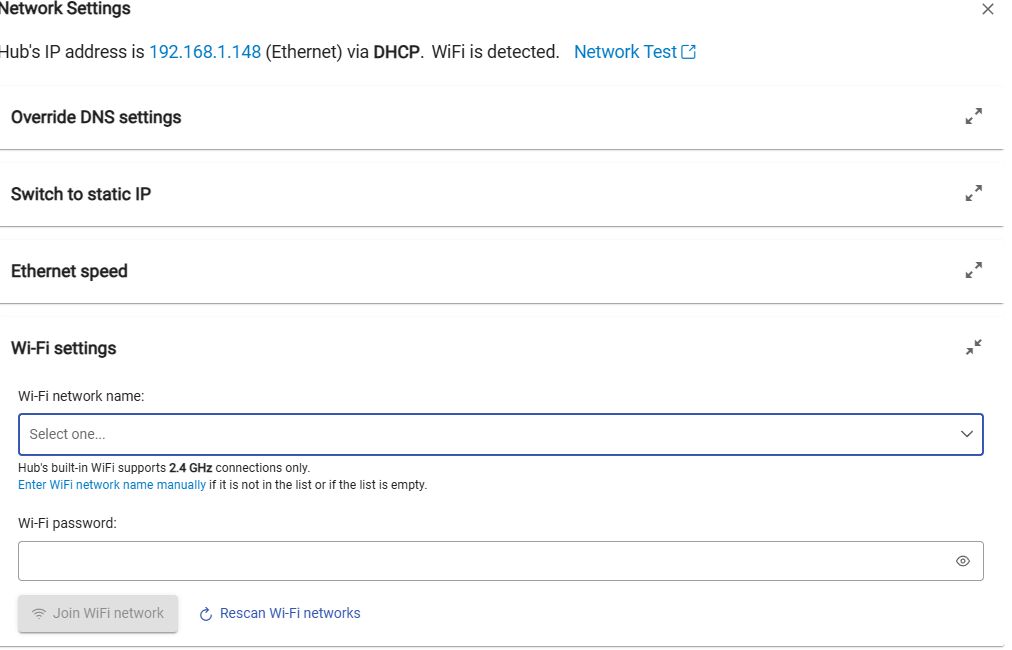
Yeah, nothing is working here for the wifi. The only way this hub works is via Ethernet. I've reset this hub multiple times but still just can't get it to connect to wifi (5GHz is off). I can browse to the hub when it's connected via Ethernet and get into the settings, but when I try to get the wifi tethered, it continues to tell me it's unable to connect. Frustrated.
Can you get logs from your router? What kind of authentication is the router configured for?
1 Like
Hi guys, I'm back now. The logs on this Netgear are pretty basic, but I'm not seeing anything (yet) from the Hubitat. Now, lemme just break down my setup here, maybe this might enlighten someone as to what's happening (or in my case, not happening):
-I turn off the 5GHz radio on the router
-Started fresh with pressing the circular button underneath the Hubitat, then waited a few minutes.
-Using my iphone, I waited to see "MyNewHubitat" in the list of wifis. I selected it, and then a window finally appeared saying like "Let's connect to your network"
-I picked my home wifi name, entered the password, and after several seconds it comes back with "Can't connect"
-I plugged in the Ethernet cable from the Hubitat to my Netgear router, so I can at least browse to the Hubitat config page.
-Now I try my laptop, since typing with it is so much easier than the damn phone
-I go to Settings/Network Setup/Wifi Settings. On this page, now I'm seeing a note that says "Don't just unplug the ethernet cable while hub is running, please shutdown ethernet first"
-I furrow my brow
-I find my home network again like I did on my phone, and I get the same "Can't connect"
So, after 24 hours of not looking at this stuff, here I am. I also notice now that the hub is hardwired into my router, I'm no longer seeing "MyNewHubitat" on my phone's list. Maybe it disappears after a few minutes, who knows.
Facepalm.
What WiFi security protocol is your Netgear configured to use for the 2.4 GHz channel? WPA2 or WPA3?
AFAIK, Hubitat cannot authenticate using WPA3. So configure the Netgear to use WPA2.
3 Likes
You cannot have both Wifi and wired at the same time, as someone indicated earlier.
The phone setup with the private MyHubitat network is mostly for the initial setup, as far as I am aware. I am not sure if it will work after the fact. It appears to not be working for you in any case.
Did you try this in the Settings tab, Network Settings? Again, you will have to unhook the wired network at some point after it joins the Wifi.
The 2.4GHz channel is setup for WPA2-PSK [AES] (Ha, AES makes me think of audio)
Thank you for confirming that the authentication setup is ok. Can you confirm that the 5 GHz radio was turned off, because the symptoms you describe are consistent with either of those being the issue.
Oh brother, now the Ethernet jack on this thing quit working, so now I can't even login to it that way. I've done the round button for 10 seconds thing, no good.
This is why I drink.
Ok, we're back. Took about ten power cycles, but it's back. Now, to answer your question about the network settings page, yes, I attempted all of the wifi config on that exact page (from my phone originally. When I tried it on the laptop, that's when I saw the message about "don't just unplug the ethernet, disable it")
Hi again. Confirming that the 5GHz radio was indeed off when it denied my wifi access. Not sure how to proceed.
Thanks.
I’ve been following your thread and understand the difficulties you’ve had connecting the hub over Wi-Fi. The hub’s Wi-Fi radio only supports 2.4GHz, which can create issues with modern routers that use features like band steering.
For this reason, we recommend using an Ethernet connection whenever possible. Ethernet delivers greater reliability, faster response times, avoids 2.4GHz compatibility problems, and provides a secure, “set-and-forget” connection. Wi-Fi should only be used temporarily—for example, when moving the hub closer to devices that are difficult to pair—and should not be considered a long-term solution.
While Wi-Fi may work in limited cases, Ethernet remains the most reliable option for keeping your smart home running smoothly.
1 Like
Hi, and thanks for the reply. Unfortunately, wired Ethernet is not an option long-term. The layout of my house just prevents this. I'm disappointed to learn that the wifi isn't reliable and robust enough to get the job done (Curse you, Sengled! That hub was a gem.)
I was fighting like hell to not give up and make this work, but if Support Services is telling me to hang it up, I'll just have to return this thing. Too bad. I'm sure another option for wifi is out there somewhere.
Thanks for all the replies, everyone! This seems like a great support community. Maybe I'll be back one day. Cheers!
Paul

