Bulb Firmware update; bulb won't stay off

I updated the firmware on one of my bulbs, and now it won't stay off. It responds to automations just fine, but after turning it off it turns itself back on. There is no entry in the logs for when it turns on, but there are entries for the update, which has continued in the following manor for days (see below).

Oh, I almost forgot, I already ran into this problem before. I updated another bulb (same make/model) and had the same issue. Then it stopped. I did try somethings to fix it (not sure if they are actually responsible for it stopping) but when I tried similar things with this bulb (turn Off/On power, reset the bulb and pair again with the hub) it did not change anything.

sys:12021-12-19 05:22:49.178 pm Starting firmware update for Bedroom 1, OSRAM from 01020492 to 01020509.
sys:12021-12-19 05:19:16.597 pm Firmware update for [name:Bedroom 1, manufacturer:OSRAM, imageFileName:110C-0008-01020509, fileVersion:01020509] is 80% complete.
sys:12021-12-19 03:57:30.683 pm Firmware update for [name:Bedroom 1, manufacturer:OSRAM, imageFileName:110C-0008-01020509, fileVersion:01020509] is 80% complete.
sys:12021-12-19 03:56:27.637 pm Firmware update for [name:Bedroom 1, manufacturer:OSRAM, imageFileName:110C-0008-01020509, fileVersion:01020509] is 60% complete.
sys:12021-12-19 03:55:24.634 pm Firmware update for [name:Bedroom 1, manufacturer:OSRAM, imageFileName:110C-0008-01020509, fileVersion:01020509] is 40% complete.
sys:12021-12-19 03:54:20.538 pm Firmware update for [name:Bedroom 1, manufacturer:OSRAM, imageFileName:110C-0008-01020509, fileVersion:01020509] is 20% complete.
sys:12021-12-19 03:53:15.687 pm Starting firmware update for Bedroom 1, OSRAM from 01020492 to 01020509.
sys:12021-12-19 03:49:43.893 pm Firmware update for [name:Bedroom 1, manufacturer:OSRAM, imageFileName:110C-0008-01020509, fileVersion:01020509] is 80% complete.
sys:12021-12-19 03:48:49.974 pm Firmware update for [name:Bedroom 1, manufacturer:OSRAM, imageFileName:110C-0008-01020509, fileVersion:01020509] is 60% complete.
sys:12021-12-19 03:47:55.477 pm Firmware update for [name:Bedroom 1, manufacturer:OSRAM, imageFileName:110C-0008-01020509, fileVersion:01020509] is 40% complete.
sys:12021-12-19 03:47:01.964 pm Firmware update for [name:Bedroom 1, manufacturer:OSRAM, imageFileName:110C-0008-01020509, fileVersion:01020509] is 20% complete.
sys:12021-12-19 03:46:08.925 pm Starting firmware update for Bedroom 1, OSRAM from 01020492 to 01020509.
sys:12021-12-19 03:42:35.997 pm Firmware update for [name:Bedroom 1, manufacturer:OSRAM, imageFileName:110C-0008-01020509, fileVersion:01020509] is 80% complete.
sys:12021-12-19 03:41:39.649 pm Firmware update for [name:Bedroom 1, manufacturer:OSRAM, imageFileName:110C-0008-01020509, fileVersion:01020509] is 60% complete.
sys:12021-12-19 03:40:44.010 pm Firmware update for [name:Bedroom 1, manufacturer:OSRAM, imageFileName:110C-0008-01020509, fileVersion:01020509] is 40% complete.
sys:12021-12-19 03:39:46.118 pm Firmware update for [name:Bedroom 1, manufacturer:OSRAM, imageFileName:110C-0008-01020509, fileVersion:01020509] is 20% complete.

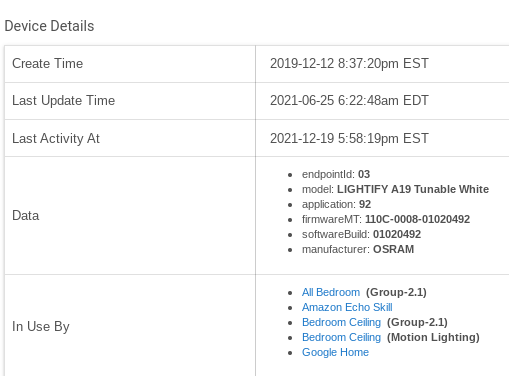
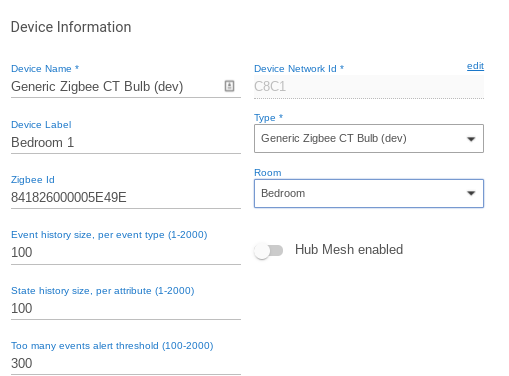
The following is from the device page:
image
image

Jon
My motto: Update early, Update often :slight_smile:

Well, problem fixed. All by itself! I noticed before I went to bed last night that the bulb wasn't on and it's still off this morning. When I checked the logs the last entry was at about 10:30 pm, and it at 60% complete. Nothing else until I tested it this morning (which only shows that I turned it on and off). :man_shrugging:

I know you shouldn't go upgrading software/firmware just because it's there, newer isn't necessarily better. In this case I was just hoping it may make these bulbs (Osram/Lightify) more stable. But it also shouldn't be that much of a problem (2 of 2 bulbs). Does anyone have any experience upgrading these bulbs? Is it always this problematic?

Thanks,
Jon

The problem with those bulbs is that they are ZLL based zigbee and make horrible repeaters and don't play nice on a mesh with ZHA devices (basically everything else). They should be isolated to their own hub. Either a HUE bridge or another hubitat. That said, I would look at the device page itself and at the bottom it will tell you what it's in use by, then checking those rules. Unlikely it is the fault of the update. Updates don't cause issues like this. What updates do due is expose problems that weren't noticed before (database corruption being a main one)

I believe the OP is referring to a Bulb’s firmware being updated, not the Hubitat hub’s firmware. :wink:

I can imagine a Zigbee bulb OTA firmware update taking a while and perhaps the bulb turning on/off during that process. Perhaps that is what is going on?

Hadn't heard about this (ZLL vs ZHA) before. Not sure if that would cause the instability problems I have with these bulbs though. I have the Osrams, a few Sengleds, a bunch of battery operated sensors, plus some wifi switches (outlets).
But, I do have a Smartthings V2 hub connected to Hubitat with HubConnect. I may consider moving them all to there.

Yup, the bulbs firmware. It kept turning On by itself but never Off. And it seemed to be at a regular intervals (that is, if I bothered to turn it off) but I never timed it or checked if it coincided with any of the log messages. The log had those repeated messages about the update for days literally. Have no idea what stopped it.

Now I'm thinking of trying on another Osram bulb just to see if I have the same results. I'll have to think of which one I won't mind having some problems with for a while. Anyone interested in a little experiment?

I had this on some when I updated them years ago. do a factory reset on them and join them again (they will slot back in there old places). Then you may find it still needs a update.

that update did do that for me.

it would cause issue on other devices so missed events and stuff.

My bad...

Sengleds don't repeat so they're ok in any mesh (as are zigbee 3.0). Osram's should be segregated to their own mesh for stability. Note: With sengleds since they don't repeat, repeaters near by help.

old osrams

I have new 3.0 ones and they are fine. Its not necessarily a 3.0 thing its a quality thing. Its just it seems that if its ZigBee 3.0 they tend to have better quality buffers in, this may be just because they have to be capable of carrying more messages if its 3.0. Ether way it doesn't make sense to not ensure you are buying 3.0 device.

1 Like

I was thinking it was the old Osram stuff that are 1.2 ZLL. 3.0 are good. @aaiyar is the tester for 3.0 bulbs :grin:

2 Likes

Just to add - I checked the firmware version on the device page for the 2 bulbs I tried to update, and several others that I haven't. They are all the same. So, not only does the process cause the bulbs to turn themselves on for, sometimes, days, it also doesn't actually update anything. :slight_smile: I will not be trying that again in the near future. Thanks! Happy Holidays! :christmas_tree:

1 Like

This is exactly what I expected you to say. This is exactly like mine. Send the update again sometimes it takes 2 times to take. Like I said do a factory reset on them as well to help them take.

So, the update may be in memory somewhere and needs a reset to load as the active firmware? OK, I'll give that a try.

-Later- I did the factory reset (5x On for 3 seconds), re-paired, and no change.

I rid myself of these and everything became better; the sun came out, birds started singing, and my wife stopped complaining about things not working.
Do your bulbs get seriously hot? I remember some of them getting too hot to touch and would stop responding to commands until I cut the power and let them cool off. I imagine that the zigbee radio goes out when this happens, then the mesh suffers.

Now do the update again and once it's "finished" down power then factory reset again. I believe that was the trick, it was 4 years ago I think.

Most of mine original ones eventually died. At the time I think I managed to get them swapped out under warranty, touch wood though since I separated them to their own hubs and did the update I have not had one go.

Still have 6 LL osram and 4 LL Philips. Rest are a mix of manufactures all 3.0

Sorry to revive an old thread. Recently I clicked the "update firmware" button for my OSRAM Lightify A19 Tunable White. An update was performed from build 01020492 to 01020509. I wasn't aware there was a new version, but figured what the heck it can't hurt.

Does anyone have any information on what the new firmware does vs the old? I was not able to find anything online. The bulb didn't have any problems before but I noticed that when the level is set to 100 it turns off automatically in a few seconds. I can get around this by setting it to 99. Hopefully this will go away on its own.

I had forgotten all about this thread, and only now realized it finished without a solution. Sorry to all who tried to help me out before. And, the problem was fixed way back when, but I don't remember how at this point.

@benasaur
I checked the firmware of several of my osram bulbs, most of them are 01020492, but the one that gave me the problem with an update that started this thread is 01020205. And, as far as I can tell it may be slightly more likely to get dropped off the mesh. Although I don't find that all that unusual for my osram bulbs. Do you have this problem? Other than possibly some stability issues I'm not sure what reasons they would have to offer updates so I'm hoping the version you have helps.

Jon

Sorry, I hadn't logged in in a long time :sweat_smile:

I had mesh issues way in the beginning with these bulbs, but 492 helped significantly. Moving to 509 gave me the 100/99% problem for the one bulb, and the prospect of having to rework legacy RM to remove all instances of 100% was too daunting, so I left it at that.

I have, however, been consistently adding zigbee devices that may have strengthened the mesh. Now the bulbs only very rarely not respond (once every few months) and I have 6 of them.