Trying to work through a required expression, I have reached a point where I am unable to add expressions or delete and there are no Cancel or Done buttons.
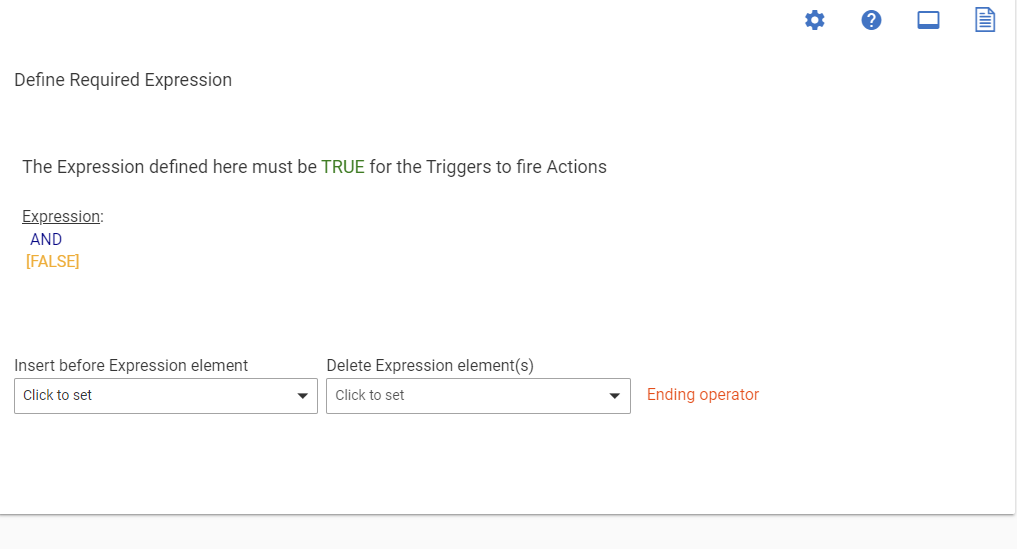
Use those pull down menus to either insert a Condition before and after the AND, or delete the AND and start over.
2 Likes
I appreciate the work around, I chose to delete the rule and start over. Still a bug though because of the inconsistent UI, allowing the user to get to this point, lack of human readable error messaging, etc.
Expressions are getting a UI revision in the upcoming 2.4.0 release, now in beta. These changes will help a lot with the difficulty of this area.
10 Likes
Good to hear!
I think I have lost count on how many times I have done this for the very reason described here. Annoying, but it works and I am able to continue.
I'm running v 2.4.3.127 and I am getting this error where the conditions page for a Required Expression doesn't present itself. I am trying to set this required expression well after the rule was initially created. I'm trying "Append new token" / "--> New Condition" and never presented with the condition page.
I've tried the troubleshooting steps: reboot with rebuild database, closing my browsers and rebooting my laptop. Every Required Condition appears as BROKEN and the UI does not display options to enter New Conditions.
1 Like

