Not asking for help as it's annoying but easy to work around.
Details: I've been duplicating JSON and CSS files for some dashboards by downloading, renaming, and then uploading them. No issue when I do this one at a time, but I noticed each time I queue up more than one file for upload in the File Manager UI and then upload, they don't all upload and there is no error reported. I think these steps will reproduce what I'm seeing.
Steps to reproduce:
On your PC (Windows 11 via Firefox for me), have two files in a folder you wish to upload: "test.json" "test.css"
In File Manager, click Choose and select test.json on the PC
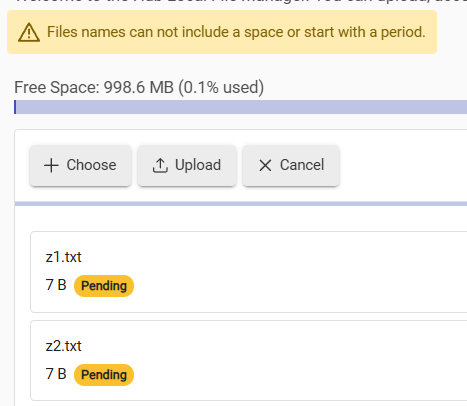
Notice test.json now shows "Pending" in the File Manager UI
Click Choose again and now pick "test.css"
Notice test.json and test.css both appear in the File Manager UI with "Pending" status - so far so good!
Click "Upload" in File Manager
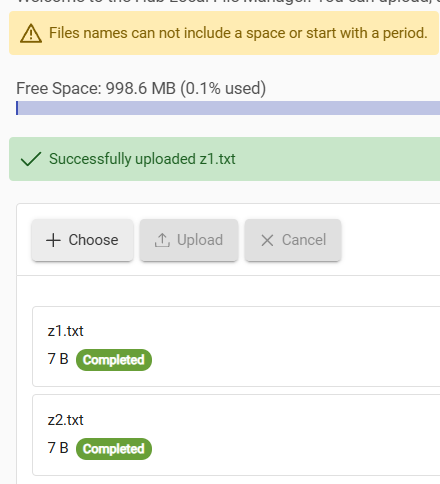
Notice both files are listed as "Uploaded" now in the UI.
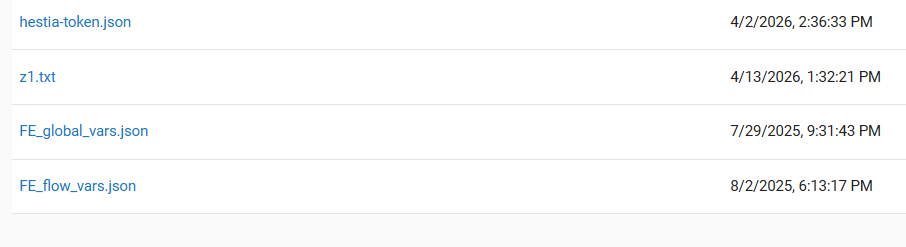
Notice only test.json was actually uploaded [BUG]
Workaround: Just choose and upload one at a time.
Note sure how this behaves with more than two files...
I noticed that some time ago. It is a bug to let you keep choosing files if it is not going to upload them as a batch.
I do see that the file picker being used only allows one file at a time, so the intent seems to be only one file, else the file picker window would allow multiple selections at once.
They probably should add the ability for actual multiple file picks, or disable +Choose button after the first file is chosen. The screen shows each file chosen as you add them, but I think that is part of the bug, in that pressing +Choose after a file is picked really replaces the file chosen internally, but it is not removed from the screen display to let you know that.