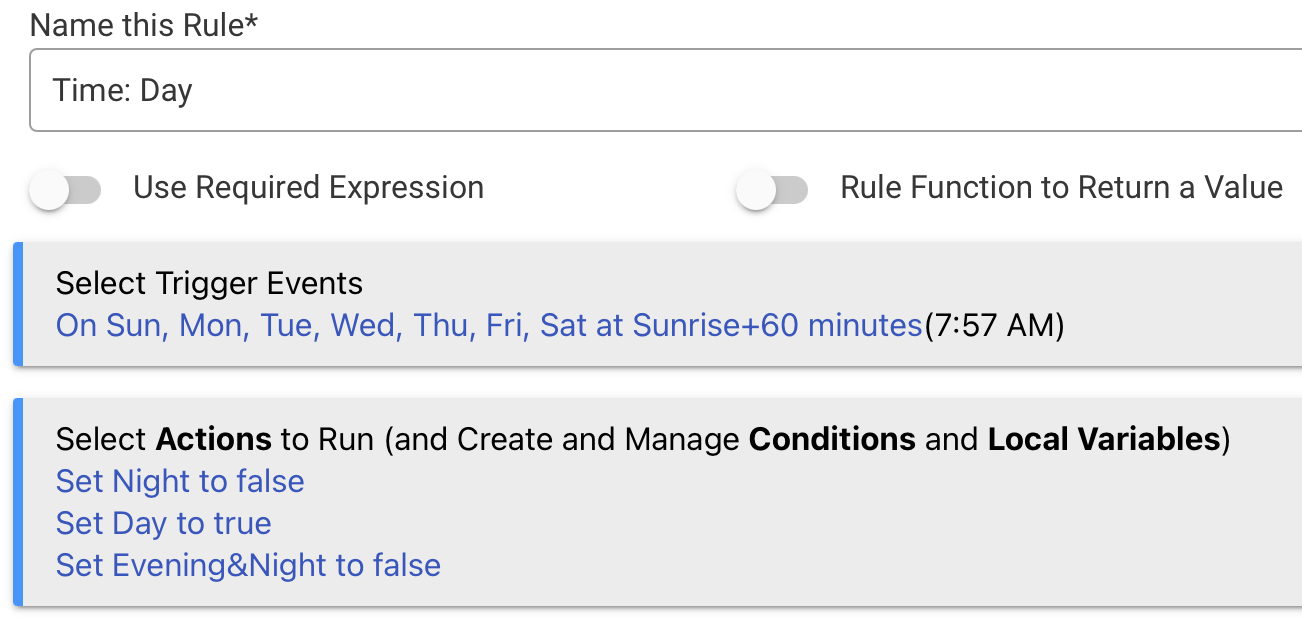
I am creating three booleans for: Day, Evening and Night. Only one of these should be active at any moment in time. Here is the Rule for "Time: Day" --
This seems straight-forward except for "set Evening&Night to false". The documentation says that two booleans can not be altered using a single "set" command. What does this line actually do? Where is this documented? Thanks!
I was setting bools in a virtual driver for something very similar. I found it is easier to just use one attribute (or variable in your case) to set the period. I use Dawn, Morning, Day, Evening, and Night, as this triggers my scenes for Dawn, Morning, Day, Evening and Night to change based on illuminance. My input is an outdoor illuminance sensor.
So instead I just set the day "period" when light changes. Then the triggers from that are just that period changed to Dawn, Morning, etc. I like using periods based on lux instead of times, because these drive lighting scenes. I don't want sunset to be based on a set time of day for sunrise/sunset, as depending on weather, the light level can be very different, and my lighting scenes are based on how dark or light it is out.
That's a good point, I've never used the hub modes, but the way hub mode is integrated into other Hubitat apps (like Mode Manager) gives a lot of smart options for managing modes for most people. I just like to "brew my own" when it comes to Hubitat automations.
I use the built-in Hub Modes to switch between the modes I use. And then I have RM rules that fire based on the mode changing and what it changed from and to. I use the previous mode as a required expression and the change to the new mode as the trigger.
Example:
Required Expression:
Mode is Away
Trigger Event:
Mode Becomes Home
And then stuff happens. I've been using this scheme for ages and it's very solid.