I've been more than happy with my Unifi setup for a couple of years now but had what I would call a major issue on Sunday. I've a fairly small setup:
Unifi Dream Router
1 x 16 Port Lite Switch
2 x U6 Lite AP's
My UDR is connected to my ISP's hub (Virgin Media Hub 5) and the hub is in modem mode. As it's a cable service although download/upload speeds are fine (1,150 down, 100 up) latency isn't great. Occasionally the Unifi logs warns me of high latency and some packet loss but this has maybe been once a month and hasn't actually affected my connection....
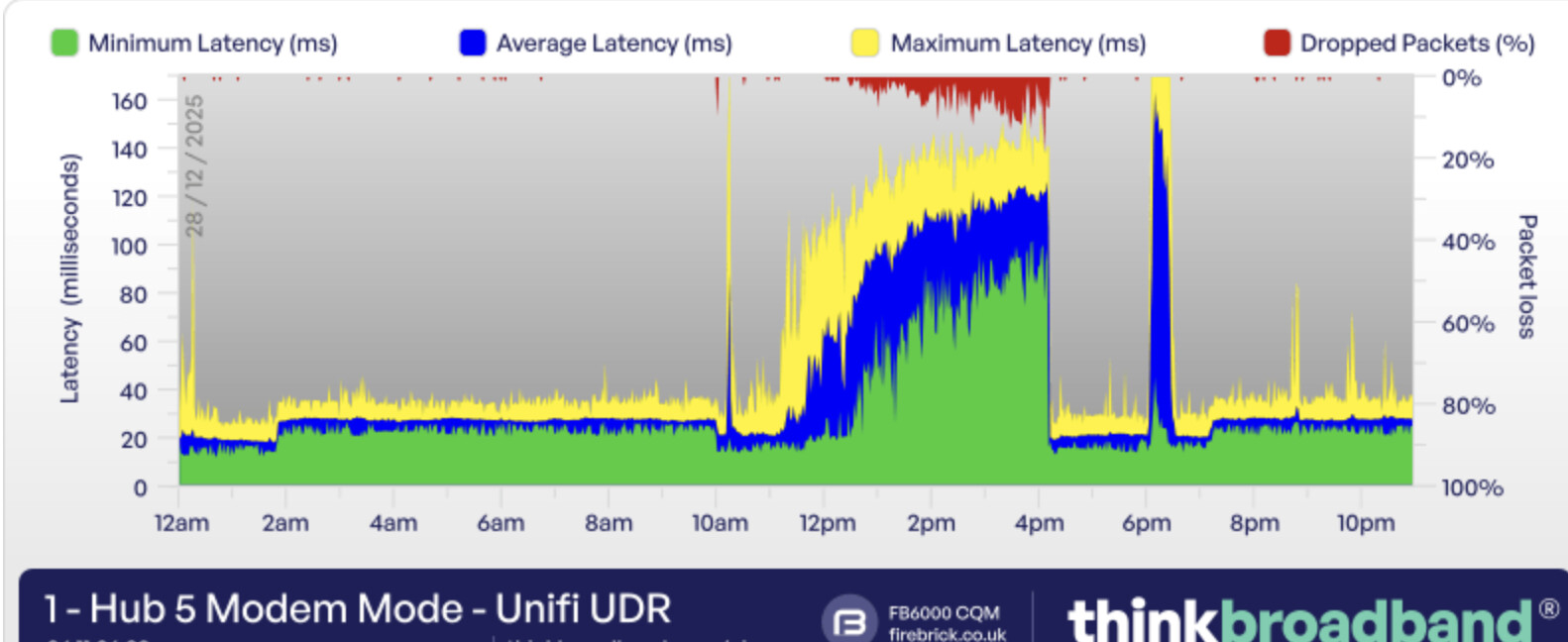
Sunday was a different matter. There were some major nationwide issues with Virgin Media. My 'think broadband' monitor was showing massive latency which was affecting my connection. See below:
Now I would expect that when my WAN connection goes tits up, that my internal setup would continue to function and in this case it did not. Every device wired and wireless was disconnected from the network and there was no DHCP server available. The results:
Apple TV disconnected from WiFi, when plugged in to the ethernet it just got an automatic private address (169.254....)
Couldn't play media as the ATV couldn't see the NAS (using infuse)
Hubitat hub and Hue bridge pro not communicating
Dashboards non functional
When I checked the logs in Unifi Network there is nothing shown - no latency warning (it was the highest it has ever been for 4 hours solid), no packet loss warning (there was massive packet loss) and no warnings/exceptions regarding WAN disconnection or anything else. All that was visible in the logs was a single entry for every device on the AP's, plugged into the UDR and plugged into the switch disconnecting one by one.
So for the first time, I'm very disappointed with Unifi. Whatever is going on with the WAN connection to the Virgin Media Hub 5 should not trash the LAN.
One metric that could be interestinng to see is what the resources of the Unifi Dream Router were at during the event. I wonder if the ISP modem issues caused somethng in the Dream Router to use up all of it's avaliable resources and therefore cause it to not serve devices reliably.
Do you use different vLAN's? if you do everythng has to funnel back to the Unifi Dream Router to go between vlan's and as such. This would include devices on the same switch but different vlans. It creates a signfiicant dependency on the router to be in a good state for information to flow.
I've got no VLANs set up. Just a flat network with 2 additional APs broadcasting 2 SSIDs (one 2.4/5 GHz and one 2.4 GHz only for IoT). I really expected to see something in the logs regarding the issue such as excessive load or whatever but there's nothing.
Something else that I just realised was that all of those disconnections happened around 6PM in the image above. By that time the WAN issue appeared to have resolved as can be seen from the flat portion between 4:15 and 18:00. I was downloading several UHD TV episodes at that point and everything fell over. I've posted on the Unifi community and uploaded a support file so I'll see if anything comes of that.
DHCP is the UDR on 192.168.0.1. The WAN connection is set to Auto DNS so will use 194.168.4.100 and 194.168.8.100 I think which are Virgin Media's DNS servers. Client devices will use the gateway address or in some cases I've manually set clients to use Googles DNS of 8.8.8.8.
I wouldn't have thought that DNS configuration would affect LAN devices connecting with one another (using IP address) or that devices would disconnect entirely.
I still wonder if the bad state of our internet cause the UDR to get overloaded in some metric. It kind of makes me think of when the guys at servethehome evaluated the UCG Fiber and found that when they really pushed it the device would just all of a sudden fail and nothing would work. I think they even had to hard reboot it.
I am thinking something like two many open connections or may memory consumption being held by packets getting held in memory becuase of the connectivity issue. Once the UDR hit it's ceiling it just fell on it's face.
If that is the case would any other router of handled it better. Is it running current firmware?
It will be interestinng what Ubiquity comes back with from the support bundle.
Yeah I'm fully up to date on Network, UDR, Switch and AP. It is concerning to me. It was bad enough that I couldn't watch the latest episode of Landman that I'd downloaded, but WAF is going to be pretty low if the lights aren't coming on because the Hue Bridge Pro and C8 can't communicate.
I'm guessing that I'll be able to pull the plug on the Virgin Media Hub (simulating a total outage) and things will work fine locally. However if I get another situation where the connection is working but experiencing massive packet loss/latency, then this could potentially happen again if the UDR is somehow getting bogged down trying to deal with it.
Don't know much about Unifi gear, but I've seen routers that have some functionality moved to the cloud, so could it be the UDR has some cloud dependant functions related to DHCP or security that can hoblle the LAN when internet is out?
I'm running Unifi Cloud Gateway Max w/Unifi APs/switches, and don't remember anything like this when the interweb went down (which is very rare for me). Does seem like this is potentially more of a configuration issue than a Unifi design issue.
It really doesn't make much sense. The OP was even using a flat network to that makes it even more simple.
You mention a unifi swtich and 2 AP's, did you try having two devices on the same AP try to talk, or two devices on the switch try to talk to each other.
With a single network/subnet the ip wouldn't even be need for some communication? How is everythig connected? Do they all plug into the UDR or is the switch the central point were everything connects?
Me neither. But on previous occasions the connection has been fully 'down' and the broadband monitor pictured further up would have been a solid block of red showing 100% packet loss. In this instance whatever issue was going on just caused high latency and packet loss. That's shown in the monitor but wasn't reported in the Unifi logs. As mentioned, historically Unifi has been quick to report latency/packet loss even when performance hasn't taken an obvious hit. Virgin Media in my area is all DOCSIS3 cable, we can't get fibre yet. When theres a fault it can be like this with loads of interference and slow speeds but without a total loss of connection. I don't think it's necessarily configuration or a Unifi issue but possibly some random crash.
I rarely make any!
Good point. I didn't get chance to try that. The UDR is the DHCP server. When I noticed that the ATV couldn't get an address assigned (as I moved it from WiFi to wired) I focussed on trying to get that working, then the console was back up and I could get connected.
UDR has direct (cabled) connection to:
a Pi
a switch in the media rack (connects TV, ATV, Denon, X-Box, Tivo box etc)
a Unifi switch upstairs (connects all other wired devices, including the NAS and two additional AP's)
I'll chalk it up to 'just one of those things' and hope it doesn't re occur.
This seems to make the most sense to me unfortunately. I know i hate it when that is most likely answer. I would wager that maybe the communication issue did induce it.
Like @danabw i have UCG Max with some other gear. It wasn't long ago i had a outage with my ISP. Turned out they were doing some work on their fiber network the majority of the night. I messed with my gear trying to get it to connect and in the end i neeeded the ISP to reboot their gear and then restart the UCG again to get it back online. I wonder if i hadn't messed with it, would it of just reconnected when they got their side in a good state. My internal network worked though so not exactly a match. Weird stuff just happens with this stuff sometimes.
That's how mine behaved...things just started working when the internet service came back. I started my process from phone to check for outage status on Spectrum, so didn't mess w/anything once I knew they were down. Have to say, Spectrum is expensive, but I rarely have outages. Been up and running all of 2025 IIRC, not a single problem, I think my last outage was sometime in 2024.
I know it seems illogical, but I'm with @JumpJump and I'd lay money on a weird dns issue coupled with upstream dhcp failure putting the UDR in a weird state.
As a previous Comcast victim, and present Fios user, I avoid ISP DNS like the plague, and use ControlD/Clouddns & Cloudflare as my upstream DNS sources.
I recently discovered dnsspeedtest.online & dnscheck.tools while attempting to get technitium dns server working, and found them useful for checking out dns configurations/providers.
Yes I can't get my head around how that could happen. Although our cable broadband isn't the best it's all we can get. Thankfully we only get issues a couple of times a year.
I thought I'd overridden the DNS setting on the WAN connection to not use the Virgin Media DNS servers but I must have changed it back again at some point. I'll manually set alternative DNS servers.
I use UniFi for AP and Switching. AP and Switches have been rock solid for me. Other than their mesh mode, which IMHO is poorly tested crap. I tried their routers a few years back but was not very impressed. I hear they are getting better. My current setup is two pfsense routers configured in a high availability shadow config. I also have two different Wan providers. Terrestrial and LEO satellite which are monitored by pfsense for failure and does automatic switch over. Very happy with what I was able to do with pfsense from a high availability point of view.
I do this stuff for a living and think this guy does a really good job of explaining things. He, in my opinion, produces some of the better UniFi setting/setup videos.
 I rarely make any!
 I started my process from phone to check for outage status on Spectrum, so didn't mess w/anything once I knew they were down. Have to say, Spectrum is expensive, but I rarely have outages. Been up and running all of 2025 IIRC, not a single problem, I think my last outage was sometime in 2024.