[BETA] HD+ Hubitat Dashboard for iOS, Mac, Windows & Linux

Great! I'm happy the video displays.. that's more than half the battle. I also noticed some UI issues like a seekbar that shows up for a few seconds while the video is loading (I want to hide the video controls). Also, when you click a video the dialog that opens is transparent while the video is loading which looks weird. I'll also test rotating the phone and see if I can reproduce what you're seeing with the video stopping.

As for the cropping, I think with Android I offer an option to either fit the entire video (no cropping) or fill the entire view (cropping). Right now it just fills the view. I could default the full screen version to fit and the dashboard tile version to fill

I wasn't aware but it seems you cannot have HD+ release version AND the TestFlight version running simultaneously

I just found that out too.. I'm learning the iOS release process and how long things take. I can say it takes a full day from when I push a new build before it'll be available in TestFlight. I imagine it'll take longer when I try to release a new production build. So, if you're looking for the latest and greatest - TestFlight is probably the way to go.

1 Like

Yeah I remember similar years ago when I was using s ha rptools, I think that also just used the same time as the phone. I did have a look at Hub Information Driver but I think as it uses poll queues, it would be very 'busy' to do it that way. There's maybe another way I could do it, hosting something on my network that I can point a tile to.

Edit: I'm looking to see if there's any widget that could easily be added from the internet....

I found that this works when added into your HTML tile. That site has loads of options (though the site is a bit busy with ads) It could probably be just tweaked to suit font and colour:

<script src="https://widgets.timesyncer.com/clocks/v1/digital/minimal-digital.js"></script>
<timesyncer-clock-minimal-digital
  timezone="Europe/London"
  custom-title="Your Title"
  custom-title-font-size="16"
  custom-title-color="#000000"
></timesyncer-clock-minimal-digital>

There's a better way of doing this without a widget. I'm vibe coding a driver so I'll just add it through maker api. I'll share it on the community once I have it working nicely....

@jpage4500 Checking in to see if restoring volume controls for devices of type "Speaker" is still on your radar, thanks!

Marc

I still have the Hub Informational Driver installed so I went and looked to see what it provides. I didn't think it did any kind of polling but I'm not looking at the code - just the preferences page (scheduled jobs).

I will say there was a couple of other things it had which I wanted to handle in Android (I might even support it in Android HD+ I'll have to look).. but things like sunrise and sunset. Also it has commands to restart the hub.. Anyway, let me know.. I can handle it and show it as a date

I didn't realize it wasn't there. I see one on my test devices screen (login with "0.0.0.0" to see this). You might have to make the tile larger than 1x1 to see it though

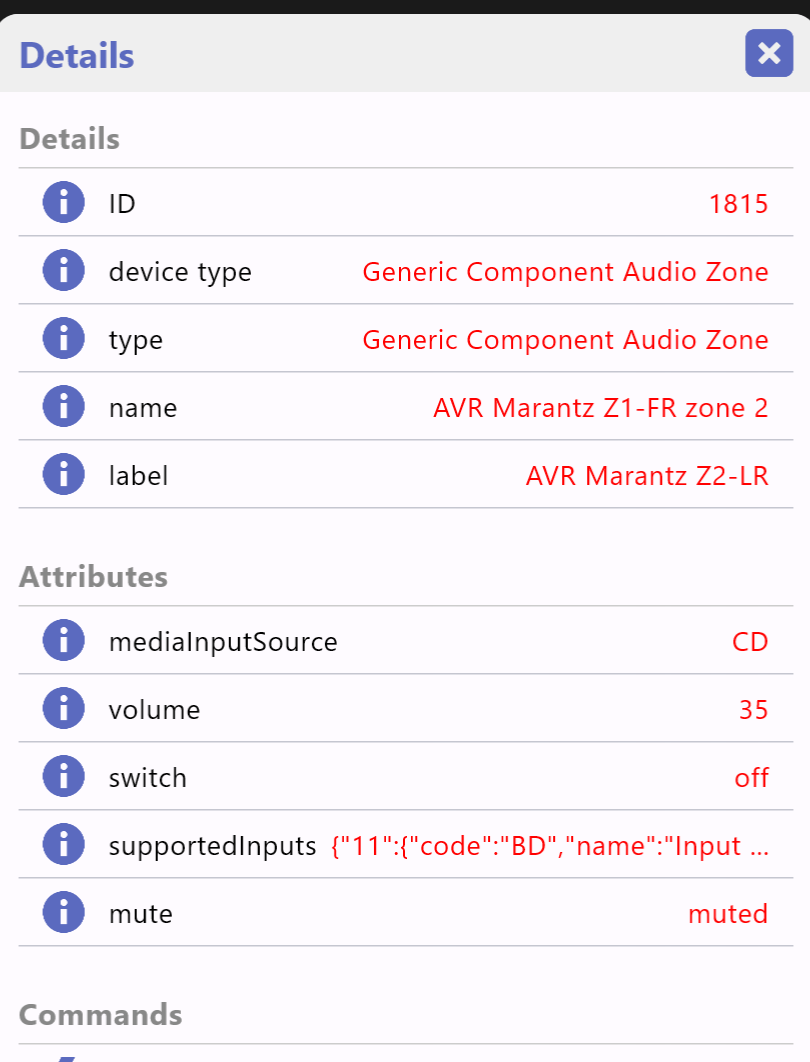
Adding this clarification to my original post: Below when I say 'my devices of type "speaker" ', I am refering to the "Device Type" that one configures in HD+. The device type in Hubitat is what the screenshot shows below.

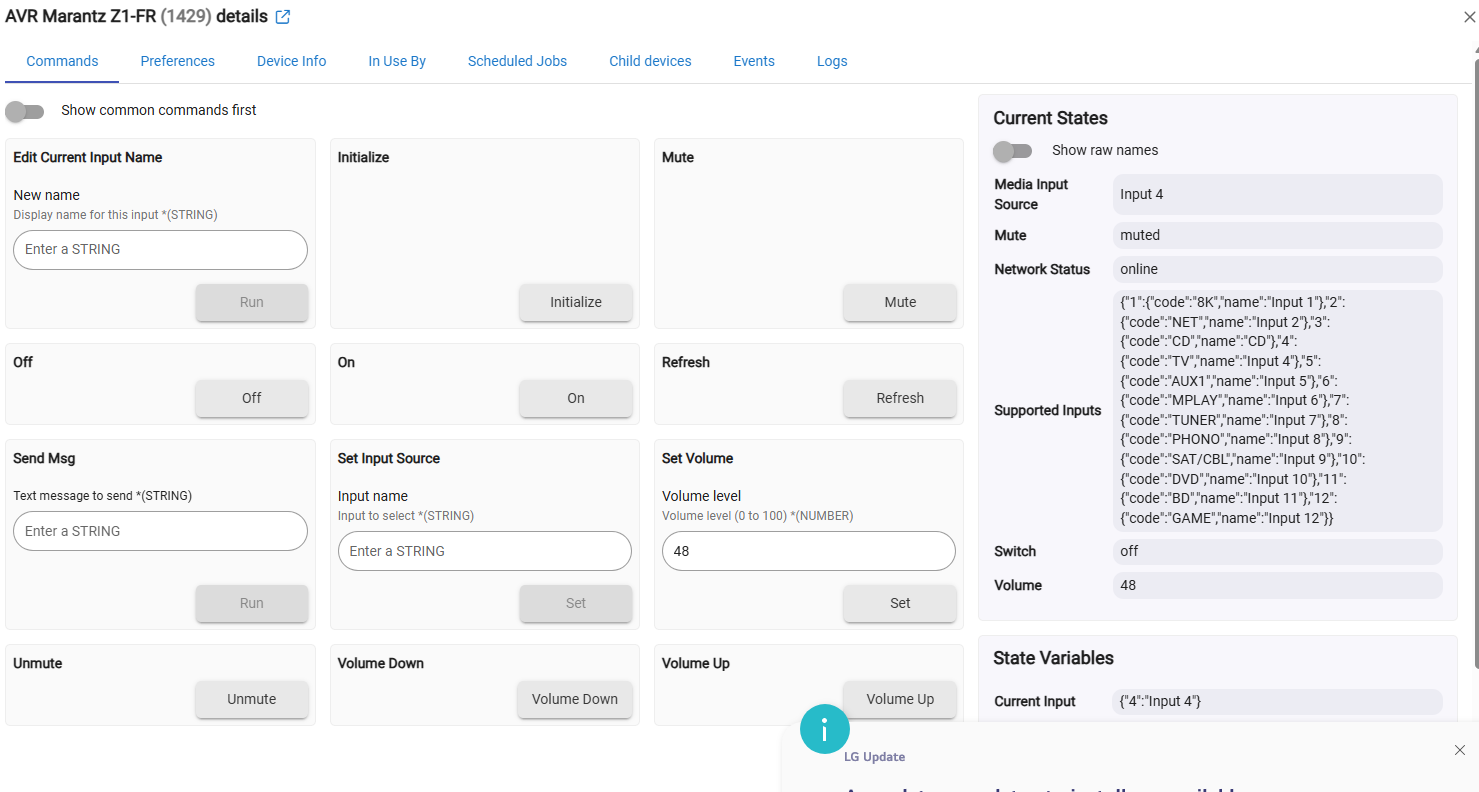
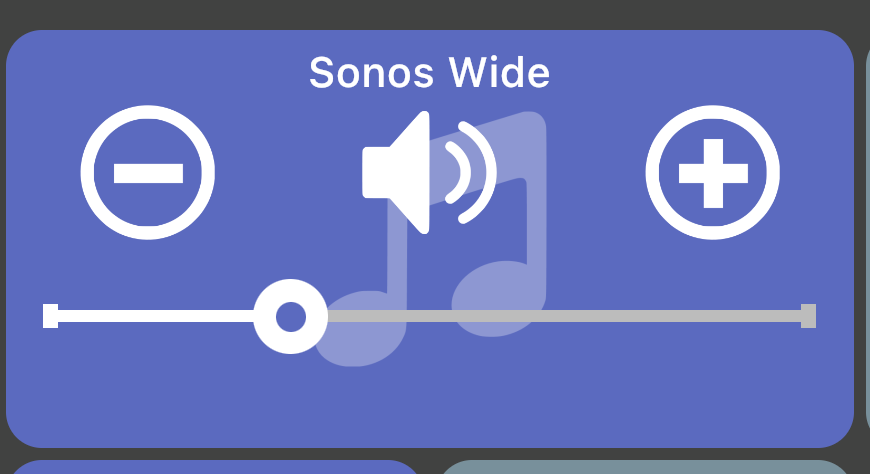
Upsized if from 4w x 1h to 4x4. Volume control not showing up on my devices of type "speaker" with HD+ on windows; it does show up on the original Android HD+ app. Screenshot below shows the device details, in case that is helpful.

My windows HD+ is version 1.0.632 -- am I on the right version?

Thanks!

Marc

Yes, some time ago when I queried the 'copy tile' function (before you'd implemented it), Hub Info Driver was the reason. I have several copies of my Hub info driver tile that I've set to custom and set a different attribute on each (sunrise on one, sunset on another etc). Hub Info Driver also has a html template that you keep in the hubs file manager so that you can show multiple items on a single tile (I use that on HD+ Android)

I've just vibe coded (bodged up with ChatGPT) the below driver for a HTML clock. It's working nicely. It defaults to the Hub Time as I'd like when I'm away, but can be set to any time zone. Selectable refresh time, 12/24hr clock. I'll update it with options for date. It might be use to someone else:

Hub Time/World Clock Driver
metadata {
    definition(
        name: "HTML Clock Tile",
        namespace: "John Williamson",
        author: "John Williamson with ChatGPT"
    ) {
        capability "Sensor"
        attribute "html", "string"
        attribute "version", "string"
    }

    preferences {
        input(
            name: "timezone",
            type: "enum",
            title: "Time Zone",
            options: [
                "hub":"Hub Time (Hubitat)",

                "UTC":"UTC",

                "GMT-12":"GMT-12 (IDLW - Baker Island)",
                "GMT-11":"GMT-11 (SST - Pago Pago)",
                "GMT-10":"GMT-10 (HST - Honolulu)",
                "GMT-9":"GMT-9 (AKST - Anchorage)",
                "GMT-8":"GMT-8 (PST - Los Angeles)",
                "GMT-7":"GMT-7 (MST - Denver)",
                "GMT-6":"GMT-6 (CST - Chicago)",
                "GMT-5":"GMT-5 (EST - New York)",
                "GMT-4":"GMT-4 (AST - Santiago)",
                "GMT-3":"GMT-3 (BRT - São Paulo)",
                "GMT-2":"GMT-2 (GST - South Georgia)",
                "GMT-1":"GMT-1 (CVT - Cape Verde)",

                "GMT+0":"GMT+0 (GMT - London)",
                "GMT+1":"GMT+1 (CET - Paris)",
                "GMT+2":"GMT+2 (EET - Athens)",
                "GMT+3":"GMT+3 (MSK - Moscow)",
                "GMT+4":"GMT+4 (GST - Dubai)",
                "GMT+5":"GMT+5 (PKT - Karachi)",
                "GMT+5:30":"GMT+5:30 (IST - Delhi)",
                "GMT+6":"GMT+6 (BST - Dhaka)",
                "GMT+7":"GMT+7 (ICT - Bangkok)",
                "GMT+8":"GMT+8 (CST/SGT - Singapore)",
                "GMT+9":"GMT+9 (JST - Tokyo)",
                "GMT+10":"GMT+10 (AEST - Sydney)",
                "GMT+11":"GMT+11 (SBT - Solomon Islands)",
                "GMT+12":"GMT+12 (NZST - Auckland)"
            ],
            defaultValue: "hub"
        )

        input(
            name: "hourFormat",
            type: "enum",
            title: "Hour Format",
            options: ["12":"12-hour","24":"24-hour"],
            defaultValue: "24"
        )

        input(
            name: "refreshInterval",
            type: "enum",
            title: "Refresh Interval (seconds)",
            options: [
                "10":"10",
                "20":"20",
                "30":"30",
                "60":"60"
            ],
            defaultValue: "30"
        )
    }
}

def installed() {
    state.version = "1.0 beta"
    sendEvent(name: "version", value: state.version)
    updateTime()
}

def updated() {
    state.version = "1.0 beta"
    sendEvent(name: "version", value: state.version)
    updateTime()
}

def updateTime() {
    def tz = (settings.timezone == "hub" || !settings.timezone) ?
        location.timeZone :
        TimeZone.getTimeZone(settings.timezone)

    def now = new Date()

    def format = settings.hourFormat == "12" ?
        "h:mm a" :
        "HH:mm"

    def timeStr = now.format(format, tz)

    sendEvent(name: "html", value: timeStr)

    sendEvent(name: "version", value: state.version ?: "1.0 beta")

    def interval = (settings.refreshInterval ?: "30") as Integer
    runIn(interval, updateTime)
}
@johnwill1 :grinning: :grinning:

It looks good but without leaving the country I don't know whether it works :rofl:

According to ChatGPT:

  • Hubitat stores a global system time zone in the hub settings
  • location.timeZone reads that value

If that's true it'll work, otherwise it's as much use as a chocolate fireguard lol

Edit: Updated it to include a customisable date:

Hub Time/World Clock Driver with optional date
metadata {
    definition(
        name: "HTML Clock Tile",
        namespace: "John Williamson",
        author: "John Williamson with ChatGPT"
    ) {
        capability "Sensor"
        attribute "html", "string"
        attribute "version", "string"
    }

    preferences {
        input(
            name: "timezone",
            type: "enum",
            title: "Time Zone",
            options: [
                "hub":"Hub Time (Hubitat)",
                "UTC":"UTC",
                "GMT-12":"GMT-12 (IDLW - Baker Island)",
                "GMT-11":"GMT-11 (SST - Pago Pago)",
                "GMT-10":"GMT-10 (HST - Honolulu)",
                "GMT-9":"GMT-9 (AKST - Anchorage)",
                "GMT-8":"GMT-8 (PST - Los Angeles)",
                "GMT-7":"GMT-7 (MST - Denver)",
                "GMT-6":"GMT-6 (CST - Chicago)",
                "GMT-5":"GMT-5 (EST - New York)",
                "GMT-4":"GMT-4 (AST - Santiago)",
                "GMT-3":"GMT-3 (BRT - São Paulo)",
                "GMT-2":"GMT-2 (GST - South Georgia)",
                "GMT-1":"GMT-1 (CVT - Cape Verde)",
                "GMT+0":"GMT+0 (GMT - London)",
                "GMT+1":"GMT+1 (CET - Paris)",
                "GMT+2":"GMT+2 (EET - Athens)",
                "GMT+3":"GMT+3 (MSK - Moscow)",
                "GMT+4":"GMT+4 (GST - Dubai)",
                "GMT+5":"GMT+5 (PKT - Karachi)",
                "GMT+5:30":"GMT+5:30 (IST - Delhi)",
                "GMT+6":"GMT+6 (BST - Dhaka)",
                "GMT+7":"GMT+7 (ICT - Bangkok)",
                "GMT+8":"GMT+8 (CST/SGT - Singapore)",
                "GMT+9":"GMT+9 (JST - Tokyo)",
                "GMT+10":"GMT+10 (AEST - Sydney)",
                "GMT+11":"GMT+11 (SBT - Solomon Islands)",
                "GMT+12":"GMT+12 (NZST - Auckland)"
            ],
            defaultValue: "hub"
        )

        input(
            name: "hourFormat",
            type: "enum",
            title: "Hour Format",
            options: ["12":"12-hour","24":"24-hour"],
            defaultValue: "24"
        )

        input(
            name: "refreshInterval",
            type: "enum",
            title: "Refresh Interval (seconds)",
            options: ["10":"10","20":"20","30":"30","60":"60"],
            defaultValue: "30"
        )

        input(
            name: "dateFormat",
            type: "enum",
            title: "Date Display",
            options: [
                "none":"Time only",

                "EEE, d MMM yyyy":"Fri, 17 Apr 2026",
                "EEEE, d MMMM yyyy":"Friday, 17 April 2026",

                "dd/MM/yyyy":"17/04/2026",
                "MM/dd/yyyy":"04/17/2026",

                "yyyy-MM-dd":"2026-04-17",
                "yyyy/MM/dd":"2026/04/17",
                "dd-MM-yyyy":"17-04-2026",

                "dd MMM yyyy":"17 Apr 2026",
                "MMM dd, yyyy":"Apr 17, 2026",

                "custom":"Custom"
            ],
            defaultValue: "none"
        )

        input(
            name: "customDateFormat",
            type: "string",
            title: "Custom Date Format (Java pattern)",
            defaultValue: ""
        )
    }
}

def installed() {
    state.version = "1.1 beta"
    sendEvent(name: "version", value: state.version)
    updateTime()
}

def updated() {
    state.version = "1.1 beta"
    sendEvent(name: "version", value: state.version)
    updateTime()
}

def updateTime() {
    def tz = (settings.timezone == "hub" || !settings.timezone) ?
        location.timeZone :
        TimeZone.getTimeZone(settings.timezone)

    def now = new Date()

    def timeFormat = settings.hourFormat == "12" ? "h:mm a" : "HH:mm"
    def timeStr = now.format(timeFormat, tz)

    def dateStr = ""
    if (settings.dateFormat && settings.dateFormat != "none") {
        def datePattern = settings.dateFormat == "custom" ?
            settings.customDateFormat :
            settings.dateFormat

        if (datePattern) {
            dateStr = now.format(datePattern, tz)
        }
    }

    if (dateStr) {
        timeStr = dateStr + " " + timeStr
    }

    sendEvent(name: "html", value: timeStr)
    sendEvent(name: "version", value: state.version)

    def interval = (settings.refreshInterval ?: "30") as Integer
    runIn(interval, updateTime)
}
1 Like

Thanks for that - I'll try to get it fixed!

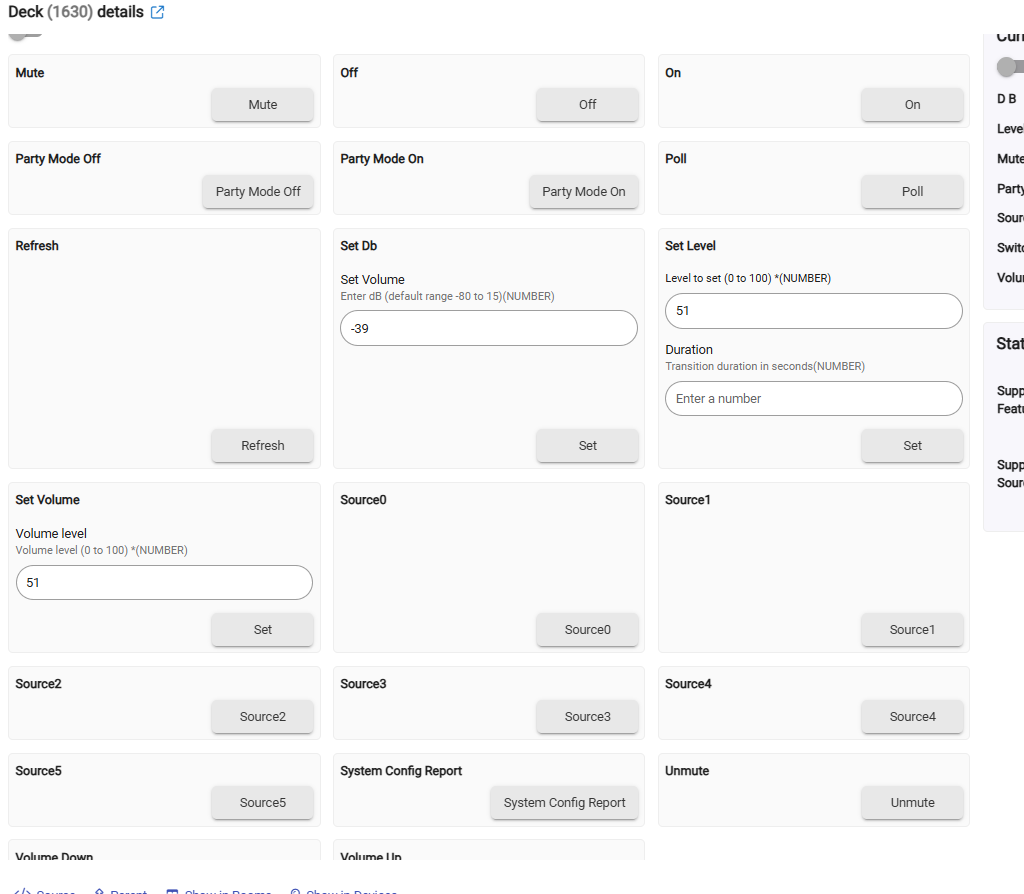
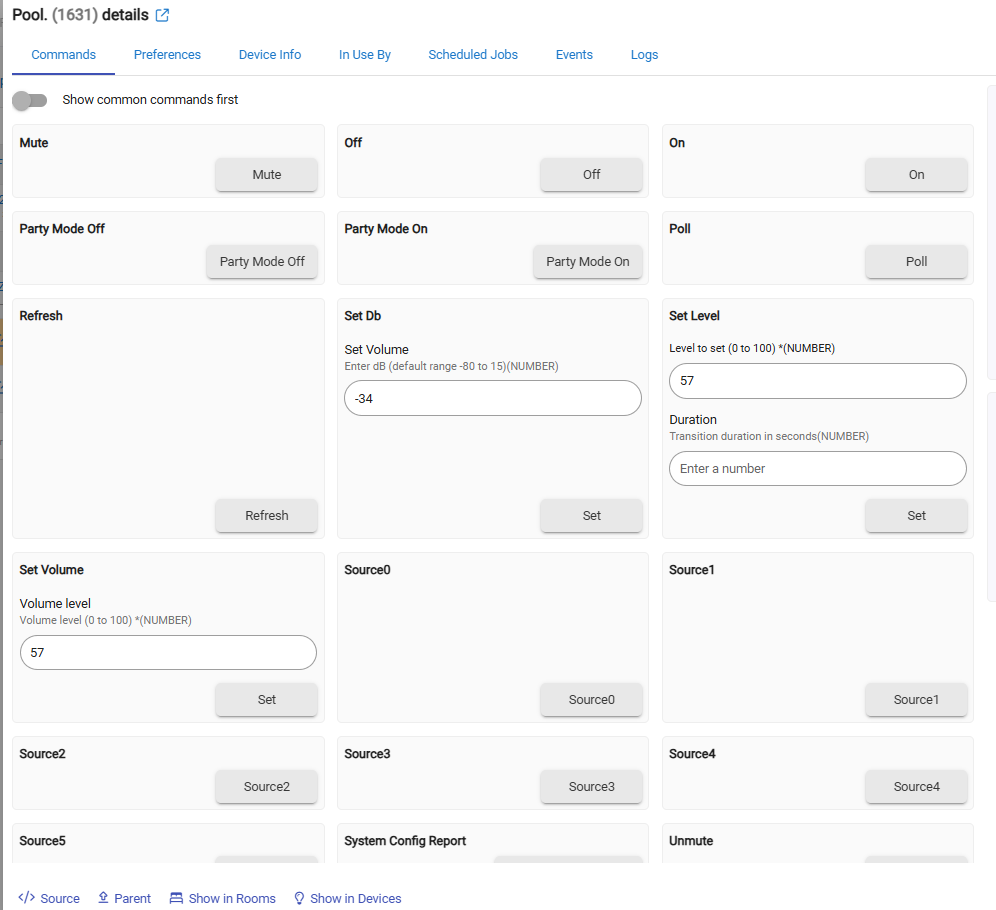
Can you check something for me? Check if this device has either a setVolume or setLevel command. One of those are required for the volume slider to show up. I already see the volume attribute so that looks good.

That's the only thing I can see which might prevent it from showing up. If not there - does this device support another way to set the volume?

2 devices, 2 zones each. They all support "Set volume". Only the Yamha seems to support "Set Level".

Screenshots below.

Let me know if you need anything else and thanks for digging into this!

Marc

marc

Oops.. my mistake. I forgot there's 2 different device types that show controls like this - music player and speaker. Only the music player type was showing any controls. Simple fix that'll be in the next version

1 Like

version 1.0.639 (iOS TestFlight)

  • RTSP video fixes
  • hide video controls while loading
  • fix video background while loading
  • make video tiles 2x2 by default
  • support title for calendar

I've been making a lot of progress on RTSP video tiles for iOS. There's a lot of options that can be tweaked so I plan to make them all settings in a future build since I know there's so many different types of RTSP cameras and probably no 1-size-fits-all device.

I'm learning the iOS release process and how long things take. I can say it takes a full day from when I push a new build before it'll be available in TestFlight

Sadly it's longer :frowning: I submitted this build on Friday. I'll have to re-think how often I submit changes for iOS

On another note though I have some really cool video features upcoming.. stay tuned!

Hi Joe - just updated on TestFlight. A few observations on RTSP for my cameras:
-Hidden video controls working
-Now when clicking video tile to full screen, it’s correctly retaining the landscape aspect ratio of the camera on the portrait screen

  • If I set the video options to ‘fit’ it doesn’t seem to affect the tile view (it’s a little cropped) However the full screen view whether the phone is in portrait or landscape orientation are perfect with the full image visible.
  • Previous issue of the video in full screen stopping when phone was rotated to landscape and back seems to be resolved.

Great work :+1:t2:

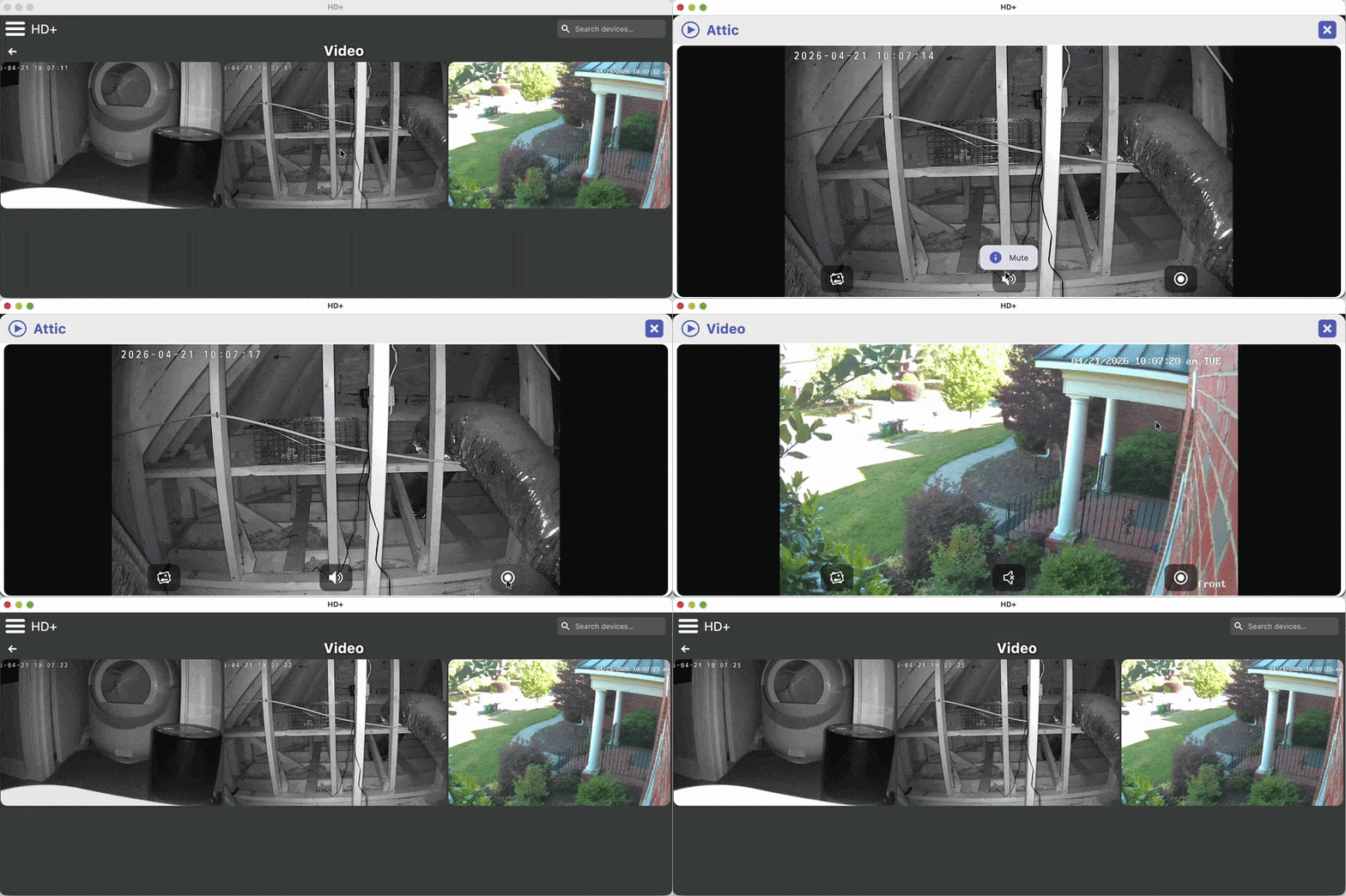
Here's a preview of what I'm working on now

  • opening a video full-screen will re-use the existing connection so it'll display instantly and not take 5-10 seconds to re-connect to the RTSP stream
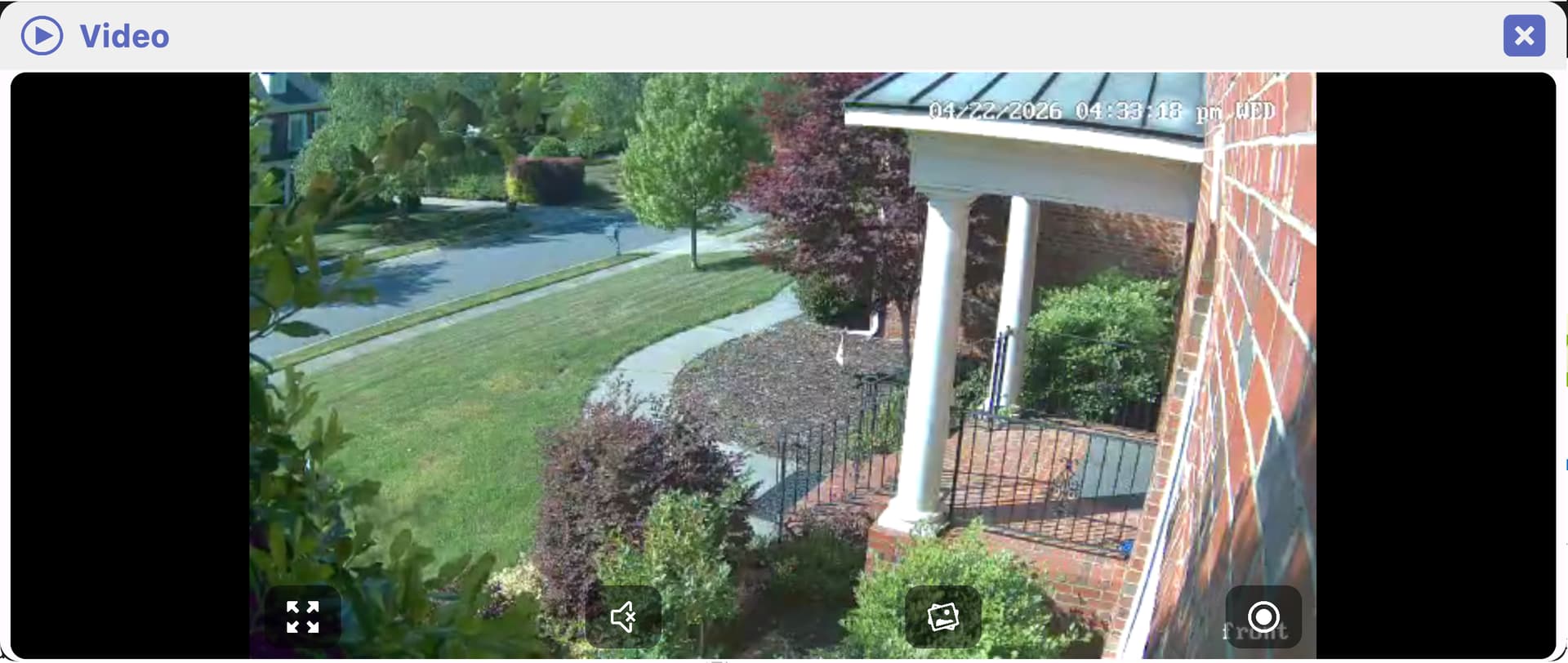
  • video controls: snapshot, record, mute

Here's what it looks like on Mac

hd-video-desktop

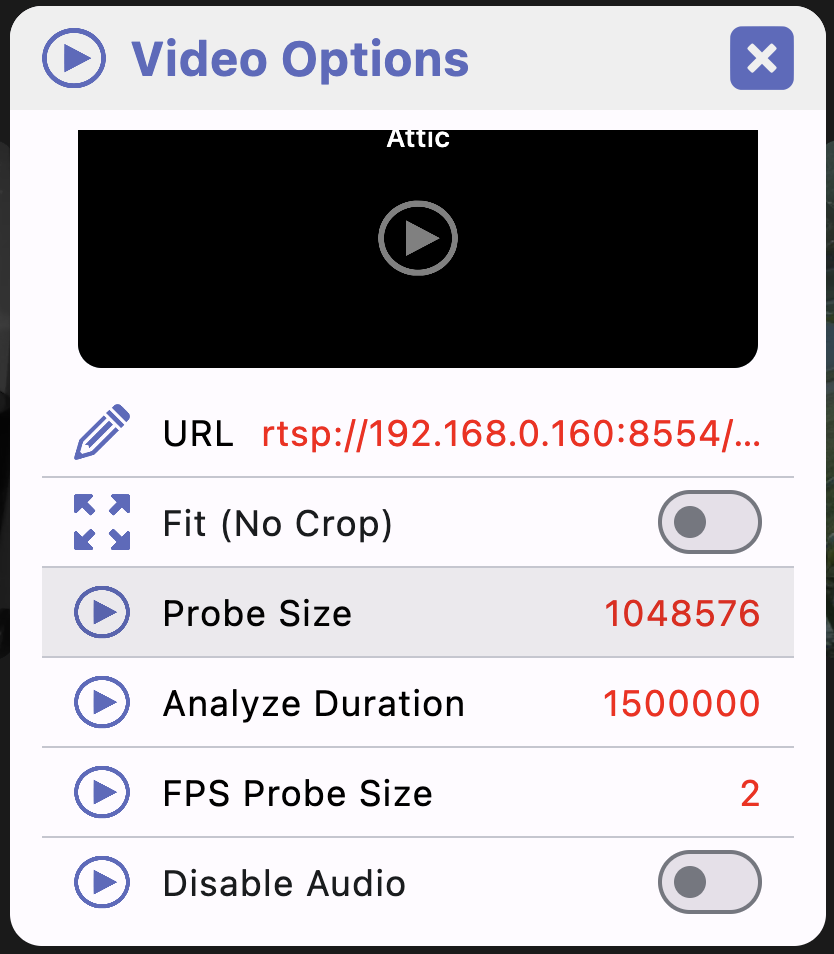
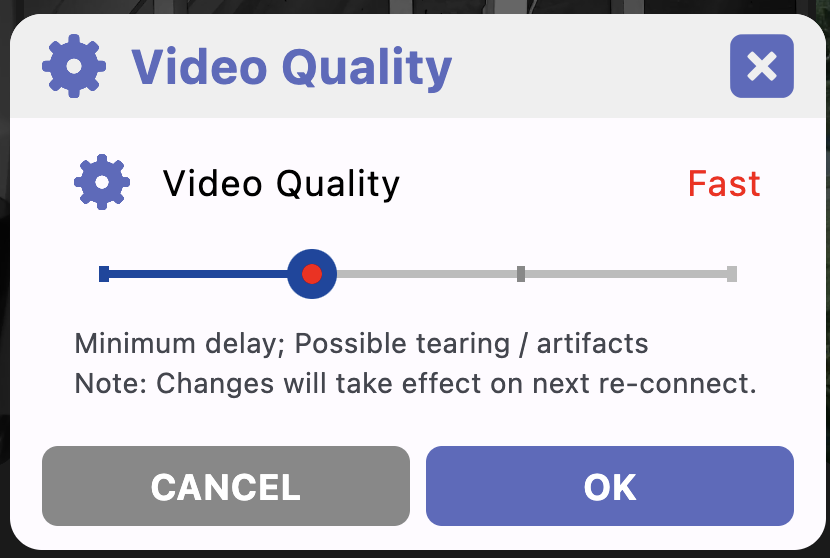
I also added several new video settings -- low level stuff. I'll try to explain each one but bottom line there will be a lot more flexibility if you want to tweak anything. Hopefully the defaults will work for most people though

1 Like

version 1.0.672 (desktop)

  • video tile: re-use existing connecting when viewing fullscreen
  • video tile: add quality setting
  • video tile: add screenshot and record video controls
  • misc video tile fixes
  • fix speaker device type to show volume controls
  • hub information driver: add date/time support
  • hub information driver: support sunrise / sunset

LOTS of video-related changes -- see the above post: [BETA] HD+ Hubitat Dashboard for iOS, Mac, Windows & Linux - #178 by jpage4500

I'm realizing a lot of people use live video feeds on their dashboards. So, I want to try and improve handling of video tiles more so than was ever done on the Android client.. including re-using a connection when viewing the tile full-screen (instant). I also figured if you're viewing a live feed you might want to take a snapshot or recording of that feed so I added buttons for this too. I have a gif showing this above and some screenshots below

Rather than expose every FFMPEG option I combined them into a quality slider.. the default value should work but this at least lets you tweak the settings since 1 might work better on some cameras than others.

Also, if you have the Hub Information Driver setup, you can now change it's device type to Date/Time for a clock view or sunrise/sunset

NOTE: This is for the desktop version only but all features are also on iOS.. but since it takes so long to get a build reviewed I'm going to keep testing it a little more.

1 Like

Brilliant, working great. Re-using the connection and avoiding the black screen 5 second 'connecting' is a huge improvement (making the camera view on my Fire HDs with HD+ Android look a bit clunky!)

Edit: Ignore the below - something seems to have updated and the tiles are now showing correctly - not sure what changed/refreshed at my end....

~~date/time support - When I change a hub info tile to device type 'date/time', the tile just shows the hub temperature value. When clicked the tile shows the time but once closed again returns to a temperature value. This is for info only as I'm using the driver I cobbled together for hub date/time.

sunrise/sunset - Same as above. When tile type is changed, the preview correctly shows sunset/sunrise and when the tile is clicked it also shows sunset/sunrise but in tile view it's hanging on to a previous attribute.~~

Hub Info Driver has so many attributes that I find it just as easy to copy a tile, set it to custom and display the attribute I want, though I guess some may find it easier to have an individual option for it in the tile settings.

Hoping that the date/time variable format error (incorrectly formatted string) is still somewhere on your todo list :wink:

Thank you! My volume controls are back!

Marc

1 Like