The Story Behind the Project I originally built this with a single goal in mind: to create a digital space for my daughter and her cousins to connect and play that was 100% safe. I wanted an environment completely under the user's control—no worries about bad actors, no data collection, and no privacy trade-offs.
But as I developed it, I realized this could be more than just a game; it was a new way for the family to interact with our home. By bridging this safe gaming environment with Hubitat, we are opening doors to smart home control that haven't been opened before. With features like Family Pulse Feed tracking mood and feelings, the future roadmap includes using that data to let the house react to the family's emotional state, not just their physical presence.
Overview: The Social & Family Connection
At its heart, this is a platform designed to keep the household connected, organized, and in sync with the home itself.
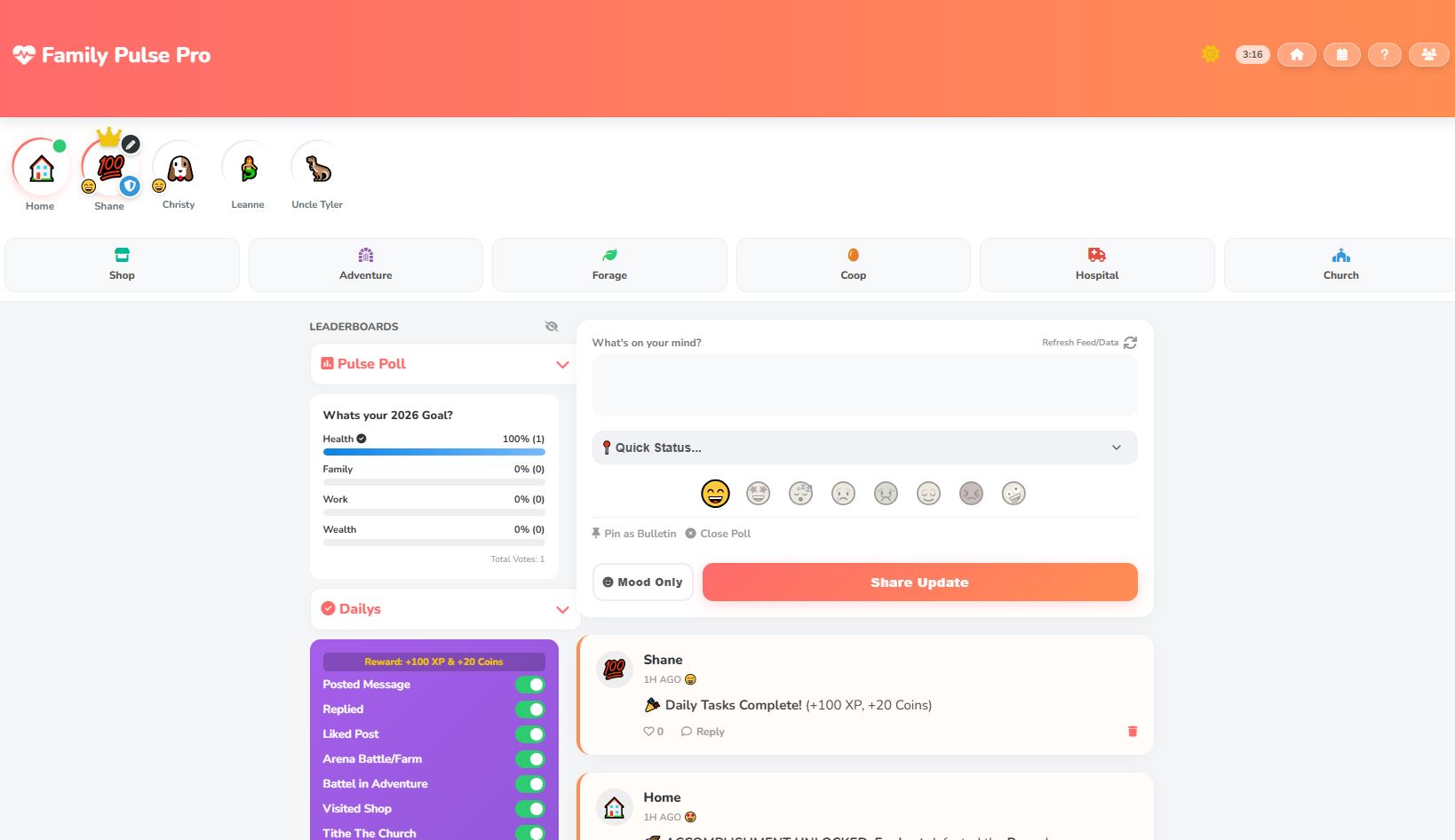
Family Pulse: This is the core social engine. It allows family members to log their current mood and overall experience. This isn't just data; it's a way for the family to communicate how they are feeling, and eventually, for the house to respond (e.g., soothing lighting if the collective mood is stressed).
Centralized Organization:
Smart Grocery Lists: A shared system to manage needs, with options to view the master list or break it down by individual stores for easier shopping.
Family Calendar: Full ability to view and edit upcoming events, ensuring everyone knows the schedule directly from the dashboard.
Safe Socializing: A completely private network for your children and family to chat and interact without the risks associated with public social platforms.
The Game Layer
To make the interaction fun and engaging for kids (and adults), the dashboard is wrapped in a fully functional RPG layer.
Loot & Equipment: Players can find and equip items, such as the "Chicken Sword," which provide real stat bonuses.
Stats & Scaling: The system tracks stats like Attack Power and Crit Chance (e.g., +10%). Enemies and bosses in the system scale based on the player's power to keep the challenge balanced.
Visual Feedback: Arcade-style combat text (damage numbers, crits) makes the interaction feel responsive and alive.
Family Pulse Pro: The Ultimate Gamified Social Feed
Family Pulse Pro is a private social network for your household that runs entirely on Hubitat. It combines a Facebook-style feed with a full RPG "Tamagotchi" style game where every family member raises a digital chicken, battles bosses, and manages an economy.
Here is the complete breakdown of every feature, mechanic, and secret in the app.
1. The Social Core
At its heart, this is a communication tool.
The Feed: A scrolling timeline of user statuses, system events, and game updates.
Interactions:
Post: Share updates with the family (+20 XP).
Reply: Threaded conversations on any post (+10 XP).
Reactions: React with emojis (, , , , ).
Like Economy: Reacting to someone else gives them+5 Coins (and notifies them!). Reacting to yourself is blocked.
Moods: Set your current status (Happy , Excited , Tired , Sad , Sick , Relaxed , Angry , Silly ). This updates your avatar on the story bar.
Pinned Bulletins: Admins can "Pin" a post to the top of the feed (e.g., "Dinner is at 6pm").
Daily Question: At 9:00 AM (configurable), the system posts a question from a local JSON file to spark conversation.
2. Your Companion: The Chicken
Every user gets a digital pet that evolves and grows based on their activity.
Evolution Stages:
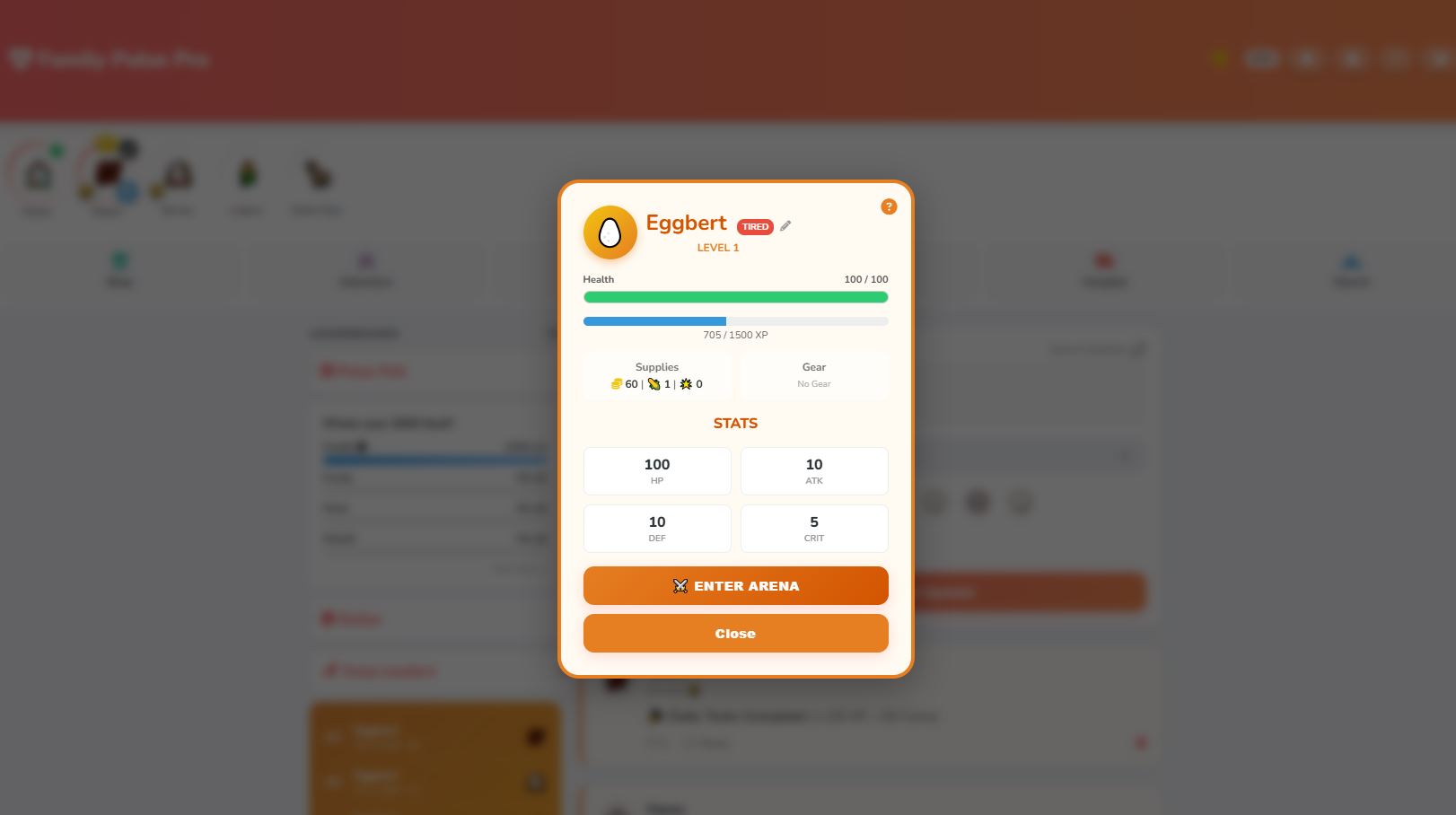
Lvl 1-2: Egg (Eggbert)
Lvl 3-7: Chick
Lvl 8-10: Chicken
Leveling Up: You gain XP for almost everything (Posting, Battling, Farming).
Cap: The max level is 10.
Rewards: Leveling up grants full HP restoration, +3 Stat Points to allocate, and stat boosts.
Stats:
HP (Health): How much damage you can take before passing out.
ATK (Attack): How hard you hit.
DEF (Defense): Damage mitigation.
CRIT: Chance to deal double damage.
Status Effects:
Unconscious: If you lose 2 battles in a day (PvP or PvE), you pass out. You cannot Battle, Farm, or Forage until you heal at the Hospital.
Tired: If you battle too much in one day, you become tired and cannot fight until the next daily reset.
3. Adventure Mode & Combat
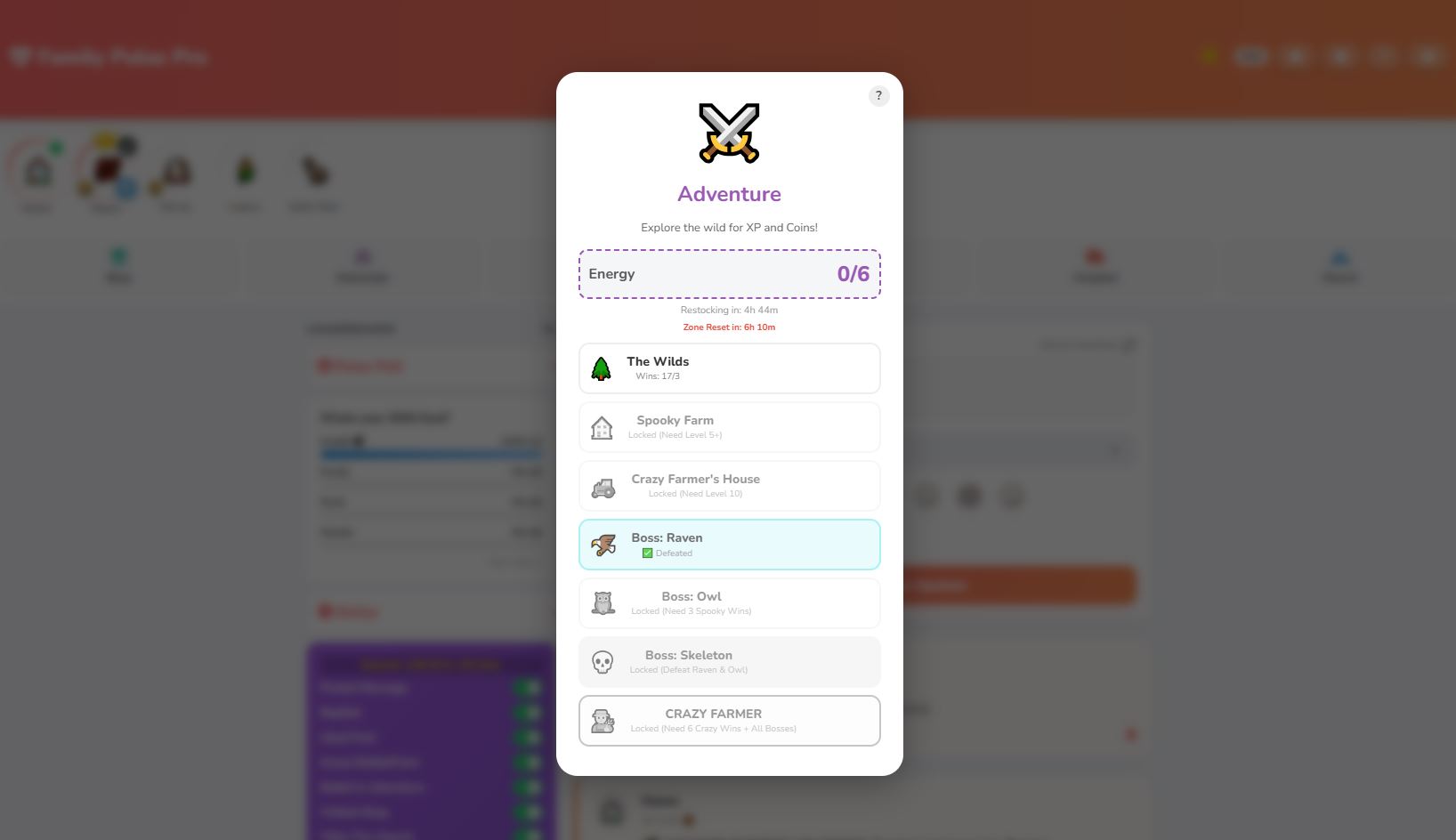
The RPG layer. Use Energy () to explore zones. You have a max of 6 Energy (upgrades to 8 at Lvl 5, 10 at Lvl 10). Energy regenerates daily.
The Zones
Zone
Cost
Unlock Req
Enemies
Rewards
The Wilds
1
None
Snake , Fox , Grub
Low XP/Coins. Win 3x to unlock Spooky Farm.
Spooky Farm
1
Lvl 5+
Mouse , Spider , Bat
Med XP/Coins. Win 3x to unlock Owl Boss.
Crazy House
1
Lvl 10
Barn Rat , Cat , Guard Dog
High XP/Coins. Win 6x to unlock Farmer Boss.
The Bosses (Daily Boss Raids)
Bosses have huge HP pools and massive damage.
The Raven: Unlocks after 3 Wilds wins. (+50 XP / +50 Coins)
Spooky Owl: Unlocks after 3 Spooky wins. (+50 XP / +50 Coins)
Skeleton: Unlocks after defeating Raven & Owl. (+100 XP / +100 Coins)
Crazy Farmer (Endgame):
Requirement: Must have 6 wins at Crazy House AND defeat all 3 sub-bosses (Raven, Owl, Skeleton) that day.
Reward:+200 XP, +200 Coins, +2 Feed, and a "Barn Box" (Chance for another 200XP/200c).
4. The Economy & Shop
The Shop is open from Sunrise to 8:00 PM. If you visit at night, the shopkeeper is asleep!
Inventory Items:
Chicken Feed (20 Coins): 50% chance to revive with full HP during battle. (Max 2/day).
Super Feed (200 Coins): 100% chance to revive during a Boss Battle. (Max 2/day, Hold limit 4).
Energy Drink (15 Coins): Restores all Adventure Energy tokens. (Max 2/day).
Steroid Shot (50 Coins): Permanently adds +5 Stat Points to your chicken. (Max 2/day).
The Future of the Suite Two additional applications are currently in development to expand this ecosystem: a dedicated Calendar and a Sports Tracker. These three apps will function as a unified suite, designed to transform Hubitat into a truly interactive smart home hub.
My goal is to move beyond simple automation and create a system that makes predictions based on user habits, offering a fun and engaging interface for the whole family—spouses and kids included. Best of all, it remains 100% local and private.
Beta Testers Needed! Please give the application a try! Since this is a passion project, I rely heavily on community feedback. If you have recommendations, ideas, or run into any issues, please let me know. Your input helps shape the future of this project.
Paste the Family Pulse Pro Groovy code into the editor.
Click Save in the top right corner.
Important: Click the OAuth button in the editor toolbar and enable OAuth for this app.
2. Create Required Files (File Manager) This app requires two local JSON files to function correctly for the "Daily Question" and "Scripture" features.
Go to Settings -> File Manager in your Hubitat menu.
Create a new file named FamilyPulse_Questions.json.
Content Example:["What is your favorite movie?", "What are you grateful for today?"]
Create a new file named FamilyPulse_Scriptures.json.
Content Example:["Love one another.", "Be kind to your neighbor."]
3. Install the App Instance
Go to Apps in the side menu.
Click + Add User App.
Select Family Pulse Pro from the list.
4. Configuration The app setup will walk you through several pages:
General Settings:
Hub ID Override : Leave as default unless you have specific cloud needs.
External App Links (Optional) : If you have a Family Hub dashboard or a Calendar app, enter their App IDs and Access Tokens here to create shortcut buttons in the Family Pulse header.
Timers : Set the hour (0-23) for the "Daily Question" and "Birthday Check".
File Name : Ensure the "Question JSON File" name matches exactly what you created in step 2.
Feed & Engagement:
Polls : Enable if you want to run a community poll and enter your question/answers.
User Management:
Enable up to 8 Users.
For each user, enter a Display Name , Avatar Emoji , Birthday (MM-DD format), and optional Password.
Note: You can also use "Timeout" to temporarily block a user.
5. Web Access
Once installed, go to the main app page. You will see links for Local Access and Cloud Access.
Use these links on your phone or tablet. The app is designed to be added to your home screen as a Progressive Web App (PWA).
6. Final Steps
Open the app on your device.
You will see a login screen with the users you created.
Tap your user to enter the feed!
Troubleshooting
Files Not Loading: If questions or scriptures don't appear, check the File Manager names against the settings. They must match exactly (case-sensitive) and be valid JSON format ["Item 1", "Item 2"].
Shop Closed : Remember the shop is only open between Sunrise and 8:00 PM.
 Family Pulse Pro: The Ultimate Gamified Social Feed
 1. The Social Core
 ,
,  ,
,  ,
,  ,
,  ).
). , Excited
  , Tired
  , Sad
, Sad  , Relaxed
  , Angry
  ). This updates your avatar on the story bar.
 2. Your Companion: The Chicken
 Egg (Eggbert)
 Chick
Chick Chicken
 Unconscious: If you lose 2 battles in a day (PvP or PvE), you pass out. You cannot Battle, Farm, or Forage until you heal at the Hospital.
 3. Adventure Mode & Combat
 ) to explore zones. You have a max of 6 Energy (upgrades to 8 at Lvl 5, 10 at Lvl 10). Energy regenerates daily.
 The Wilds
 , Fox
, Fox  , Grub
 Spooky Farm
 , Spider
  , Bat
, Bat 
 Crazy House
 , Cat
, Cat  , Guard Dog
 The Raven: Unlocks after 3 Wilds wins. (+50 XP / +50 Coins)
 Spooky Owl: Unlocks after 3 Spooky wins. (+50 XP / +50 Coins)
 Skeleton: Unlocks after defeating Raven & Owl. (+100 XP / +100 Coins)
 Crazy Farmer (Endgame):
 4. The Economy & Shop
 Chicken Feed (20 Coins): 50% chance to revive with full HP during battle. (Max 2/day).
 Super Feed (200 Coins): 100% chance to revive during a Boss Battle. (Max 2/day, Hold limit 4).
 Steroid Shot (50 Coins): Permanently adds +5 Stat Points to your chicken. (Max 2/day).
 Growth Hormone (100 Coins): Instantly grants +100 XP. (Max 5/day, disabled at Lvl 10).
 Boss Lure (150 Coins): Resets your daily attempt counters for Bosses (allows you to fight them again).
 Cardboard Box (150 Coins): A mystery box.
 Chicken Shield (1000 Coins): Adds +100 DEF.
 5. The Hospital & Church
 The Hospital
 The Church
 6. Foraging & Farming
 7. Random Events
 The Farmer's Wife: Randomly visits a "healthy" chicken.
 Birthdays: If today matches a user's birthday setting, they get a shoutout and a gift (+200 XP / +200 Coins).
 Holidays: Special bonuses on Halloween, Thanksgiving, and Christmas.
 8. Leaderboards & Dailys
 9. Admin & Technical Features
 The Future of the Suite Two additional applications are currently in development to expand this ecosystem: a dedicated Calendar and a Sports Tracker. These three apps will function as a unified suite, designed to transform Hubitat into a truly interactive smart home hub.
 Beta Testers Needed! Please give the application a try! Since this is a passion project, I rely heavily on community feedback. If you have recommendations, ideas, or run into any issues, please let me know. Your input helps shape the future of this project.
