@jnosa899 @halfrican.ak try this branch:
Here are testing instructions courtesy of claude
Testing the Dreo integration
This adds support for Dreo devices beyond tower fans: air circulators, air purifiers, ceiling fans and humidifiers. Almost none of it has run on real hardware, because I only own tower fans. Everything else was written by studying Dreo's official Home Assistant integration plus real device data from the Hubitat logs people have posted here.
So it might work perfectly, or it might not work at all. Either outcome is useful to know.
You can stop after Phase 1. Just knowing whether your devices show up is the single most valuable thing.
Install
Grab the drivers you need plus the app:
| If you have |
Install |
| Any fan, circulator or purifier |
dreo_fan.groovy |
| A ceiling fan |
dreo_fan.groovy and dreo_fan_light.groovy |
| A humidifier |
dreo_humidifier.groovy |
| An air conditioner or heater |
dreo_basic_device.groovy |
| Everyone |
dreo_integration.groovy |
Add the drivers first, then the app. The other way round fails with a "driver not found" error. If you already have an earlier version installed, paste over the existing entries rather than creating new ones.
Then Apps > Add User App > Dreo Integration, enter your Dreo email and password, and tap Log in & find devices.
Two settings worth changing while testing: set the polling interval to 10 minutes, and if you have an air conditioner or heater, turn on Add non-fan device types using the basic driver under Diagnostics. Fans, circulators, purifiers and humidifiers need nothing switched on.
Phase 1: do your devices appear?
Tap Log in & find devices and see what it reports. Previously anything that was not a tower fan got skipped, so the interesting question is whether your count is now right.
Tick the devices, tap Done, then open each one and hit Refresh.
Tell me how many appeared and whether each shows a sensible on/off state, speed and mode. "All of them showed up and look right" is a complete answer.
If something is off, the most useful thing you can send is Diagnostics > Capture device list and Capture device state. Both write to Settings > File Manager as dreo-dump.txt.
Serial numbers are always replaced with SN-1, SN-2 and so on before anything is written. Device names are only replaced if you tick Redact device names, which is worth considering, since names like "Master Bedroom" or "Kids Room" describe your home.
Please wrap long output so it does not swamp the thread:
[details="Device dump"]
(paste here, inside a code fence)
[/details]
Phase 2: does it match reality?
Open a device page next to the Dreo mobile app and compare them.
Fans, circulators and purifiers
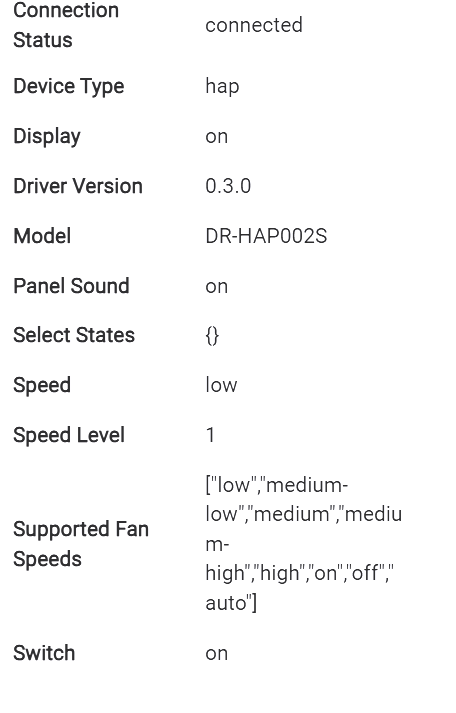
- Does the speed match? Ranges differ a lot by model, anywhere from 1 to 4 up to 1 to 20, and the driver reads yours from the API rather than assuming
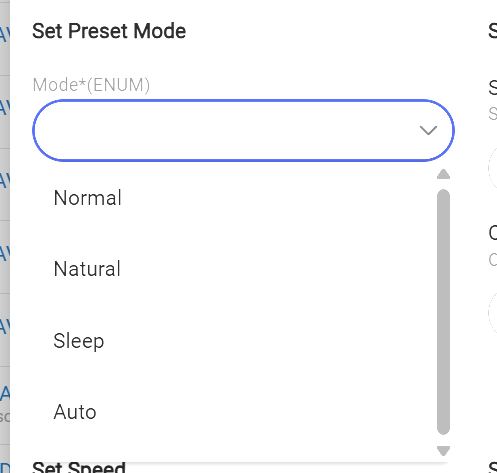
- Do the mode names match the Dreo app exactly, capitalisation included?
- Circulators: does the oscillation direction show correctly? Fixed, Horizontal, Vertical, Both or Pan-tilt
- Purifiers have no oscillation. Does the device page reflect that sensibly?
Ceiling fans
This is the part with no tester at all, so anything you can tell me helps.
- Does the light appear as its own separate device alongside the fan?
- Do brightness and on/off work from the light device?
- Is Reverse among the fan's preset modes, and does selecting it actually reverse the blades?
The colour temperature question, which I would most like answered. Dreo's API does not use kelvin at all. It exposes colour temperature as a plain 1 to 100 number, and nothing anywhere states which end is warm. I have assumed 1% is the warm end and that the range runs 2700K to 6500K, copying what the Home Assistant integration does, but that is a guess sitting on top of another guess.
So: set the light to its lowest colour temperature in the Dreo app and tell me whether it looks warm and orange or cool and blue. If it is cool, tick Invert in the light device's preferences and let me know. The warm and cool kelvin values are also preferences, so if 2700 and 6500 look wrong for your fan, you can change them.
One more: does setting colour temperature while the light is off work, or does it get rejected?
Humidifiers
The thing I would most like checked. Put the unit in Auto and note humiditySetpoint, then switch to Sleep and look again.
- If the number changes, it is working
- If it shows the same number in both modes, it is broken, so please say so
These devices hold a separate target for Auto and for Sleep and report both at once, so reading the right one depends on the mode. The official Home Assistant integration gets this wrong, so it is a real trap rather than a theoretical one.
In Manual mode, setpointField should read fog_level and the humidity target no longer applies, with fogLevel taking over. Does that match the app?
Phase 3: only if you are up for it
Every device page has logCapabilities and logRawState, which print what your device says it can do and what it is currently reporting. Running both on anything unusual tells me things I cannot find out any other way.
There is also sendDesired, which sends a raw command, for example:
{"speed":3}
Everything goes through Dreo's own servers, which validate commands and reject ones they do not accept, so you get an error rather than strange behaviour. It has no guard rails of its own though. If a device ends up somewhere you did not intend, power cycling it and using the Dreo app always recovers it.
To find out which internal value a physical control maps to: Diagnostics > Capture device state, then change something on the device or in the Dreo app, then Diff vs last capture. You get only the values that changed. That is probably the single most useful thing anyone can send me.
Reporting
App version (shown at the bottom of the app page):
Driver and version:
Device model:

What I did:
What I expected:
What actually happened:
Turn on Enable debug logging before reproducing something, then turn it off after. It is noisy, and it switches itself off after 30 minutes anyway.
Known gaps, so nobody reports them as bugs
- Exact oscillation angles. On/off and direction work; setting the precise sweep limits does not. Those need a more complicated command than a single number, and it did not seem worth the complexity yet.
- Extra sensor readings. Humidity on a humidifier works. Anything else your device measures is visible via
logRawState but does not have its own tile.
- Colour-changing ambient lighting on the models that have it.
- Air conditioners, heaters and dehumidifiers get on/off and mode only.
- Evaporative coolers get the fan side but not humidity.
- Deselecting a device deletes it, along with any dashboard tiles or rules pointing at it.
- Cloud only, as before. No internet, no control.