Three dimmable, dumb lights, each controlled by its smart dimmer. Light 1 and light 2 (the "primaries") are completely independent (i.e., a change to one doesn't cause the other to change) and need to stay that way. Light 3 (the "secondary") should turn on when either of the primaries are turned on, should stay on when at least one of the primaries is on, and should turn off when both primaries are off. LIght 3's smart dimmer is never physically used. For example...
1 and 2 are off so 3 is off
1 -> on causes 3 -> on
2 -> on causes no change because 3 is already on
1 -> off causes no change because 2 is still on (i.e., 3 remains on)
2 -> off causes 3 -> off because 1 is currently off
With respect to dimming, 3's level should be dependent on the primaries. Not sure how I would want to handle both primaries being on but at different levels (set 3 to highest, lowest, or based on sequence of primaries being switched on), etc.
Is there a mirror or lighting app than makes this easy, or will I need to use RM to do this?
I would do this as a RM.
Trigger: Light 1 turns on or Light 2 turns on
Action:
Turn on light 3
Wait for Light 1 is off and Light 2 is off
Turn off light 3
.
The dimming can likely be handled by a separate rule, something like (I didn’t test this):
Trigger: Light 1 dimming change or Light 2 dimming change
Action:
Set variableDimLevel to %value%
Set Light 3 dim level to variableDimLevel
.
Alternatively, you could probably ask an AI to create an app for you that would do this…
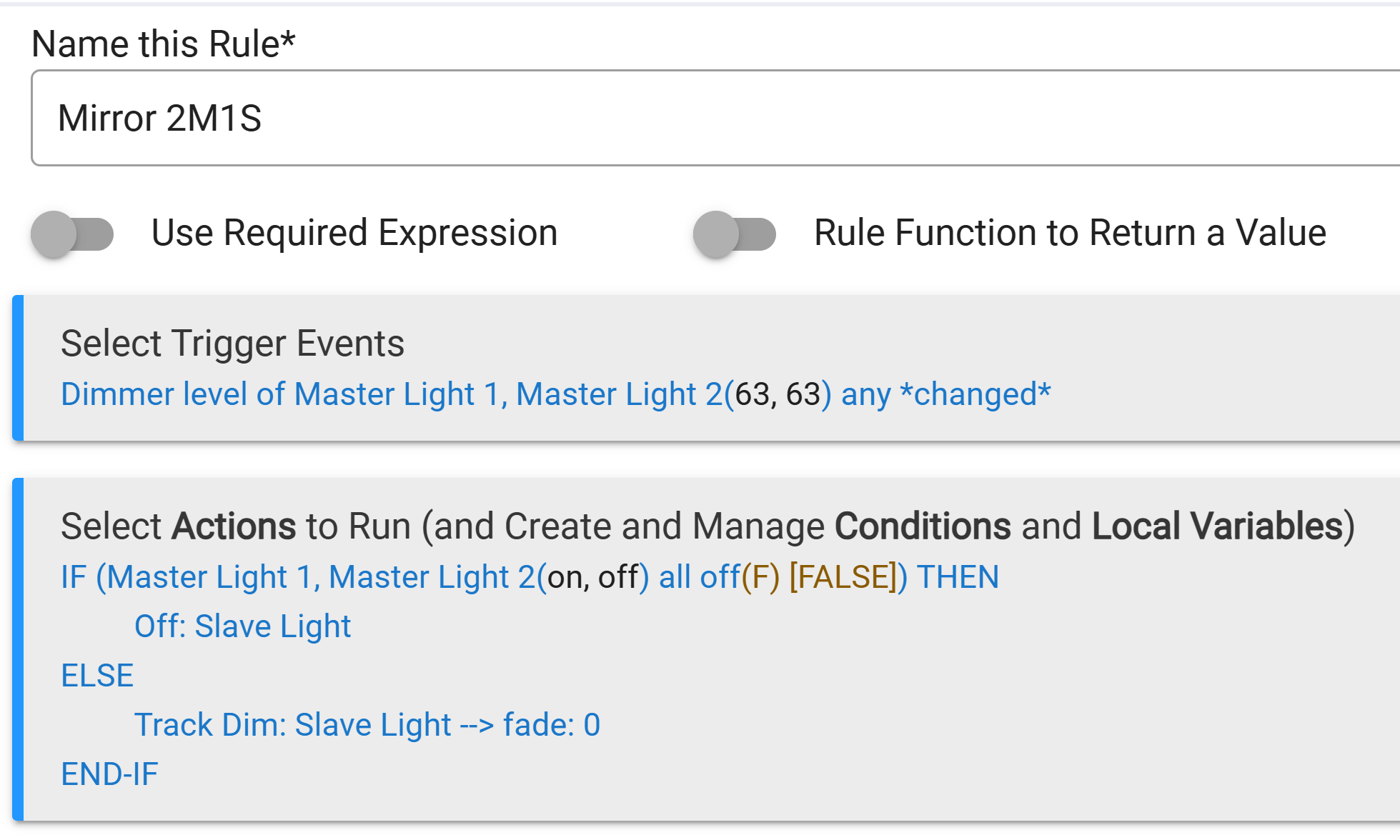
Here's my thinking:
Granted, this needs some tweaking because it can still turn OFF the Slave Light when one of the Master Lights goes off. I just didn't have time to refine the IF-THEN logic. I like what @Sebastien did above, too.
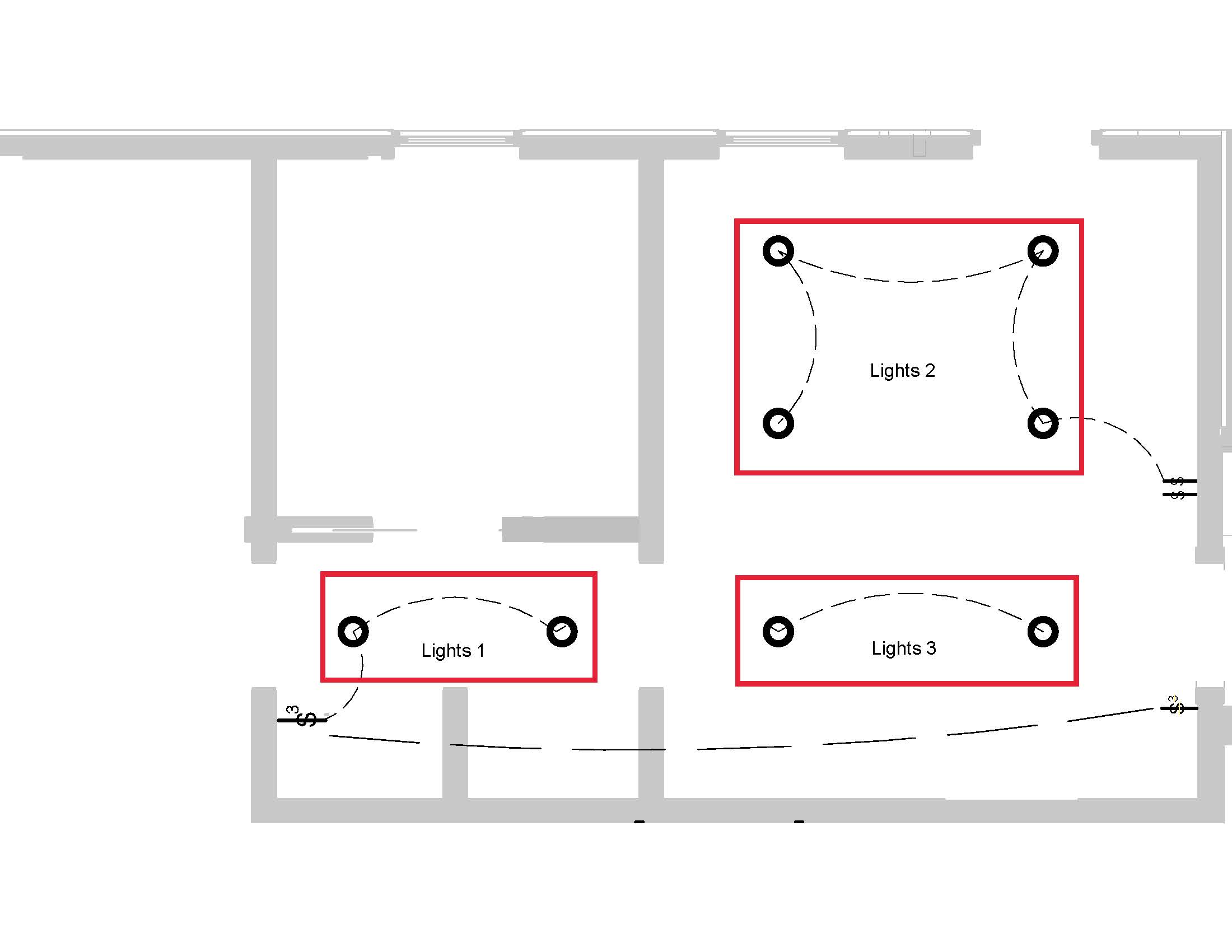
The hard part using RM will be making everything work smoothly, especially when it comes to brightness levels. My original post simplified things a bit to make the task easier to explain. In reality, light 1 is two recessed wafers, light 2 is four recessed wafers, and light 3 is two recessed wafers. They are in an "L-shaped" area where both "parts" of the L share light(s) 3. Here's a drawing...
My guess is that when L1 or L2 is turned on, there will be a slight delay for L3, but it will probably be acceptable. Same when turning off the lights. I'm concerned how it will "look" when dimming comes into play. For example, L1 is at 100% when it is switched off (which means L3 was also at 100% when switched off). Then L2 (which had been switched off much earlier while it was 50%) is switched back on with a single tap so it goes to 50% again. L3 gets switched on by RM, but it starts off at 100% (because that is what its level was when last switched off by RM). Seems like L2 would ramp up to 50%, but RM would switch on L3 at 100%, then have to dim to 50%. Maybe when a rule is triggered by L1 or L2 being switched on and L3 is off, it could obtain the level for L1 or L2 (whichever is being switched on), set the level for L3 to the obtained level, then switch on L3. If that worked and the ramp rates were the same for all dimmers, it seems like L3 would behave like the primary, but with a bit of a delay.
I'm guessing brightness changes may be even more difficult to make them look like they are doing the same thing, but with a brief delay. There's also a lot of edge cases that have to be taken into account.
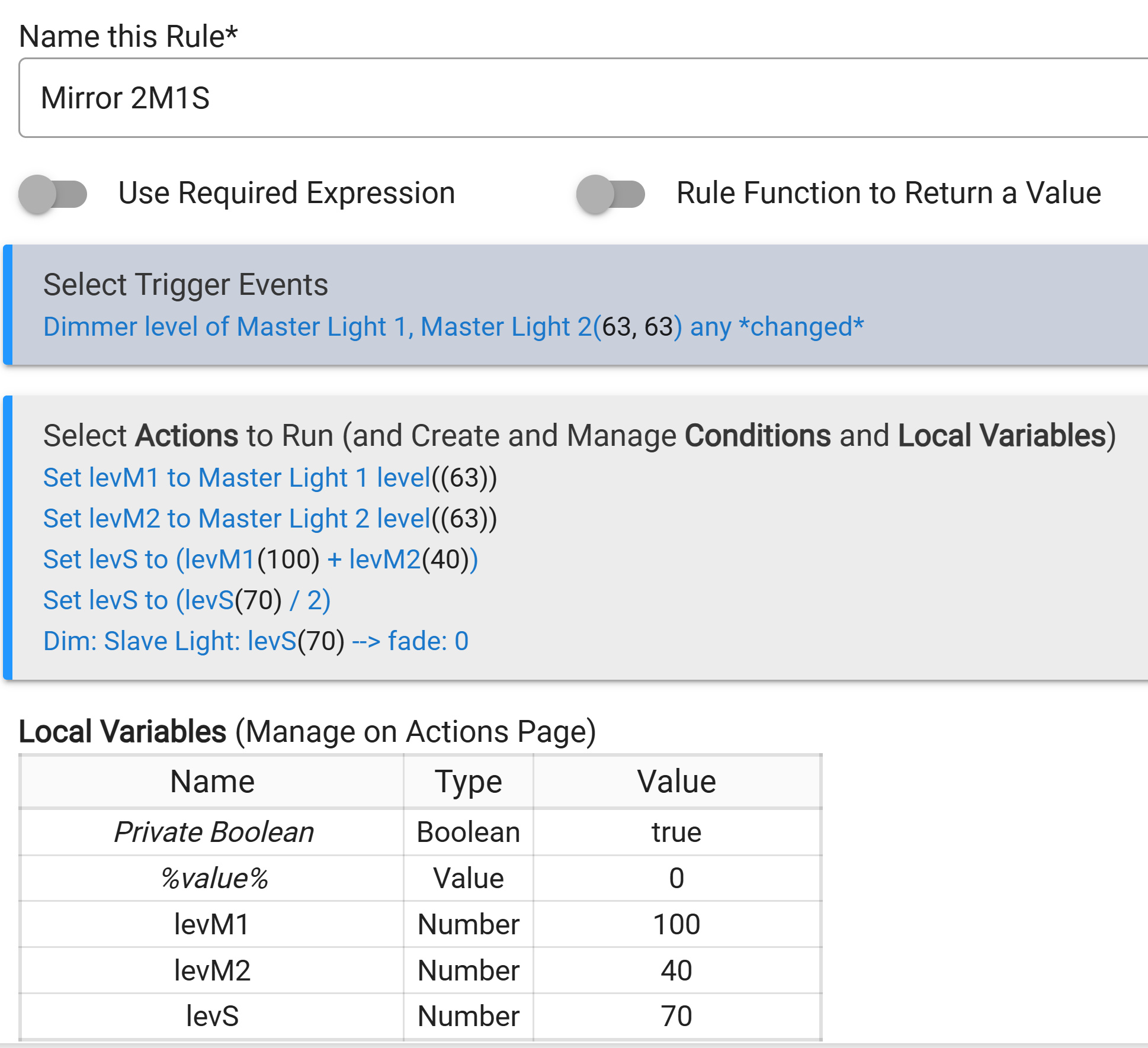
That is precisely what my rule, above, does. However, it needs some tuning if you want to avoid L3 turning off just because L1 or L2 got turned off. I think that's a fairly trivial fix. Let me know if you want to see a more fleshed-out example.
EDIT: Here ya go... does all the things.
These days, I think it is easier to just have AI write you an app.
It took me about one minute to have Gemini write this. I had it use the average of lights 1 and 2 for the dim level of light 3, but when only either 1 or 2 are on, it will just match the dim level of the light that is on.
I did take another couple minutes to test it:
definition(
    name: "Average Dimmer Sync",
    namespace: "custom",
    author: "AI Collaborator",
    description: "Sets Light 3 to the average dim level of Light 1 and Light 2. If only one is on, Light 3 matches that active light. Turns off Light 3 only when both are off.",
    category: "Convenience",
    iconUrl: "",
    iconX2Url: ""
)

preferences {
    page(name: "mainPage")
}

def mainPage() {
    dynamicPage(name: "mainPage", title: "Average Dimmer Sync Settings", install: true, uninstall: true) {
        section("Trigger Dimmers") {
            input "light1", "capability.switchLevel", title: "Light 1", required: true, multiple: false
            input "light2", "capability.switchLevel", title: "Light 2", required: true, multiple: false
        }
        section("Target Dimmer") {
            input "light3", "capability.switchLevel", title: "Light 3 (Target)", required: true, multiple: false
        }
    }
}

def installed() {
    log.info "Average Dimmer Sync installed"
    initialize()
}

def updated() {
    log.info "Average Dimmer Sync updated"
    unsubscribe()
    initialize()
}

def initialize() {
    subscribe(light1, "switch", handleEvent)
    subscribe(light1, "level", handleEvent)
    subscribe(light2, "switch", handleEvent)
    subscribe(light2, "level", handleEvent)
}

def handleEvent(evt) {
    log.debug "Event received from ${evt.displayName}: ${evt.name} = ${evt.value}"

    def s1 = light1.currentValue("switch")
    def s2 = light2.currentValue("switch")

    // 1. Condition: Turn off Light 3 only when both trigger lights are off
    if (s1 == "off" && s2 == "off") {
        if (light3.currentValue("switch") != "off") {
            log.info "Both trigger lights are off. Turning off ${light3.displayName}."
            light3.off()
        }
        return
    }

    int targetLevel = 0

    // 2. Determine target level based on active lights
    if (s1 == "on" && s2 == "on") {
        // Both are on: Calculate the true average
        def l1 = light1.currentValue("level") ?: 0
        def l2 = light2.currentValue("level") ?: 0
        targetLevel = Math.round((l1 + l2) / 2)
        log.info "Both lights active. Syncing ${light3.displayName} to average: ${targetLevel}% (Light 1: ${l1}%, Light 2: ${l2}%)"
    }
    else if (s1 == "on") {
        // Only Light 1 is on: Match Light 1 exactly
        targetLevel = light1.currentValue("level") ?: 0
        log.info "Only Light 1 is active. Syncing ${light3.displayName} to match: ${targetLevel}%"
    }
    else if (s2 == "on") {
        // Only Light 2 is on: Match Light 2 exactly
        targetLevel = light2.currentValue("level") ?: 0
        log.info "Only Light 2 is active. Syncing ${light3.displayName} to match: ${targetLevel}%"
    }

    // Safeguard level range for Hubitat (1-100)
    if (targetLevel < 1) targetLevel = 1

    // 3. Set the target level
    light3.setLevel(targetLevel)
}
I just tried Gemini and sent it well too far after few iterations... In fact code was working but too far from expectation. Logic was clearly machine thinking. So, good luck with AI ...
It is up to you and the quality of your prompts to keep it from going off the rails. Keep previous versions if it goes astray, and specifically tell it not to change parts of code that are working, keep it focused on what you want it to do. Yes, I'm having good luck with AI, your specific experience does not invalidate that.
I am using AI mostly as an automated typewriter because i am very lazy to type whatever specifically at the very beginning. The next steps are to constraint AI left and right what to do and what is more important - what NOT to do. After many iterations I am getting something useful. Please keep in mind - AI did not fall from the sky. It was created by very smart people. But machine is still a machine.
I wrote mainframe software products (operating system utilities) for almost 40 years until I retired a few years ago. I just can't bring myself to asking AI to write code for me.