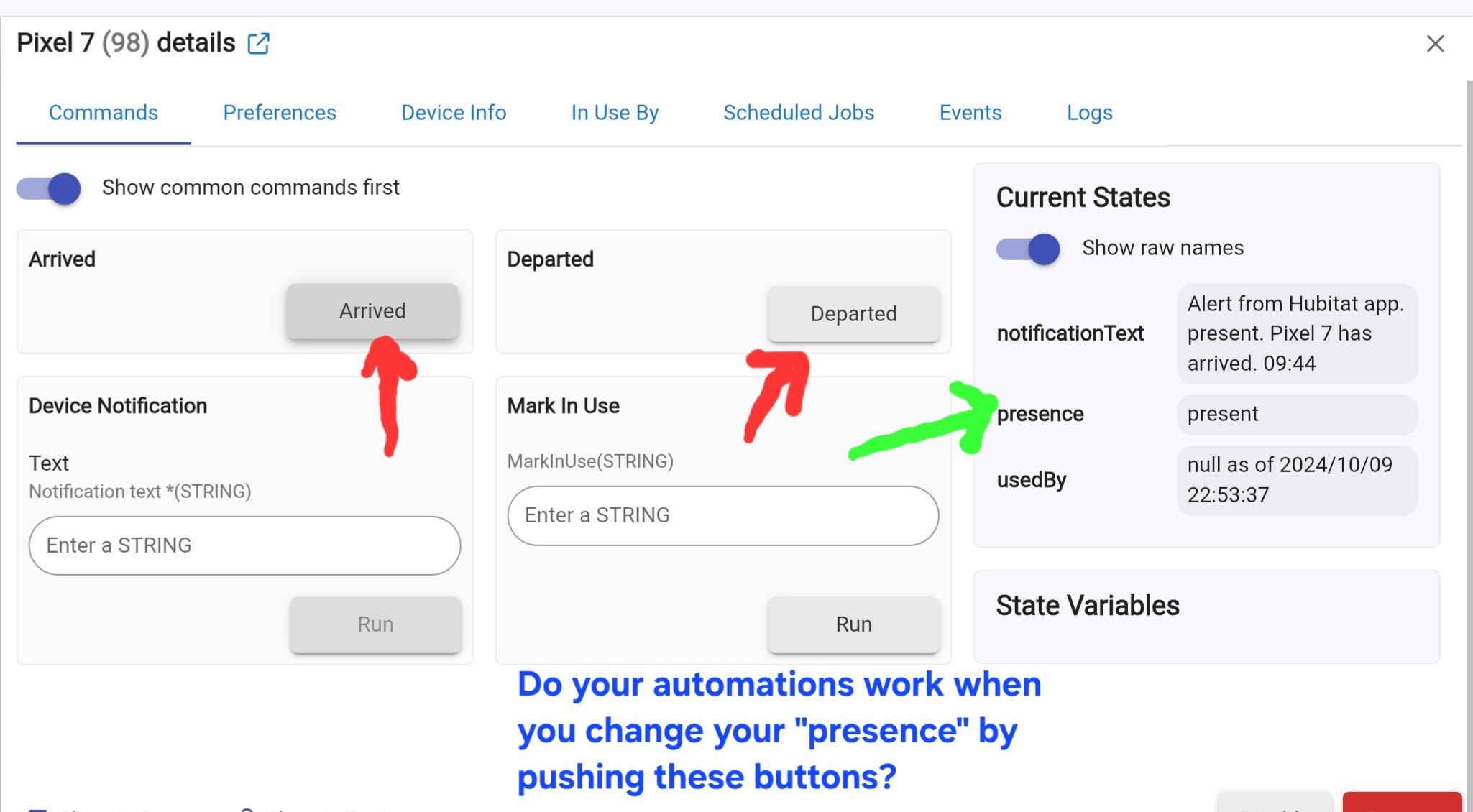
Do your automations work when you manually change your "presence"?
I will try that later today
And yes all the other automations work as expected
Yes if I manually do it, they do work
Does the device page (for the phone), update properly as you move in and out of the geofence? Look at the value where the green line is pointing.
My thinking is that you have not removed your old phone from Hubitat. Your new phone is updating it's "presence" as your logs show, but your automations are tied to the presence of your old phone.
Although your logs show that the hub is aware of your coming and going, I don't think we should assume anything. I think it might be best to go back to a logical step by step procedure. So if you could answer my original questions, I think that would be helpful.
The fact that during re-installation of the phone app, it did not ask you what hub to connect to, or what "phone" you wish to replace. That raises questions on what hub's are registered under your account (one of my previous questions).
EDIT: Just to clarify, I believe you may have created a new phone device when you reinstalled the app. And it may have been created on the original hub. I want to make sure your automations are tied to this new device.
1 Like
I’m not sure what else you are looking for when I changed over to the new hub I shut down the old hub first then I went in and did the restore onto the new hub, so therefore it would not ask for which hub to connect to
same thing with the phone it only came up one phone and registered it. I turned on the Geo fence set everything up the map and the Geo fence page shows me moving and it tells me if I’m in or out of the Geo fence. All no Geo fence automations work just fine. I have deleted the app like 10 times reinstalled it so it would register the phone and as you can see from the picture the log is showing me leaving and coming back. But, the automations are not working. I even went in and deleted the phone out of the device page logged out, signed back in, and It pulled up the same phone when I had both hubs hooked up the new one had a different IP address so when I shut down the old hub, I went in to the router and changed the new hubs IP over to the old hubs IP as I have it set as a static IP I have not physically opened the device page and watch to see if it changes as I leave kinda hard to do when you are driving. if I manually go in and run the automations they work fine. They’re just not working automatically cause they should. I’m not sure if it has something to do with changing the IP address or what if there is anything missing please explain what you arelooking for if I haven’t explained it already
I just checked the device page as I just went out and came back and It did not update in the device. Page but It said I was outside of the geofence
I was hoping you would login to my.hubitat.com and confirm how many hubs are registered under your account. You are suggesting that the method you used to add the new hub, should have automatically removed the old hub. Let's take a moment to confirm that. If you do find 2 hub's registered to your account, please verify the IP addresses of each, as I requested earlier.
How did you access the Hubitat console after deleting the phone device. Did you use a web browser on a PC or phone, or did you use the phone app.? A deleted device should not automatically appear without you re-creating it.
When you removed the app from your phone and reinstalled it, it should ask what hub you want to connect to, even if you only have a single hub. It should also ask if you are adding a brand new phone or replacing an existing one. In your case you would choose replacing an existing phone. Yet you confirmed that you did not see, or respond, to these questions.
Just to confirm, you are seeing this on the phone app, but you have not seen this when looking at the phone's device page. The section where I drew the green line? Unless you are paying for remote access you would not be able to see the phone status on the device page while you were away. This would require an assistant at home to check that while you were away.
I did not log into to that when I changed over I did everything in the app
I can’t recall if they both showed up through the app when I checked that way I haven’t done anything on the web or computer and you would be correct I do pay for remote admin
Would be it be beneficial to just do a hard reset and start over maybe something got screwed up when I changed the ip address cause I didn’t change it till after I was already in the new hub
I’m try my best to answer ur questions the best I can being I did this a few days ago and don’t remember everything I exactly did when I did it
I just went and rechecked what was in ur picture and where the green arrow is did change when I hit departed and when I hit arrived when I hit arrived manually the automations work
To summarize my previous questions......
When you push the "departed" and "arrived" buttons on the phone's device page, your automations work.
You also told me that when you look at the phone app, it correctly shows you inside or outside the geofence.
So the only question is, "is your phone sending updates to the hub when it changes it's status".
That is what we want to see when your phone changes location.
Since you have remote access ability, you can easily check that does change when you are away from home.
I have a feeling that you may have both hubs registered to your account, and the phone is sending it's status updates to the old hub. That is why I have been asking that you verify which hub's are registered to your account.
The fact that you weren't asked which hub to connect to, when you reinstalled the app, and you weren't asked if you were adding a new phone, or replacing an existing phone, is very unusual. In fact I have never seen it not ask those questions (at least not on Android), so I also question if the app was installed correctly.
1 Like
I've had it happen with the iOS app. I'm not sure which version the OP is using. But it's easy enough to switch hubs on the app's home page if that's what the problem is. (Home --> Hub name link --> Switch to another hub)
I've also had it take a while to catch up to the fact that the app is on a new phone. Sometimes hitting refresh on the App Settings page helps. But every time I've switch phones it seems like there's a disconnect for a little while between the phone the app is loaded on and the phone device on the hub.
1 Like
Here’s a new one So if I go into the geofence part and tap on send geo event the automations work.
I think maybe twice it’s actually worked on its own and this morning it said I came home and left all at the same time so is there anyone out there with any idea’s of what it might be is it the phone or is it the hub
There are a number of things that can cause this:
Sleep settings, background activity, compass decalibration. It really depends on your phone and it's settings.
I documented most of the fixes for my phone here:
Sorry forgot to say I have a Iphone
Anyone else out there have any ideas

