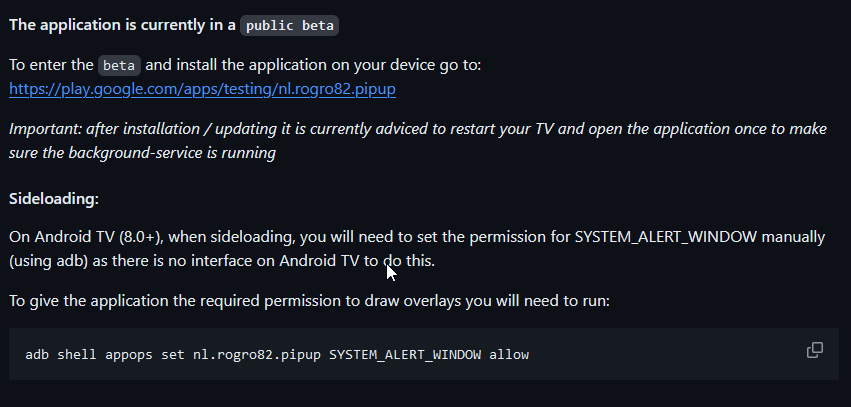
I have found this - GitHub - rogro82/PiPup: Enhanced notifications for Android TV
But no apk and the link to the playstore appears to no longer work
I have found this - GitHub - rogro82/PiPup: Enhanced notifications for Android TV
But no apk and the link to the playstore appears to no longer work
Is Line 90 the only place you made change of ports? I didn't see it anywhere else.
I will check that later today. When I created this post, the app was available in the play store...
I tried the larger driver file with 243 lines that includes ability to enter PORT on Device Page and get same error. I was able to get the Home Assistant integration to work using NOTIFICATIONS FOR ANDROID TV on Shield.
As indicated on the github of the app. The app is still in Beta.
I didn't remember that, it's been a while since I installed the application...
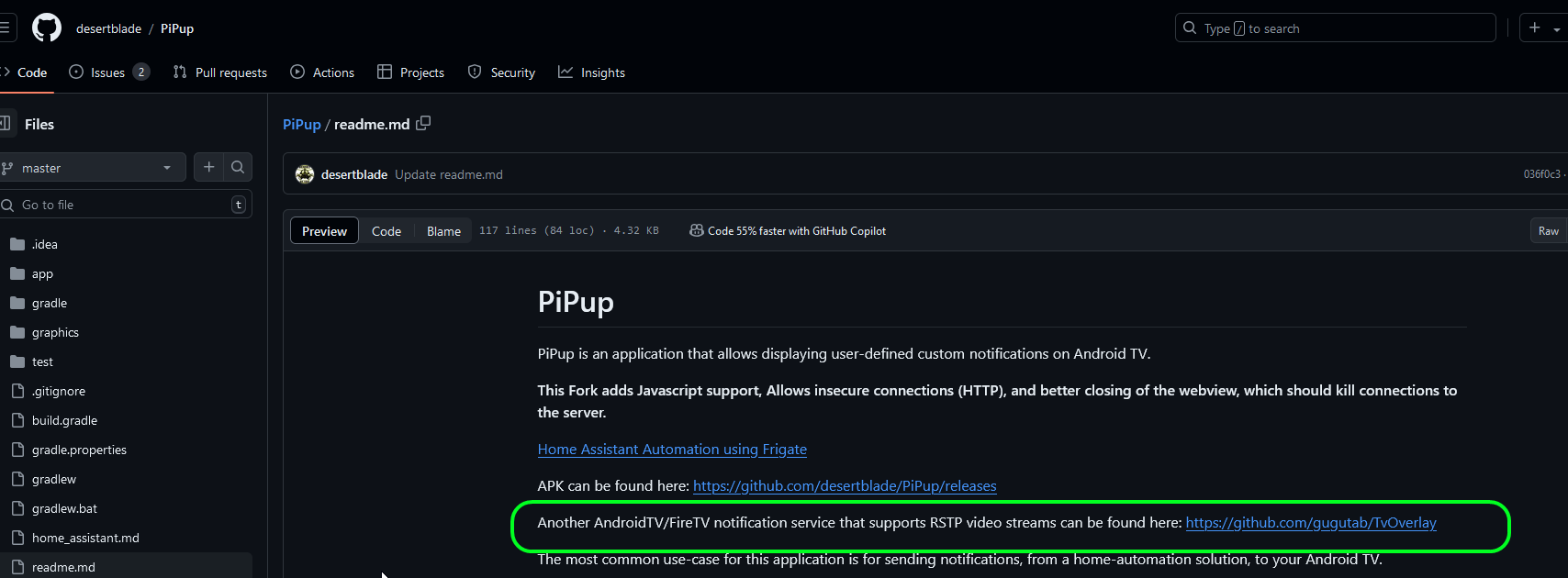
I have done some more digging and found a fork of that app as that one is no longer in use,
The app is here: Releases · desertblade/PiPup · GitHub
The guide I found is: A short guide for setting up TV PiP notifications (with PiPup) - Community Guides - Home Assistant Community
To install this I did the following...
Interesting, I never actually looked that far down as was too determined to get this working tonight.
For now I'm happy with this but Ring images would be a benefit. I was previously using another driver that sent notifications to Kodi on my shield. Now using PipUp instead I can send notifications to overlay on any app so that's a big improvement already over what I had a couple of hours ago.
Cheers for your help in steering me the right way on this
Sorry to dig up this discussion. But now that I have a camera phone. I'd like to try including an image to the notifications when it rings. Would it be possible to enhance the code to include image support?
I had put this project aside, and I just spent my sleepless night working on it. All in all, I made good progress with the help of ChatGPT. Maybe someone will be able to help me with the last thing that's holding me back?
Here is my rewritten driver (i'm not a dev, I only used chatgpt to help me on this)
/**
 *  PiPup Doorbell Auto v4.1 (camera Snapshot + Fallback)
 *  Author: Patrick Gagne
 *  2025-11-07
 *
 *  Function:
 *    - Shows camera snapshot on PiPup
 *    - If the snapshot is unavailable → shows a fallback test image
 *    - JSON format compatible with PiPup
 */

metadata {
    definition (name: 'PiPup Doorbell Auto v4.1', namespace: 'pgagne', author: 'Patrick Gagne') {
        capability 'Notification'
        capability 'Switch'
        command 'notifyDoorbell'
    }

    preferences {
        input(name: "DebugLogging", type: "bool", title:"Enable Debug Logging", defaultValue: true)
        input(name: "TVIPAddress", type: "string", title:"Android TV / PiPup IP Address", defaultValue: "")
        input(name: "SnapshotURL", type: "string", title:"Snapshot URL",
              defaultValue: "https://192.168.1.105/cgi-bin/api.cgi?cmd=Snap&user=admin&password=ReyOhLink99!")
        input(name: "FallbackImageURL", type: "string", title:"Fallback Image URL",
              defaultValue: "https://mir-s3-cdn-cf.behance.net/project_modules/max_1200/cfcc3137009463.5731d08bd66a1.png")
        input(name: "DisplayDuration", type: "number", title:"Duration in seconds", defaultValue: 15)
        input(name: "Position", type: "number", title:"Position (0=TopRight, 1=TopLeft, 2=BottomRight, 3=BottomLeft, 4=Center)", defaultValue: 0)
        input(name: "DefaultTitle", type: "string", title:"Default Notification Title", defaultValue: "Doorbell")
        input(name: "TitleColor", type: "string", title:"Title Color (#RRGGBB)", defaultValue: "#0066cc")
        input(name: "TitleSize", type: "number", title:"Font Size of Title", defaultValue: 20)
        input(name: "MessageColor", type: "string", title:"Message Color (#RRGGBB)", defaultValue: "#000000")
        input(name: "MessageSize", type: "number", title:"Font Size of Message", defaultValue: 14)
        input(name: "BackgroundColor", type: "string", title:"Background Color (#RRGGBB)", defaultValue: "#ffffff")
        input(name: "Message", type: "string", title:"Message Text", defaultValue: "Someone is at the door!")
    }
}

void installed() { debugLog("Installed") }
void updated() { debugLog("Preferences Updated") }
void initialize() { debugLog("Initialized") }

void deviceNotification(String text) {
    debugLog("deviceNotification received: ${text}")
    notifyDoorbell(text)
}

void on() {
    debugLog("Switch ON → triggering doorbell notification")
    notifyDoorbell()
}

void off() {
    debugLog("Switch OFF → no action")
}

void notifyDoorbell(String customMessage = null) {
    String messageText = customMessage ?: DoorbellMessage
    if (!TVIPAddress) {
        errorLog("TV IP address is missing!")
        return
    }
    sendSnapshotToPiPup(messageText)
}

private void sendSnapshotToPiPup(String messageText) {
    def imageURL = SnapshotURL
    if (!imageURL) {
        errorLog("Snapshot URL missing, using fallback image")
        imageURL = FallbackImageURL
    }

    try {
        // Quick check of URL accessibility
        httpGet([uri: imageURL, timeout: 5]) { resp ->
            if (resp.status != 200) {
                debugLog("Snapshot inaccessible (HTTP ${resp.status}), using fallback image")
                imageURL = FallbackImageURL
            }
        }
    } catch (Exception e) {
        debugLog("Error accessing snapshot: ${e}, using fallback image")
        imageURL = FallbackImageURL
    }

    try {
        def json = [
            duration: DisplayDuration,
            position: Position,
            title: DefaultTitle,
            titleColor: TitleColor,
            titleSize: TitleSize,
            message: messageText,
            messageColor: MessageColor,
            messageSize: MessageSize,
            backgroundColor: BackgroundColor,
            media: [
                image: [
                    uri: imageURL,
                    width: 480
                ]
            ]
        ]

        def postParams = [
            uri: "http://${TVIPAddress}:7979/notify",
            headers: ["Content-Type": "application/json"],
            body: groovy.json.JsonOutput.toJson(json)
        ]

        debugLog("JSON Snapshot sent: ${groovy.json.JsonOutput.toJson(json)}")

        httpPost(postParams) { resp ->
            debugLog("sendSnapshotToPiPup: Response ${resp.status}")
        }

    } catch (Exception e) {
        errorLog("sendSnapshotToPiPup: ${e}")
    }
}

// Logging Utility
def debugLog(msg) { if (DebugLogging) log.debug msg }
def errorLog(msg) { log.error msg }
The problem remains that I am able to display an image from an external URL that points to a JPG or PNG file, but when I try with the URL from Frigate, it doesn't work.
Great news! I have something that work completely now.
The problem was the Android app that was outdated. Someone had built recently an improved version that work instantly and flawless! Take the .apk here:
In the next few days I will try to improve the driver by adding video stream support.
So far so good, I contacted the developer of the pipup fork (GitHub - steffjenl/PiPup at 0.1.7) and for now, feed display is not implemented. But it's on his to-do list. I will improve my driver when this feature becomes available. In the meantime, I've improved the driver to support another feature that pipup supports, namely displaying a web page. This is useful for displaying custom content or a link that sends to a web video stream such as mjpeg with Frigate, for example.
Here is the the complete instructions:
download latest .APK at: Release 0.1.7 · steffjenl/PiPup · GitHub
download adb (Android debug bridge)
use the following command: adb connect IP_address_of_AndroidTV
on AndroidTV device, autorize connection
use the following command: adb install C:\pathtoapk\pipup\app-release.apk
use the following command: adb shell appops set nl.rogro82.pipup SYSTEM_ALERT_WINDOW allow
Please note that you also need to setup a virtual device for your doorbell. See: Reolink Doorbell - receiving Visitor events in Hubitat - #13 by richard-brown
Latest Hubitat driver code:
/**
 *  PiPup Doorbell Auto v4.2 (Snapshot + Web Media + Fallback)
 *  Author: Patrick Gagne
 *  2025-11-14
 *
 *  New in v4.2:
 *    - Adds support for media.web (e.g. MJPEG streams or HTTP web pages)
 *    - Automatically chooses web OR image depending on settings
 */

metadata {
    definition (name: 'PiPup Doorbell Auto v4.2', namespace: 'pgagne', author: 'Patrick Gagne') {
        capability 'Notification'
        capability 'Switch'
        command 'notifyDoorbell'
    }

    preferences {
        input(name: "DebugLogging", type: "bool", title:"Enable Debug Logging", defaultValue: true)
        input(name: "TVIPAddress", type: "string", title:"Android TV / PiPup IP Address", defaultValue: "")

        // Image snapshot
        input(name: "SnapshotURL", type: "string", title:"Snapshot URL", defaultValue: "")
        input(name: "FallbackImageURL", type: "string", title:"Fallback Image URL",
              defaultValue: "https://mir-s3-cdn-cf.behance.net/project_modules/max_1200/cfcc3137009463.5731d08bd66a1.png")

        // Web media
        input(name: "WebMediaURL", type: "string", title:"Web Media URL (optional)",
              description:"If set, the driver sends media.web instead of an image", defaultValue: "")

        // Display settings
        input(name: "DisplayDuration", type: "number", title:"Duration (seconds)", defaultValue: 15)
        input(name: "Position", type: "number", title:"Position (0=TR,1=TL,2=BR,3=BL,4=Center)", defaultValue: 0)
        input(name: "DefaultTitle", type: "string", title:"Notification Title", defaultValue: "Doorbell")
        input(name: "TitleColor", type: "string", title:"Title Color", defaultValue: "#0066cc")
        input(name: "TitleSize", type: "number", title:"Title Size", defaultValue: 20)
        input(name: "MessageColor", type: "string", title:"Message Color", defaultValue: "#000000")
        input(name: "MessageSize", type: "number", title:"Message Size", defaultValue: 14)
        input(name: "BackgroundColor", type: "string", title:"Background Color", defaultValue: "#ffffff")
        input(name: "Message", type: "string", title:"Default Message Text", defaultValue: "Someone is at the door!")
    }
}

void installed() { debugLog("Installed") }
void updated() { debugLog("Preferences Updated") }
void initialize() { debugLog("Initialized") }

void deviceNotification(String text) {
    debugLog("deviceNotification received: ${text}")
    notifyDoorbell(text)
}

void on() {
    debugLog("Switch ON → sending notification")
    notifyDoorbell()
}

void off() { debugLog("Switch OFF → no action") }

void notifyDoorbell(String customMessage = null) {
    String messageText = customMessage ?: Message
    if (!TVIPAddress) {
        errorLog("TV IP address is missing!")
        return
    }

    if (WebMediaURL?.trim()) {
        sendWebMediaToPiPup(messageText)
    } else {
        sendSnapshotToPiPup(messageText)
    }
}

//
// ───────────────────────────────────────────
//  IMAGE SNAPSHOT MODE
// ───────────────────────────────────────────
//

private void sendSnapshotToPiPup(String messageText) {
    def imageURL = SnapshotURL
    if (!imageURL) {
        errorLog("Snapshot URL missing → using fallback")
        imageURL = FallbackImageURL
    }

    // Validate snapshot
    try {
        httpGet([uri: imageURL, timeout: 5]) { resp ->
            if (resp.status != 200) {
                debugLog("Snapshot inaccessible (HTTP ${resp.status}) → fallback")
                imageURL = FallbackImageURL
            }
        }
    } catch (Exception e) {
        debugLog("Snapshot error: ${e} → fallback")
        imageURL = FallbackImageURL
    }

    def json = [
        duration: DisplayDuration,
        position: Position,
        title: DefaultTitle,
        titleColor: TitleColor,
        titleSize: TitleSize,
        message: messageText,
        messageColor: MessageColor,
        messageSize: MessageSize,
        backgroundColor: BackgroundColor,
        media: [
            image: [
                uri: imageURL,
                width: 480
            ]
        ]
    ]

    sendToPiPup(json, "snapshot")
}

//
// ───────────────────────────────────────────
//  WEB MEDIA MODE  (MJPEG, Dashboard, etc.)
// ───────────────────────────────────────────
//

private void sendWebMediaToPiPup(String messageText) {
    String url = WebMediaURL

    def json = [
        duration: DisplayDuration,
        position: Position,
        title: DefaultTitle,
        titleColor: TitleColor,
        titleSize: TitleSize,
        message: messageText,
        messageColor: MessageColor,
        messageSize: MessageSize,
        backgroundColor: BackgroundColor,
        media: [
            web: [
                uri: url,
                width: 640,
                height: 480
            ]
        ]
    ]

    sendToPiPup(json, "web media")
}

//
// ───────────────────────────────────────────
//  SHARED PiPUP POST FUNCTION
// ───────────────────────────────────────────
//

private void sendToPiPup(def json, String mode) {
    try {
        def postParams = [
            uri: "http://${TVIPAddress}:7979/notify",
            headers: ["Content-Type": "application/json"],
            body: groovy.json.JsonOutput.toJson(json)
        ]

        debugLog("JSON (${mode}) sent: ${groovy.json.JsonOutput.toJson(json)}")

        httpPost(postParams) { resp ->
            debugLog("PiPup response: ${resp.status}")
        }

    } catch (Exception e) {
        errorLog("Error sending notification: ${e}")
    }
}

// Logging
def debugLog(msg) { if (DebugLogging) log.debug msg }
def errorLog(msg) { log.error msg }
Device settings example:
Just caught up on this, will be giving it a go soon!
Download the Hubitat app