Yes
I'll check that.
I did do this though, wasn't sure at first if it had to be separate but decided it must have to be within the same project.
Yes
I'll check that.
I did do this though, wasn't sure at first if it had to be separate but decided it must have to be within the same project.
Will this integration allow me to trigger a google home routine? I am currently using the standard hubitat integration and virtual switch and it will not kick of the routine in google home.
Yes, devices configured via this app can trigger Google Home automations/routines once you configure Home Graph as long as you have the "Push device events to Google" setting enabled.
Hi All
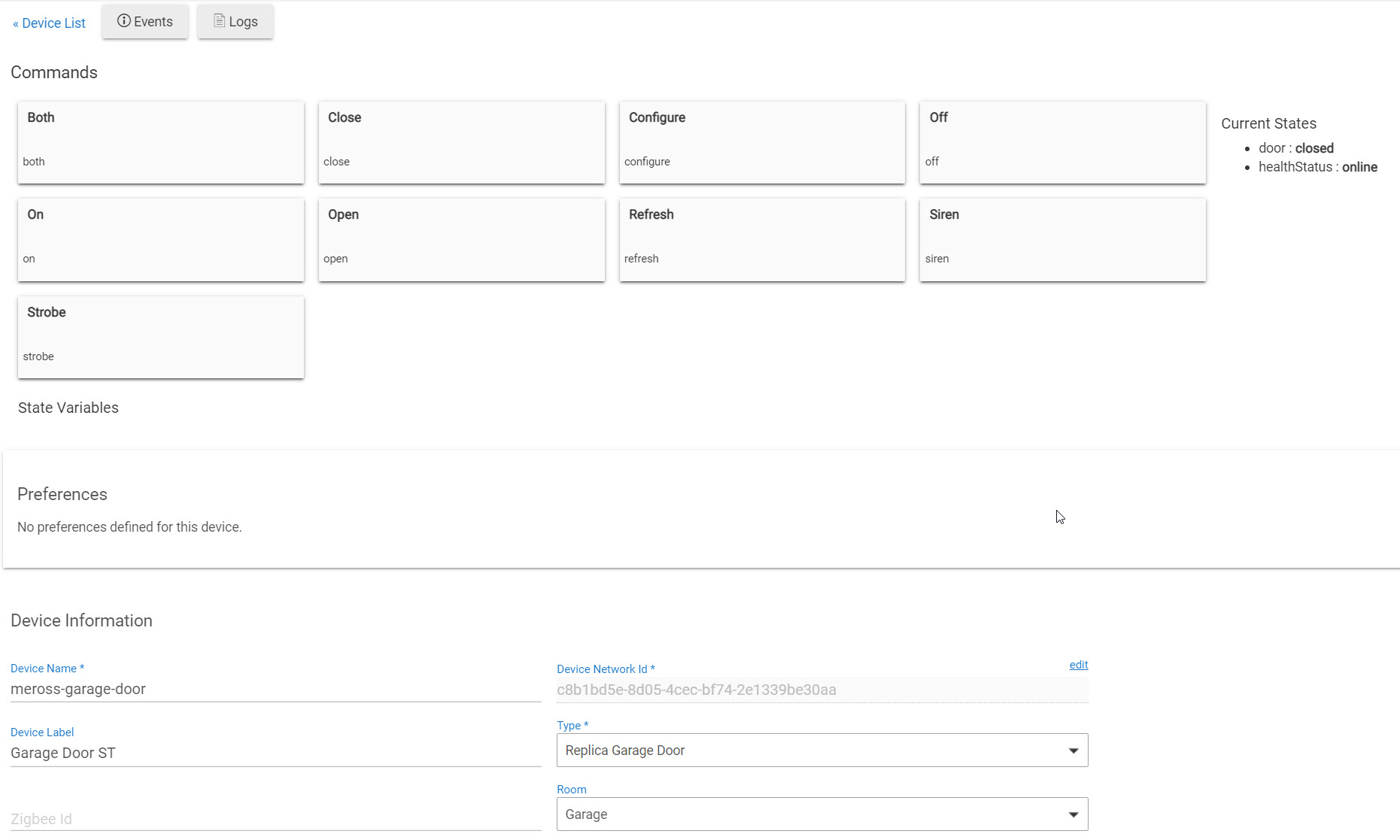
so I'm having a weird issue with my garage door. I'm pretty sure I have Google Home Community setup properly in Hubitat. Also I can command the garage door from Hubitat just fine.
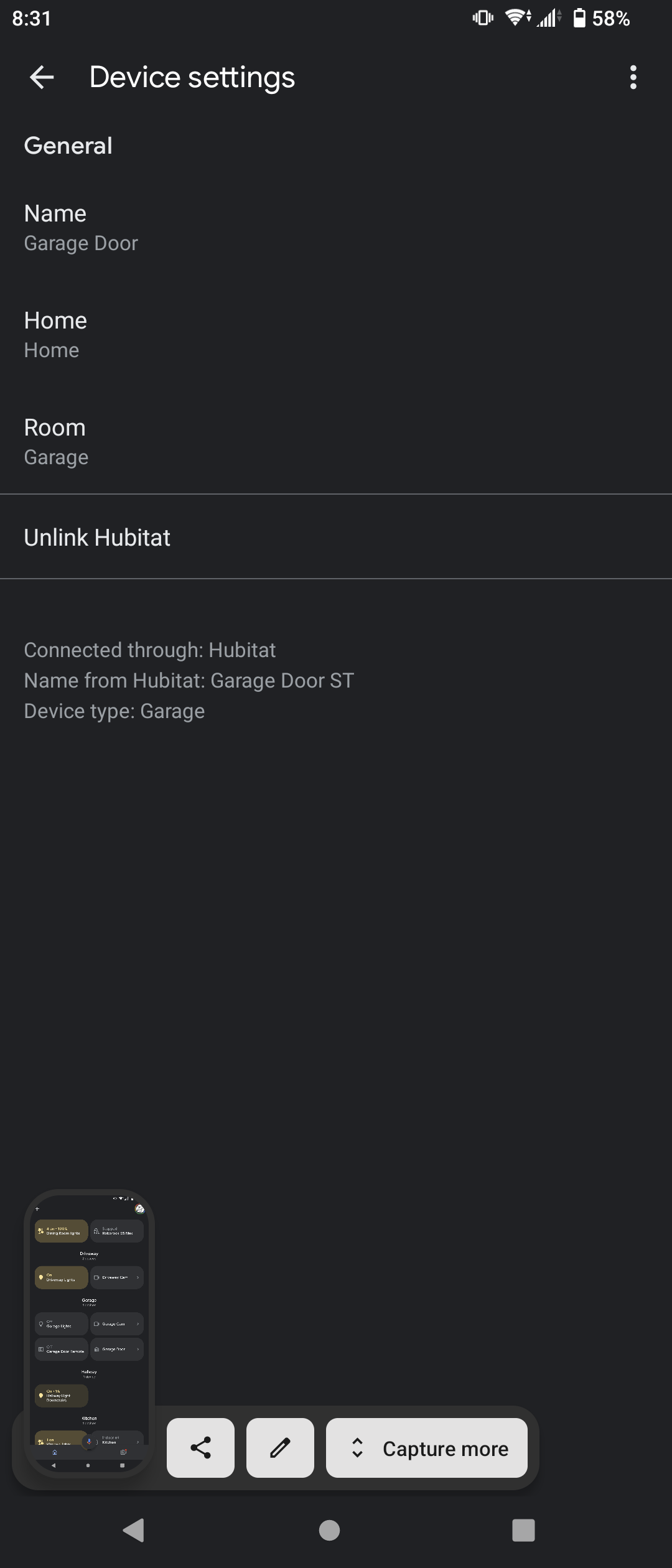
But in the google home app, I can't control the garage door. It shows up in the app, but theres no controls and it doesn't report the status of the door(open or close).
If I setup a virtual switch in hubitat and have that mirrored into google home, I can control the garage door with that(Garage Door Remote in the screen shots below).
Any ideas? Is this just a limitation of Google Home?
Thanks in advance
Yes, I believe that's a limitation of the Google Home app. If you can tell the Google Assistant to open/close the door and ask about its state via voice commands then that should mean everything is set up correctly.
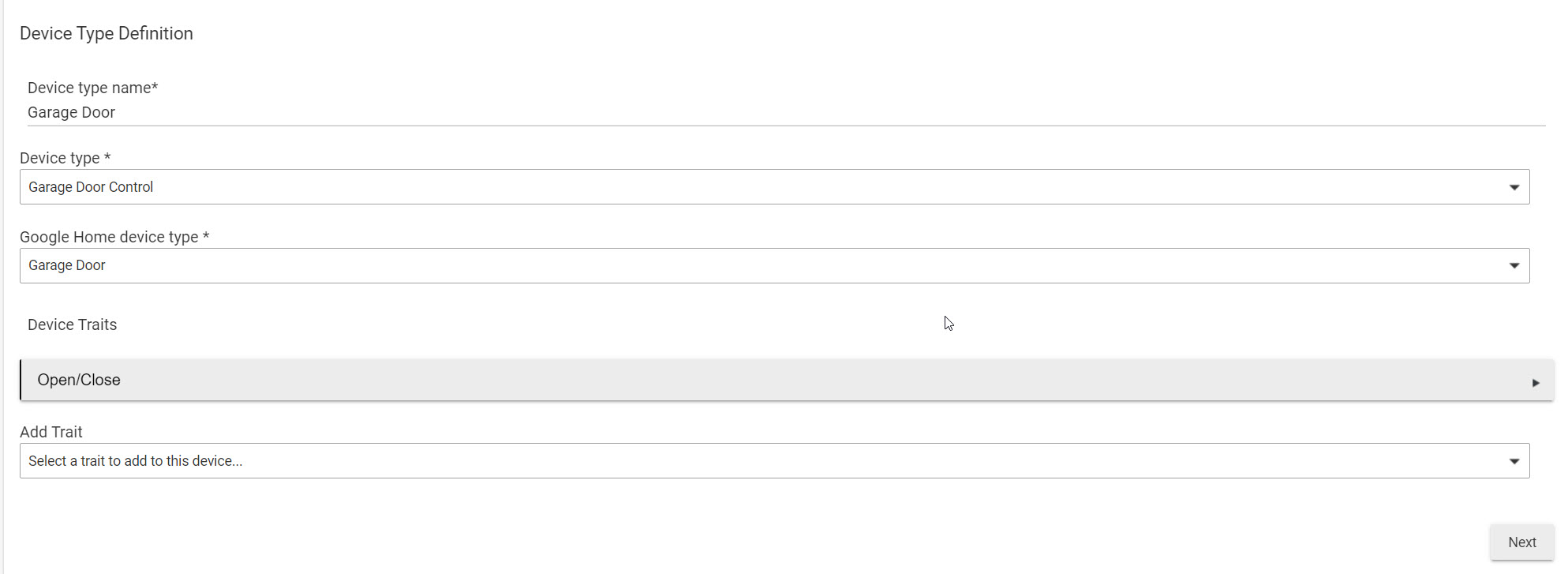
EDIT: I just looked at your screenshots again and your Open/Close trait doesn’t look right. You should have the “discrete only” toggle enabled since your door can only be fully opened and closed, not partially. Also the “open/close
attribute” should be “door” since that’s the attribute Hubitat uses to track the open/closed state of the device. Also, if you want to be able to control the door via the Google Assistant then you need to turn the “query only” toggle off.
Thank You! those settings did the trick. Now I can control the garage door through the google home app.
You have thermostatMode, but can you also add activeThermostatMode to report if the heat/cool is on at the current moment?
On my thermostat this is given by the thermostatOperatingState state. But it might need to be mapped - mine says heating but looks like Google wants heat.
Thanks.
Searching the forums, I know I'm definitely not the first person to have this issue... But for the life of me after hours of troubleshooting, I can't figure out what's going on. I have had this up and running for a few months without issue. Devices were all synced and working nicely with GH. When I came home from work today, however, GH said HE was offline... None of the devices I'd integrated were working... During troubleshooting, I tried resyncing the integration, and got the dreaded "The parameter "state" must be set in the query string." message. Mind you, this had been working for months without issue, so my oauth was setup properly. The only thing that's changed recently is I got rid of the Nest Wifi Pros (God awful, had nothing but problems with them) and swapped them for the Unifi Dream Machine SE with U6-Pro APs around the house. I have the HE hub I'm trying to integrate with GH again setup with a static IP address on the UDM-SE has been running fine for a week, HE hub is set to DHCP, not a static IP address, and the IP is showing up properly under my Registered Hubs. My motion automations and Lutron Picos controlling Hue lights are all working. Just the GH integration isn't working. I can sync devices to GH from the HE-supplied linked service for GH, but not the community-maintained GH integration link.
So far, I've unlinked my [test] Hubitat account from GH, removing all the devices, as one troubleshooter recommended trying...feel like that was a mistake. I tried restarting my phone, wifi, HE hub... Nothing. Verified my GH Smart Home Action was setup properly (app ID, hub ID, fulfillment URL, auth URL, token URL, etc.). I tried resetting the link on my Pixel phone (beta GH app) and my husband's Apple phone (stock app, non-beta). The only thing I haven't tried yet is completely removing the app/GH Smart Home Action integration and starting from scratch. Before I try that, I'm hoping someone might have something else I should try before I have to take the time to setup all the different types of devices and settings within the Google Home Community app. Any help would be much appreciated... 

So I had this happen this evening. I was able to resolve it. Here is what I did:
In Google Home App, go back to add, works with smart things.
Click your test program.
Click reauthenticate.
Mine errored out here.
Restart hub.
Wait for hub to come back up.
Repeat step 1-3. Mine landed on a 404 page.
Repeat #6 this time I got a do you want to sing in as (email address). Then nothing.
#6 again, this time it took me to pick a hub, the nothing.
#6 again, this time I was able to pick all my devices and finish.
It reconnect to Google home.
I know it sounds stupid, but I think something is borked with oauth, but I just kept hitting it and eventually it worked.
I relented. Took screenshots of all the device types so I could reconfigure everything, deleted the Google Home Community app, and then recreated everything. Then went back to the Actions Console page to update the Fulfillment URL with the revised app ID number. Then when I went back to the GH app, clicked on Works with Google, re-setup my [test] Hubitat integration, and voila, they all showed up again. Now to rename and reconfigure to the proper rooms... Hopefully this isn't a recurring issue...
SOLVED: I just needed to add it to a home first, then it could be added to a room. My mistake. I'm leaving the rest of this post in case someone else makes the same mistake.
Note: I've solve this issue, I'm leaving this here in case others trip-up on the same issue.
I think I've got this set-up and working properly, but I'm facing one issue: I can't assign my device to a room in my house in the Google Home app. It is my bathroom fan I'm trying to set up, and it shows up as "Bathroom Fan" in Google Home, and I can toggle it on and off (and it correctly turns the fan on and off). However, the device shows up under the "Linked to you" section at the bottom of the Google Home app, and doesn't offer any way to move it into a room.
Note I'm using the Google Home Preview version of the app. I'm not sure if this matters or not.
I've tried two approaches to move the device into a room:
Has anyone else experienced this issue? I searched this thread and did not see any mention of this, but maybe I missed it. It could also be because I'm using the "Preview" version of the Google Home app.
Might go further and point out how to do that. It gets me every now and then when I add new devices.
The device is usually listed at the very bottom of the list of Google Home app in the unassigned section ("linked to you" header) of all your devices. Opening the device, there should be an "add to room" button at the bottom of the device page. Clicking that will prompt to add to a home, then select the room. If no, then clicking the gear icon will get you to the settings. From there, you should be able to see "add to a home" under the home section.
@mbudnek I have seen some 500 errors from Google when updating device state.
Unfortunately google's error messages are super unhelpful and just show a generic internal error. So I added a bit of logging to dump out the request when an exception is thrown when posting. This produced:
Error posting device state: request=[requestId:ac0ba96a-95b9-4b5a-bb9b-dc1274d22109, agentUserId:removed, payload:[devices:[states:[286:[activityState:null, playbackState:playing, on:true, currentVolume:49, isMuted:false]]]]]
After a bit of fiddling I worked out that it seems Google's handling of the playbackState enum is case sensitive. When I uppercased the value, the error stopped being thrown. This case sensitivity doesn't seem consistent though as I'm not seeing similar errors for other attributes.
I can fix the issue with the addition of some .toUpperCase() calls, but before I submit a PR I wondered if you had seen this with other trait attributes? Or if you think a global tweak that uppercases any enum type attributes is worth doing?
@SuppressWarnings('UnusedPrivateMethod')
private deviceStateForTrait_MediaState(deviceTrait, device) {
    return [
        activityState: device.currentValue(deviceTrait.activityStateAttribute)?.toUpperCase(),
        playbackState: device.currentValue(deviceTrait.playbackStateAttribute)?.toUpperCase()
    ]
}
That seems consistent with Google's documentation. I'm not aware of any other such values in the traits that are currently implemented.
I just want to give another "thanks" for the work that has gone in to this.
Now that Google has added more controls from the app, that, along with this app, are really starting to makes things work really well.
With audio devices (like amps) you can now have on/off control, volume control (without having to use light brightness), and for my Monoprice 6 Zone Child devices, I added toggles so I can change the inputs.
Great work!
can this be used to control a light that i have linked to google home via hubitat as i have some wifi lights that it would be nice if i can control using hubitat
It won't directly expose the light to Hubitat, but, you could create a virtual switch in Hubitat, push that to GH, and write a GH routine to have the virtual switch mimic the lights.
If you got a C-8 and do the migration...don't forget to go update your Hub ID in the the Google app.
And for those like me who need more help figuring things out, it's at Step 8 of the setup instructions. 
I updated to a C8 and updated my hub ID but I'm getting this error now.
groovyx.net.http.HttpResponseException: status code: 404, reason phrase: Not Found on line 212 (method updated)
Am I forgetting to update something else?
Download the Hubitat app