Considering the Respeaker was a bust, i just ordered a HA Voice Preview device. Hopefully i will have more success with that. As of right now the basic functions seem to be working well from the chat virtual device.
3 Likes
Keeping an eye on this thread. Has your HA voice preview showed up? I've read mixed reviews of it so far.
It should be here tomorrow. Once I get it setup, i will give a review.
There are allot of potential gotcha's for its usefulness. As long as it transcribes the request properly I would expect the responses to be dependent on the quality of the LLM to generate a good answer.
Then you got more advanced non Home Automation specific functions. At the moment i am not sure how to make it work with things like plex for video or music playback.
I also need to decide if i am going to get another dedicated GPU for the LLM Processing.
2 Likes
I finally got it hooked up this evening and onboarded into my HA instance just to test with. There are a few interesting things of note. One of them is it does seem to be a very flexible device the way HA has it setup. It seems the way HA has setup their stuff with it, it can be fully cloud, Local but with limited functions, and then Fully local with more robust and flexible abilities fully leaning on external resources for TTS, SST and LLM. I definitely need more time to play with it, but my initial thoughts on it are pretty positive. It seems very configurable. I am using it with all the bells and whistles for local processing.
The biggest con i have right now with it is that, at least with HA, it seems to be slower then expected. I haven't narrowed down why it is slower then i expected, but tasks that i was able to process on Hubitat in just a few seconds with lets say a smaller Qwen3 LLM are taking allot longer on HA. I am not sure if that is something to do with the Whisper, Piper text conversion stuff or if it is related to the LLM. My HA instance is running on a N305 mini pc so considerably lower powered compared to where the LLM is running
With the settings i am using it is certainly not limited to specific prompts only,
4 Likes
I have not read this entire thread because most of the discussion is beyond my understanding, but posting to say this:
- I would love to have voice control, but only if it is 100% local.
- My Hubitat works great, so if Hubitat came out with a secondary plug and play device that would connect to the Hubitat and run local voice control, I'd definitely be interested.
- Hubitat would have to do a good job ensuring me that the local voice control is truly 100% local and was not somehow using the internet connected Hubitat as a back door to get to the internet.
- The solution would have to be the correct hardware, configured and with the correct software. I would buy a Hubitat plug & play solution to local voice control long before I would buy something I would either have to build myself, or need to do alot of tinkering with or from any other company.
@mavrrick58 , do you think something like this is good for running the LLM? I also have HA running on a Yellow with the CM4 - 4GB RAM, 32GB eMMC. Also added in a SAMSUNG 970 EVO Plus SSD 1TB NVMe M.2 Internal Solid State Hard Drive.
If the goal is just for AI, I would look at other options. Keep in mind all of these LLM's function best when stored in local memory on a very highly parralellized system like a GPU. There are a few systems with Unified memory that work well, but the memory has to be very fast to compete at all with a decent GPU.
If you are just trying to get something just to test with i would see what you can do with a computer that has a reasonable CPU and then maybe consider getting a discrete GPU with atleast 8GB(12 or 16 would be best) of ram if not more on the second had market. Even a RTX 3050 with 8GB of ram will likely be much faster than most integrated solutions. The NVME will help with reducing the load time for the model into the GPU Memory, but beyond that it shouldn't make much of a difference.
A Nvidia Jetson could be a option as well for a small AI box, but i feel like you really need a model that is around or over 8b to be practically useful. That will be pushing it on jetson.
Personally I have been looking at one of two options for a dedidated AI solution.
- Get a RTX 5060 TI with 16GB of ram and add it to my server for AI only.
- Get a AMD Strix Halo Mini PC like a Framwork or the Gmtek Evo x2.
Neither option is cheap though the GPU would be less then $500. The Strix Halo setup would be awesome because It could have 128GB of ram and run very large models unlike the 5060 but it is getting close to 2k when in the 128GB options.
All that said i am not really dissappointed with my RTX 3050 8GB GPU. It does pretty good for the limited testing i am doing and smaller models. I did have to pull in a older GTX 1030 i got during Covid for my regular pc so i could dedicate the 3050 to a Linux Container for AI though. I would certainly not recommend anything lower then 6GB thought.
If money wasn't a concern I would get the framework mini desktop MB with 128GB of ram right now though.
1 Like
Thanks for the info. That's exactly what I was afraid of. If the hardware can't be had for less than $300, there is no way for local AI to gain any traction. Guess I'll have to keep using the cloud and wait a little longer. 
1 Like
You just have to be creative.
To keep the price that low what you would need is something like get the cheapest pc you can with a NVME drive. Think used Dell Optiplex system. Then Add into it like a RTX 3060 with 12GB of RAM.
A quick look on facebook marketplace would put that card around 180 in my area and then a 100 PC with a open PCIe slot puts your price in reach. You don't need much storage so a small fast NVME drive for 50-60 bucks and off to the races. It wouldn't break any speed records, but would be a ok entry into AI
Now you have me wondering what if i got a card to convert a M.2 slot in my the N305 Mini PC I have to a 4x PCIe slot and put my RTX 3050 on it. How would it run. It would be horriable if the model left the GPU for processing, but if a smaller one was selected that stayed in the card memory i wonder how it would run.
Think something like CWWK Magic Magic Computer N200/i3-N305 Small host PCIe x8 slot 4NVme 2x 10G network card DIY players' new favorite 3D printing – cwwk and a older RTX card could possibly perform well. and be fairly reasonably cheap. It would require some testing to be sure.
Second Thoughts The thought of using a Mini PC is a bad idea the more i think about it. It is a power issue. My 3050 requires a PCIe 8 pin power connector. That is fine for a small computer, but not great for a mini PC. It just can't provide enough power.
1 Like
You know what else. Another thought is a Nvidia Jetson
1 Like
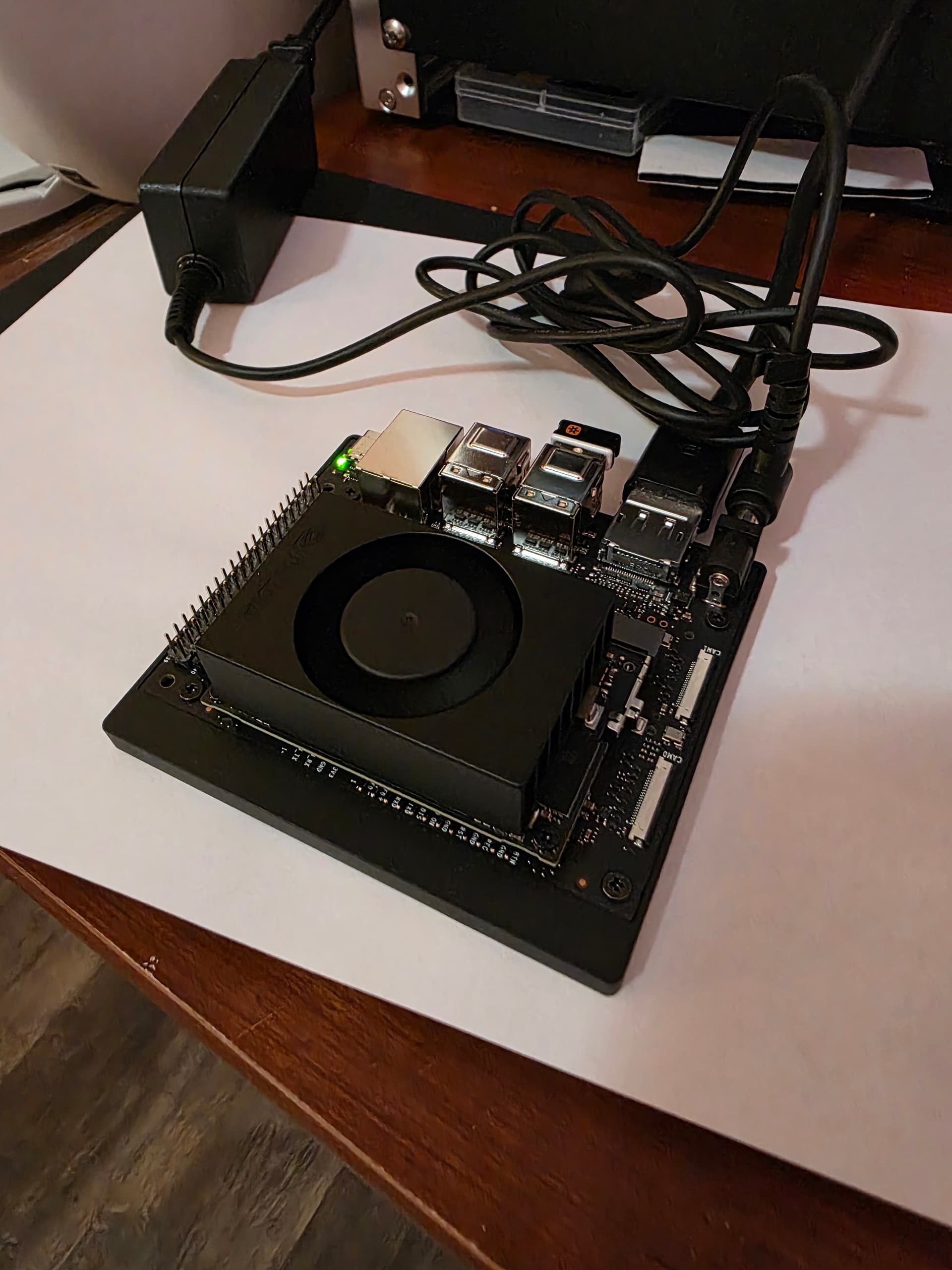
So i couldn't help but want to try this out. I went and picked up a jetson from Microcenter. Going to run through some tests to see how it performs relative to the other stuff i have tried.
4 Likes
That was fast, lol. Looking forward to your conclusions.
2 Likes
The results have been a little interesting. I needed some base lines to compare to. So I also got values from a Pi4 and my Home server running CPU only from a VM. I am also collected the results from my RTX 3050. Basically I just loaded a given LLM then started by saying "Hi" to it to fully initialize it and then asked it to "tell a story" a few times.
Here is the information collected:
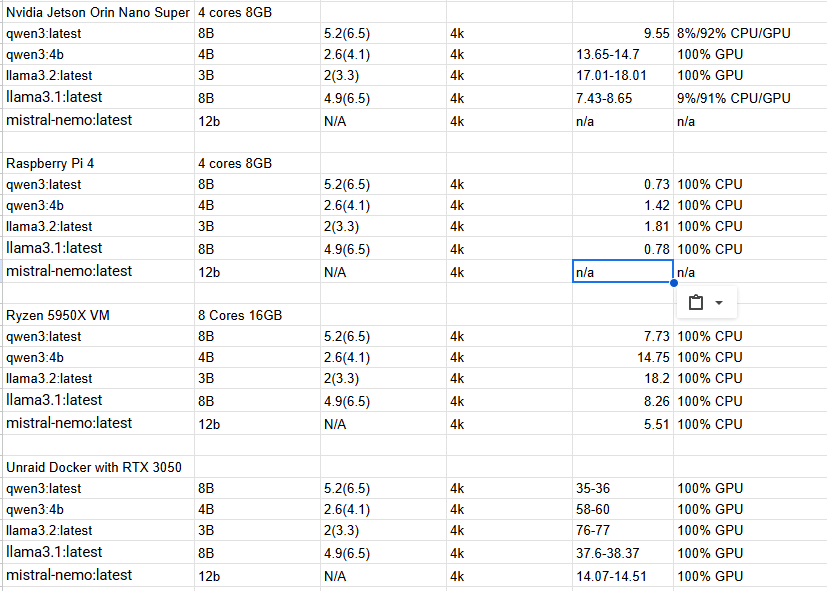
So here are my conclusions with the options I have to test with,
The Pi4 is horribly slow, though that was expected. It was painful to wait for.
The Jetson Orin Nano Super and my Server with a Ryzen 5950 is very similar in performance. It should be noted though that the VM on my server had 8 threads on separate cores and 16GB of ram. I could probably get more out of my server if I allowed all 32 Threads and 128MB of ram to be used. That said the Jetson's performance fluctuated a bit because of power envelope. At first I set it to the MAXN Power Plan and it is constantly complaining about not having enough power budget and Over Current Warnings. To not mess it up I set it back to a 25w power plan. Maybe with some tuning more could be squeezed out of it.
When compared to my server depending primarily on a RTX 3050 it isn't close. The RTX 3050 is generally 4-5 times faster then the raw CPU , or the Jetson Orin Nano.
In regards to the Mini PC mentioned with the Ryzen 5825u , it will likely be about 40% slower then the Ryzen 5950x desktop Chip I have. The Jetson should be a bit faster most likely and slightly cheaper.
The RTX 3050 uses 130 Watts + whatever the CPU is using. As said above the Jetson is about 25 watts, when under full load. If the choice is between those two the Jetson makes allot of sense.
I guess in the end the big question is what are you trying to accomplish and what are your needs. The Jetson could be sufficient as long as you have proper expectations.
My advice though if you want to get the Jetson for AI make sure you use a NVME drive to reduce load times. Then also once setup turn off the Desktop environment and follow the steps for the Jet setup to reduce memory usage as much as possible.
1 Like
The is a product as well that appears to be using a Jetson Orin Nano alerady
1 Like
Link to reasons. 
1 Like
I've been on that waiting list for months, lol.
1 Like
I decided to hook the Nano to Hubitat to see how well it actually worked with this integration with Hubitat. There seems to be some kind of issue with the way I am sending the context info so it currently isn't a option yet. I am going to see if i can fix this so it will work
It appears that the install directly from Ollama has some issues. If you want to use the Jetson Nano install the Docker container with ollama as shown in the setup procedures on the Jetson-AI site. That seems to have fixed my issues with Garbage data coming from it and the context info being sent from Hubitat.
Using the LLM llama3.2:latest i am processing a request in just under 5-6 seconds
To make Ollama start after reboots submit the below command once logged in
sudo docker run --name ollama --restart unless-stopped --runtime nvidia -it --network=host dustynv/ollama:0.6.8-r36.4-cu126-22.04
You should be able to look at the messaging generated when you started it the first time manually to verify the last part.
2 Likes
So because of all of this stuff with the Jetson Orin Nano and going between that now and my actual home server I started to take a closer look at working this through Open Web UI instead of directly to Ollama. This would put it in way that it works more in line with what I think are typical AI/LLM setups. This basically just means, in between the client and the LLM there is basically a management system that handles agents/tools and the chat conversation.
Because it is so different this will basically be a separate integration. The basics of the code and methodology will be the same, but there are several things that make it incompatible. I still have a few things that are manual so not going to release anything just yet, but the integration of tools like this actually make it much more responsive. The context information is now real RAG data verses passing info as part of the conversation or in the system part of the prompt. These changes have made it very responsive. With Open WebUI processing the tools as well now all models are compatible instead of just a few that natively support tools.
The things I have left to do/figure out are
Upload the rag data automatically when after the device selection is made and the integration is updatedDoneTrigger a re-index when the RAG data is updated.Done- Continue to add/enhance tools/function to add functionality.
- Find a good way to share the Tools easily for Open WebUI.
A added bonus of using Open WebUI is that if you wanted to, you could link this to external cloud systems or multiple AI hosts at home. I currently have it linked to both my Jetson Orin Nano and my Home Server and it jumps between them as needed.
3 Likes
Incase anyone is interested in try this out with Open WebUI you can view a new repo at this link.
Hubitat-by-Mavrrick/OpenWebUIwithHubitat at main · Mavrrick/Hubitat-by-Mavrrick
It is a bit more involved in setting up since you have to have Open WebUI installed and running. The steps would be.
- Ensure you have a working Ollama instance and Open WebUI instance linked to it.
- Then go to Workspace and tools and import the tools file using this URL
raw.githubusercontent.com/Mavrrick/Hubitat-by-Mavrrick/refs/heads/main/OpenWebUIwithHubitat/HubitatTool.py - Now add the OpenWebUI App to your hub with enabled OAUTH, and if you don't have it the Ollama chat driver driver(yes i am using the same one).
- Setup the app. As you follow through the setup screens. The first setup screen connects the hub to the Open WebUI instance. The second Page effectively is all about configuration of OpenWebUI for Knowledge base and tools. The third page is all about selecting the devices to be enabled through the integration.
- Once back at the Main page, take note of your App ID for the integration, and the App token token click done.
- Now you need to update your Open WebUI server with two environment variables. You need to create the environment variable "hubitat_appID" with the App ID for the integration and "hubitat_apiKey" with your application api key captured in the step above. These two values are needed for the tools to talk to your hub.
When you click done If everything goes well It should at this point create the Knowledge base in Open WebUI. It will then build the files to send to Open WebUI for Context. Once they are built they will upload to the Open WebUI server for tokenization processing and be added to a local Vortex database. The processing can take a little bit of time depending on how many devices but is generally just a few seconds. You may see logs indicating that the install process is waiting for that processing to be completed. Once that is done that new context data will be added to the Knowledge base.
If you remove the integration the files should be removed from Open WebUI.
Any time you update the associated devices from the integration app it should completely reset the files sent to OpenWebUI for context. This can take a little bit of time because it includes all of the steps above in addition to Reindexing the Vortex database.
Advantages to this over direct connection to Ollama:
There is still room for improvement, but this is a decent start and with the way the tools function now performance can be pretty good even with modest hardware.
If you want to you can take the steps to integration Open WebUI with external LLM's like ChatGPT and you can also use them as well.
Disadvantages:
The only really disadvantage to this process is that we potentially can impact Context. You will likely need to incrase your context window to 16 or 32k if your environment gets fairly large.
Next Steps
I really think to move this much forward now we need to find a way to do a real MCP, or OpenAI tools/agent server potentially as part of the integration. I just need to figure out how to start that process.
I hope all of that makes sense.
4 Likes