Can you try clicking on the "New Conversation" button.
It may be a context thing. That will help as hub specific data is added to the context when you do that.
Sorry i didn't post the code update i talked about yesterday. I didn't like were i left the new code. So started cleaning it up more.
Made more adjustments so now it will better to support Models that don't work with tools and hide thinking parts of responces.
Now when you setup your model it will pull the models capability use that to determine what parts should be passed to the LLM when chatting.
Should mean you can use whatever model you want.
The last thing i was working on is a more complete list of context for the hubitat hub. I may have gone a little overboard with it though. At the moment i can't create new conversations on my gear. Once i get that worked out i will post the update. With all of these changes.
I tried doing a New Conversation, but that didn’t change anything. Same result as previous. I’ll hold off until you release the next version. Not sure what to try otherwise.
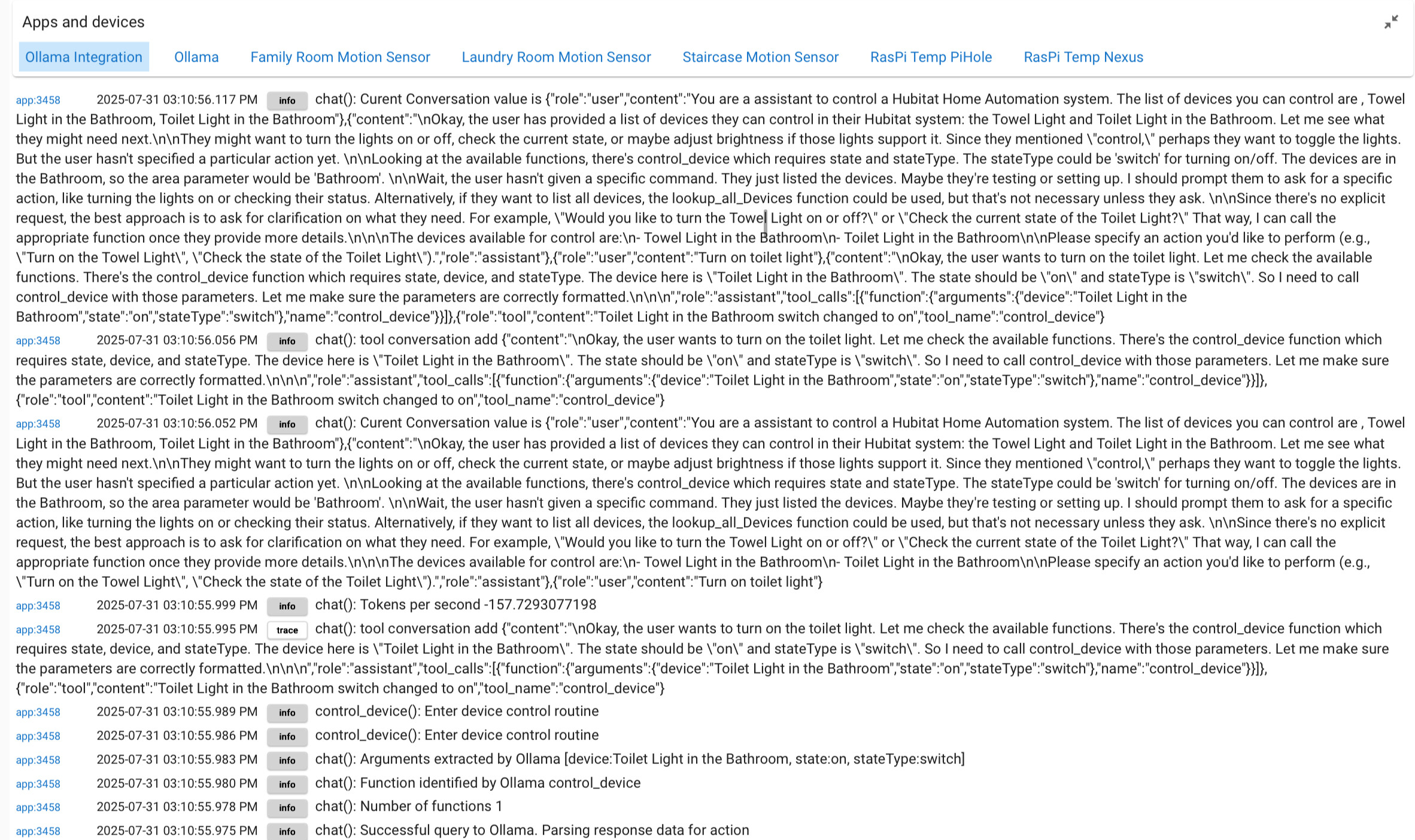
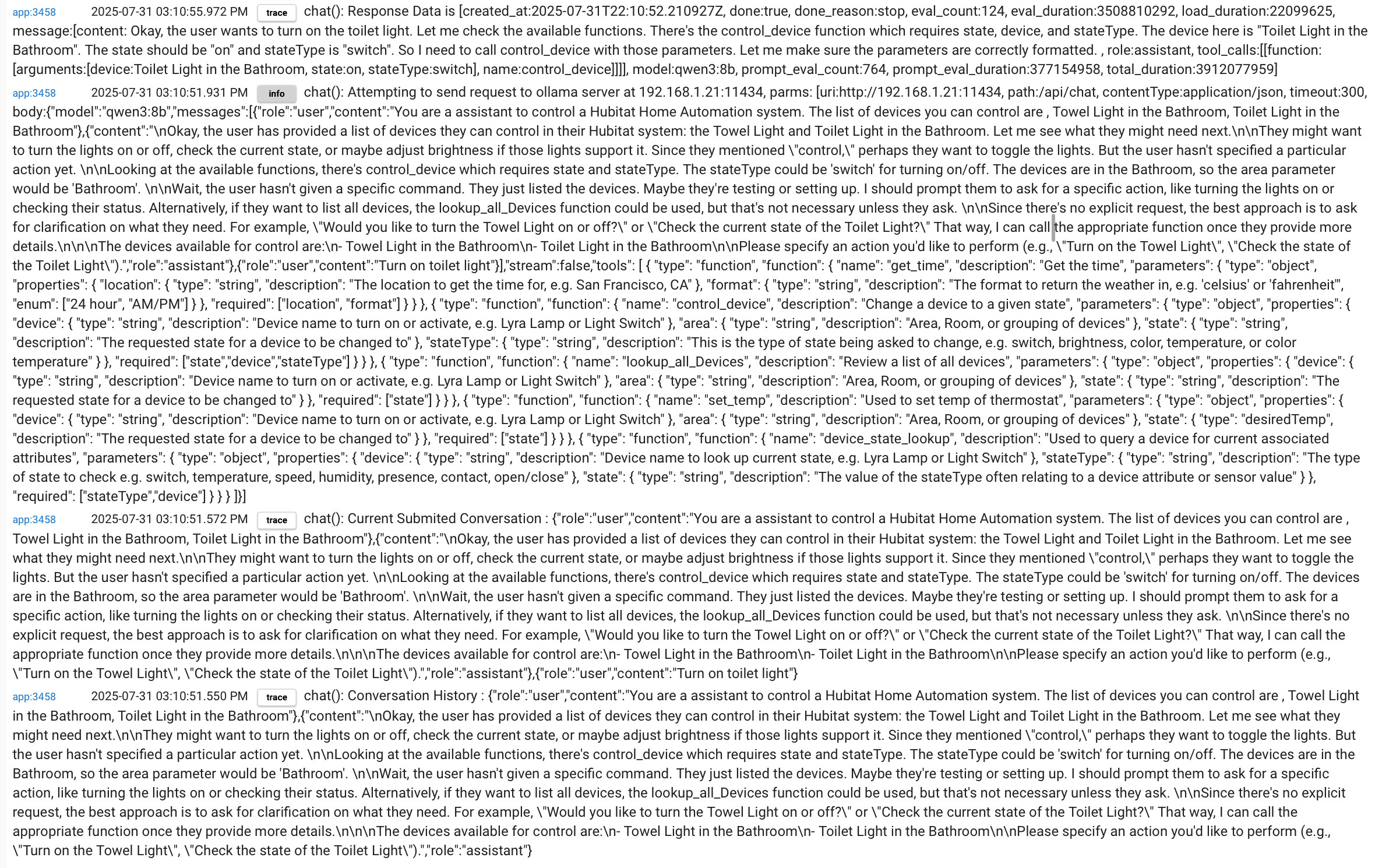
Can you adjust the Ollama integration app to Trace logging and then share the values ollama passed to the function? that will help me understand what is going on. I am trying to figure out where the "in the Bathroom" came from.
In that clip i can see what came out of the Ollama call in reguards to it deciding on a function and then the execution of the function. and the values used. What i am wonder is if ollama and the model added the "in the Bathrom" bit to it.
Unfortunately the ReSpeaker and speakers i got are a bust. They will be going back to amazon. It looks like i will probably test with a USB confrence call speaker/mic attached to a Pi. So i haven't even gotten started on that.
I just pushed a new bundle and files to Github for the Ollama Integration.
A few changes were added.
Enhancements to allow the use of LLM Models that do not support tools. This doesn't mean they will work to create actions yet though. They will respond though with what is hopefully relevant information. I am still working on the best way to get them to provide back information we can act on.
Completely reworked how the context info is sent. Now alot more information is being sent to Ollama on initial new conversation iniitialization which should help improve context.
Set the sytem to default not providing thinking context to user when using a thinking Model. This shoould help reduce the amount of extra crud in the conversation.
Some other code cleanup and minor improvements.
Hopefully this new code will improve everyones experience.
I just updated to the latest code on github and your driver appears to be working in my environment now! I’ve only done a few tests, but I’m able to turn on and off the lights in the bathroom. Great! I’ll do some more testing, but off to a good start!
What were the issues with the ReSpeaker? It’ll be really interesting to see what speaker/mic combo ends up working well. I’m also curious about end to end performance. Given the LLM processing time, the smaller the model the better. Those small models are getting better and better though.
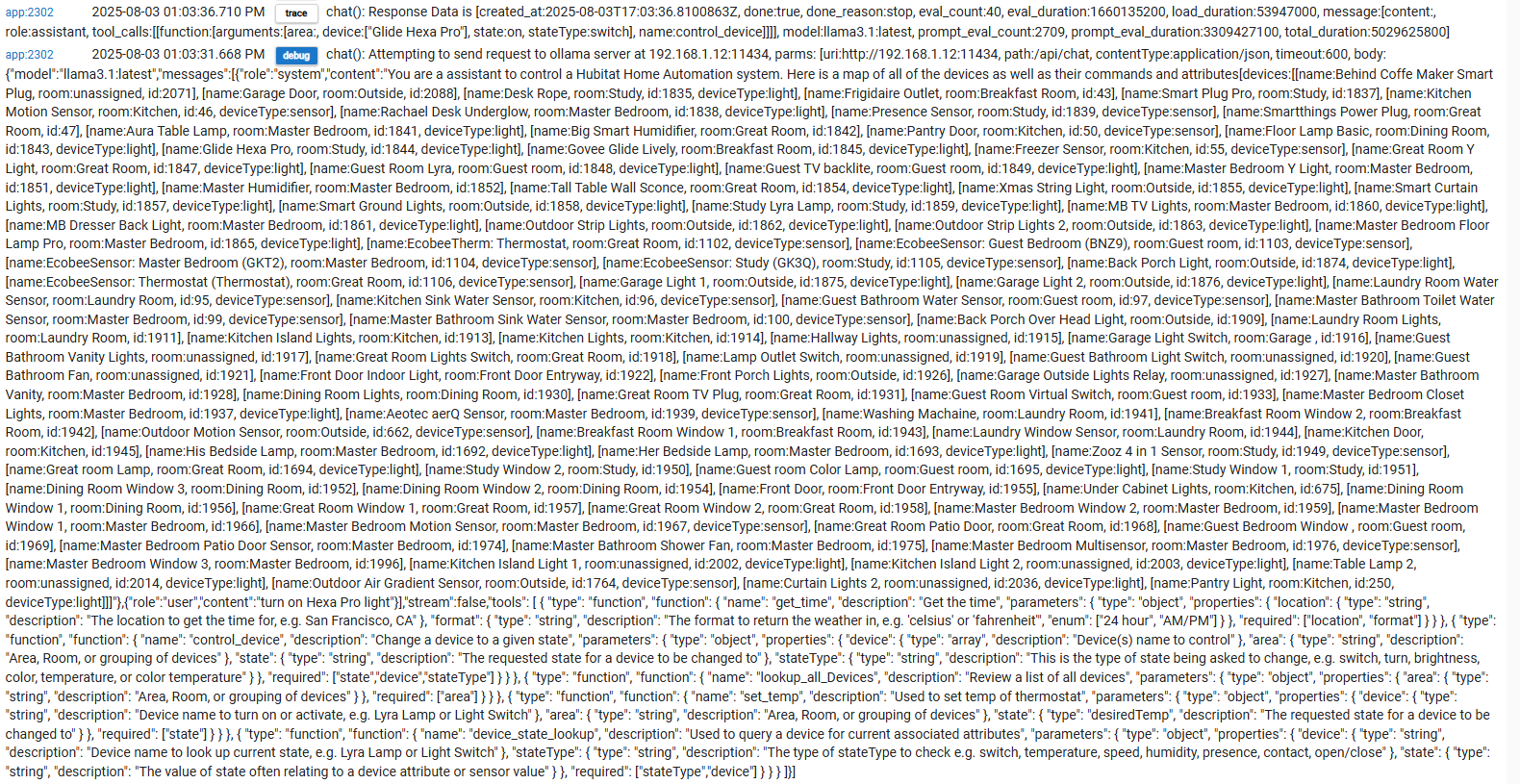
I am glad to hear it is working well for you. I did a fair amount of testing before letting this batch of code out since I changed so much. That screen shot shows the problem was exactly what I suspected. it seems the context statement for the device and room confused it. The new method should eliminate that from happening. Now the information is passed as a large map,
That said i have found an issue with this new process. It seems there may be a way for information being collected can break it. I will need to do some more testing.
As far as the repeaker goes i just haven't been able to get the driver to load. Last night I reloaded the OS on my Pi 4 probably half a dozen times. It is a compatibility issue with the linux kernel. I may try using Ubuntu instead of PI OS and see if that works better. This lead me down some paths and i found that the vendor sent me a old version of the hat as well and it looks like support from the maker has been a ongoing issue. I am going to return it and the speakers i got and just see about getting a usb confrence call speaker/mic. As long as i can plug that it i should be able to do the same thing. At this point I am not trying to build a device. I just want to get started on figuring out the TTS and STT.
This is my big question to. I think if someone decides to do this they have to accept to be local they will have to do a bit of spending to have the computer to do it. However you go about this it will take a robust system to do the processing. I would love for some folks to join in on this with various graphics cards and give some feed back. I have watched a few Youtube videos and it is clear there are certain types of systems that will handle this allot better then others. Even raw CPU cores won't cut it. You need atleast a system with a dedicated GPU, and then things will only get better from there. There are some interesting options. I kind of want to try a RTX 5060 TI with 16GB of ram. That should hube step up from my RTX 3050. That puts my CPU to shame as well.
We will see how this plays out.
I would love to use a smaller model, but I need to see that they will work reliably. There is a smaller Qwen Model that you could try. The reliability is why i have stuck with the Qwen3 model, maybe the recent change for the context will help the other models to perform better though.
For giggles i loaded Ollama on the Raspberry Pi lol It got 1.79 tokens/second telling me a story using a small model
The RTX 3050 is generally around 65-70 tokens/second with that same model. I would really like to try a RTX 5060 Ti 16GB version.
The M4 Pro with it's unified memory is really a great option to run this AI stuff on.
In testing with llama3.2:latest I am getting pretty good results now. So maybe the last update smoothed that out a bit.
I have found a problem with the new version that when a device has current states that includes a Map or list of values instead of a single one like some thermostats, Keypads and fan devices. it will cause the integration to fail. I will need to look at that next to prevent the failure.
I've also found that llama3.2:3b is working quite well for me. I've also tried a larger model, mistral-small3.2:24b, and it also works well, though more slowly. I think that non-thinking models will likely be faster than thinking models. The qwen3 model is thinking, and definitely takes much longer to respond for me than llama3.2.
I think you mentioned something about the context size, and I'm definitely feeling the slowdown after asking a few questions to the model. Clicking the New Conversation button resets processing time of the next question, making me think there might need to be some logic around auto-clearing context at some point. Not sure how that'd all work.
Out of curiosity, do you think there's a way to optimize the model selection process a bit? Clicking Ollama Setup Menu takes 50 seconds on my system. Then selecting a new model takes a long time as well. In normal circumstances we wouldn't need to change the model often, but during testing, it's really handy to be able to test scenarios on different models.
I just published a few changes for everyone to use if you want to test with.
I have updated several logging lines in the code that should reduce the chatter unless needed. Simply put changed them from info to debug or trace depending on the amount of data presented
I removed a few lines of code from the Clear Conversation routine that will reduce the context added. This will help improve performance as it had limited benefits.
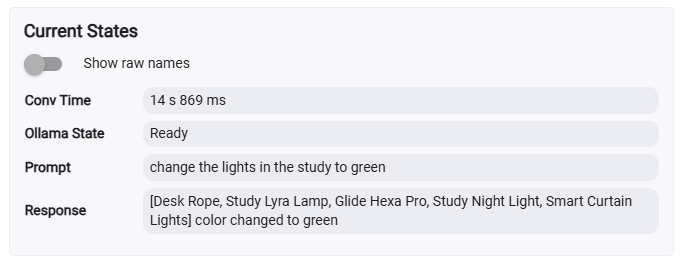
Updated the control_device function to allow an array of devices to be passed instead of one. This should improve the ability to ask for something like turn on all the lights in aa room. It worked before with qwen3, but llama3.2 would fail to perform the task at all before.
I also removed some code that was used for testing or for removed functions
I have been having a much better experiences with llama3.2 as the code has improved. It is nice because it really improves performance. I have seen calls process as fast as a 1.5-3 seconds. Generally with Gween mine is running between 7-12 seconds for me on my hardware.
Yea.. Context compounds as the conversation progresses. Think of it like this. Every time you make a call, everything previously sent and recieved has to be sent up with the new prompt. After a few back and forth exchanges that adds up. The amount of data being sent up can get pretty large. The idea of resetting the conversation automatically isn't lost on me, I have thought about it. I just haven't implemented anything to do it yet.
So yea.. This came about because of the amount of data that comes from the Ollama API to retrieve the currently selected model details. Change the logging to debug or info and it should get better. I know when testing that may not be the best option, but that is the best solution.
I'm also getting pretty good speeds with llama3.2, normally about 2 seconds. That said, often times the response from the LLM doesn't actually work. I'll run the same command multiple times, and the LLM will choose different methods to implement my request. I guess that's not surprising, but it's tricky to know if the request will actually result in success. For instance, I'll do:
turn on overhead light 1
and I'll get one of several responses:
[Overhead Light 1] switch changed to on (this one controls the light)
[110] switch changed to on (no control)
["Overhead Light 1"] switch changed to on (no control)
At some point a fine-tuned model might be needed for consistency, though I'm sure there are ways to put more strict formats on responses.
Yea. I hear you this is. It is why i keep making changes to how the context is passed and what is included. I am also starting to research RAG to see if that may help. From the little bit of research i have done already though i suspect it will require another external piece that manages database for it. I think this is where something built into the hub would be optimal actually.
I also somewhat question the ability of these smaller models to understand our intent unless we are spot on for it. I never have a problem if i say "turn on X" with the exact name. But if i use a lesser model they seem to struggle if i say "Turn on part of name." I was testing earlier and qwen3:latest turn on 6 devices at once. it was pretty nifty. I haven't seen llama 3.2 do it as well yet..
I talk allot about the qwen model, but even it's smaller one seems to struggle as well. I am almost thinking 7-8B records is almost minimum to get a decent understanding of what we mean.
I adjusted how some of the data was formatted in the context used in a attempt to improve missed associations for the device name with smaller models.
I also change to a different method for loading context in the conversation. Simply put now it takes far less time to Gen a new conversation, but it may take a little longer on the first attempt to use it.
I also added two new outputs from logging. Simply put you will now see in logging how many tokens you are using and sending to the LLM this can help if context becomes a concern.
I think I need to work on some logic to help identify when something doesn't happen from the request. Right now I am not doing any validation. It would be good to add some of that so we get the correct response from the hub instead of a generic it happened.
Qwen model still seems to be the most reliable. Lllama 3.2 seems to do a ok job, but struggles when i ask it to do a more advanced task like act on a room instead of a device.
I have a device called Glide Hexa Pro which I use allot for testing. Both seem to recognize that pretty well with slight variations in naming.
This is blowing my mind.
qwen3 seems to do well with this. llama 3.2 struggles, sometimes it will perform on more then one devices. Sometimes it doesn't find anything. qwen3:latest seems to get this every. I turned on the devices, Turn them off, and changed there color. All worked flawlessly. I think this is all about the context and helping llama3.2 or non-thinking models recognize the context better.
I just need to figure out what i need to speed this up to be more usable with that model.
I just pushed some more code with some improvements to how the conversation is managed.
Now if it is inactive for 5 min it should reset the conversation automatically.
I also changed the keepalive for it from 5 min to now be forever. Until unloaded by habitat or changes.
I also tweaked how the devices are listed in output from the functions. This is to help prevent problems from the LLM passing data to a function that would break it when added back to the Tool response. I was finding that some of the LLM 's would respond with data that would break the conversation formatting.
I added a capability type to the context info as well hoping it will help the LLM identify if a device can support a kind of action. This is basically classifying a light, lamp, bulb, ect as a light device. Along with this i added a type for sensor as well.
Fixed the calculation for Tokens per second so it is now reliable.
Added information to logging for Tokens sent and received so you can now see how intense your environment is. with sending data to Ollama.
I am fairly certain i am missing something, but try it out and let me know.
I noticed in the last version of ollama it seems there is a new UI that you can set your context as well. I did some experimenting with that. Seems the default in my house is 4k. Since i was hitting nearly 2900 just with context I decided to bump that up to 8k and see how it goes. Here are the details of those tests.
Model Name
Parameters
Model size(ImMemory)
Context size
tps
Processing type
Mult device
Notes
qwen3:latest
8B
5.2(7.5)
8k
20
7%/93% CPU/GPU
yes
Loss in performance may be due to not being 100% on the GPU
qwen3:latest
8B
5.2(6.5)
4k
29
7%/93% CPU/GPU
yes
Loss in performance may be due to not being 100% on the GPU
qwen3:4b
4B
2.6(5.2)
8k
42c-43
100% GPU
only got one device
qwen3:4b
4B
2.6(4.2)
4k
41-43
100% GPU
not quite purfect
llama3.2:latest
3B
2(4)
8k
58-60
100% GPU
no
First provided tool response in strange format. Used Brightness change type instead of switch, on, or off. Inconsistant in it's ability to find correct values for functions.
llama3.2:latest
3B
2(3.3)
4k
59
100% GPU
Includes special charecters and is causing the calls to the API to faile
llama3.1:latest
8B
4.9(6.9)
8k
30-32
100% GPU
llama3.1:latest
8B
4.9(6.1)
4k
31-32
100% GPU
Mostly works
Seems to add " in the conversation that caus it to break. Will need to add a routine to filter out special charecters from the conversation stream
mistral-nemo:latest
12b
7.1(9.5)
8k
8-9
18%/82% CPU/GPU
Worked mostly
It would occasionally mis a device
mistral-nemo:latest
12b
7.1(8.8)
4k
11
18%/82% CPU/GPU
Worked mostly
It would occasionally mis a device
One thing that is clear is you want to keep the model as much as you can in GPU memory. You can see in the example of the qwen3:latest my performance drops by a third by only using 7% cpu. My small RTX3050 just doesn't have enough memory.
Of those i tried out probably the most performant and functional was llama3.1. it was on par with qwen3:latest when it came to how it generally worked, but lacked all of the extra stuff that comes with being a thinking model. It also seems to have gotten better with most recent changes. Because that saved allot on context as a conversation. Still not quite as accurate all the time, but when you consider it normally completes around 2-3 seconds it is a good improvement and much closer to really usable. OfCourse if you have a better GPU with more memory then it could all be a bit different for you.
Made a small change to the device driver to add a preference value for the new Conversation reset timer. Now you can adjust how long it has before the conversation is automatically reset.
I also noticed that you can't submit multiple requests to the default install of Ollama. I did some testing with making adjustments to the install environment to allow parallel queries. It has a not insignificant impact on memory. It doesn't double it, but it is enough that it will make 8GB of VRAM insignificant. I would probably recommend at least 12GB of VRAM minimum if you want to allow parallel calls. As soon as I enabled parallel the memory requirements for most models jumped to well over 8GB of ram and my performance tanked. 16GB would be better.
I had also noticed the Ollama UI change that allows for context size changes. I’ve been running at 64k for a few days now, but I haven’t noticed much difference yet. I’m sure as contexts grow, it’ll be useful.
I also updated to your latest code and so far so good. I’m still having issues getting models to deal with multiple switches in one room correctly. For instance, in the bathroom, I have “bathroom group” which is a Hue group of bulbs over the sinks, and I have a “toilet light” over the toilet. Using either llama3.1 or qwen3, when I ask “turn on toilet light”, I always receive the response “Bathroom group switch changed to on”. Sure enough, the group switch was turned on.
Maybe ask "Turn on the Toilet light" and see if that makes a difference. I have very good success when I specify the exact name. When it is something close it can sometimes miss.
Right now the grouping I have been trying to accomplish is by using the Room devices are in. Like in my case with the Study, it is a room in Hubitat. That room is collected on the devices and added to the context. All that for me to say how are you creating the "bathroom group"? Is it a device, or is it some other method for grouping?
In the end this is all about inference right. the LLM looks at what we provide and tries to figure out what is the best combination to respond for the function call. The idea of calling a group of device can be good at times, and then be flaky at others. I believe even context can start to confuse it.
As far as a 64k context i would think you may want to pull that back. I think some of the LLM's we have been talking about only support 32k and the reality is you are likely way below that. On my prod hub that i am testing this out even with all of the context added in the initial setup of the conversation only brings it to about 3k in context. Unless you are using a thinking model that likely won't go up to fast after that. I am probably going to stay at 8k myself. The memory hit was to much for my small RTX 3050 8GB. I would really like to test this on a 5060 ti with 16GB. I just need to find a good deal on one.
I also tried using the exact spelling of the device, including capitalization, but still no-go. This did work the other day on a previous release of your code. The “Bathroom group” is a Hue light group imported using the built-in Hue integration. The “group” is of type hueBridgeGroup which has a single switch and brightness, like a normal bulb. Anyway, I don’t want to go down a rabbit hole…I’ll test with more “normal” bulbs for now.
Good idea about the context size…I’ll drop mine down.
So i don't have anything to do with Hue myself. So I have no clue how that impacts what i have done. To help me understand how it is possibly getting to that conclusion can you change your logging to trace, try the call again, then check Live Logging for the last call that starts with "chat(): Attempting to send request". It should look something like the below. Can you capture that and send it to me. I am just trying to zero in on what the context information looks like for that group device is all.
Before you do that it could be interesting to see what the memory is running at for that size context on the LLM you are running. It is easy to see if you run "ollama ps" from the comand prompt.
I changed how the context was being added not long ago. I was basically making a call to the LLM to send all of the context as part of a chat vs including it in the System data. Ofcourse I have now changed the format of that data a few times as well.
It would be interesting to reverse it and see if it startes to work better for you. The first method for context passed a actual sentence with the device name and the room it was in if configured. Now i am passing a map that includes all of the info.