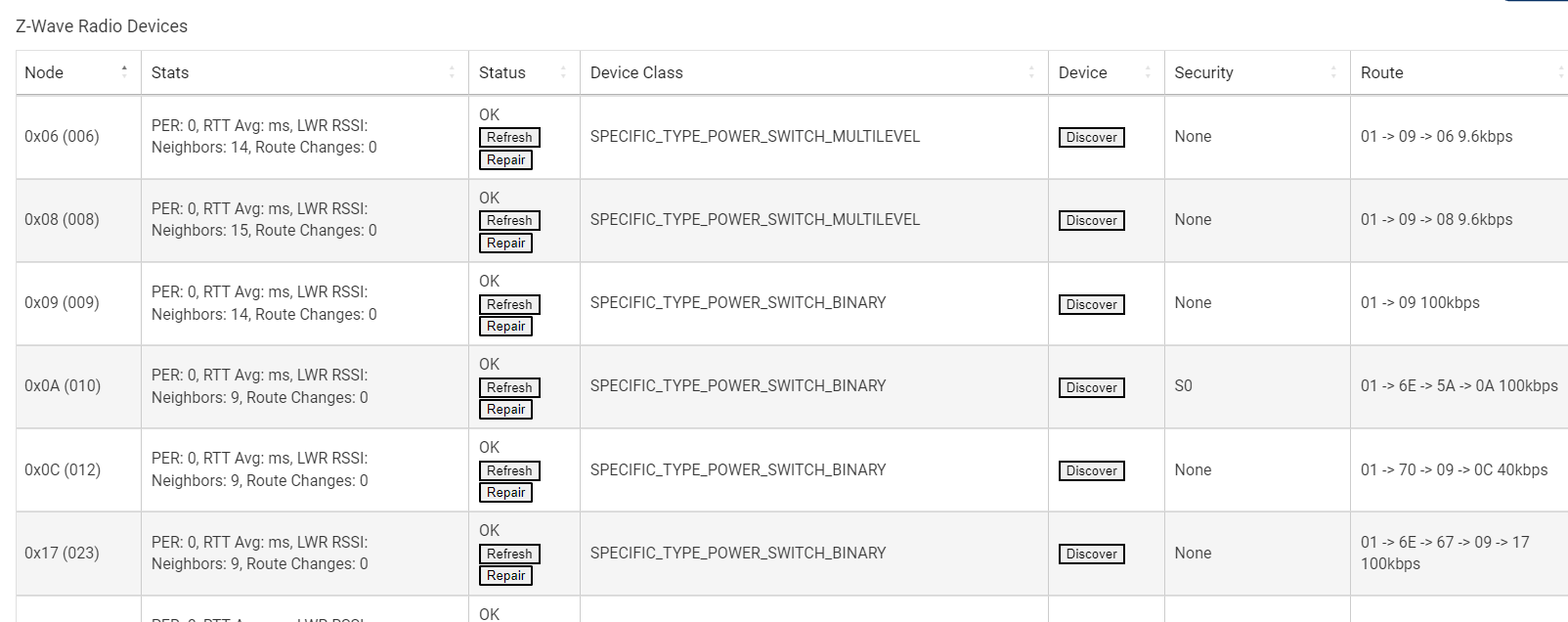
Started having trouble with one of my hubs today and I noticed I had a bunch of ghost devices... all of which I had never paired with the hub before. Also, they were all generic in nature. I tried discovering all of them and "Force Removing" them and they would go away in the devices screen, but show back up in the Z-Wave details screen.
Long story short, I decided to start brand new and did a soft reset. Even after a soft reset and NOT restoring a backup... in the hubs virgin state the devices all still show up! Anyone ever encountered anything like this before?
Soft reset (devices were still there)
Z-Wave reset (Devices stayed gone after reboot finally)
Restored from a backup (Normal devices there, but no z-wave devices in the Z-wave settings table)
I am now re-adding devices - they aren't matching back up to the devices in the device table, but I can re-add the z-wave stuff and start fresh.
That is correct, local backup only contains hub database, no radio data.
That is also correct. After excluding devices, they get new ids upon inclusion. You could probably use the Swap Devices app from Settings to replace the older devices.
If you have any failed pairings, STOP and check for the ghosts. Also any time you remove a z-wave device, do it from the z-wave settings page instead of the devices page.