I am using Rule Machine to sync status between HE and Z-Box. I am doing this via 26 variables. However, because there is no Do Case, I have to make 52 If Thens -- Off and On for 26 variables. There has to be a better way.
If writing your own Groovy app is not something you want to do, there are other methods to integrate the Z-box with Hubitat. Do you have Home Assistant running anywhere? Integrate your Z-Box with HA, and then use HADB (Home Assistant Device Bridge) to bring z-box paired devices from HA into Hubitat.
So you you have virtual devices on Hubitat and you are sending the state changes to the Z-box hub?
Personally, I would write a custom driver that does the API calls which also acts as a virtual device. So when you press on, it sends the ON api call, etc... The driver could have a setting for IP, login, and Z-Box device ID.
Take that to the next level, you have an app where you set the credentials, and create the child devices via the app. Then you only have to put the login info in one spot.
I am in the process of building a new home and of course I am redesigning all the IT. I have years with HE and Webcore but I bought the Z-Box out of curiosity. I liked its speed and distance and I am plan to use it exclusively for all the ZWave switches in the new home but I needed a way for it to pass status to the Hubitat for the Zigbee devices I have to trigger.
I have a solution that will work, I just want to make it more efficient.
Seems like a lot of messing around just to use a different hub as the zwave controller.
If you are using Zooz switches, you might lose the ability to easily change settings on the fly (with community drivers), like the LED colors, etc... Especially if you are using any ZEN32/35's. Also not sure if you will be able to get the button events from the device back to Hubitat. Speaking of that, how do you get any events back to Hubitat?
I do like that the Z-box has a proper modern z-wave implementation, such that it does not have device specific drivers. It just scans the device and then sets everything up on the fly based on the command classes the device supports.
It's been a while since I have mentioned this... But I remember one of my early edicts was that I should test / discover new devices or platforms in small batches before taking them on en-masse. I feel like I am missing a reference here to a YT blogger that suggested this... But I still feel it is sage advice.
To me it feels like you have chosen to try something new, which I think we can all agree is why we are all here... , but perhaps you need to scale it back slightly until you get a good handle on what it will involve and whether you are willing / happy to spend the time to implement it... Or choose one of the other options offered..
I have been testing the Z-Box for the last 8 months in the house I am in. Whereas the install in my current house was a replacement, the test bed is roughly the same.
All the new smart switches are Zooz. ZEN 30, 35, 71, 72, 76 and 32. The crossover is to allow for Zigbee switches in the Hubitat to be triggered. Control and scenes for the switches will be Z-Box.
I am using a QuickApp on the Z-Box like a virtual switch on the Hubitat. When either side is triggered it passes it on.
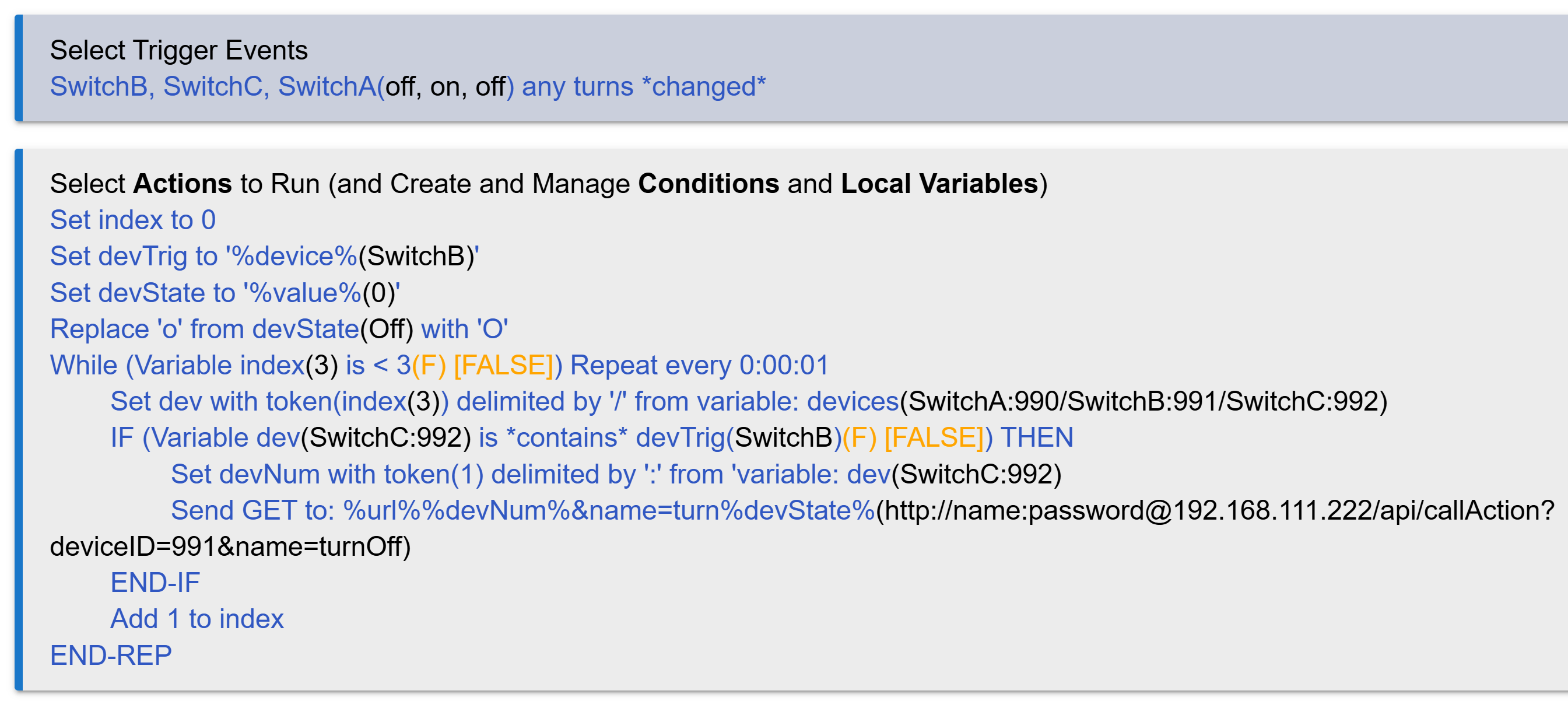
As they used to say on TV, "I can name that tune in only 12 notes!" I mean actions. Leveraging some of RM's peculiarities (while carefully sidestepping others), I was able to create a rule to do what you asked, using a WHILE loop:
Special care was needed to parse the GET url syntax you're using, e.g. capitalizing the 'O' in 'turnOff'. But it works, only sends a single HTTP request per event, and should be easy to maintain. You can even add unlimited devices (as long as you update index to the exact count, since RM will choke on array overruns).
For clarity, here's how I set up the Local Vars in that rule:

 , but perhaps you need to scale it back slightly until you get a good handle on what it will involve and whether you are willing / happy to spend the time to implement it... Or choose one of the other options offered..