Hello, I'm a complete beginner with home automation, and I'm stuck on adding my IKEA Matter devices (MYggspray, myggbett, and the Klippbok).
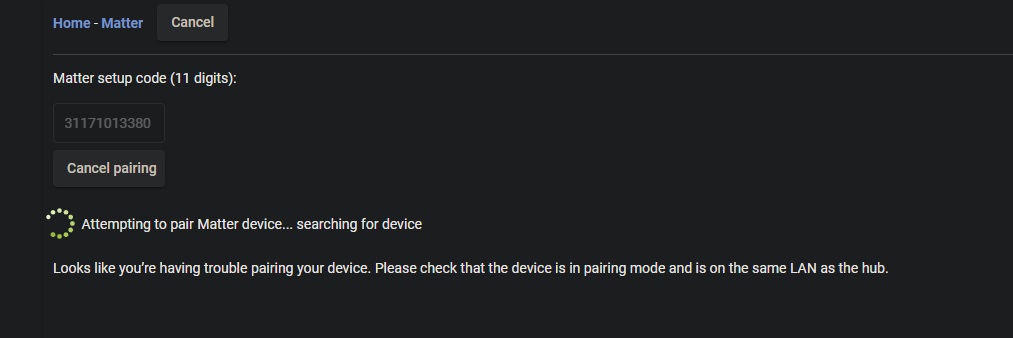
I've configured my HE on the 2.4GHz network, entering the 11-digit serial numbers for each device (all brand new), but the pairing isn't working. It's constantly searching without success.
Here's my configuration:
Platform Version
2.4.3.177
Hardware Version
C-8 Pro
If I'm not mistaken, a solution will come with the 2.4.4 update of HA.
Will my three devices (MYggspray, myggbett, and the Klippbok) be working with the update, or should I return them to IKEA to be safe?
I'm also having the same problem with my Leviton DAWSC switch not connecting. Using the MyLeviton app, I can control the switch and I even get the Matter code for another pairing, but once in HE, it can't find it.
Ikea's devices are Matter over Thread, so your Wi-Fi connection doesn't really matter. (And you don't have your hub connected to both Wi-Fi and Ethernet, do you? You shouldn't use both, and wired -- which I'd suggest if you don't have a reason you can't -- is sufficient even for Matter over Wi-Fi devices.) However, you do need a Thread Border Router on your network. I would read this document to understand more:
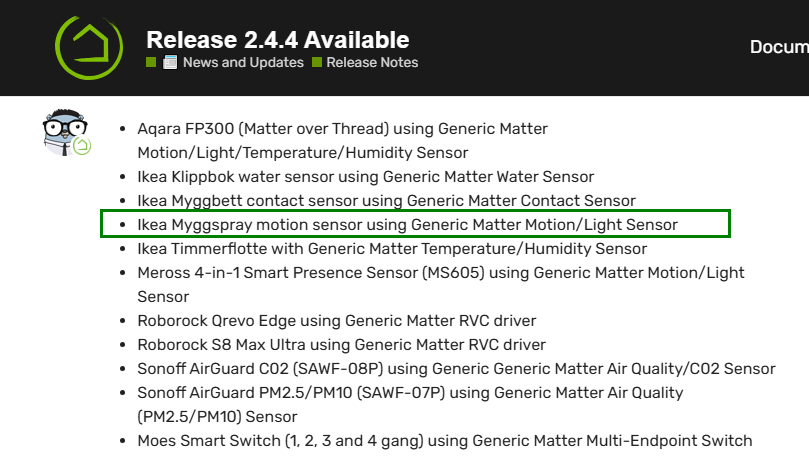
But you might be having another problem. What does your "Status" say under Settings > Matter Details? If it's not "Online" but rather "Starting," there's a fix for that in 2.4.4. Version 2.4.4 will also add a bunch of Matter drivers, including some for these Ikea devices. However, if you can't even get a device paired in the first place, a driver won't help, so I'd figure out what the problem is first.
I bought a couple ikea matter devices last week. (Alpstuga and Bilresa). I initially paired them to my Apple Home and then put them into pairing mode through the Home app so I could pair them to Hubitat, but no matter what I did, Hubitat would not pair with them.
My only suspicion is my network setup. My Apple TVs are on a different vlan from my Hubitat however both are permitted to talk to each other. I'm not quite sure what to do now. Honestly I wish I could just bypass the Apple TV. My whole reason for having the Hubitat is for it to be the center of my home automation. Its ridiculous that I should even need the Apple TV.
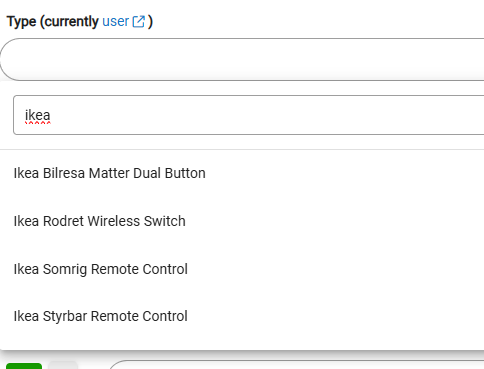
I was able to pair my MYGGSPRAY Ikea Matter device to Hubitat after pairing it with HomeKit and using the pairing code from Apple Home. However, what device type should I select that will work with this device?
The new HE inbuilt drivers are using the newer, better Matter parsing method. Once you switch to the stock drivers, this new mode remains for any other drivers you may try later. When I have the chance, I will update the ChatGPT drivers to use the new parsing method as well to prevent these exceptions and make them work again after switching between the stock and the community drivers.
Hubitat's new IKEA drivers are fully functional and working very well. I suggest that you stick to them.
Update: ChatGPT driver is now updated to use the newParse:true decoding.
I'm not seeing the one for Myggspray. Currently running version: 2.4.4.132. I thought it might be because I had been using your community driver, so I switched all my Myggspray to Device, deleted your community driver, but still not seeing the system driver.
I still am unable to pair my ikea devices, been trying for the last couple weeks. I am currently on HE build 2.4.4.133. Have my devices added to google home thru google tv streamer, use google home to produce the matter sharing code to share with hubitat, but only gets as far as the pairing screen in hubitat. I have added a couple other matter devices (non IKEA), linkind plugs, and lights, but the IKEA devices refuse to pair with my hub.
Still a newbie here but did successfully get three Bilresa buttons to pair up to control a selection of both Matter bulbs (IKEA) and Zigbee bulbs. I use an Aqara M100 as a thread border router. All has worked fine for 2 or 3 weeks. Now suddenly, all the Bilresa switches have stopped working and whatever I do, I can't get them re-paired. Just when you think you've cracked it, this happens. The word 'help' springs to mind😉
Exactly the same here. I tried it through the Hubitat app and had the same problem. My Google home has no problem seeing the devices but Hubitat won't connect to them. Any luck?
Never mind. It paired once I reset the device by removing the battery. This was true for both BILRESA devices I was trying to connect after setting them up on a Google Nest Hub.