Zigbee device issues

There's a lot going on here, so it's important to establish whether there's a device driver configuration issue, a mesh issue, or a bug in a device driver.

Typically, if a device "works" with the device driver after initial pairing, then there's no problem with the device driver itself.

If a device stops working at some point after that then 99% of the time there's something else going on - mesh problems, bad configuration, etc.

If you've truly set a device to report every 1 SECOND then you're likely overloading your ZigBee mesh.

ZigBee is fast, but any RF protocol is going to struggle to cope with that level of activity. A socket that's trying to deliver messages every second for itself is going to struggle to also handle communication routing other devices.

I would suggest starting with the basics for ZigBee:

  1. Pull all the batteries from any battery device.
  2. Re-pair all the mains powered devices, one at a time, working outwards from the hub.
  3. Leave any device settings at their defaults (revert anything that you've changed).
  4. Note what device driver each device has picked up - are all the sockets the same make / model with the same fingerprint? Different versions may pick up different device drivers, or the same device driver but different settings (there are multiple versions of SmartThings Sockets in the UK for example).
  5. Run "configure" on each device in turn, watching the logs for success or errors. This ensures the device is configured to defaults (this should happen on re-pairing anyway, but it doesn't hurt to do it again)
  6. Optionally enable debug logging on a device to investigate any errors shown above (it's usually enabled for 30 minutes after initial pairing anyway).
  7. Run "refresh" on each device in turn, again watching the logs for success or errors.
  8. Make sure each device can be controlled successfully from the UI.
  9. Let things settle.

Once you've done that, put batteries back in each battery device in turn. Depending on the make / model of the battery devices you might need to re-pair in place, configure / refresh as needed.

At this point you should have a solid ZigBee mesh with devices responding correctly to on / off commands and reporting autonomous status changes / data as per default settings.

After that you can start tweaking settings like power reporting, but there's not a lot of point doing that if the ZigBee mesh isn't optimal to begin with.

Power reporting should also be handled with care, as mentioned above setting devices to report too frequently can easily flood the ZigBee network. Start with one device at a time and watch for any negative impacts on the system.

I typically tune power reporting based on what the device connected is. I don't really need to have reports of every Watt change on something like a static camera that uses 10W constantly for example, a timed based report is likely fine for that, perhaps every half an hour.

Similarly on something that does vary like a heater, perhaps a 50W change is fine to give an indication of it moving through different heat ranges (low, medium, high). Setting a 1W change on something like that will just generate insane amounts of RF traffic for no real benefit.
2 Likes

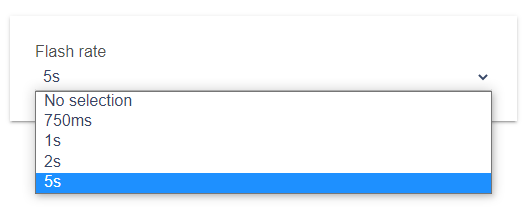
The built in driver, the lowest is 750m/s and the highest is 5 seconds - not something I'm overloading....its the built in option on Hubitat. SmartThings reports at exactly the same rate, with all 10....I dont see how thats overloading anything

image

I'm not new to Home Automation, the whole point in having these is to provide a good mesh for ZigBee. Out of the 10 plugs, only 4 actually have anything plugged into them (because of the issues). So they are just switched on, in a socket, dotted around my home.

The device plugged into the others dont have large swings and the only one with energy reporting currently turned on now is a single plug with a USB webcam on it....not exactly going to overload the system.

Is "Flash Rate" reporting? Did I miss something? On my generic driver I have "Enable Automatic Power Reporting" and that is disabled by default.

1 Like

I was always under the impression it was - but my "Automatic Power Reporting" is set to 5Watts on that single device.

Apologies but that might be me getting confused....eitherway, I've not done anything drastic to the device to cause an overload.

1 Like

Well that's the "flash rate", nothing to do with reporting options. It's used when you send the "Flash" command to a device, to make it turn on / off repeatedly, for example to flash a lamp.

OK, well I gave you my suggestions for troubleshooting, of course you don't have to follow them if you don't wish to.

The key takeaway is this:

How you investigate what is happening after that point is up to you .....

1 Like

Sorry, the whole point in me being here is for suggestions as I've run out of my own.

I'm not getting funny with anyone and apologies if its coming across that way - but suggesting I've overloaded my mesh arent really helpful....I'm not doing anything which isnt built into Hubitat and I certainly dont have hundreds of ZigBee devices - infact I dont think I would even reach 32 devices with the plugs included.

I will have a look at your suggestions, and see what else I can come up with. But from my standpoint, I've done everything EXACTLY the same on each device and yet they are showing different on the Hubitat dashboard.

I also dont see how multiple mains powered devices, which havent moved or switched on/off can suddenly stop. These ran fine for many years with SmartThings and isnt just a single device....its why I'm here for suggestions.

Smartthings/ADT has/had a line of zigbee devices that would only work with the ST/ADT hub, there's some threads on here discussing those products, so I'm guessing that that maybe the case, especially if Mike doesn't recognize the device. Generally devices falling off can be poor mesh(not you w/ 10 plugs) or similar to Aqara devices, a different zigbee implementation, not 100% compliant to zigbee standards. I'm guessing the latter

1 Like

I've had a few devices go bad over the years - one smart plug started flaking out and would randomly turn on and sometimes caused my zigbee service to go offline (C-4), another plug caused a few devices nearby to stop responding. If you have a tester - one thing you might want to check is if you have good power to each outlet.

Other issues I've experienced are Zigbee bulbs that repeat or are controlled by a non-smart switch. Also experienced the "Great Peanut Panic" where peanut plugs were constantly changing around in the mesh and causing trouble.

1 Like

Some community members have had success by isolating troublesome devices to a separate hub.

1 Like

Well we can only make suggestions based on the information that you've given us.

In this case:

Several of us spotted that and suggested it could be the ZigBee network being overwhelmed.

Similarly here, if these are all truly the same device / manufacturer / model / version then they should be using the same device driver and have the same device preferences.

If there's some mismatch there then it's worth investigating that first, hence my suggestion to re-pair all in place, checking which device / manufacturer / model and device driver they are picking up when paired.

If something isn't picking up the correct device driver or showing the correct device preferences then you would be able to show screenshots of the device to indicate that.

In the same vein, when clicking configure / refresh, if something isn't getting set correctly in the device, showing screenshots of the logs with debugging enabled might help identify that.

If something isn't getting configured correctly then that might cause issues with devices appearing to not respond, for example if the relevant ZigBee Clusters aren't being bound, the device might not report its status / data changes correctly.

Unless you have access to a ZigBee sniffer and an understanding of the protocol, some issues are difficult to diagnose.

With any troubleshooting in a ZigBee network it's important to establish a baseline. My suggest of starting with mains-powered devices also temporarily eliminates any battery powered device that may be causing an issue.

If your mains-powered devices are all at default settings, using the right device drivers, controllable from the UI and stable ..... and then you add back a battery device and it all falls apart, you've identified that it's likely caused by that device.

2 Likes

There are settings in Hubitat that if used in the wrong combination can cause issues. Some of these settings are to be used by themselves, or if in combination you have to be aware of the consequences. Just because the setting is there doesn't mean it must be used.

Power plugs are a great example, most have the option to report Watts, Change, and/or time based reporting. When people turn on all three, and put them to something like 1W, 1% Change, and 1s reporting, that gives multiple upon multiple reports, and swamps the network. You really only want or need one of these options, but you are free to use which one is best not all of them.

I am not saying this is your particular issue, but you need to be aware of what you are doing, and it is good to follow suggestions by people who have done this before. Even if it is just to test things out.

2 Likes

Ok so I've spent the weekend messing about and trying to diagnose what I could.

I removed all of my ZigBee devices, and did full reset on the ZigBee Radio.

Now I joined a few Philip hue Dimmer switches to my setup - just something that is spread across the house and I have plenty of them and they should respond to my clicks- so can be a rough, instant guide on if things are working etc.

Things seemed to be stable for 24 hours, so I added a single SmartThings Plug - 2-3 hours later, problem on one of my dimmers. Looking at the "/hub/zigbee/getChildAndRouteInfo" on the zigbee mesh and that device has disappeared from the "Child Data" list - which I would guess means its connected via the SmartThings plug so isnt talking straight to the hub anymore?

I have now unplugged the SmartThings plug again, should I expect to see the missing dimmer reappear in the child devices?

It looks to me like the SmartThings plugs arent repeating Zigbee signals 100% - but that doesnt make sense as they was rock solid on SmartThings.

Just wanted to apologise again for the way things come out above, I must have been having a bad day and didnt mean things to sound so ..... forward? abrupt? pick any other horrible way

Kraeg

The zigbee mesh doesn't really like being messed with, and by that I mean unplugging repeaters, or even moving them if you have a dense network.
Certainly it's self healing for the most part, but that takes time, it's not an instant update.
When laying out a zigbee network, add all your repeaters first, from the hub outward, if they are power sockets, make sure they all can be controlled, after that add in your battery devices, in place.
Moving items after inclusion does not produce the best network routing to start off with, the network may and should sort itself out, but why make things more difficult...

4 Likes

Thanks for the suggestions @mike.maxwell, but I'm slowly loosing the will to live with this ZigBee now.

Followed your instructions, flattened the zigbee mesh and started again.

Added all my SmartThings plugs from the hub outwards, ensuring they all added, all displayed the same config page and was all controllable.

Then started adding my dimmers and motion sensors - again starting from the hub outwards (best I could, I dont live in a circular house :slight_smile:).

Wait 15 minutes, and now one of the dimmers has stopped responding. Ironically its fairly close to the hub too.

I'm going to wait a couple of hours and see if its just the mesh settling or something. But in all the years I've had SmartThings, I've never once had this problem, I have no clue what I'm suddenly doing wrong now.

I've had so many problems with Zigbee devices on Hubitat...I've just decided to sell them all and the hub and be done with Hubitat. It's a shame, because I was excited to use it after leaving Smartthings, but there are just too many issues to deal with and I'm tired of the wife telling me a button or light stopped working again.

Off to Ebay they go.

Strange you never asked for help. All 7 of your other posts are about cameras.

1 Like

If the problem is the hub, why are you selling the Zigbee devices? I guess I am missing something . . .

1 Like

Trust me, I've read every post on here about zigbee issues and have been troubleshooting this for longer than I care to admit. Just because I didn't ask for help, doesn't mean I wasn't actively working on the problem.

Compared to Smarthings, I feel the zigbee radio/implementation is a tad bit weaker. Same devices, same locations. The Zwave portion has been rock solid, but unfortunately my Zwave devices aren't the devices that anyone other than me interacts with.

No harm no foul. It just frees up more of my time (that I don't have).

Post a link, if you would, to any gear you are selling. Probably a few folks here might be interested.

2 Likes