I have a Z-Wave documentation server setup so I can read all of it on my ipad
1 Like
So the 64k question - is 2.2.7 really just doing the same thing as the manual repairs used to do, just automatically, or is there more to the changes than just running automatiaclly?
Because I still can't reconcile why my routing is SO different in 2.2.7 than it was pre-2.2.7 with manual repairs.
Not quite.. But similar.. And most importantly it includes sleepy devices too which was not possible before.
Do these 2.2.7 nightly neighbor update enhancements work for pre C-3 thru C-5 as well, or are they strictly limited to C-7 hubs?
Ok, I give up trying to understand it then.
It is just "magic" that 100% of my 9.6k connected devices now are 40kb+, the number of direct hub connected devices went up 40%, and pretty much all of the weird 4 hop routes I had that made no sense at all disappeared.
And I did multiple manual repairs on 2.2.6 before installing 2.2.7 to get it as good as possible just because I knew this change was coming. 
Maybe it is solar flares, or a shift in the Earth's magnetic field. 
3 Likes
No.. It’s C7 only
I don't think so. If every node saw all nodes all nodes would connect to the hub. That's okay but not required, and you don't need a mesh If that's the case.
Maybe I'm not interpreting this right (I just started with HE a week ago) but the statement that a device red in both axis is unreachable doesn't seem true on my chart. I have three of them, but what distinguishes each is what I see in the "routes" column of the main table on Z-Wave. In all those cases, their route is direct to the hub, and direct-to-hub routes do not appear to show up on the little checkerboard display.
@OldGuy Sometimes that chart is hard to interpret. Your best bet is to stick with the z-wave settings page. As long as you don't have any ghosts and your numbers look good things are generally ok. If you post your z-wave status page we can give you better comments
1 Like
I totally agree; I found that the Routes column was the critical information. If you had a route you were OK. I'm going to use that column as my guide when I start to install two repeaters, which sadly I found out I needed only when I couldn't enroll some nodes because of range.
If your farther away device is still problematic and won't bite on the repeater, move the repeater closer then exclude and re include the device. It should grab the repeater
1 Like
Got it; I'll report my results when the stuff comes in!
1 Like
My z wave lock works unreliably and I'm very confused by the topology. I have two z wave devices in my network, a Yale lock and a Aeotec Repeater 7. The z wave status shows the lock going through the repeater to reach the hub, but the topology seems to show that the repeater isn't between the hub and the lock, which it is. Any help would be appreciated.
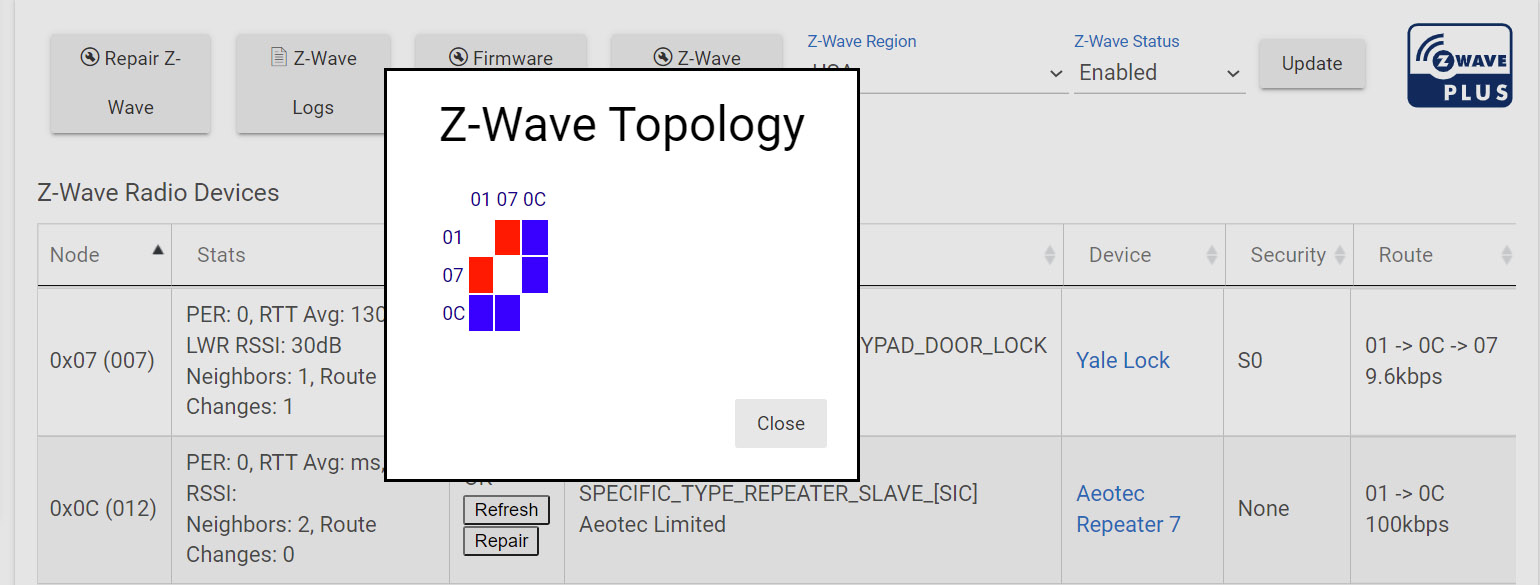
Topology shows tha 0x0C can see 0x07, and that 0x07 can see 0x0C. So it is correct. What is partially obscured by the topology is that the round trip is taking a long time and could possibly use and repeater to boost it.
1 Like
I was thinking he could move the existing repeater closer to the lock..
2 Likes
That is worth a try..
1 Like
This topic was automatically closed 365 days after the last reply. New replies are no longer allowed.

