Local home automation isn’t always the easiest path in a plug-and-play cloud world, which makes this milestone mean even more to us and our users.
Thank you to everyone who has supported Hubitat, helped fellow users in the community, and shared your honest experiences. Reaching a 4-star rating on Amazon is a great reflection of how far the platform has come, and it wouldn’t be possible without this community.
That said, we never stop looking for ways to make Hubitat better. We’d love your candid feedback on where we should focus next:
What’s working well in your day-to-day setup?
Where can we improve? Onboarding, documentation, built-in apps, device compatibility, reliability, or something else?
Tell us in the comments what would make Hubitat work even better for you.
Bought your hub on Amazon? Whether you've had it for a month or a few years, we’d love for you to share an honest review on our Amazon listing to help newcomers know what to expect.
Working well: day-to-day reliability, and how quickly the team responds and fixes things.
Where I'd focus: documentation for new users, especially around apps. The Apps docs do a nice job explaining Integrations, Automations and Apps, but community apps are mostly missing from the new-user path. Getting Started only covers built-in apps, and the one page on custom apps covers copy-paste installs only.
A few ideas:
Mention HPM in the docs, since that's how most people install and update community apps today
Update the custom apps steps: they point to Apps > Add User App, but many user apps now land under Integrations or Automations
A short "built-in vs community" section in Getting Started: who supports each, and how each gets updated (platform updates vs HPM)
What to do when a community app becomes built-in
I'd also love to see more of the how-to videos. They were really helpful, and a lot of new users look for a video before they read anything .
And for developers, adding hub load limits to the Best Practices page would help us build lighter apps from the start. (MAYBE)
This is actually how I found Hubitat. I saw the old how to videos on YouTube and got interested in watching them. Then over a couple years it grew into a three hub addiction.
Not only are they good information videos but they are also good sales drivers as well since people understand what it is before they order.
Ya presence on Youtube is a disaster, official or regular users talking about it would surely help. I really like the channels that talk about what's coming up 4-5 days before an update is available like a few channels do for HA (this does not need to be a staff video format like you guys use to do). How-to videos are also very fun and inspiring.
I am always amazed on how many third party home automation connected device manufacturers fail to state that their product supports Hubitat. They still always mention SmartThings... Ugh!
I love the constant innovation, availability of staff and great community! On my hubs, automations pretty much just work, and when they don’t, it tends to be just a reboot required or a bit of debugging on my own, with AI or the community.
Areas that could be improved for me are the custom (legacy) dashboards and the mobile app. It seems like opening it usually requires a lot of re-loading and refreshing…. But that said, I don’t use either of those very often.
Congrats, that is really great. Lots of uninformed/confused users and maddening things like "The delivery from Amazon was a day late so I took off two stars!!"
Hubitat has evolved to a stable, reliable, and powerful home automation system - perfect for my needs. I think it offers nearly all of the power of Home Assistant but easier to get up and running and more solid.
I think that to increase your market share and get better reviews an easy to use dashboard needs to be the main (Home) screen - with all the current UI choices (devices, settings, automations, etc) not shown as prominently (hidden?) on the Home screen. While Wink had lots of issues, the user UI was great - especially for the household members who just want to use home automation, not create or manage it. The current Home screen has moved in this direction, it would be a good idea to have a UI specialist work on the Home screen - from the perspective of a household member.
Thank you for the kind words and feedback. Since you mentioned Wink, I assume the UI improvements that you are suggesting apply (mostly) to the mobile app, is that correct?
Let a new user know how this works - before I bought my Hubitat almost 5 years ago, I thought it was like a computer and would need a screen and keyboard. I had no idea I could access it from any computer on my LAN. Make that clearer...
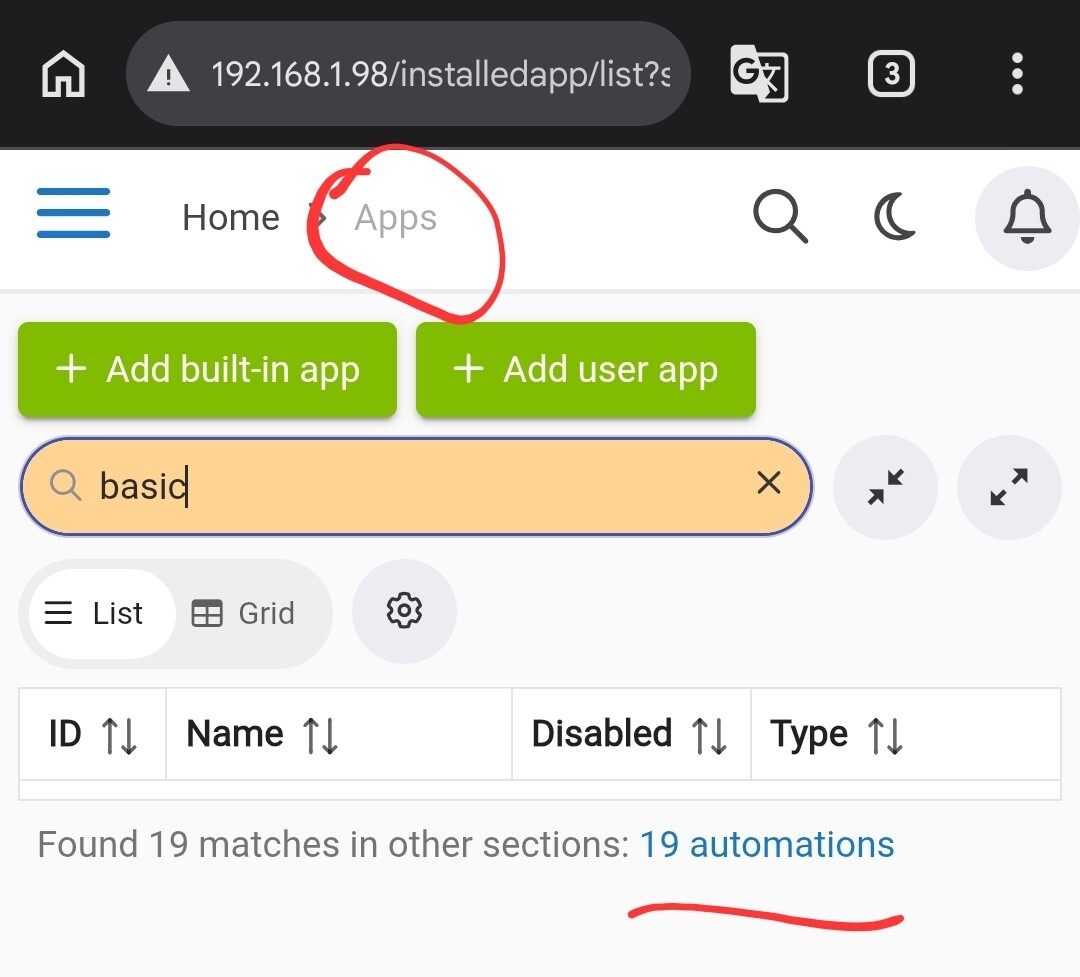
I would prefer just APPs ... the apps, integrations and automation separation is more confusing... like we fixed something that wasn't broke. Also if echo speak ever breaks that there must be a replacement solution waiting in the wings : )
I completely agree. I now have to think about which bucket the app I need to view is located. Amazon has had categories for years on products and I personally never use them I simply search
A HE global search feature would be preferred that could go across everything in the platform from apps to devices to settings. I would then just ignore the nav bar on the left just like I do in many online sites.
 .

 In my former world clicks == $$