WTF is a variable - people keep talking about them
I don't need them my automation rules work fine
I want my rule to do something a bit more complicated as I've got an idea for something that would be cool
To the community - How do I do this - I can't think of a way to do this with my rule?
From the community - Create a variable, do x, y, and z to make your rule work
Now it made no sense at first. However once you have a need for them and you have them set up in your rules to do something more complicated, you can see from your own rules use how it's working and you'll start to find ways to use them to solve problems.
No the variable is the value output for that device. For instance. This came up the other day. This is very simple.
I have a google speaker. It's playing music and lets say a volume value of 35. This same speaker is used for system announcements. Now since I may not notice the announcement due to the level my speaker is currently at (that 35 would be low music in the background) I would want the announcement to be way louder. But when it returns to playing music I would not want the music to be that loud, I would want it to return to the level 35. With me so far??
So I want to make a rule that would look at the current level of the speaker (35) and insert that number into a variable. We'll call that variable %speak-level%. (You can use whatever name you want for the variable) The next part of the rule is notifiy "whateverspeakeriscalled" but do so at lvl 100. After announcement is done set the level back to 35.
If Door Opens
log speakername lvl to %speak-level%
Send TTS (the anouncement) to whatevergooglespeaker lvl 100.
Set speaker lvl to %speak-level%
As you can see that last bit was already populated by the existing speaker level (in this case 35) so after the announcement was made at 100 it went back down to 35 and exited the rule so that the music playing on it would continue at it's original level.
For example, the descriptionText for an event might not be directly actionable. But it can be placed into a string variable, which can function as a trigger, with the actions being dependent on the content of the string.
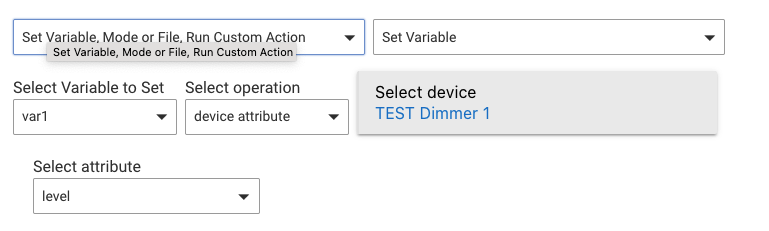
Using rule actions. The same way you do anything with a rule. The ones you'll need are mostly under Set Variable, Mode or File, Run Custom Action > Set Variable. For example, for your specific request, first* you'd need to store the three sensor values into three separate variables. Here's how you'd do it for one, except you'd choose your devices and the right attributes (temperature instead of level--I just used a device I could show this with):
*Actually, first you'd need to create the hub or local variables of the appropriate type (probably decimal for your use case), but that's easy enough.
For your final step, you'll need to use regular math via "variable math" under "Select operation" to add the variables and then divide by the total number of things you added. (Depending on how you do this, you might also want yet another variable to store the sum as you make it--you can only do two operands at a time.) If you get that far and need help, someone can probably show you, but I just wanted to give you a general picture of the idea since you asked.
Adding to the above: in general, a variable is just way to store a value. Another possible use is if you want to reference the same value in multiple apps but only have to change it in one place rather than "hard-coding" it into multiple apps (and having to change them each every time you change what you want the value to be).
If you can't think of a use, you probably don't need them. But if you have an automation you actually want to create, can't think of how, and think this might help, someone can probably point you in the right direction.
@user5068 You never gave a specific use case for why you wanted to know how to use variables. Maybe you were just curious.
While the answer @bertabcd1234 provided for averaging temperature using variables is 100% correct, you can see how it's really not that simple to average multiple values with Rule Machine and why there have been at least three different community apps that I know of to average values.
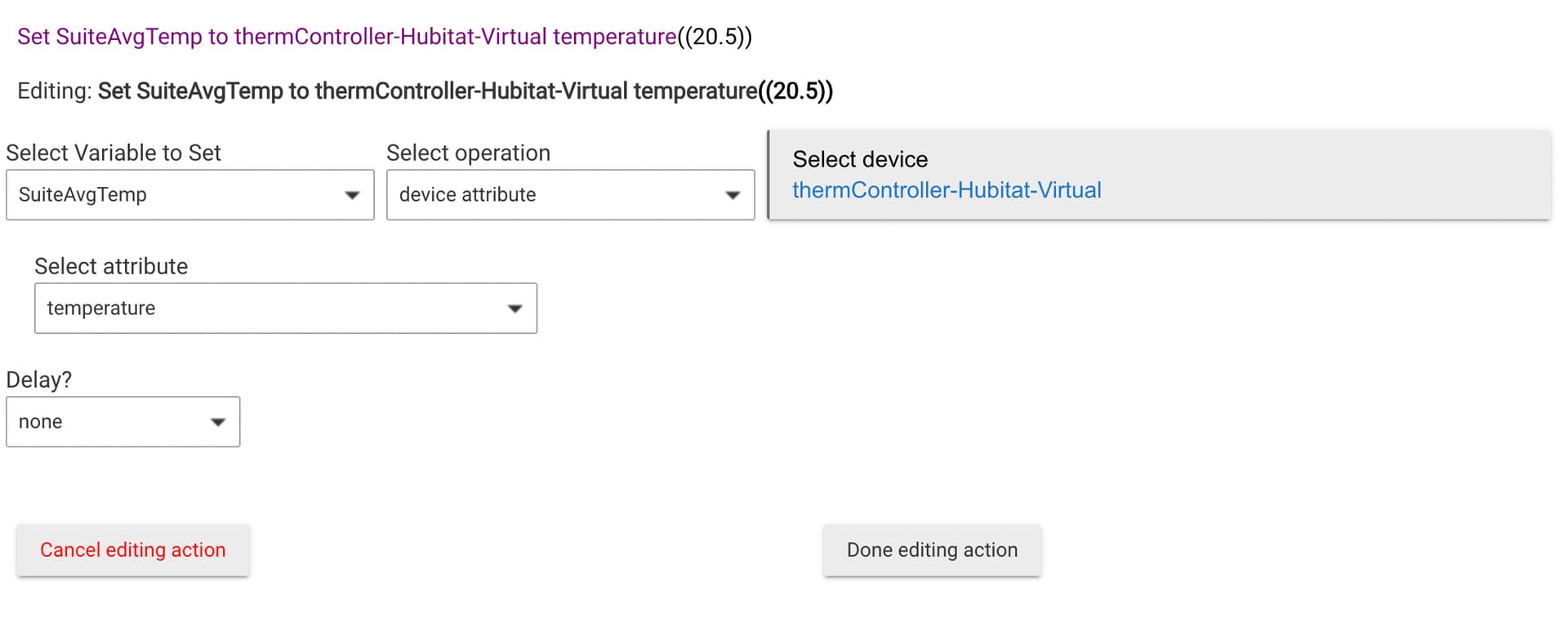
Specifically for averaging temperature (which is probably the most common use case for averaging a value), I would suggest an easier and more flexible method using the Hubitat Built-In app called Thermostat Controller and a simple Rule Machine action to store the result in a variable.
Create a Hubitat Virtual Thermostat device (name it whatever you want).
Install the Built-In Thermostat Controller app and specify your Hubitat Virtual Thermostat as the device to control.
Select as many temperature sensors as you want to average.
Press Done and it will create a device with the prefix thermController
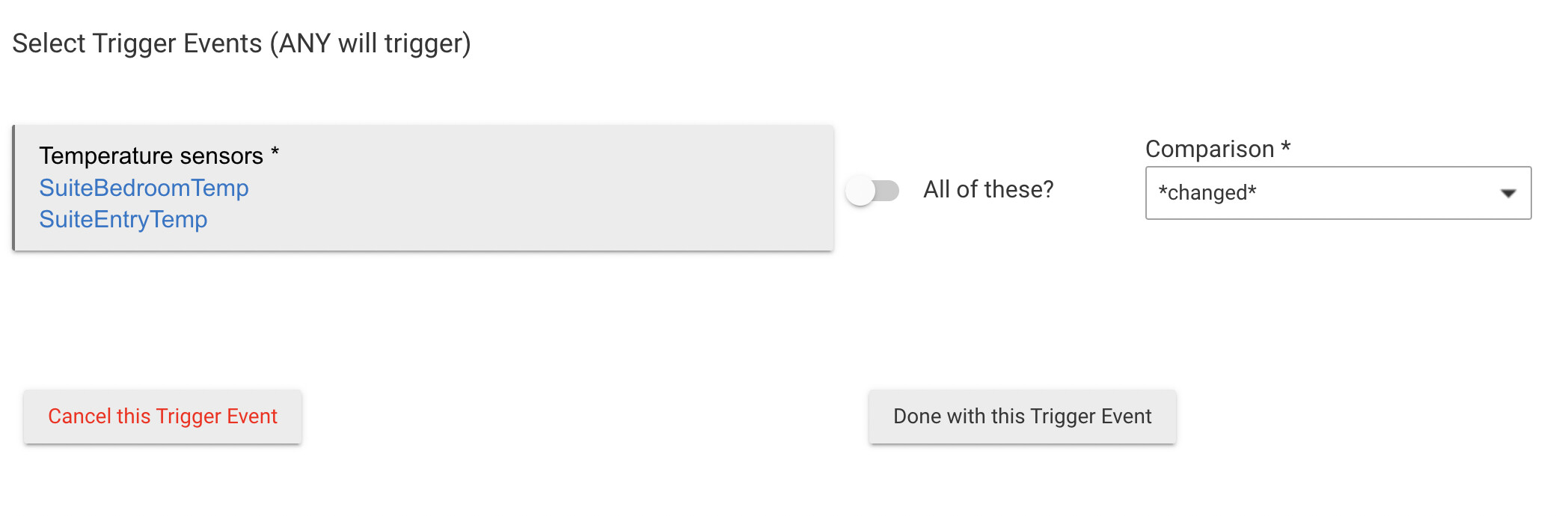
Create a Rule Machine rule with some kind of trigger. I would probably use changed from any of the temperature sensors I specified in the Thermostat Controller app.
You will now get an average temperature stored in the Hub Variable you created in Step 5 from all temperature sensors you selected in Step 3 and you can use that variable in Rule Machine rules, or Apps and Drivers that utilize a temperature value.
 The same way you do anything with a rule. The ones you'll need are mostly under Set Variable, Mode or File, Run Custom Action > Set Variable. For example, for your specific request, first* you'd need to store the three sensor values into three separate variables. Here's how you'd do it for one, except you'd choose your devices and the right attributes (temperature instead of level--I just used a device I could show this with):