Well - I decided I might as well give Tailscale a try, so I installed it on my Pi4B and iPhone (with some ChatGPT assistance) and have got it working.
I now just have to wait for the Starlink kit to arrive and looking online at comments from UK users, it's anyone's guess as to how long it'll take - some are saying 4 weeks (not good as I'll be without internet access at that point other than tethering to phone!)
Glad to hear you got Tailscale up and running. I guess Great Minds Think Alike because I also decided to mess around with Tailscale. I have it running on my always-on Unraid server as an Exit Node and I added a subnet route to my main home VLAN. This allows me to connect to all of my devices while away from home on my iPhone, iPad, and MacBookPro client devices. By using it as an exit node on all of my client devices, I am forcing all traffic from those devices through my home network. This makes sure that I am properly geo-located for all streaming services to my home location. I also enabled the Tailnet Lock feature to make sure I am the only one that can add new devices to my Tailnet. If you enable this feature, be sure to save those disable codes somewhere very safe!
I must say, Tailscale almost seems too good to be true... What's the catch? Why is it free?
The free tier gets you enough to get you started without putting a critical feature behind a paywall. If you watch their youtube video's you realize they targeted the home and home lab user by keeping the most used key features free and then rate limited those that are more enterprise for the free tier. And the features in the free tier are really generous and never been at the point where I had to think about moving the paid tier.
Also to run the service the impact to their backing services use very little compute or transaction turns. Their secret sauce is how they took Wireguard which is OpenSource and came up with the approach to break though highly restricted NAT services and enhance the Zero trust network overlay which is something that Hamachi and others were not able to do.
This was the bit I've not done as yet; I couldn't quite get my head around the use of it. I have my subnet set so that I can access any device on my UDR remotely from a client with Tailscale (iPhone, MacBook) while away from home using it's internal IP (much like I have been with Wireguard). If I were to set it my iPhone as an exit node, would that mean all outgoing traffic was routed through my home connection, or would I need to also set that on the 'host' (my RPI)?
If the goal is to route through the RPi on your home network, then the RPi needs to be configured as an exit node and authorized as such in the Tailscale admin console. From that point on, any of the other nodes in your tailnet (e.g. your phone) can be configured to use the RPi as its exit node (a simple setting you can flip on and off).
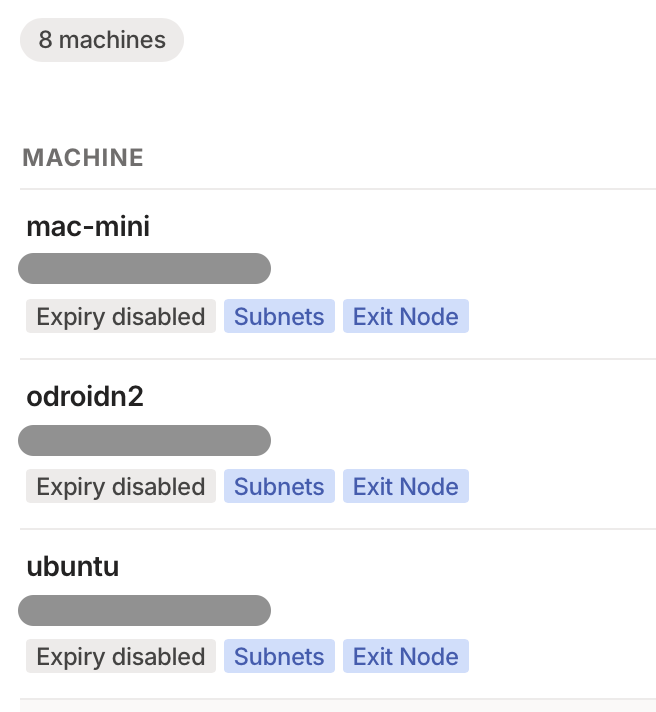
To reiterate what @hubitrep said, you need to mark the RPi as an exit node in the Tailscale admin console. This is in addition to using the flag "--advertise-exit-node" when you start tailscale on the RPi.
I'm running Tailscale exit nodes on three networks. In addition to marking each as an exit node on the admin console, I also disable key expiry, so I'm not caught off guard unable to access a particular network.
Just revisiting this post as I discovered something yesterday while setting up a new MacBook. When I looked at Tailscale my first thought for accessing my network while away was to put Tailscale on my Pi as I needed an always on computer on the network to do the subnet routing. It was a bit of a pain for me to install and configure it on the Pi as everything was done at the command line. I’ve only just realised that Tailscale has an app for Apple TV and I could have achieved the same result with a couple of mouse clicks in that app….
The RPi Tailscale install is technically a one-liner, but yeah, it’s going to be additional maintenance.
But your efforts are not necessarily in vain: you can have two nodes on your LAN, both set to advertise routes, but only one of them authorized to do so from the Tailscale admin console. If one of them goes down, just flip the authz from the (cloud) admin console and you’re back in. Nice insurance.
I never trust the RPi and I’m not sure why. I should because it runs Homebridge, node-red, Mosquitto MQTT and has never had an issue, never needed a reboot, has survived multiple unscheduled power cycles. It just plods away for months on end unattended.
 What's the catch? Why is it free?
 .
.