Sinope is killing my zigbee network


Please provide your hub model (C7, C8, etc.) and its platform version from Settings>Hub Details.

Check out the following post for help troubleshooting problems and gathering details that will help others to identify and solve the problem you are experiencing: ‼ READ FIRST - Before Posting in Get Help


C8 Pro on 2.5.1.183

In July I posted C8 Stuck on Zigbee Firmware Update because my ZigBee network went offline and then got stuck on the update screen. The offline issue had happened a couple of times prior but figured it was a fluke. After getting the firmware to update, assumed it would be okay. It wasn't. It kept going offline. I looked into possible causes and saw there had been a lot of discussion of Sinope devices getting notification causing the ZigBee network to be overwhelmed/go offline. I've had the two thermostats for at least 3 years (probably 4) without issue. The heater is from the beginning of 2023. They were never problematic previously.

I have three Sinope ZigBee devices

  • Bedroom thermostat- TH1124ZB; Type in Hubitat- Sinope TH1124ZB (4KW) Thermostat [I have tried the same device type listed for the entryway too]
  • Entryway thermostat- TH1124ZB-G2; Type in Hubitat- Sinope TH1123ZB Thermostat
  • Garage Heater- Back Wall- RM3250ZB;Type in Hubitat- Sinope load controller

In July I hit the circuit breakers for all 3. The network came back. Any time I turned the circuit breakers on, other ZigBee devices started acting weird. Then the whole network would go offline. Normally within 12 hours but sometimes 24. What I mean by the other devices acting weird is plugs would make the "click" as if they were changing state from on/off but there would be not a change in power status. If they were off, the device remained off and if they were on, the device didn't have a power hiccup. Whereas I only needed the devices in the winter, figured I'd leave them off and some platform update would have resolved the issue.

Well now we're 2+ months later and I decided to do some testing. I tried turning each one on individually to see what would happen. If I have just the entryway thermostat on, there is no impact to the ZigBee network (I tried this for 3+ days). If I have only either the bedroom thermostat or garage heater on, the "clicks" of the plugs return almost immediately and the network goes offline. If I have the entryway thermostat on, and either of the other two devices on, the "clicks" return and the network goes offline. The same happens with all 3 circuit breakers on.

Looking at the logs for the devices I can hear, they get squirrelly. Here is one example. Also not sure why the debug logging gets disabled so quickly.

If I turn off the breakers for the two problematic devices (bedroom thermostat/garage heater) the device logs will be quiet again. Here is the bedroom thermostat log for that same time period
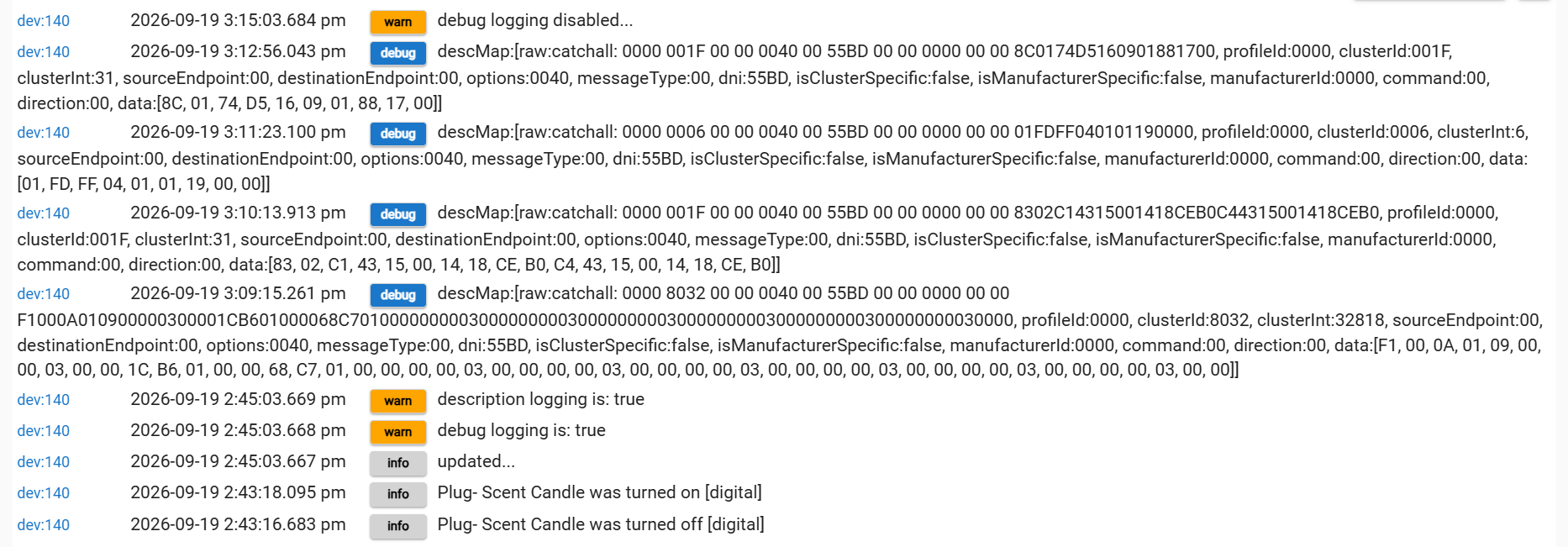
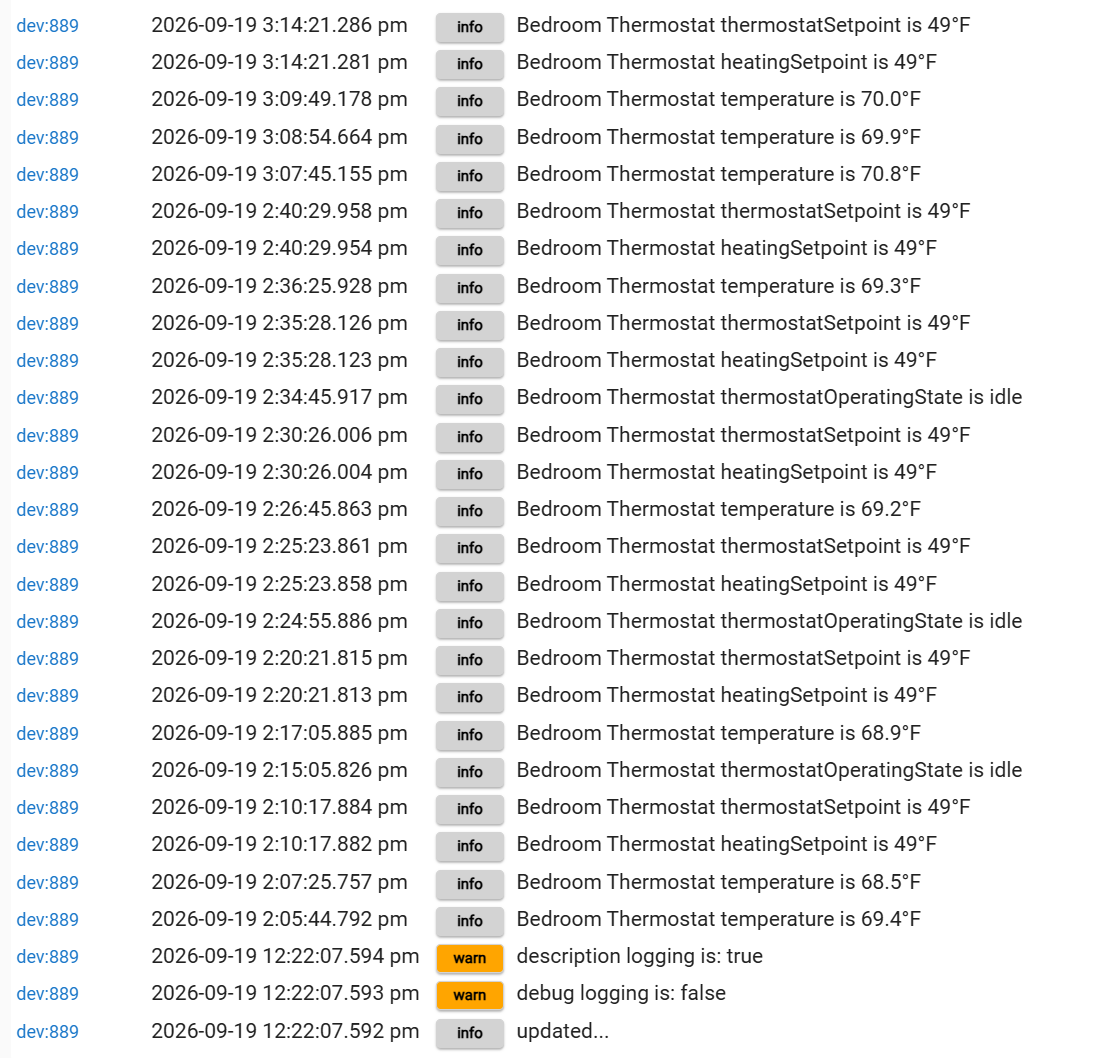
Note- I turned off the breaker at 2:40 and turned it back on right around 3:07. That's why there is that gap.

I've mainly focused my troubleshooting on the bedroom thermostat. I tried changing it so the device type was the same as the entryway thermostat but that didn't help. I also verified all of the preferences mirror between the two thermostats. The only difference is the "cycle length" which is a must because of how the attached heaters would respond. For the garage heater, I tried changing it to a Sinope switch type when it was the only Sinope device on the network but that didn't do anything.

I know at one time I was using a custom driver but have been using the Hubitat driver since they incorporated them. I tried disabling notification as there appeared to be a problem with some code where they stacked and it overloaded the system. I really don't want to need to delete and re-add the devices to try to see if that solves the issue as both are pretty intensively involved in the rule machine. I'm also not exactly sure when they started to become an issue and rolling back to an old build will create a whole other set of issues.

Any thoughts on the best way to try to resolve these issues? It's really weird it's just the Sinope devices, which were functional for 3+ years, which gives me hope that it won't turn into a huge project. Feels like it's something that should be pretty quickly solved.... [famous last words- especially as I need to get this up and running before the heating system will be needed in a couple weeks]

I think @mike.maxwell was working on the Sinope? Maybe he can look at this and see if there were any recent changes that might account for this behavior?

(some of this AI-written, but all of it human-reviewed)

Those catchalls in your plug log are all endpoint 00, so ZDO, not device traffic:

  • 001F is Parent_annce. The plug broadcast one at 3:10 listing two Sengled children, another at 3:12 listing a Hue device. Different child list 2.5 minutes apart — it rejoined twice.
  • 8032 is a routing table response: 10 entries, 7 Inactive pointing at 0x0000, 2 stuck in Discovery Underway toward 0xB61C and 0xC768.

That plug lost its route to the hub and keeps trying to rejoin. The click with no state change is probably the plug rebooting, not receiving a command. Any chance 0xB61C or 0xC768 are the Sinopé devices? Settings/Zigbee Details will tell you.

The 30 minute debug cutoff is normal, that's Hubitat's typical system driver debug log auto-disable. With debug off on the thermostat, that log only shows attribute reports, we can't see everything it's putting on the network. Turn on debug logs before the next episode.

May I suggest you capture the Zigbee logs for 15-30 minutes in a browser window (Settings/Zigbee Details/View logs button) and feed them to your favourite AI chatbot to see what it can infer from them?

One more: something is sending Mgmt_Rtg_req to that plug, and the hub doesn't do that on its own. Are you running a mesh mapping app?

Those thermostats completely crashed my zigbee network multiple times to the point where I couldn't even reset or use my other zigbee devices. My inovelli light switches were turning on and off constantly as the switches continually went through reset cycles, making the entire house look like some sort of mad funhouse. Impossible to even hard reset them too because they would reboot while I was going through the reset process. The wife actually told me to rip out the automation because we literally couldn't use the light switches any more. I eventually had to kill the circuit breaker to get the network under control again. Thankfully they were all on a their own breaker... No fix found; I solved the issue by putting my 4 thermostats on their own hub (a spare C5 I had laying around).

Which specific thermostat models?, I haven't observed anything like this in testing the Sinope thermostats that I have available.

Same model TH1124ZB. It actually sparked a discussion with Eric over at Inovelli since the switches get completely locked up in a reset/boot loop. Hub radio went offline too. I believe it has something to do with the size of the network but that's just a hypothesis at this juncture.

Very curious about the network size hypothesis - I've got 4 of those Sinope TH1124ZB along with one recent TH1300ZB on a 100+ Zigbee mesh in one location, and 10 of them (mix of TH1124ZB, TH1123ZB and TH1123ZB-G2) on a 60+ Zigbee mesh in another location. Most have been installed for 3+ years.

Both hubs are C7.

EDIT: I did connect them to a Sinope GT-130 gateway some time ago to get firmware to updates.

Interesting on the firmware update comment because I believe this is Sinope firmware related that may have been fixed in a more recent update. My thermostats were purchased a number of years ago. However, when the problem cropped up, I didn't have the ~$100 + 50% tariff to put in a gateway just to do a single update that may or may not have fixed the problem. TBH I am somewhat upset with Sinope's decision not to work with Hubitat (or other third parties) to provide a native firmware upgrade capability.

You're not the only one, I might have some understanding of this if we hosted these firmware files on some random publically accessible website, this is explicitly why I implemented our zigbee firmware updates the way that i did (secure hosting, internal download and distribution)
Perhaps if Sinope was aware of this they may have a different take on it, but in situations like this in the past the manufacturer has been more responsive to customer complaints than to mine.
In the end I think they want you to use their gateway and entire ecosystem.
I used to be fan of their products and had good relations with their engineering staff, including sharing of custom cluster implementations, so I honestly don't understand their issues with the firmware files, makes no sense.

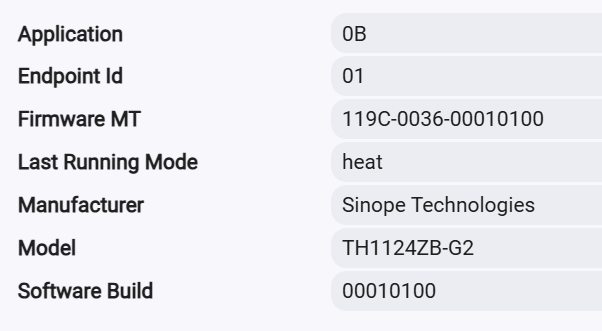
interesting. I have 5 TH1123ZB and 1 TH123ZB-G2 with pretty old firmware and don't have Zigbee mesh issue. They are over 6 years old. I removed 3 last year because we now have heatpump. Below is my firmware.

Those two devices are both Sengled plugs. Across the network I hear lots of plugs the are doing the 'clicks' which, to your point, is them likely rebooting. Lots of misdirected traffic could definitely overwhelm the network and knock it offline.

As soon as I flip the breakers for the bedroom thermostat or garage heater, the system will start having issues. Are there any suggested queries to run through an AI program? Something as simple as "what is causing errors within this network?"

I do not have a mesh mapping app configured. I am only running one hub but did see that a few plugs had hub mesh configured. I turned that off on them and will try hitting the breakers again.

This is an interesting idea. I do have an old hub laying around and probably could move them over to that one. I only have 80 zigbee devices so it's not an unreasonable number.

I had been considering creating a virtual thermostat, replacing the problematic bedroom thermostat with it, unpairing the bedroom thermostat, factory resetting it, and then adding it back into Hubitat as a replacement for the virtual thermostat. That way I'm not losing any of the configuration but also able to delete it. I'd do the same with the garage heater and a virtual switch.

That's "good news" in the sense that it is easy to reproduce and you most likely won't need to capture for more than 5 minutes to get a representative sample.

I've had decent luck for a prompt as simple as the one you suggested. Adding context about your observations of what is going wrong can also help.

Hub Mesh is a built-in platform feature that uses the LAN to allow two or more hubs to communicate with each other. I was not referring to this. I was referring to apps such as Zigbee Map app or similar, which typically sends those kinds of management requests over the Zigbee network.

I disabled hub mesh on the few plugs where it was enabled and turned on the bedroom thermostat. After about five minutes without any issues, I turned on power to the garage heater as well. So far it's been a little more than a hour and I haven't heard any plugs rebooting. I'll update tomorrow. Really hoping that was a root cause for this issue.

here's mine:

I did the analysis on this and the cause was the thermostats agressively announcing route changes to the point where they were overwhelming other devices on the mesh. I also have har files that captured the event. From a cause perspective, its still a mystery to me. After flipping the breaker back on, the network storm would start up again within ~3 hours.

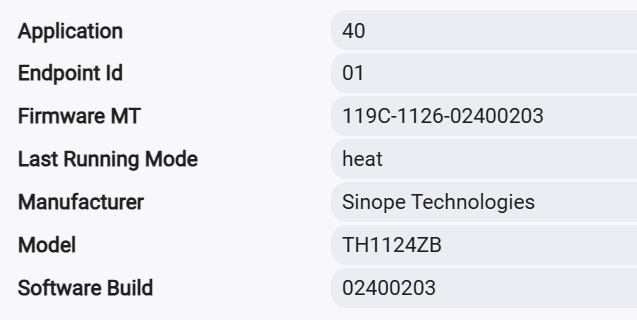
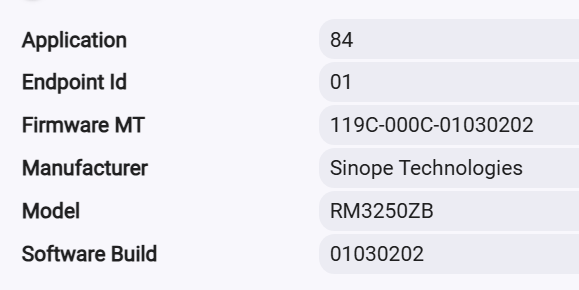
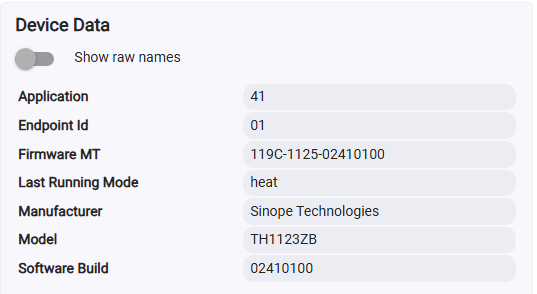
what firmware version is running on your thermostats?

On the entryway (the one that is able to be powered on without causing issues)

On the bedroom thermostat

and on the garage heater (load controller)

It did not work out as I hoped. The network stayed online for almost 24 hours before crashing. I heard the plugs rebooting almost as soon as sending that message. However, the frequency definitely decreased. I'll need to run logs and try to get the behavior to occur as it was not happening as much as it had been.

It feels like it gets triggered when a command is communicated on the ZigBee network that relays through one of the devices. Like yesterday the first time I heard a plug reboot was after I turned on the garage lights. The lights are on a ZigBee controller. Within 3 seconds a plug over by the light switch clicked.

I found that time for the issue to crop back up varied too and seemed to be unrelated to changes I was making. The firmware on your bedroom thermostat is even older than mine. If you can't throw the bedroom breaker for an extended period of time, you could try physically disconnecting it to see if that has an effect. I did that myself while troubleshooting the issue. Your advantage is that you only have one TH1124ZB thermostat (which I suspect is your root cause) and I have four...