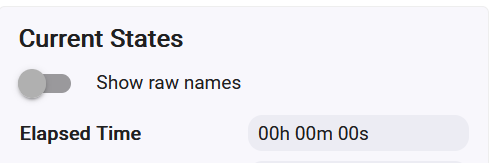
Thanks. Thats exactly what i did. Gemini did an amazing job of doing the driver code. I just told it that i wanted the elapsed time in minutes and it made the driver for me. Very handy.
I should include the code that Gemini generated, for anyone to copy and/or improve.
The code produces a driver for a switch with a custom attribute: elapsedtimeMinutes, which is the amount of minutes since the switch was turned on.
/**
- Elapsed On-Time Switch Driver for Hubitat
- Licensed under the Apache License, Version 2.0 (the "License"); you may not use this file except
- in compliance with the License. You may obtain a copy of the License at:
-
http://apache.org
- Unless required by applicable law or agreed to in writing, Version 2.0 (the "License"); you may not use
- this file except in compliance with the License. You may obtain a copy of the License at:
-
http://apache.org
- Unless required by applicable law or agreed to in writing, Version 2.0 (the "License"); you may not use
- this file except in compliance with the License. You may obtain a copy of the License at:
-
http://apache.org
- Unless required by applicable law or agreed to in writing, software distributed under the License is distributed
- on an "AS IS" BASIS, WITHOUT WARRANTIES OR CONDITIONS OF ANY KIND, either express or implied. See the License
- for the specific language governing permissions and limitations under the License.
*/
metadata {
definition (name: "Elapsed On-Time Switch", namespace: "custom", author: "AI Collaborator") {
capability "Switch"
capability "Refresh"
    attribute "elapsedOnTimeMinutes", "number"
}

preferences {
    input name: "logEnable", type: "bool", title: "Enable debug logging", defaultValue: true
}
}
def installed() {
log.info "Elapsed On-Time Switch Installed"
initialize()
}
def updated() {
log.info "Elapsed On-Time Switch Updated"
initialize()
}
def initialize() {
unschedule()
if (device.currentValue("switch") == "on") {
// If the device re-initializes while on, restart tracking from the original time if available
if (state.switchOnTime == null) {
state.switchOnTime = now()
}
runEvery1Minute(updateElapsedTime)
} else {
sendEvent(name: "switch", value: "off")
sendEvent(name: "elapsedOnTimeMinutes", value: 0)
state.switchOnTime = null
}
}
def on() {
if (logEnable) log.debug "Turning Switch ON"
sendEvent(name: "switch", value: "on")
state.switchOnTime = now()
sendEvent(name: "elapsedOnTimeMinutes", value: 0)

// Start scheduling the minute counter
runEvery1Minute(updateElapsedTime)
}
def off() {
if (logEnable) log.debug "Turning Switch OFF"
sendEvent(name: "switch", value: "off")
unschedule(updateElapsedTime)
state.switchOnTime = null
sendEvent(name: "elapsedOnTimeMinutes", value: 0)
}
def refresh() {
if (logEnable) log.debug "Refresh requested"
updateElapsedTime()
}
def updateElapsedTime() {
if (device.currentValue("switch") == "on" && state.switchOnTime != null) {
long runningTimeMs = now() - state.switchOnTime
long runningTimeMins = runningTimeMs / 60000
    if (logEnable) log.debug "Updating elapsed time: ${runningTimeMins} minutes"
    sendEvent(name: "elapsedOnTimeMinutes", value: runningTimeMins)
} else {
    if (device.currentValue("elapsedOnTimeMinutes") != 0) {
        sendEvent(name: "elapsedOnTimeMinutes", value: 0)
    }
}
}