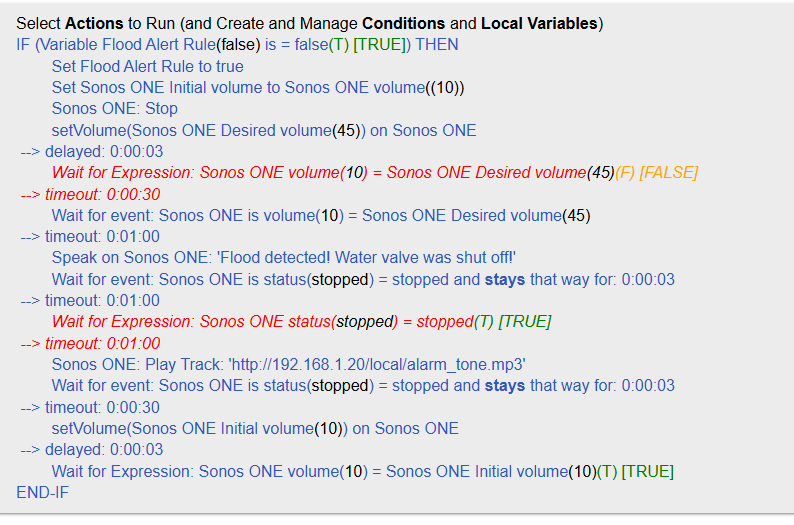
If i set a delay the action is laggy. I have to wait between actions and i don't like it.
The initial rule had timeouts instead and only 5 sec delay (stays that way for 5 sec) so if the event occured in 5 sec it wouldn't wait for 1 min.
I will test and finetune the delay to a couple of second if needed at all.
At the end i still don't like that RM does not run instruction by instruction in loop.
I am used to PLC programming.
Basically if i have a wait for event instruction at line 6 it should not by allowed to execute instruction at line 7 until the event occurs.
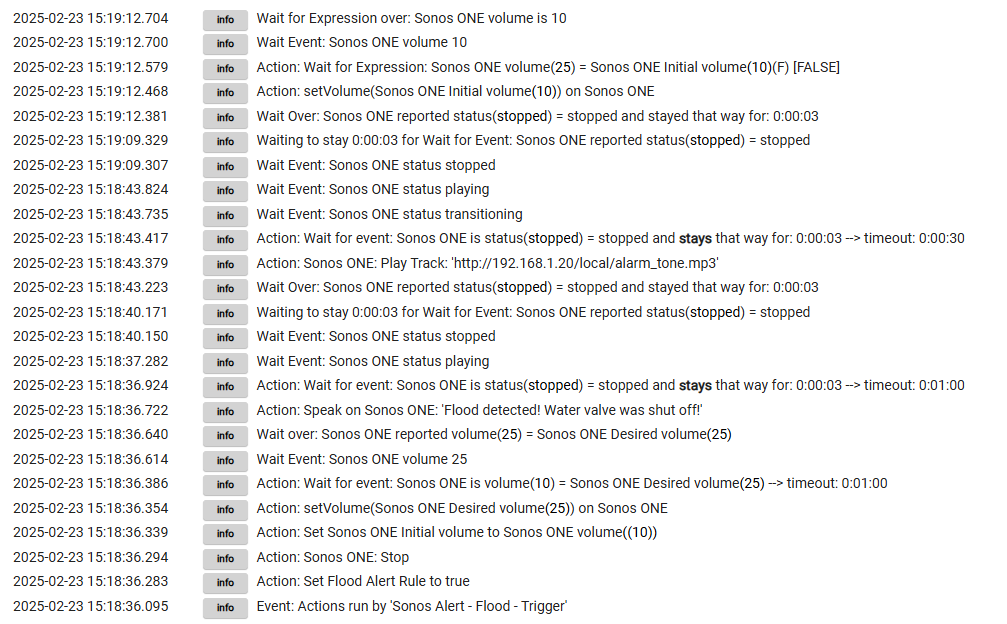
I've looked at the logs when triggering the rule and it actually waits for that event.
With wait for expression (the one disabled in the screenshot) it did a weird thing. It never spoke but went directly to playing the alarm tone.
A timeout ensures the Wait action doesn't wait forever, but in general you should design the rule in such a way that the timeout is not usually reached
A "stays" is not a delay but a duration for which the condition needs to hold true for the Wait (or trigger) to be satisfied and moving on to the next instruction
A delayed action amounts to asking RM to schedule the action to a later time (effectively changing the order in which the rule's actions are executed)
A "Delay" action (different from a delayed action - I know, confusing - but you don't have one in your rule) asks RM to stop here and schedule to resume execution of the rule later.
All of this is covered in detail in the documentation.
I'm not sure where you are getting that from. RM does execute the actions in the specified order, one after the other, the exception being delayed actions.
You have not shown your triggers for this rule. One reason for apparent out-of-order execution could be rule re-triggering. RM has the ability to start multiple instances of the rule, one each time a trigger fires.
You're also not shown logs. For others to be able to help you would need to turn on logging (Events, Triggers and Actions) and show a screenshot of the whole rule execution sequence, filtering the logs for the rule only (although if you have logs for the sonos device executing commands, that could be useful too).
Regarding the way RM executes instructions. It was not clear if it executes instruction after instruction so i asked. Someone suggested that is not (first replies) and it makes sense if delayed action is changing the order.
Regarding multiple instances, i've used a boolean variable to make sure that does not happen. Basically if the rule is executed the boolean Flood Alert is set to true. Only after i manually reset the hsmAlert the variable is set to false.
Maybe there is a better way to achieve this. I've tried with required expression and cancel pending actions, but once the variable is set to true the rest of the rule does not execute. So this tells me that with the current setup, the rule executes all the instructions until the booleand is set to true.
Another way is to trigger this rule from another.
This way i do not need the IF anymore. Just required expression in the trigger rule.
While the instructions commence in the given order (excepting ones with delays), the hub doesn't always complete the intended action prior to the next instruction starting.
This surfaced on this version, a bug fix or so ago, when there were long delays on some commands interacting with other rule, etc
I had one rule that set a private Boolean on another rule then invoked that other rule.
The other rule ran but it wasn't seeing the private Boolean set. I had to add a 1 sec delay at the start to let it catch up.
So, things aren't totally synchronous across rules.
Yes, but it's an example to show that, at least some, actions can be started but do not complete before the next line is executed.
Another example: you might turn on a light, but it won't be actually on until moments later (and the device state will be set ON before the device is actually on).
Those are all things to keep in mind, if something is critical to your desired effect.