Thanks, as I suspected. So go practice for its use would be to make it the last command in a rule or be sure you don’t depend on its work without checking first.
It really depends on the situation. For example, I have several "arrival" and "departure" rules that will run rule actions from several different rules in parallel all at once while also continuing its own other tasks before quitting. Running things like enabling the auto-door lock rule, activating several security notification rules, turning off particular lights, etc all in parallel is fine as nothing is waiting for any sort of feedback in this case.
However, at the beginning of my departure or arrival rules, there IS one rule action that I run and then pause and wait for a result before continuing. And that is to determine if there are any other family members present at home and which ones, as that determines what the rule will do next when it resumes.
I guess when you think about it, every command, with the exception of the delay and wait variants, is asynchronous. Some are just so fast they seem synchronous.
In all fairness, it is not quite as simple as you would like it to be.
Nevertheless, given that this issue is one that comes up over and over, and despite the documented solutions and ignored advice concerning KISS, I am adding a feature to RM in the next release that can cause a rule to ignore trigger events if the rule is already running, like this:

There are three ways a rule can come to the end of "running": after the final action is run, the Exit Rule action is run, or Stop Rule Actions run against the rule (by some other rule).
Here are the logs of a rule with a delay that is triggered multiple times during the delay:
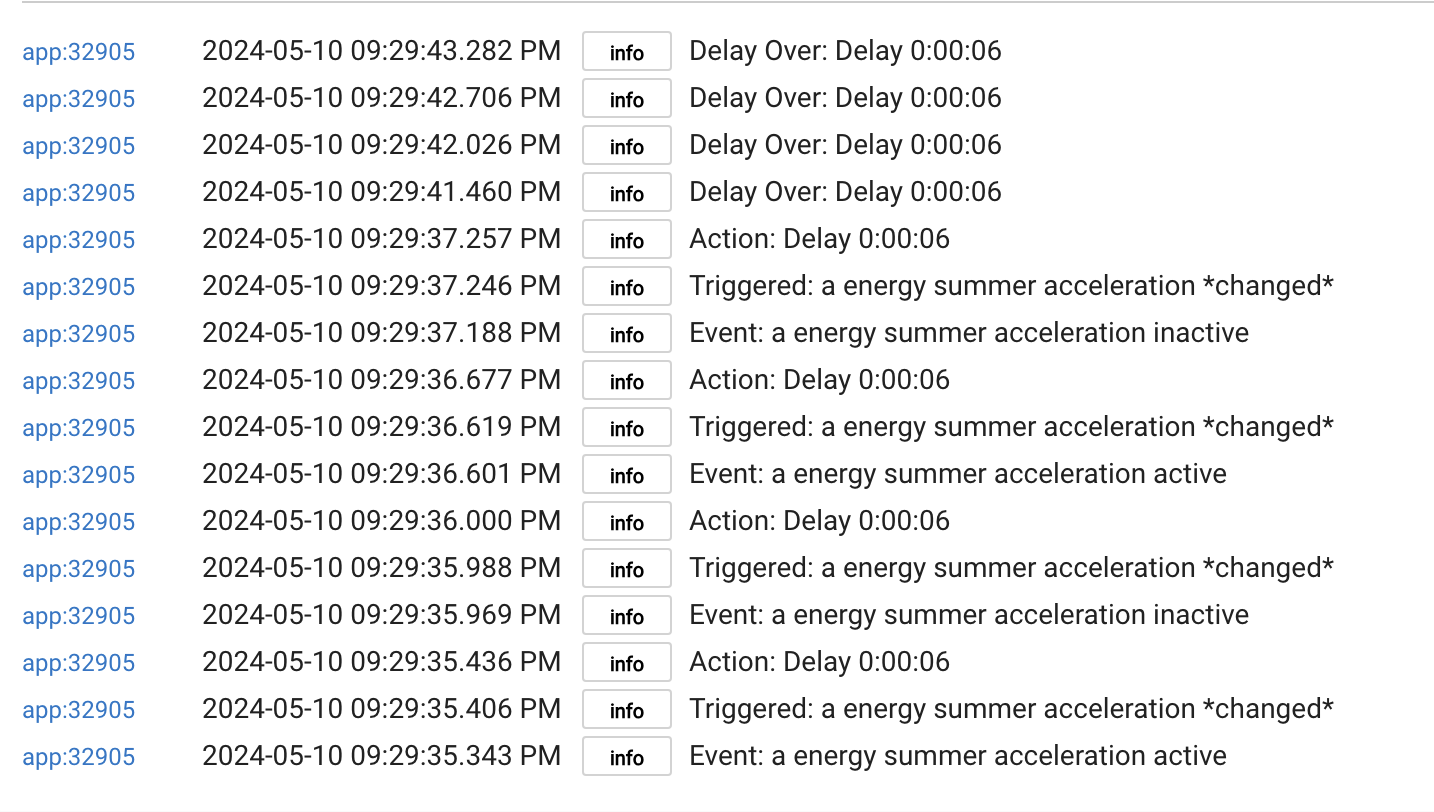
Notice that there were 4 instances of the rule running simultaneously, each throwing a delay, and that eventually those delays catch up.
Below are the logs of that same rule running with similar trigger events but with the option to ignore trigger events turned on:
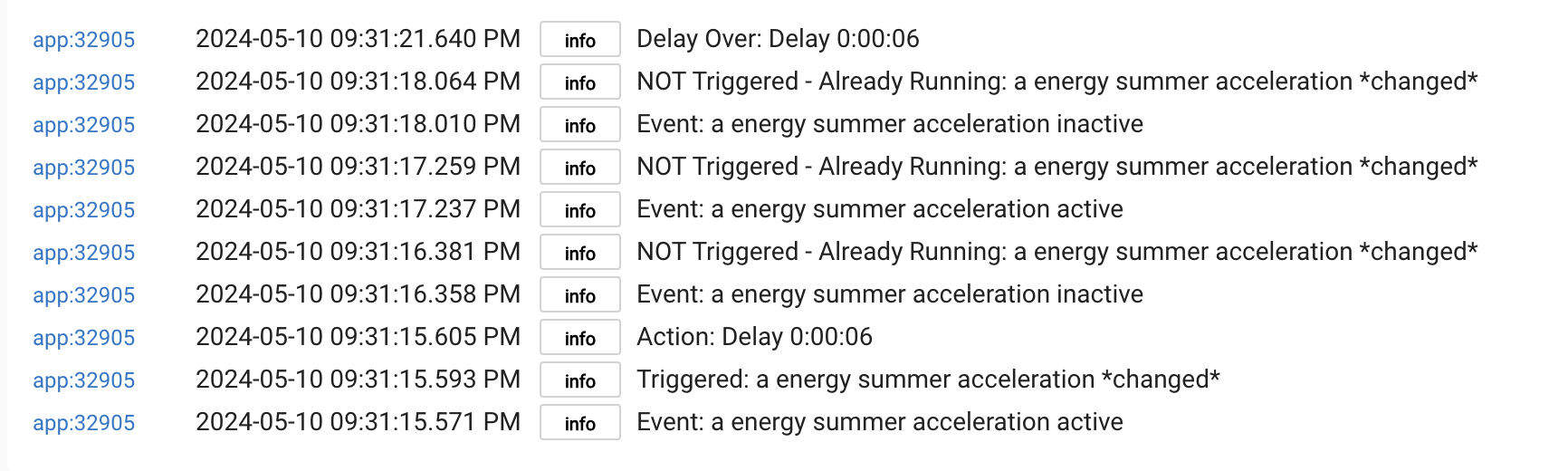
Notice that it logs the fact that trigger events are ignored. The rule won't be triggered again until it has completed 'running', including all of its delays expired (or stopped).
This will be in the 2.3.9 release.
Thanks, I love it.
So I’m learning, I’m not having a go at you Bruce, it’s just that I’ve never seen an any documentation that describes the multi threaded behaviours being pointed out.
The Multi threaded behaviour of RM has tripped me up countless times and I’ve had no idea why. That might be my fault, but from my simple non developer point of view, RM rules look like they are 100% serial, unless they are calling other rules during execution.
This is a huge trap for non devs and RM muppets like myself.
Awesome, thank you. 
Actually it's only a problem for people who create pretty complex rules with IF-THEN blocks with embedded delays against frequent triggers. The same users hit this over and over. Hmmm.
Odds are good that using this feature will result in other surprises, like, "why didn't my rule trigger" when the triggers are being ignored.
I get what you are saying, but to the average user the following 2 blocks look functionality identically:
Delay 10 seconds
Turn off light
Vs
Turn off light - Delay 10 seconds
And yet the latter code block is adding multi threading to your rule.
A discussion on this particular issue is linked to in the Rule 5.1 docs (also accessible from the "?" icon in a rule as it is for most apps).
Fair enough, maybe I’m just dense - until it was explained here, I didn’t appreciate this fully.
Both create new instances, not just the first one. Both exit the rule for the delay, and the rule 'comes back to life' after 10 seconds (a separate instance from the original). Either of those would be problematic with frequent triggers nested inside an IF-THEN block. Those differ only as to the continuation of actions after the second one, where succeeding actions would run before the end of the delay, and in the first case all actions are delayed.
Oh, I thought folk were saying the first option pauses the rule in place for 10 seconds?
Is behavior the same if instead of a "Delay" "Wait for Expression : Elapsed Time" is used?
No, Waits are cancelled by triggers.
But, like a delay, a wait does exit the rule instance, leaving behind event subscriptions or scheduled jobs. Those 'leave-behinds' are removed when the wait is cancelled, so effectively the elapsed time delay is cancelled.
Love it! Looking forward to using it. I have a few rules that can likely use this, where I set booleans to true/false up to now.
Bruce, will this be able to prevent triggers from rapid fire events, or will a debounce device still be needed in instances where multiple triggers can come in within milliseconds of each other?
I have a couple of rules where I'm using a virtual contact and your 'debounce contact sensor' app to prevent multiple triggers, and this simple toggle would be much simpler if it can achieve the same result.
It's not possible to predict this, as it depends entirely on timing. Everything the hub does takes some amount of time, so it's possible that a second trigger might come prior to a first trigger having flipped the switch (so to speak).
Thank you for this, Bruce, very much appreciated and works great. 

Btw, I've been pondering the multithreaded nature of RM, and I'm wondering what the rationale for it is? Wouldn't RM be just as powerful if its default mode of operation was serial, and if folk wanted/needed it to be multithreaded they called other RM Rules as Sub-routines?
I know my non-dev brain struggles with this sort of thing, but in my own experience, the multithreading has tripped me up many times, and does seem to be a contributing factor in many of the "why isnt my RM rule working as I thought it would?' questions on the forum.
/1c
The use case I can immediately think of is one I use - I am logging particular events and I do really want to know how often they happen. Although if they fire so quickly the log file is still opened by the previous instance then I suppose they could get lost.
I don’t mean multiple instances of rules running, I do see the use case for that.
I’m referring to when you say have an action with an attached delay and RM send that action to the scheduler and then quits out of the rule. Rather than the rule instance simply pausing for the duration at that spot in the rule.