@gopher.ny FYI: looks like we have a Z-Wave JS discrepency here on Yale Assure 2 locks.
Hi i just received my new lock today and I did the Z-wave JS conversation a few days ago is there an issue with the Z-wave JS? if so should I wait to set up my new lock until its resolved?
Investigating… Looks like it is related to another bug I was chasing down
If you are using Z-wave JS instead of Z-Ip then I believe that @kdb might have a variant that works. Ultimately, I would expect that the Z-wave JS stack itself would be updated so that it operates the same way as zip does with these locks however.
@jbwrd3 I've been running my locks on JS with a slightly forked version of @kevin_wilcox's driver. It's not really standardized or cleaned up in any way for public consumption, but feel free to use it. It's been solid for me, but let me know if you run into any issues.
Ok thank you, I did install sleuth255/trunzoc code with HPM should I delete and manually reinstall your forked vers? I might give it a day or 2 see if any updates come along and only do a one install.
No need to delete. You can just install my version directly (Driver's code -> Add driver -> Import -> Save) and it'll exist as a separate driver choice ("Yale Assure Lock 2 Custom"). Easy to switch back and forth.
In any case, most functionality should work fine with the HPM version, so if you don't notice anything broken for your use cases you could just stick with that too. Main 2 JS-specific bugs mine fixed were opening the door (with DoorSense) would trigger a phantom "lock" and unlocking with a user code would not report the user correctly, so keep an eye out for those.
Hi so i'm sort of in a learning curve with this new lock and hoping you have and setting one up can help the only way it's seems is to split the user in lock manager for pin number for fingerprint as per the snippet also if i try to add my garage lock and the yale lock to the same user it gets stuck on pending any help or direction would be appriciated.Is this the only way to add both fingerprint and pin to lock mamager?

A couple things to confirm:
- Have you set the Yale Access app to have user codes be managed via external platform (i.e., Hubitat)?
- Did you add fingerprints via the Yale Access app under Owners, and do they work to open the lock? (I haven't tested fingerprints under guests)
- Is your garage lock also a Yale lock using this driver, or a different ZW lock?
Getting fingerprints and user codes to work seamlessly together is a little tricky because fingerprints are managed in the Yale app only and codes are managed in HE. In Lock Code Manager, you should only add 1 name per actual user (with a code). In the Yale app, have corresponding owners (1 per actual user), and enroll fingerprints in the same order as the users appear in LCM.
In the device page, you should see the users and codes under Lock Codes, with consecutive slot numbers 1, 2, etc. Unlocking with a fingerprint, if you enrolled them in the same order, should report the corresponding slot numbers (you'll only see this in logs with debug enabled) and get matched correctly by the driver, but if you've un-enrolled and re-enrolled fingerprints a few times they may skip numbers, e.g., 1 and 3. Easy fix for that, but before we get there, try the above, and turn on debug and trace logging. If you want to send me some logs (DM so we don't clog up the release thread), I can take a look, but make sure you're using placeholder codes like 1234 rather than real ones, since they'll appear in the logs.
HI.
- Yes i did
- Yes under owners, and do work.
- Garage lock is a Weiser Smartcode 5 zwave.
Tricky is right been at it for a bit to try and understand it, so when I set it up and removed my existing lock I lost most of the lock manager users, so i tried to start fresh with me as the owner and then a fingerprint for myself but it put it into slot 8 and did show up in the log with my name. device page doesn't show it that way in 1,2,3 order what I had to do is John pin first then in the device added my John with a bogus pin 1234 and forced it to use slot 2 under slot1. I will do a log and send it. Should I delete and restart so it shows in the log?this is what it is showing in the device yale lock. The log has been on but with no errors. My garage lock work but again it has it own slot list and I have to add John (garage) but it doesn't use any slots from the yale device only on the weiser device. hope I explain all this ok.
On the Yale Device
{"1":{"code":"xxxx","name":"John","status":"active"},"2":{"code":"1234","name":"John's(fingerprint)","status":"active"},"3":{"code":"xxxx","name":"Kim","status":"active"}}
Lock manager
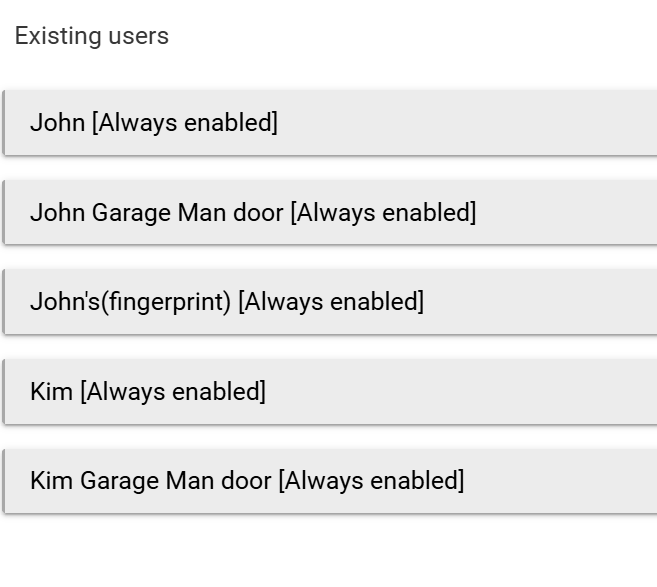
I'm a bit confused about your fingerprint reporting slot 8 but still logging your name (it shouldn't be able to do that if you have nothing under slot 8 in the device page). Maybe you also unlocked with your code right before or after the fingerprint unlock?
Assuming the fingerprint is being reported as slot 8, you can manually move your main user John from slot 1 to slot 8 to match. LCM doesn't care about the slot number, just the name and code, so it'll be transparent to it. In the device page for the Yale lock, Delete Code (1), then Set Code (8, xxxx, John). After that, Lock Codes in the device page should show John under slot 8, and unlocking with either that code or fingerprint should be reported correctly by the driver as John.
If that doesn't work, capture the logs (with debug and trace) while doing a fingerprint then code unlock, and send me the (sanitized) logs.
Ok thanks think ill start fresh delete all users and try your method with a log.
Hi I tried to send a log but delivery was incomplete. So just that I understand and am clear if the set up is done correctly it should show if it was a fingerprint that unlocked the lock when using fingerprint or if it was a pin/keypad that unlocked the door when using a pin in the log and notification? Or just the name and it was opened by the keypad using either method in the log and notification.
Unlocking by either fingerprint or keypad should report the same thing (it'll say keypad), in both log and events. The goal is just to get the name to be correct in both cases. Unfortunately, currently (unless something changed since I tested) there's no way to differentiate fingerprint unlock from code unlock under JS on HE.
Ok thank you for the clarification. I do have it working that way.
Hi another question is there any way to tell which slot gets used on the yale lock for the fingerprint? I know the device driver gives the pin slot used in lock manager but not the fingerprint slot because it is stored on the lock itself.
Yes, if you have debug and trace on, and unlock with a fingerprint, somewhere in the logs will be the slot number the lock reported for that fingerprint (same as when you unlock with a code). I just don't remember if the main log info lines or events will have it or just something like "unknown user" (assuming it doesn't match an existing slot in your HE-side lock codes).
I have had the YRD450 with the ZW3 module for several years and it has been pretty frustrating. The ZW3 module sends no events when unlocking with a fingerprint but does for manual and keypad code unlocking. I tried to get support several times and it always ended with "it's a problem with your Z-Wave hub and software". Within the last month, I finally got them to recognize it's an issue with their implementation, but it sounds like they won't attempt to fix it.
So, now I have something working with this driver and it's exposure of the door contact sensor. It seems to be working as desired but the door open event is quite delayed.
Your delay could be caused by a number of things including the magnet placement. Try re-calibrating but when it says "hold the door to almost closed", actually leave it open about 6-12". After calibration, use the yale app to check how fast the lock changes to opened or closed. My locks are behaving well with doorsense currently. I'm also running the official driver which works with Z-IP. Working with @bcopeland to get zWave JS issues sorted on it as well but for now there's a custom driver variant which attempts to work around the issues.
Hey all, I've been running this driver on two Assure 2s (one ZW3, one ZW2) on C-7s, which run Z-Wave JS, and ran into a few JS quirks. Keypad unlocks showed "User null", opening the door logged a phantom lock, and open/close fired 2–4 times. I started from kdb-jc's fixes and added a few of my own: codes only show up once the lock actually confirms them, duplicate codes report as failed, codes can be stored encrypted, plus some crash fixes.
I've sent it to @sleuth255 as a PR so he can pick whatever he wants: v1.08: Z-Wave JS fixes, lock codes confirmed by the lock, optional code encryption by brossow · Pull Request #2 · sleuth255/Yale_YRD4xx_Hubitat_driver · GitHub
If you're on Z-Wave JS and want to try it before then, the code is here (paste it over the existing driver and click Initialize): https://raw.githubusercontent.com/brossow/hubitat-drivers/main/yale-assure-lock-2/YaleAssure2.groovy
It hasn't been tested on a fingerprint model yet, so reports from anyone with one would be great.