I've kept Voice Monkey in my back pocket for sending voice alerts to Echo devices ever since Samsung banned Echo Speaks back when I was on SmartThings. I used Voice Monkey with a Webcore piston until I moved to Hubitat and I was able to use Echo Speaks again.
I thought it would be fun to have AI write a Voice Monkey Driver using the new V3 APIs for when Echo Speaks dies. Though I have seen in the Echo Speaks [release] thread that people have been doing good work with writing echo drivers directly using the Alexa APIs now, this is just another option for speech & text. It sort-of uses Voice Monkey as a middle-man to the Alexa APIs.
So here it is, I have it functional enough for use, but I may keep adding to it.
All you need to do is create a free account and setup Voice Monkey (if not already using it.)
What it Does:
After installing the parent driver as a virtual device, get your API token from Voice Monkey and add it in preferences. When you save preferences it will create child devices for each Echo device, and it will create a button Child device for each Routine Trigger you have set-up in Voice Monkey.
That's it - most of the work is in Voice Monkey itself, setting up your Echo devices and making any routine triggers you want to use first.
You can send voice and text (on screen devices) from the Voice Monkey child devices.
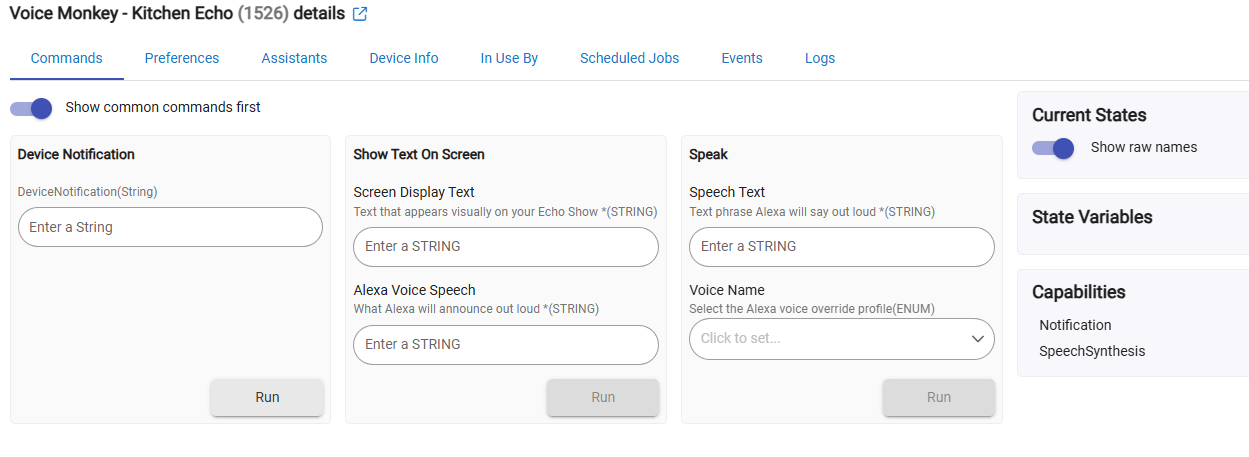
Device Notification: This just sends a voice alert with the standard Alexa Voice
Show Text On Screen This replaces the Announcement feature in Echo Speaks, as Voice Monkey has no Announce feature to do that. So this is a work-around. It will put the text on the screen and make a voice announcement (they don't need to match).
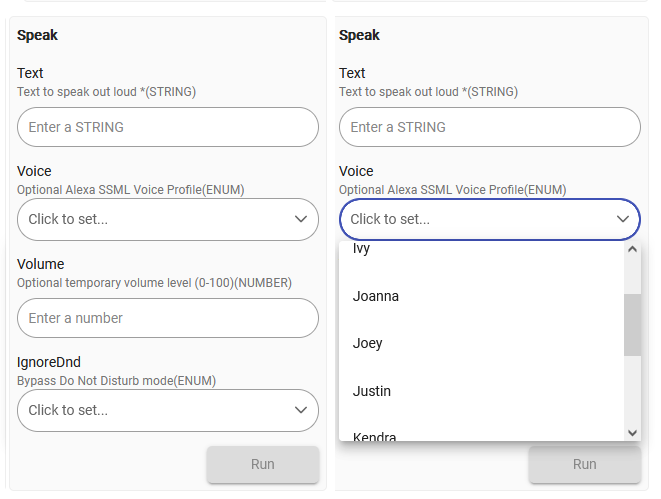
Speak: This lets you pick a specific voice to speak with, selected from the dropdown.
Issue with Show Text: The text will stay on the screen forever unless it is cleared. However, I had AI add in a feature where it will automatically run a routine that contains "Clear Screen" in your Voice Monkey routines (if it finds one). It basically finds that child device (if the Routine Trigger Name in VM contains "Clear Screen") and pushes the button to trigger the clear screen routine you have setup in Alexa, with that routine trigger in Voice Monkey. That routine in Alexa just needs do the custom action->"Go Home". That returns the echo to the home screen.
In each Echo Speak Device Child, there is a preference for How Many Seconds to keep the text on the screen. I added an option of "Forever", should you want to leave text up until someone clears it by telling the echo to "Go Home". Good for leaving notes for people? I have not tested how long an Echo actually keeps the text on the screen, but there is probably an eventual time-out. Edit: yup, it times-out in about 30 minutes and it returns to the home screen even if you do not clear it, so not "forever".
So that's about it! Add the driver code for the parent, the Speaker child, and the Routine Child drivers. Create the device and add your API token to the parent in preferences. Make sure to create a Clear Screen Routine in Voice Monkey/Alexa, if you want text to clear after a Show Text. If you add new routines or echo devices in VM, press discover in the parent device and it will add the new child devices.
Parent Driver:
/\*\*

 \*  Voice Monkey API Hubitat Parent Driver

 \*  v3 Endpoints: /devices, /announce, /trigger, /flow

 \*/

import groovy.json.JsonSlurper


metadata {

    definition (name: "Voice Monkey V3 API Driver", namespace: "custom", author: "AI Assistant") {

        capability "Actuator"

        capability "Notification"


        command "deviceNotification", \["String"\]

        command "sendAnnouncement", \[

            \[name:"Device\*", type: "STRING", description: "Speaker ID"\],

            \[name:"Speech\*", type: "STRING", description: "Text to announce"\],

            \[name:"Media URL", type: "STRING", description: "Audio file URL (Optional)"\],

            \[name:"Voice", type: "STRING", description: "Voice override (Optional)"\]

        \]

        command "triggerRoutine", \[\[name:"Device\*", type: "STRING", description: "Routine Trigger ID"\]\]

        command "executeFlow", \[

            \[name:"Flow ID\*", type: "STRING", description: "Flow Request Reference (e.g. 1234)"\],

            \[name:"Target Device", type: "STRING", description: "Device path override (Optional)"\]

        \]

        command "setVariable", \[

            \[name:"Variable Name\*", type: "STRING", description: "Variable Name"\],

            \[name:"Variable Value\*", type: "STRING", description: "Variable Value"\]

        \]

        command "discoverAll"

        attribute "lastUpdatedVariable", "string"

    }

    preferences {

        input "apiToken", "text", title: "API Token", description: "Voice Monkey v3 Token", required: true

        input "defaultDevice", "text", title: "Default Device ID", required: false

        input "logEnable", "bool", title: "Enable logging", defaultValue: true

    }

}


def installed() { log.info "Voice Monkey Driver Installed" }

def updated() { initialize() }

def initialize() { discoverAll() }

def discoverAll() { discoverAssets() }


def discoverAssets() {

    if (!apiToken) { log.error "API Token missing."; return }

    try {

        asynchttpGet("handleDiscoveryResponse", \[

            uri: "https://api-v3.voicemonkey.io/devices",

            headers: \["Authorization": "Bearer ${apiToken.trim()}", "Accept": "application/json"\],

            timeout: 10

        \])

    } catch (e) { log.error "discoverAssets initialization failed: ${e.message}" }

}


def handleDiscoveryResponse(response, data) {

    try {

        def rawText = response.data ?: ""

        if (!rawText || rawText.toString().startsWith("<")) {

            log.error "Voice Monkey discovery handshake rejected. Server Status: ${response.getStatus()}"

            return

        }


        def jsonMap = new JsonSlurper().parseText(rawText.toString())

        if (jsonMap && jsonMap.data) {

            jsonMap.data.each { d ->

                if (d.capability == "speakers") {

                    def dni = "${device.id}-monkey-${d.id}"

                    def child = childDevices.find { it.deviceNetworkId == dni }

                    if (!child) {

                        log.info "Adding speaker child: ${d.name}"

                        child = addChildDevice("custom", "Voice Monkey Speaker Device", dni, \[completedSetup: true, label: "${device.displayName} - ${d.name}", isComponent: false\])

                    }

                    if (child) { child.updateDataValue("monkeyDeviceId", d.id) }

                } else if (d.capability == "routines") {

                    def dni = "${device.id}-routine-${d.id}"

                    def child = childDevices.find { it.deviceNetworkId == dni }

                    if (!child) {

                        log.info "Adding routine child: ${d.name}"

                        child = addChildDevice("custom", "Voice Monkey Routine Button", dni, \[completedSetup: true, label: "${device.displayName} - Routine: ${d.name}", isComponent: false\])

                    }

                    if (child) { child.updateDataValue("monkeyRoutineId", d.id) }

                }

            }

        }

    } catch (e) { log.error "handleDiscoveryResponse runtime parsing failed: ${e.message}" }

}


def deviceNotification(String txt) {

    sendAnnouncement(defaultDevice, txt, null, null)

}


def sendAnnouncement(String devId, String txt, String url = null, String vc = null) {

    log.info "PARENT sendAnnouncement executing: devId=${devId}, txt=${txt}"

    def payload = \[token: apiToken.trim(), device: devId, speech: txt\]

    if (url) payload.mediaUrl = url

    if (vc) payload.voice = vc

    sendApiRequest("announce", payload)

}


def triggerRoutine(String devId) { sendApiRequest("trigger", \[token: apiToken.trim(), device: devId\]) }


def executeFlow(String flId, String tDev = null) {

    def payload = \[token: apiToken.trim(), flow: flId\]

    if (tDev) payload.device = tDev

    sendApiRequest("flow", payload)

}


def setVariable(String name, String val) {

    sendEvent(name: name, value: val)

    sendApiRequest("variable", \[token: apiToken.trim(), variable: name, value: val\])

}


/\*\*

 \* Resolves URI parsing syntax errors by enforcing clean endpoint concatenation definitions

 \*/

def sendApiRequest(String ep, Map payload) {

    try {

        def targetUri = "https://api-v3.voicemonkey.io/" + ep

        def params = \[

            uri: targetUri,

            headers: \["Content-Type": "application/json", "Accept": "application/json"\],

            body: groovy.json.JsonOutput.toJson(payload),

            timeout: 10

        \]

        asynchttpPost("handleGenericApiResponse", params, \[endpoint: ep\])

    } catch (e) { log.error "Async API Request failed for /${ep}: ${e.message}" }

}


def handleGenericApiResponse(response, data) {

    if (logEnable) log.info "PARENT execution for /${data?.endpoint} complete. Status: ${response.getStatus()} | Response: ${response.data}"

}


def childSpeak(child, String txt) {

    def id = child.getDataValue("monkeyDeviceId")

    if (id) {

        sendAnnouncement(id, txt, null, null)

    } else {

        log.error "PARENT childSpeak failed: Missing monkeyDeviceId database association!"

    }

}


def childPushRoutine(child) {

    def id = child.getDataValue("monkeyRoutineId")

    if (id) triggerRoutine(id)

}


/\*\*

 \* THE SINGLE ADDED METHOD: Finds the child routine button containing "Clear Screen" and pushes it.

 \*/

def parentFindAndPushClearButton() {

    def targetChildButton = childDevices.find {

        if (it.getDataValue("monkeyRoutineId") != null) {

            def lookupLabel = (it.label ?: "").toLowerCase()

            def lookupName = (it.name ?: "").toLowerCase()

            def lookupDisplay = (it.displayName ?: "").toLowerCase()

            return (lookupLabel.contains("clear screen") || lookupName.contains("clear screen") || lookupDisplay.contains("clear screen"))

        }

        return false

    }


    if (targetChildButton) {

        childPushRoutine(targetChildButton)

    } else {

        if (logEnable) log.warn "PARENT clear loop failed: No routine buttons found containing 'Clear Screen'."

    }

}
Child Speaker Driver:
/\*\*

 \*  Voice Monkey Speaker Device Component (Custom Text + Voice Dropdown Menu Layout)

 \*/

metadata {

    definition (name: "Voice Monkey Speaker Device", namespace: "custom", author: "AI Assistant") {

        capability "SpeechSynthesis"

        capability "Notification"

        command "deviceNotification", \["String"\]


        // CUSTOM OVERRIDE OVERLAY: Exposes exactly two clean parameter inputs (Text and Voice Menu Dropdown)

        command "speak", \[

            \[name:"Speech Text\*", type: "STRING", description: "Text phrase Alexa will say out loud"\],

            \[name:"Voice Name", type: "ENUM", constraints: \["Brian", "Amy", "Emma", "Nicole", "Russell", "Justin", "Kendra", "Joey"\], description: "Select the Alexa voice override profile"\]

        \]


        command "showTextOnScreen", \[

            \[name:"Screen Display Text\*", type: "STRING", description: "Text that appears visually on your Echo Show"\],

            \[name:"Alexa Voice Speech\*", type: "STRING", description: "What Alexa will announce out loud"\]

        \]

    }

    preferences {

        input(name: "clearSeconds", type: "enum", title: "How many seconds to keep the text on the screen with Show Text", description: "Needs a Clear Screen Routine in Voice Monkey",options:\[5:"5",7:"7",10:"10",15:"15",30:"30",45:"45",0:"Forever"\], defaultValue: "5",required:true)

    }

}


/\*\*

 \* Custom Text + Voice Name Method Executor

 \* Maps parameters directly down to your parent's stable advanced voice endpoint handlers

 \*/

def speak(String txt, String voiceName) {

    if (voiceName && voiceName.trim() != "") {

        def tokenStr = parent.getSetting("apiToken") ?: ""

        def id = getDataValue("monkeyDeviceId")


        if (id && tokenStr) {

            log.info "CHILD speak executing advanced voice engine override: voice=${voiceName}, txt=${txt}"

            def payload = \[

                token: tokenStr.trim(),

                device: id,

                speech: txt,

                voice: voiceName.trim()

            \]

            parent.sendApiRequest("announce", payload)

        } else {

            log.error "CHILD advanced speak failed: Missing configuration links!"

        }

    } else {

        parent.childSpeak(this, txt)

    }

}


// Standard baseline fallback signature hook called by general Hubitat apps

def speak(String txt) {

    parent.childSpeak(this, txt)

}


// Built-in App Background Framework Overloads (Preserved strictly as quiet system fail-safes)

def deviceNotification(String txt) { parent.childSpeak(this, txt) }

def speak(String txt, volume) { parent.childSpeak(this, txt) }

def speak(String txt, volume, String voice) { parent.childSpeak(this, txt) }


/\*\*

 \* Handles text-to-screen announcements and delegates the reset to the parent method after a runIn delay.

 \*/

def showTextOnScreen(String screenDisplayText, String alexaVoiceSpeech) {

    def id = getDataValue("monkeyDeviceId")

    if (!id) {

        log.error "CHILD showTextOnScreen failed: Missing monkeyDeviceId link!"

        return

    }


    def tokenStr = parent.getSetting("apiToken") ?: ""


    def payload = \[

        token: tokenStr.trim(),

        device: id,

        speech: alexaVoiceSpeech,

        text_display: screenDisplayText

    \]

    parent.sendApiRequest("announce", payload)


    if (settings?.clearSeconds != "0") {runIn(settings?.clearSeconds.toInteger(), "callParentClearMethod")}

}


def callParentClearMethod() {

    parent.parentFindAndPushClearButton()

}
Child Routine Driver:
/\*\*

 \*  Voice Monkey Routine Button Component (Push Button Only)

 \*/

metadata {

    definition (name: "Voice Monkey Routine Button", namespace: "custom", author: "AI Assistant") {

        capability "Momentary"

    }

}

def push() { parent.childPushRoutine(this) }