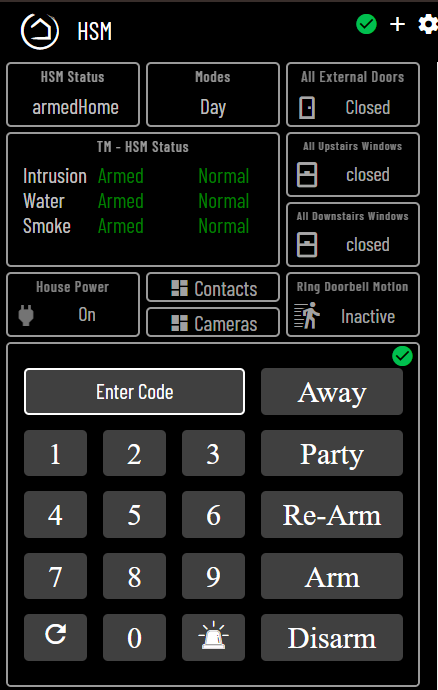
Disregard, I was able to find it just now by adjusting the height and width of the button contents:
.tile.button .tile-contents, .tile.attribute .tile-contents {
    height: calc(90%);
    width: calc(100%)
}
Disregard, I was able to find it just now by adjusting the height and width of the button contents:
.tile.button .tile-contents, .tile.attribute .tile-contents {
height: calc(90%);
width: calc(100%)
}
I am experiencing slow response and intermittent response on my Virtual Keypad on my Fire Tablet. Sometimes I have to touch a button several times to get it to accept the touch. When it does accept the touch, it takes several seconds to respond. It is set for local lan with a 1 second refresh rate. Any suggestions? Thanks.
I know this sounds silly but I had this issue a while ago and it was the Fire tablet, have you tried rebooting the tablet?
Similar issue here, Fire Tablet very slow or unresponsive. Reboot fixed it.
Yes, I tried rebooting the Fire Tablet.
Hello everyone,
So I managed to get this installed, set into a dashboard and well positioned. However, I'm running into an issue when I try to use it to change HSM.
No matter what I do, the Keypad itself does NOT save the pin information within device settings. Each time I set it and click save, the settings clear.
I also went to the dashboard that it is setup in and added a test pin to the dashboard for HSM Commands. I then proceed to enter the pin in the keypad, the keypad records the pin entries onto the input but later says "INPUT DENIED."
Does anyone know what the issue is?
Thanks.
have you setup the pin in Lock code manager? That's how I manage all my codes/lock codes I've been using this for a couple years now with no issues. are you using the virtual keypad or Virtual basic Keypad?
Hey Mike,
Virtual Keypad.
I have not set the pins up in Lock Code Manager. I tried setting it up in the Device itself and also in the Dashboard itself with no success. Are we expected to use another app to store the pins in?
I just tried it in my test device and it saves the codes, when you go into your keypad device click get codes does it return anything in the current states (Mine shows the codes in the current states)
Hello all,
Virtual Keypad has worked very well for me! Since updating Hubitat to 2.4.0.145 there seems to be a bug (needs to be confirmed). Please see description in my other thread which I linked. Thanks.
can you give me step by step instructions for making the keypad dashboard?
Missed the first post? Maybe take another look there for detailed instructions. Search the thread if you run into issues.
If you still have issues, post the steps you have completed, where you are stuck and what is/is not happening as expected.
I got the basic keypad made but it does not display what buttons were pressed and the buttons don't work? I'd like to use the example in the picture if somebody has recreated that can you kindly share how you did that please?
Which picture? There are pictures of several different virtual keypads in this thread.
This picture is the one I was talking about above.
Was wanting to set this up on a couple tablets one by the front door and the back door.
The example code used in the GitHub does not let me push any buttons to show up on the display field. I'm totally new to CSS and iframe and JavaScript
That screenshot, is of a dashboard, that includes the keypad dashboard as an iframe using another iframe custom plugin.
Note the green circle check to the right of the away button. That is the same green circle check as the top right of the main dashboard the iframe is included in.
first, you will need a dedicated dashboard for the keypad device. Follow the first post to get that setup. When that is working on its own, you can then take the next step to add the dedicated keypad dashboard into another dashboard as needed.
Lots of info in this thread to help get through common issues.
When asking for help, it pays to over-comminicate. We dont see what you are seeing and dont have the same context to offer immediate help that gets you where you want to be.
Morning Anyone?,
I am at a loss at figuring out the intent of this preference in Virtual Keypad iframe setup. I do have a functional floating keypad that is launced via a button. I am curious however as to what functionality setting this preference provides.
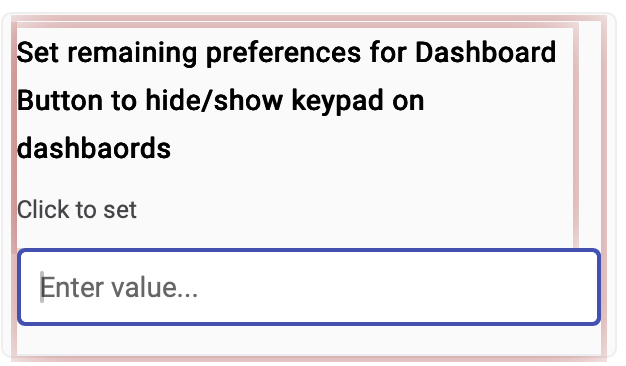
Thank you.
Greetings,
I have been using Virtual Keypad and iFrame Advanced for some years.
Recently I changed Dashboard design so that the Keypad now appears in a modal window. It works successfully. However, I recently returned to the configuration to change the auto timeout of the modal window from the default of "60." Alas the time edit is not recognized. I have both shortened and lengthened the timeout by manual entry into the configuration field as well as using the cursor arrows to edit the seconds. I went so far as to change the default timeout in the driver code. (I am not a coder but I manage to get around). I have also rebooted the hub after making edits. I have confirmed that the auto timeout functions in iFrame Advanced devices. I also confirmed that other edits to e.g. "Close" / "Refresh", etc. work as expected. Suggestions as to what I might be missing appreciated. I am using the most recent HE firmware on a
C-8 Pro.
Update - I resolved this soon after composing above by creating an iframe Advanced device and using it to launch the Keypad dashboard. That accomplished my goal.
Download the Hubitat app